New free system imaging program

Tried ET on the weekend and it is fast.

I still need to manually install Renesas usb3 drivers with the pe boot and remember to use the x32 bit not x64 bit drivers. I'm probably doing something wrong when making the pe.

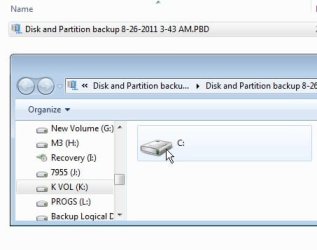
The folder backup capability doesn't seem to use imaging??? Does anyone know what format Easeus use for imaging and folder backup?
 

My Computer

Computer type
PC/Desktop
Computer Manufacturer/Model Number
Own build
OS
Windows 7x64 Home Premium SP1
CPU
Intel i7 2600k
Motherboard
ASUS P8Z68 Deluxe
Memory
G.Skill Ripjaws (DDR3-1600) 2x4GB
Graphics Card(s)
Nvidia GeForce GTS 450; Intel HD Graphics 3000(GT2+)
Monitor(s) Displays
Dell Ultrasharp IPS panel U2311H, Samsung SyncMaster P2350
Screen Resolution
1920x1080
Hard Drives
Samsung 850 Pro SSD 256GB, Samsung SSD 840 120GB, Seagates 1TB Barracuda ST31000528AS x2
PSU
Seasonic M12II 520W
Case
Lian Li Lancool PC-K60
Cooling
Case: 1x120mm, 3x140mm CPU: Hyper 212+
Keyboard
Logitech MK520 (wireless)
Mouse
Logitech MK520
Internet Speed
6-7 Mbps
Antivirus
Norton Security Premium, Malwarebytes on 2 (MSE on 3rd PC)
Browser
FireFox
Other Info
Audio: Logitech Z523 2.1
Thanks for the update, Seth.

You can view backup image contents in windows explorer- just click on the pbd - see the partitions inside - then click on one to access the contents

TODO-EXPLORER.jpg
 

My Computers

System One System Two

  • Computer type
    PC/Desktop
    OS
    7 X64
    CPU
    i5 8400
    Motherboard
    gigabyte b365m ds3h
    Memory
    2x8gb 3200mhz
    Hard Drives
    various
    PSU
    pure power 11 400w cm
    Case
    Coolermaster
    Cooling
    cryorig m9i
  • Computer type
    PC/Desktop
    OS
    7x64
    CPU
    g5400
    Motherboard
    ga b365m ds3h
    Memory
    8gb ddr4 2400
    PSU
    xfx pro 450w
Hi Alan ,

No, my app. needs dism - it isn't included in Vista.

You will be able to install WAIK on Vista and then Todo will be able to make it's own winpe media.

However, you don't need to.

If you already made Todo pe media - just make a copy and give it to your friend.

Why do you see the need to uninstall it?
It's enormous and he probably won't want to use it again.

My ToDo media was created on a 64 bit machine, will it work on 32 bits ?

Failing which, is the KB3AIK_EN.iso received from Microsoft universal for 64 and 32 bit machines,
or would that need another 2 hour download ?

You are correct about the size and my priorities.

My Windows 7 Ultimate occupies 16 GB of used space, including 7 GB of pagefile.sys and hiberfil.sys.
That is 9 GB of data which needs to be imaged.
A 1.7 GB installation download could install 3.4 GB extra into C:\.
That is a 40% increase in the size of a backup image,
and a 40% increase in the time to create or restore an image,
and a 30% reduction in the number of images that can be held in my duplicated backup drives.

Regards
Alan
 

My Computer

Computer Manufacturer/Model Number
ASUSTeK Computer INC. M3A32-MVP DELUXE (CPU 1)
OS
Windows 7 Ultimate 64 bit SP1 x64
CPU
AMD Phenom X4 9500
Motherboard
ASUSTeK M3A32-MVP Deluxe (CPU 1)
Memory
8 GB
Graphics Card(s)
ATI Radeon HD 4600 Series
Sound Card
AMD High Definition Audio Device
Monitor(s) Displays
SyncMaster (1680x1050@60Hz)
Hard Drives
59GB OCZ-VERTEX2 ATA Device
+
977GB SAMSUNG HD103SJ ATA Device
+
625GB WDC WD6401AALS-00L3B2 ATA Device
My ToDo media was created on a 64 bit machine, will it work on 32 bits ?

Yes it will work perfectly.It loads into memory and runs completely independently from the installed operating system .

O/S bit version does not matter.
 

My Computers

System One System Two

  • Computer type
    PC/Desktop
    OS
    7 X64
    CPU
    i5 8400
    Motherboard
    gigabyte b365m ds3h
    Memory
    2x8gb 3200mhz
    Hard Drives
    various
    PSU
    pure power 11 400w cm
    Case
    Coolermaster
    Cooling
    cryorig m9i
  • Computer type
    PC/Desktop
    OS
    7x64
    CPU
    g5400
    Motherboard
    ga b365m ds3h
    Memory
    8gb ddr4 2400
    PSU
    xfx pro 450w
My ToDo media was created on a 64 bit machine, will it work on 32 bits ?
Yes it will work perfectly.It loads into memory and runs completely independently from the installed operating system .

O/S bit version does not matter.
Many thanks. This sounds ideal

Regards
Alan
 

My Computer

Computer Manufacturer/Model Number
ASUSTeK Computer INC. M3A32-MVP DELUXE (CPU 1)
OS
Windows 7 Ultimate 64 bit SP1 x64
CPU
AMD Phenom X4 9500
Motherboard
ASUSTeK M3A32-MVP Deluxe (CPU 1)
Memory
8 GB
Graphics Card(s)
ATI Radeon HD 4600 Series
Sound Card
AMD High Definition Audio Device
Monitor(s) Displays
SyncMaster (1680x1050@60Hz)
Hard Drives
59GB OCZ-VERTEX2 ATA Device
+
977GB SAMSUNG HD103SJ ATA Device
+
625GB WDC WD6401AALS-00L3B2 ATA Device
Well I haven't had much luck with EaseUS ToDo, at least not the way I'd like to use it. I have a netbook and tried to make an image backup to my NAS, and EaseUS put 15 2Gb files onto it. I don't see any options to specify output so can only assume EaseUS TD saw the drive as a FAT32 or something (though no other imaging program I've tried does this).

Then I boot from the Linux-based .iso, and although it somehow knows about the backup in the Recovery screen, it can't find any of the .PBD files because it has no network capability!?

Acronis won't boot the netbook (an Athlon Neo processor running W7HPx64), EaseUS doesn't network, and Macrium Free v4.2 does appear to network but it won't see my NAS. My last hope I guess is Macrium v5 using SIW2's PE app--but what a bitch so far trying to image from this netbook!

Hey SIW2 it would be nice if you changed the title of this thread to include 'EaseUS'--I always manage to get lost in here wondering which program we're talking about.

:o
 

My Computer

Computer type
Laptop
Computer Manufacturer/Model Number
Dell Latitude E6540 Laptop
OS
Windows 7 Professional 64bit
CPU
Intel Core i7 4600M @ 2.90GHz
Motherboard
Dell Inc. 0CYT5F (SOCKET 0)
Memory
16.0GB Dual-Channel DDR3 @ 797MHz (11-11-11-28)
Graphics Card(s)
Intel HD Graphics 4600 (Dell) 2048MB ATI AMD Radeon HD 8790M
Sound Card
Realtek High Definition Audio
Monitor(s) Displays
HP ZR30w (2560x1600@60Hz)
Hard Drives
256GB LITEONIT LMT-256M6M-41 mm SATA (SSD)
1TB Samsung SSD 860 EVO mSATA SATA (SSD)
2TB USB 3.0 USB Device
115GB SanDisk Ultra Fit USB
Other Info
Multiple Dell E-Port Plus II Port Replicator/Docking Stations 0Y72NH USB 3.0 + 130W AC Adapters
You have nothing to lose trying Hirens boot CD v14.1 with inbuilt Macrium Reflect free.
 

My Computer

Computer type
PC/Desktop
Computer Manufacturer/Model Number
Own build
OS
Windows 7x64 Home Premium SP1
CPU
Intel i7 2600k
Motherboard
ASUS P8Z68 Deluxe
Memory
G.Skill Ripjaws (DDR3-1600) 2x4GB
Graphics Card(s)
Nvidia GeForce GTS 450; Intel HD Graphics 3000(GT2+)
Monitor(s) Displays
Dell Ultrasharp IPS panel U2311H, Samsung SyncMaster P2350
Screen Resolution
1920x1080
Hard Drives
Samsung 850 Pro SSD 256GB, Samsung SSD 840 120GB, Seagates 1TB Barracuda ST31000528AS x2
PSU
Seasonic M12II 520W
Case
Lian Li Lancool PC-K60
Cooling
Case: 1x120mm, 3x140mm CPU: Hyper 212+
Keyboard
Logitech MK520 (wireless)
Mouse
Logitech MK520
Internet Speed
6-7 Mbps
Antivirus
Norton Security Premium, Malwarebytes on 2 (MSE on 3rd PC)
Browser
FireFox
Other Info
Audio: Logitech Z523 2.1
But that includes just Macrium Free which I already tried and it doesn't see my NAS.

No joy w/Macrium 5 I'm afraid. Installed & did SIW2's EasyPE thing and on boot I get lotsa disk activity when "Windows is loading files" but then when I reach the Starting Windows screen it just sits there, I get no animation, and just a blip of my HDD light every long while--it hangs there.

Can't believe this is so hard--am I relegated to using Windows (ugh) Backup only with this netbook? Haven't tried that but assume it will work...
 

My Computer

Computer type
Laptop
Computer Manufacturer/Model Number
Dell Latitude E6540 Laptop
OS
Windows 7 Professional 64bit
CPU
Intel Core i7 4600M @ 2.90GHz
Motherboard
Dell Inc. 0CYT5F (SOCKET 0)
Memory
16.0GB Dual-Channel DDR3 @ 797MHz (11-11-11-28)
Graphics Card(s)
Intel HD Graphics 4600 (Dell) 2048MB ATI AMD Radeon HD 8790M
Sound Card
Realtek High Definition Audio
Monitor(s) Displays
HP ZR30w (2560x1600@60Hz)
Hard Drives
256GB LITEONIT LMT-256M6M-41 mm SATA (SSD)
1TB Samsung SSD 860 EVO mSATA SATA (SSD)
2TB USB 3.0 USB Device
115GB SanDisk Ultra Fit USB
Other Info
Multiple Dell E-Port Plus II Port Replicator/Docking Stations 0Y72NH USB 3.0 + 130W AC Adapters
Todo does split like that when backing up to NAS.

You can change the setting to manual and put the size to 300000 MB for example.

You seem to be having a lot of trouble with this.

but then when I reach the Starting Windows screen it just sits there

There might be something odd about your drive geometry.
 

My Computers

System One System Two

  • Computer type
    PC/Desktop
    OS
    7 X64
    CPU
    i5 8400
    Motherboard
    gigabyte b365m ds3h
    Memory
    2x8gb 3200mhz
    Hard Drives
    various
    PSU
    pure power 11 400w cm
    Case
    Coolermaster
    Cooling
    cryorig m9i
  • Computer type
    PC/Desktop
    OS
    7x64
    CPU
    g5400
    Motherboard
    ga b365m ds3h
    Memory
    8gb ddr4 2400
    PSU
    xfx pro 450w
You seem to be having a lot of trouble with this.
Indeed I am. Too many variables!

I tried the Macrium5EasyPE on another PC and it loaded fine, so it's something about the Netbook (tho it was CREATED on the netbook). I have a question for you:

When EasyPE assembles the files for booting Windows, does it use all the files & drivers for the current PC in its output? Thus is an .iso created on one PC different from one created on another?

There might be something odd about your drive geometry.
I think you may be right about this. When I install for example Acronis True Image to the netbook, and make a bootable disk from that, on boot I get an error at Starting Acronis Loader... i.e.

Acronis Loader fatal error: Boot drive (partition) not found.
Press <Enter> to try to boot your OS...

If Acronis doesn't like what it sees on boot, then the Macrium5EasyPE might be having a similar problem with it somehow.

A final burr in my saddle is that it appears my boot method may be flawed, which is to use XBOOT with my .iso files. I found for example that one of my failed XBOOT .isos worked when I took XBOOT out of the picture and booted directly from the USB stick. Nice tool when it works, but I have no clue how to tshoot it...

Thanks anyway SIW2 I appreciate your feedback!
 
Last edited:

My Computer

Computer type
Laptop
Computer Manufacturer/Model Number
Dell Latitude E6540 Laptop
OS
Windows 7 Professional 64bit
CPU
Intel Core i7 4600M @ 2.90GHz
Motherboard
Dell Inc. 0CYT5F (SOCKET 0)
Memory
16.0GB Dual-Channel DDR3 @ 797MHz (11-11-11-28)
Graphics Card(s)
Intel HD Graphics 4600 (Dell) 2048MB ATI AMD Radeon HD 8790M
Sound Card
Realtek High Definition Audio
Monitor(s) Displays
HP ZR30w (2560x1600@60Hz)
Hard Drives
256GB LITEONIT LMT-256M6M-41 mm SATA (SSD)
1TB Samsung SSD 860 EVO mSATA SATA (SSD)
2TB USB 3.0 USB Device
115GB SanDisk Ultra Fit USB
Other Info
Multiple Dell E-Port Plus II Port Replicator/Docking Stations 0Y72NH USB 3.0 + 130W AC Adapters
It seems that almost every program I've tried with my Netbook has had some fatal flaw, though EaseUS came closest to working. I decided though, given EaseUS didn't compress worth a bleep, and was really slow, and then finally that it is from some Chinese company I'm not sure I can trust (and it does look like it's lifted software from Acronis & Macrium) that I can't commit to it.

Instead it looks like Acronis' Netbook Edition 2011 works great (though the trial doesn't let you make backups from the recovery disk) and so I've bought that one for my Acer Aspire AO721.

Given this is an EaseUS thread I will step-away, though I still want to thank SIW2 for the EasyPE idea (and would appreciate a reply to my question above). Thanks...
 

My Computer

Computer type
Laptop
Computer Manufacturer/Model Number
Dell Latitude E6540 Laptop
OS
Windows 7 Professional 64bit
CPU
Intel Core i7 4600M @ 2.90GHz
Motherboard
Dell Inc. 0CYT5F (SOCKET 0)
Memory
16.0GB Dual-Channel DDR3 @ 797MHz (11-11-11-28)
Graphics Card(s)
Intel HD Graphics 4600 (Dell) 2048MB ATI AMD Radeon HD 8790M
Sound Card
Realtek High Definition Audio
Monitor(s) Displays
HP ZR30w (2560x1600@60Hz)
Hard Drives
256GB LITEONIT LMT-256M6M-41 mm SATA (SSD)
1TB Samsung SSD 860 EVO mSATA SATA (SSD)
2TB USB 3.0 USB Device
115GB SanDisk Ultra Fit USB
Other Info
Multiple Dell E-Port Plus II Port Replicator/Docking Stations 0Y72NH USB 3.0 + 130W AC Adapters
BTW Easeus is entirely respectable - TODO is made by them and uses it's own engine - different from that used by other companies.

It is possibly the best free offering available.

It doesn't compress a lot on the normal setting - but it is very fast.


The boot media my little app. makes will be the same whatever machine you make it on.

The only slight difference depends on whether you installed SP1 via windows update , or installed from a MS install dvd that comes with SP1 integrated.

It uses the standard MS boot process and the standard MS drivers - like you get on the install dvd.

The dificulty seems to be with your system - rather than with any of the apps. you have tried.

I hope the Acronis works well for you, given that you are paying for it.

Let us know how you get on.
 

My Computers

System One System Two

  • Computer type
    PC/Desktop
    OS
    7 X64
    CPU
    i5 8400
    Motherboard
    gigabyte b365m ds3h
    Memory
    2x8gb 3200mhz
    Hard Drives
    various
    PSU
    pure power 11 400w cm
    Case
    Coolermaster
    Cooling
    cryorig m9i
  • Computer type
    PC/Desktop
    OS
    7x64
    CPU
    g5400
    Motherboard
    ga b365m ds3h
    Memory
    8gb ddr4 2400
    PSU
    xfx pro 450w
The boot media my little app. makes will be the same whatever machine you make it on. The only slight difference depends on whether you installed SP1 via windows update , or installed from a MS install dvd that comes with SP1 integrated. It uses the standard MS boot process and the standard MS drivers...
So "MS drivers only" thus machine-independent. Thanks; I suppose I might someday have to learn BartPE which apparently lets you install custom (machine-specific that is) drivers. Every time I have looked-into that it's made my head spin to the point I've not tried it. Will have to dive headfirst into that pool someday and see if I can swim (or sink)!

I have surfed til I'm nauseous about netbook backups and am surprised there aren't more custom solutions out there like Acronis Netbook Edition (which is so hard to find I imagine they didn't sell many and maybe have even taken it off the market, unless it's incorporated to ATIH2012 though it's not mentioned anywhere). Anyway I"m about to become an expert on "ATI Netbook Edition" fwiw.

:o
 

My Computer

Computer type
Laptop
Computer Manufacturer/Model Number
Dell Latitude E6540 Laptop
OS
Windows 7 Professional 64bit
CPU
Intel Core i7 4600M @ 2.90GHz
Motherboard
Dell Inc. 0CYT5F (SOCKET 0)
Memory
16.0GB Dual-Channel DDR3 @ 797MHz (11-11-11-28)
Graphics Card(s)
Intel HD Graphics 4600 (Dell) 2048MB ATI AMD Radeon HD 8790M
Sound Card
Realtek High Definition Audio
Monitor(s) Displays
HP ZR30w (2560x1600@60Hz)
Hard Drives
256GB LITEONIT LMT-256M6M-41 mm SATA (SSD)
1TB Samsung SSD 860 EVO mSATA SATA (SSD)
2TB USB 3.0 USB Device
115GB SanDisk Ultra Fit USB
Other Info
Multiple Dell E-Port Plus II Port Replicator/Docking Stations 0Y72NH USB 3.0 + 130W AC Adapters
You can install extra drivers if you wish. The image is serviceable, so you can use Dism to do it.
 

My Computers

System One System Two

  • Computer type
    PC/Desktop
    OS
    7 X64
    CPU
    i5 8400
    Motherboard
    gigabyte b365m ds3h
    Memory
    2x8gb 3200mhz
    Hard Drives
    various
    PSU
    pure power 11 400w cm
    Case
    Coolermaster
    Cooling
    cryorig m9i
  • Computer type
    PC/Desktop
    OS
    7x64
    CPU
    g5400
    Motherboard
    ga b365m ds3h
    Memory
    8gb ddr4 2400
    PSU
    xfx pro 450w
EASYPE-X86 READY.

This can only be created on win7 32 bit.

Recommend you first install:

Partition Wizard Home 7

MT Data Recovery 6.5

Easeus TODO 3 free

Macrium v5 (The trial edition will be fine for this )

PowerISO (Free/unregistered version is fine )

2 zip files. View attachment EASYPE-X86.7z.zip View attachment 174158

Extract them both into the same directory - e.g downloads.

Then un 7-zip the .001 onto your Windows 7 partition - to get e.g. C:\ EASYPE-X86

Inside EASYPE-X86 is RunMeAsAdminx86.exe

Takes a few mins to make as adjustments needed to keep it small.

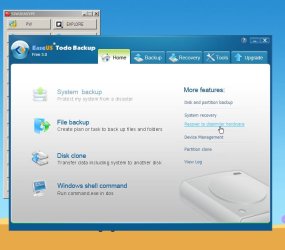
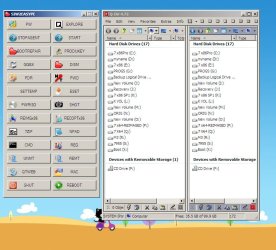
This is what you get:

EASYPEx86-2.jpg

EASYPEx86-3.jpg

EASYPEx86-4.jpg

EASYPEx86-5.jpg

EASYPEx86-1.jpg


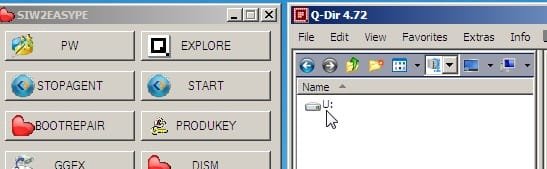
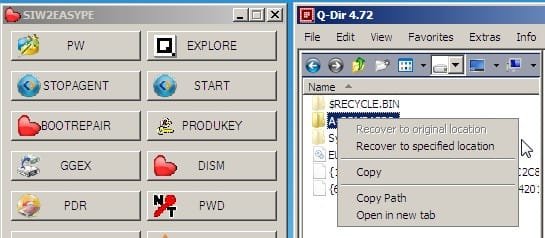
Yes, the Easeus Todo Images are mounted by default.

If you start Todo, and then shut it down - you need to click STOPAGENT before restarting Todo.
 

My Computers

System One System Two

  • Computer type
    PC/Desktop
    OS
    7 X64
    CPU
    i5 8400
    Motherboard
    gigabyte b365m ds3h
    Memory
    2x8gb 3200mhz
    Hard Drives
    various
    PSU
    pure power 11 400w cm
    Case
    Coolermaster
    Cooling
    cryorig m9i
  • Computer type
    PC/Desktop
    OS
    7x64
    CPU
    g5400
    Motherboard
    ga b365m ds3h
    Memory
    8gb ddr4 2400
    PSU
    xfx pro 450w
Thanks for this software and also for the recommended installs.

Thanks for the "Partition Wizard Home 7"
I have version 6 and Freewarefiles.com have not yet notified me of an update.

Please advise me :-
1.
Is Macrium v5 needed for the creation of Easeus TODO,
or is it for use with your EasyPE(2).zip to install WinPE in Macrium Free ?

2.
Are these tools a required part for creating Easeus/Macrium software,
or are these simple precautions to deal with any future disasters when learning "what not to do" with partitions ?
Partition Wizard Home 7
MT Data Recovery 6.5
PowerISO (Free/unregistered version is fine )
Please note that last year I lost all the partitions on my HDD.
I used the Partition Wizard BOOT CD and its Recovery Wizard put me back in business.
The only partition that gave a problem was the hidden FAT32 Acronis Secure Zone,
so I discarded Acronis because I was more than comfortable with Macrium.
Then I could not boot and I realised that Acronis had fiddled with MBR for the benefit of the Secure Zone which was no more,
so P.W. Boot CD was used to fix MBR and then my Laptop booted.
It booted into a dirty chkdsk bit and hundreds of chkdsk errors, but only for a FAT32 partition.
No problem with any NTFS partitions.
I guess whatever took out the partitions also threw trash over the contents and NTFS survived a sprinkling of trash better than FAT32.

All my important partitions, including the corrupted FAT32, had Macrium images,
So I restored them.
My download partition had no image and what P.W. retrieved was still functional/

I am still comforted by the knowledge that if I suffer a future disaster,
I can depend upon Macrium to rescue me - BUT SHOULD IT FAIL I HAVE BOOTABLE ALTERNATIVES.

For anyone who has not yet installed and proven their image restoration system,
I suggest downloading the Boot ISO's and burning to CD before courting disaster.
n.b. P.W. BOOT ISO is free and unrestricted
MT DATA BOOT ISO is free but with demo limitation you have to pay licence to save,
but the Windows version is free.

Alan
 

My Computer

Computer Manufacturer/Model Number
ASUSTeK Computer INC. M3A32-MVP DELUXE (CPU 1)
OS
Windows 7 Ultimate 64 bit SP1 x64
CPU
AMD Phenom X4 9500
Motherboard
ASUSTeK M3A32-MVP Deluxe (CPU 1)
Memory
8 GB
Graphics Card(s)
ATI Radeon HD 4600 Series
Sound Card
AMD High Definition Audio Device
Monitor(s) Displays
SyncMaster (1680x1050@60Hz)
Hard Drives
59GB OCZ-VERTEX2 ATA Device
+
977GB SAMSUNG HD103SJ ATA Device
+
625GB WDC WD6401AALS-00L3B2 ATA Device
Hi Alan,

Easype will make winpe media for you.

It is set up to include a few popular programs - it can only include them if you already have them . They are not compulsory.

Macrium and Todo are completely separate programs - you can include one or the other , or both.
 

My Computers

System One System Two

  • Computer type
    PC/Desktop
    OS
    7 X64
    CPU
    i5 8400
    Motherboard
    gigabyte b365m ds3h
    Memory
    2x8gb 3200mhz
    Hard Drives
    various
    PSU
    pure power 11 400w cm
    Case
    Coolermaster
    Cooling
    cryorig m9i
  • Computer type
    PC/Desktop
    OS
    7x64
    CPU
    g5400
    Motherboard
    ga b365m ds3h
    Memory
    8gb ddr4 2400
    PSU
    xfx pro 450w
Many thanks for the explanation.
I was so focussed on Easeus ToDo that I overlooked the obvious.

On the final image the second column from the left has "SHOT" as the seventh button down.
Is this for a screen shot ?

One think I have been looking for is freeware screenshot that can run under a Boot CD to capture and save screen images and pop-ups - especially when things are failing.

Regards
Alan
 

My Computer

Computer Manufacturer/Model Number
ASUSTeK Computer INC. M3A32-MVP DELUXE (CPU 1)
OS
Windows 7 Ultimate 64 bit SP1 x64
CPU
AMD Phenom X4 9500
Motherboard
ASUSTeK M3A32-MVP Deluxe (CPU 1)
Memory
8 GB
Graphics Card(s)
ATI Radeon HD 4600 Series
Sound Card
AMD High Definition Audio Device
Monitor(s) Displays
SyncMaster (1680x1050@60Hz)
Hard Drives
59GB OCZ-VERTEX2 ATA Device
+
977GB SAMSUNG HD103SJ ATA Device
+
625GB WDC WD6401AALS-00L3B2 ATA Device
Yes, you take screenshots with that.

It should run just fine in any winpe environment - it is quite simple, but it does the job.
 

My Computers

System One System Two

  • Computer type
    PC/Desktop
    OS
    7 X64
    CPU
    i5 8400
    Motherboard
    gigabyte b365m ds3h
    Memory
    2x8gb 3200mhz
    Hard Drives
    various
    PSU
    pure power 11 400w cm
    Case
    Coolermaster
    Cooling
    cryorig m9i
  • Computer type
    PC/Desktop
    OS
    7x64
    CPU
    g5400
    Motherboard
    ga b365m ds3h
    Memory
    8gb ddr4 2400
    PSU
    xfx pro 450w
Many thanks.

Your Zips are now downloaded and ready for use.

Regards
Alan
 

My Computer

Computer Manufacturer/Model Number
ASUSTeK Computer INC. M3A32-MVP DELUXE (CPU 1)
OS
Windows 7 Ultimate 64 bit SP1 x64
CPU
AMD Phenom X4 9500
Motherboard
ASUSTeK M3A32-MVP Deluxe (CPU 1)
Memory
8 GB
Graphics Card(s)
ATI Radeon HD 4600 Series
Sound Card
AMD High Definition Audio Device
Monitor(s) Displays
SyncMaster (1680x1050@60Hz)
Hard Drives
59GB OCZ-VERTEX2 ATA Device
+
977GB SAMSUNG HD103SJ ATA Device
+
625GB WDC WD6401AALS-00L3B2 ATA Device
Back
Top