New Hard drive, same prod. key, no system image, no install disk?!

DOC - That's what I thought. Initially, when the Windows people said the word "enterprise" I assumed they meant the whole msdn-aa thing, not that the product key I was giving them was actually for Windows Enterprise.

I have also run Jelly Bean KeyFinder. This is what it says for Windows:

Windows 7 Professional
Product Part No.: X15-39081
Installed from 'Volume' media.
Product ID: (it gives the real product ID, but then says "match to CD Key data")
CD Key: BBBBB-BBBBB-BBBBB-BBBBB-BBBBB

So....

My concern now is that the school tech guy I spoke with today gave me a new product id that I can't use since it may be for Windows Enterprise (except my school doesn't give that out, so I don't know why he would have a product id for it)

WISHMASTER - I shouldn't have either since my initial install was a full version, and it isn't OEM since my pc came with Vista originally. If I can't get an install disk, perhaps I can use my product id/key/whatever to at least get the upgrade version, though I don't think that's the best option.


Here is mine from MS Technet install;

Windows 7 Professional
Product Part No.: X15-39009
Installed from 'Full Packaged Product' media.
Product ID:XXXXXXXX match to CD Key data
CD Key: XXXXXXXXXXXXXX
Computer Name: PHENOM2-550
Registered Owner: Phenom2
Registered Organization:


So your school must use a Volume media install DVD

That may be why Microsoft considers it a Volume "Enterprise" key :confused:
 

My Computer My Computer

At a glance

Win7 Enterprise, Win7 x86 (Ult 7600), Win7 x6...AMD fx8350 4ghz, AMD-32 2400mhz, AMD-64 3200m...2gb, 4gb on the Ult 7600, 4gb on Technet RTM,...Draw my own Graphics, several nVidia cards
Computer type
PC/Desktop
Computer Manufacturer/Model Number
Built them myself, Science Experiments !
OS
Win7 Enterprise, Win7 x86 (Ult 7600), Win7 x64 Ult 7600, TechNet RTM on AMD x64 (2.8Ghz)
CPU
AMD fx8350 4ghz, AMD-32 2400mhz, AMD-64 3200mhz, AMDx64 2.8G
Motherboard
SIS 755, ECS-K8M890M-M (Ult 7600), GigaByte & others
Memory
2gb, 4gb on the Ult 7600, 4gb on Technet RTM, 32gb on FX8350
Graphics Card(s)
Draw my own Graphics, several nVidia cards
Sound Card
on motherboard
Monitor(s) Displays
19" flat scr, 28" I-Inc widescr,22" Emprex Widescr, 23" Acer
Screen Resolution
1280 x 1024, 1440 x 900, 1920 x 1080
Hard Drives
6 pata Ide HD's & 2 Sata HD's
added 80gb external on Ult 7600 computer,
numerous extra 1tb, 2TB, 3Tb SATA HD's
A collection of ext HD Docks w/ HDs
PSU
430w, 550w, 600w, 700, 800, etc
Case
All Generic Full Towers
Cooling
Open Air & a few fans, some w/ colored LEDs
Keyboard
Compaq & Dell recycled from GoodWill
Mouse
Made in China Optical Wired Mouse
Internet Speed
Fast Cable InterNet
Antivirus
AVG Free on 24 different Desktops, NO Problems!
Browser
IE 8 is preferred, but use FireFox sometimes
Other Info
Linksys Routers, switches, & Hubs
Too Many USB Flash Drives to count, Biggest is 64GB !
Eight computers in my home network.
Sixteen computers at my business network.
Linked via TeamViewer !
Lots of old used spare computer parts everywhere!
Just FYI - Jelly Bean didn't give me a produc key. It actually said BBBBB-BBBBB-BBBBB-BBBBB-BBBBB

what does that mean?
 

My Computer My Computer

At a glance

Windows 7 ProfessionalDell Latitude E65308 GB RAM
OS
Windows 7 Professional
CPU
Dell Latitude E6530
Memory
8 GB RAM
Have you tried running chkdsk on your current HD, and the maker's full diag/repair scan to see if you can get your HD in good enough shape to produce a viable image? Some failng HD's can even be returned to full service life after these repairs:
Disk Check
Hard Drive Diagnostics Tools and Utilities (Storage) - TACKtech Corp.URL

As you need to rely on the image, if you can get your HD in good enough shape then try Win7 backup imaging as well as Macrium. If neither of those reimage correctly I would even try Paragon Backup and restore free version: Paragon Backup & Recovery Free Edition - Free Download
 
Jelly Bean & SIW give me my actual Key that I used to install & activate with.

I just typed in XXXXX so as not to display it here.
 

My Computer My Computer

At a glance

Win7 Enterprise, Win7 x86 (Ult 7600), Win7 x6...AMD fx8350 4ghz, AMD-32 2400mhz, AMD-64 3200m...2gb, 4gb on the Ult 7600, 4gb on Technet RTM,...Draw my own Graphics, several nVidia cards
Computer type
PC/Desktop
Computer Manufacturer/Model Number
Built them myself, Science Experiments !
OS
Win7 Enterprise, Win7 x86 (Ult 7600), Win7 x64 Ult 7600, TechNet RTM on AMD x64 (2.8Ghz)
CPU
AMD fx8350 4ghz, AMD-32 2400mhz, AMD-64 3200mhz, AMDx64 2.8G
Motherboard
SIS 755, ECS-K8M890M-M (Ult 7600), GigaByte & others
Memory
2gb, 4gb on the Ult 7600, 4gb on Technet RTM, 32gb on FX8350
Graphics Card(s)
Draw my own Graphics, several nVidia cards
Sound Card
on motherboard
Monitor(s) Displays
19" flat scr, 28" I-Inc widescr,22" Emprex Widescr, 23" Acer
Screen Resolution
1280 x 1024, 1440 x 900, 1920 x 1080
Hard Drives
6 pata Ide HD's & 2 Sata HD's
added 80gb external on Ult 7600 computer,
numerous extra 1tb, 2TB, 3Tb SATA HD's
A collection of ext HD Docks w/ HDs
PSU
430w, 550w, 600w, 700, 800, etc
Case
All Generic Full Towers
Cooling
Open Air & a few fans, some w/ colored LEDs
Keyboard
Compaq & Dell recycled from GoodWill
Mouse
Made in China Optical Wired Mouse
Internet Speed
Fast Cable InterNet
Antivirus
AVG Free on 24 different Desktops, NO Problems!
Browser
IE 8 is preferred, but use FireFox sometimes
Other Info
Linksys Routers, switches, & Hubs
Too Many USB Flash Drives to count, Biggest is 64GB !
Eight computers in my home network.
Sixteen computers at my business network.
Linked via TeamViewer !
Lots of old used spare computer parts everywhere!
1) According to this link you are eligible for free software and it is activated permanently, even after graduation.

Student Resources

Free Software for Students

Whether your school department has chosen an Online (downloads-only) subscription or an Online+Media subscription, you are able to obtain free Microsoft software with a license that never expires—even after you graduate! All you have to do is:

2) Borrow a win7 retail dvd from a friend or get it from wherever you can, install win7 pro and use the AA key you have. I think it would work. If the borrowed disk is for a different edition, just delete the ei.cfg file in the "Sources" folder at the root of the dvd, rebuild the iso and burn to dvd. That'll land you a universal disk that'll let you choose the edition to install, including pro.
 

My Computer My Computer

At a glance

Windows 7 x64 pro/ Windows 7 x86 Pro/ XP SP3 x86
Computer Manufacturer/Model Number
Too many to describe...
OS
Windows 7 x64 pro/ Windows 7 x86 Pro/ XP SP3 x86
1) According to this link you are eligible for free software and it is activated permanently, even after graduation.

Student Resources

Free Software for Students


Whether your school department has chosen an Online (downloads-only) subscription or an Online+Media subscription, you are able to obtain free Microsoft software with a license that never expires—even after you graduate! All you have to do is:

2) Borrow a win7 retail dvd from a friend or get it from wherever you can, install win7 pro and use the AA key you have. I think it would work. If the borrowed disk is for a different edition, just delete the ei.cfg file in the "Sources" folder at the root of the dvd, rebuild the iso and burn to dvd. That'll land you a universal disk that'll let you choose the edition to install, including pro.


Nice find Bill ;)

That answers the legal question.

Ditto on Greg's recomendations ;)


And yes an " All in One DVD" is very good backup to have. Like this one ;)
 

Attachments

  • All_In_One_Win7_DVD.jpg
    All_In_One_Win7_DVD.jpg
    62.4 KB · Views: 90

My Computer My Computer

At a glance

Win7 Enterprise, Win7 x86 (Ult 7600), Win7 x6...AMD fx8350 4ghz, AMD-32 2400mhz, AMD-64 3200m...2gb, 4gb on the Ult 7600, 4gb on Technet RTM,...Draw my own Graphics, several nVidia cards
Computer type
PC/Desktop
Computer Manufacturer/Model Number
Built them myself, Science Experiments !
OS
Win7 Enterprise, Win7 x86 (Ult 7600), Win7 x64 Ult 7600, TechNet RTM on AMD x64 (2.8Ghz)
CPU
AMD fx8350 4ghz, AMD-32 2400mhz, AMD-64 3200mhz, AMDx64 2.8G
Motherboard
SIS 755, ECS-K8M890M-M (Ult 7600), GigaByte & others
Memory
2gb, 4gb on the Ult 7600, 4gb on Technet RTM, 32gb on FX8350
Graphics Card(s)
Draw my own Graphics, several nVidia cards
Sound Card
on motherboard
Monitor(s) Displays
19" flat scr, 28" I-Inc widescr,22" Emprex Widescr, 23" Acer
Screen Resolution
1280 x 1024, 1440 x 900, 1920 x 1080
Hard Drives
6 pata Ide HD's & 2 Sata HD's
added 80gb external on Ult 7600 computer,
numerous extra 1tb, 2TB, 3Tb SATA HD's
A collection of ext HD Docks w/ HDs
PSU
430w, 550w, 600w, 700, 800, etc
Case
All Generic Full Towers
Cooling
Open Air & a few fans, some w/ colored LEDs
Keyboard
Compaq & Dell recycled from GoodWill
Mouse
Made in China Optical Wired Mouse
Internet Speed
Fast Cable InterNet
Antivirus
AVG Free on 24 different Desktops, NO Problems!
Browser
IE 8 is preferred, but use FireFox sometimes
Other Info
Linksys Routers, switches, & Hubs
Too Many USB Flash Drives to count, Biggest is 64GB !
Eight computers in my home network.
Sixteen computers at my business network.
Linked via TeamViewer !
Lots of old used spare computer parts everywhere!
GREG - I haven't done that stuff yet because I wanted to try and get as much of my data off as possible first. I'll try that stuff this weekend since I have until monday before I get my new hard drive. I'll also try the macrium and paragon.

BILL/DOC I saw that earlier - I should have posted the link originally when people were saying I would be stealing. That's partially why I'm so frustrated - as long as the product key I got from the guy today is legit, since I can't seem to find the product key from Jelly Bean (I'm running SIW now...) all i need is a damn install disc! I have a product ID (proving the OS was registered) and I have a product key - I don't understand for the life of me why both my school AND windows have refused to send me a simple install disk or access to an online download link so I can make my own install disk!!!!!

Maybe if I call windows and use my product id instead of my product key, they'll send me a disk.

SIW is still churning out the product keys, but it did also say that my OS was both "Windows 7 (business)" and "Windows 7 Professional"
 

My Computer My Computer

At a glance

Windows 7 ProfessionalDell Latitude E65308 GB RAM
OS
Windows 7 Professional
CPU
Dell Latitude E6530
Memory
8 GB RAM
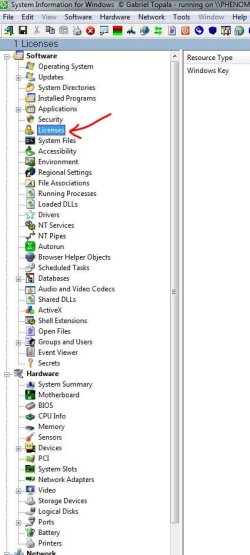
Did you click on Licenses ?
 

Attachments

  • SIW_Key_Info.JPG
    SIW_Key_Info.JPG
    61.6 KB · Views: 147

My Computer My Computer

At a glance

Win7 Enterprise, Win7 x86 (Ult 7600), Win7 x6...AMD fx8350 4ghz, AMD-32 2400mhz, AMD-64 3200m...2gb, 4gb on the Ult 7600, 4gb on Technet RTM,...Draw my own Graphics, several nVidia cards
Computer type
PC/Desktop
Computer Manufacturer/Model Number
Built them myself, Science Experiments !
OS
Win7 Enterprise, Win7 x86 (Ult 7600), Win7 x64 Ult 7600, TechNet RTM on AMD x64 (2.8Ghz)
CPU
AMD fx8350 4ghz, AMD-32 2400mhz, AMD-64 3200mhz, AMDx64 2.8G
Motherboard
SIS 755, ECS-K8M890M-M (Ult 7600), GigaByte & others
Memory
2gb, 4gb on the Ult 7600, 4gb on Technet RTM, 32gb on FX8350
Graphics Card(s)
Draw my own Graphics, several nVidia cards
Sound Card
on motherboard
Monitor(s) Displays
19" flat scr, 28" I-Inc widescr,22" Emprex Widescr, 23" Acer
Screen Resolution
1280 x 1024, 1440 x 900, 1920 x 1080
Hard Drives
6 pata Ide HD's & 2 Sata HD's
added 80gb external on Ult 7600 computer,
numerous extra 1tb, 2TB, 3Tb SATA HD's
A collection of ext HD Docks w/ HDs
PSU
430w, 550w, 600w, 700, 800, etc
Case
All Generic Full Towers
Cooling
Open Air & a few fans, some w/ colored LEDs
Keyboard
Compaq & Dell recycled from GoodWill
Mouse
Made in China Optical Wired Mouse
Internet Speed
Fast Cable InterNet
Antivirus
AVG Free on 24 different Desktops, NO Problems!
Browser
IE 8 is preferred, but use FireFox sometimes
Other Info
Linksys Routers, switches, & Hubs
Too Many USB Flash Drives to count, Biggest is 64GB !
Eight computers in my home network.
Sixteen computers at my business network.
Linked via TeamViewer !
Lots of old used spare computer parts everywhere!
Yeah it's just taking forever...."Processing 183 of 227"

When I opened it at first, it said it wasn't compatible with Windows 7 Business version, which appears to NOT be free. I'm hoping the free version you gave me will at least get me the product key...

P.S. - BTW, your name being Doc Brown has made wasting 3 days of my big move on a bad hard drive totally worth it. Thanks for your help!

THANKS TO ALL OF YOU FOR HELPING ME WITH THIS!!
 

My Computer My Computer

At a glance

Windows 7 ProfessionalDell Latitude E65308 GB RAM
OS
Windows 7 Professional
CPU
Dell Latitude E6530
Memory
8 GB RAM

Attachments

  • DocNeedMoreJiggaWatts.jpg
    DocNeedMoreJiggaWatts.jpg
    28.9 KB · Views: 6

My Computer My Computer

At a glance

Win7 Enterprise, Win7 x86 (Ult 7600), Win7 x6...AMD fx8350 4ghz, AMD-32 2400mhz, AMD-64 3200m...2gb, 4gb on the Ult 7600, 4gb on Technet RTM,...Draw my own Graphics, several nVidia cards
Computer type
PC/Desktop
Computer Manufacturer/Model Number
Built them myself, Science Experiments !
OS
Win7 Enterprise, Win7 x86 (Ult 7600), Win7 x64 Ult 7600, TechNet RTM on AMD x64 (2.8Ghz)
CPU
AMD fx8350 4ghz, AMD-32 2400mhz, AMD-64 3200mhz, AMDx64 2.8G
Motherboard
SIS 755, ECS-K8M890M-M (Ult 7600), GigaByte & others
Memory
2gb, 4gb on the Ult 7600, 4gb on Technet RTM, 32gb on FX8350
Graphics Card(s)
Draw my own Graphics, several nVidia cards
Sound Card
on motherboard
Monitor(s) Displays
19" flat scr, 28" I-Inc widescr,22" Emprex Widescr, 23" Acer
Screen Resolution
1280 x 1024, 1440 x 900, 1920 x 1080
Hard Drives
6 pata Ide HD's & 2 Sata HD's
added 80gb external on Ult 7600 computer,
numerous extra 1tb, 2TB, 3Tb SATA HD's
A collection of ext HD Docks w/ HDs
PSU
430w, 550w, 600w, 700, 800, etc
Case
All Generic Full Towers
Cooling
Open Air & a few fans, some w/ colored LEDs
Keyboard
Compaq & Dell recycled from GoodWill
Mouse
Made in China Optical Wired Mouse
Internet Speed
Fast Cable InterNet
Antivirus
AVG Free on 24 different Desktops, NO Problems!
Browser
IE 8 is preferred, but use FireFox sometimes
Other Info
Linksys Routers, switches, & Hubs
Too Many USB Flash Drives to count, Biggest is 64GB !
Eight computers in my home network.
Sixteen computers at my business network.
Linked via TeamViewer !
Lots of old used spare computer parts everywhere!
1) According to this link you are eligible for free software and it is activated permanently, even after graduation.

Student Resources

Free Software for Students


Whether your school department has chosen an Online (downloads-only) subscription or an Online+Media subscription, you are able to obtain free Microsoft software with a license that never expires—even after you graduate! All you have to do is:

2) Borrow a win7 retail dvd from a friend or get it from wherever you can, install win7 pro and use the AA key you have. I think it would work. If the borrowed disk is for a different edition, just delete the ei.cfg file in the "Sources" folder at the root of the dvd, rebuild the iso and burn to dvd. That'll land you a universal disk that'll let you choose the edition to install, including pro.


Hello LEVAMDG, welcome to Seven Forums; I hope you can get this sorted.


Here's a link for the info Bill posted.

Windows 7 Universal Installation Disc - Create
 

My Computer My Computer

At a glance

W 7 64-bit UltimateIntel Q9550 Yorkfield8GB Dominator 8500C5DATI : XFX 5870
Computer Manufacturer/Model Number
* BFK Customs *
OS
W 7 64-bit Ultimate
CPU
Intel Q9550 Yorkfield
Motherboard
ASUS P5Q Pro
Memory
8GB Dominator 8500C5D
Graphics Card(s)
ATI : XFX 5870
Sound Card
Realtek HD Audio 7-1
Monitor(s) Displays
1x 47" LCD HDMI & 3x 26" LCD HDMI
Screen Resolution
1920x1080P & 1920x1200
Hard Drives
1x 80GB Intel X25-M G2 SSD : 1x 500GB & 1x 640GB WD Caviar Black(s)
PSU
Corsair 620HX
Case
Cooler Master RC-690
Cooling
Tuniq Tower 120, 2x 140mm and 3x 120mm case fans
Keyboard
Microsoft 500
Mouse
Razer Diamondback 3G
Internet Speed
14 Mb/s
Other Info
1x Koutech 3Gb/s SATA HDD Hot Swap Rack
Thanks for the link!

I've copy and pasted my documents, media, outlook pst's, firefox profile, program installer files, and I can't think of anything else...is there anything else?? I don't seem to have many drivers (printer and external hd only it looks like).

SIW couldn't find my windows product key either, so unless I have it written down with some stuff I've already moved in to my apartment, I only have the one the guy says was mine yesterday. But I do have the product ID.

I'm going offline until tonight to finish my move. Once I'm down there, I'll do the macrium, chk dsk, etc. I need to get moving to my apartment. It doesn't have internet, but I'll find a library or something nearby and post an update.

Now where can I find a windows 7 install disk...
 

My Computer My Computer

At a glance

Windows 7 ProfessionalDell Latitude E65308 GB RAM
OS
Windows 7 Professional
CPU
Dell Latitude E6530
Memory
8 GB RAM
I'll try that this afternoon - thanks!
 

My Computer My Computer

At a glance

Windows 7 ProfessionalDell Latitude E65308 GB RAM
OS
Windows 7 Professional
CPU
Dell Latitude E6530
Memory
8 GB RAM
UPDATE TIME - PLEASE READ:

1.) Got to my apartment. None of the disks I had were Windows 7 disks, and I got tired of trying to get my pc to work well enough to try Belarc Advisoe, Macrium, chk dsk, etc. Thus, no system image of the old hard drive, but I have all my data.

2.) Dell guy came and installed new hard drive, without an OS. HE LET ME KEEP THE OLD HD. If you guys think I need anything from it, I have 10 days to extract it before I need to mail it.

3.) I found a local pc repair guy to burn me a Windows Professional install disk for 5 bucks.

4.) The disk is for Windows 7 Professional "N" - WHAT DOES THIS MEAN?!

5.) Despite not knowing what "N" means, I installed it on my pc, using the product key that I have.

6.) When asked about the 3 security options (use recommended settings, important updates only, or ask me later) I said "ask me later." I did this because I didn't know what settings are good to have, and also because I will be installing Symantec Endpoint on the PC, and I know some of the settings were anti-virus related. PLEASE LET ME KNOW WHAT I SHOULD DO ABOUT THIS.

7.) PROBLEMS...? I turned off the pc, and when I tried to turn it on again, the power button didn't do anything (it was fully charged) and then when I pressed and held the button it finally worked, but the profile log-in page looked like it was in safety mode (large icons and text, etc.) Was this just because the install CD was still in the drive? Perhaps a video driver issue? I took the disk out, and restarted it.

8.) It started fine this time, but then MY MOUSE DIDN'T WORK. Once connected to the internet, the PC said it was installing drivers - is that why?

9.) I restarted the pc, and the mouse works now. WHAT'S GOING ON?!?! Do I still need to use those dell driver disks I have when I got the computer or are those just for Vista?

10.) I activated the product key - IT WORKED! YAY!

CONCLUSION: So Windows is activated, and everything SEEMS to be functioning now, but the turning-on issue and touchpad not working issues were troubling, though they seemed to have worked themselves out.

I want to get you guys' imput on these weird things before I start putting my data on the new HD, in case you feel I need to re-install 7 on the HD.

If not, I will begin transferring my data from the external to the new hard drive this afternoon, and immediately after do a full Windows Backup WITH a System Image.

Let me know if you have any questions about what I've posted!
 

My Computer My Computer

At a glance

Windows 7 ProfessionalDell Latitude E65308 GB RAM
OS
Windows 7 Professional
CPU
Dell Latitude E6530
Memory
8 GB RAM
From what you've described;
Large icons, things not working etc are simply driver issues.

Once connected to the net, Seven should be able to get most, if not all of them for you.


Make sure nothing is missing in the Device manager:

Just Press the Start Orb :orb:
In the serch box type "Device Manager" and click on it in the search results.
Look for any Yellow Triangles.:warn:


The Security Options were refering to Updates:


Recommended settings -- Automatically Installs Important and Recommended updates.
Important Only -- automatically installs only the Important updates.

Or as many here will suggest, set it to Check for Updates But ask me what do.
This way, Windows will let you know updates are available, but will not download or install anything untill you tell it to.
 

My Computer My Computer

At a glance

Windows 7 Home Premium 64bitIntel Core i7 2700k8GB Mushkin Redline Ridgebacks @1866EVGA GTX570 SC
Computer Manufacturer/Model Number
Custom (Self Build)
OS
Windows 7 Home Premium 64bit
CPU
Intel Core i7 2700k
Motherboard
eVGA P67 SLI
Memory
8GB Mushkin Redline Ridgebacks @1866
Graphics Card(s)
EVGA GTX570 SC
Sound Card
XiFi Titanium HD
Monitor(s) Displays
LG W2453V
Screen Resolution
1920x1080
Hard Drives
Intel 320 80GB -- Intel X25-V 40GB --WD Black 1TB x2 -- WD Blue 640GB
PSU
Seasonic x750
Case
Corsair 600T SE White
Cooling
eVGA Superclocked CPU Cooler
Keyboard
Saitek Cyborg
Antivirus
Kaspersky
Browser
IE
Other Info
LG BD/DVD
There are no yellow triangles, but I'm having a hard time finding the touchpad settings window that allowed me to turn off the damn blue stick in my keyboard. If I remember correctly, Windows 7 had something for that without me needing a separate driver/program. Under mouse, there are not touchpad settings...

How do I go back and change the update/security/whatever settings?
 

My Computer My Computer

At a glance

Windows 7 ProfessionalDell Latitude E65308 GB RAM
OS
Windows 7 Professional
CPU
Dell Latitude E6530
Memory
8 GB RAM
There are no yellow triangles, but I'm having a hard time finding the touchpad settings window that allowed me to turn off the damn blue stick in my keyboard. If I remember correctly, Windows 7 had something for that without me needing a separate driver/program. Under mouse, there are not touchpad settings...

How do I go back and change the update/security/whatever settings?

All Programs/ Windows Update (Or do a search for Windows Update)

And Change Settings in left Panel.
 

My Computer My Computer

At a glance

Windows 7 Home Premium 64bitIntel Core i7 2700k8GB Mushkin Redline Ridgebacks @1866EVGA GTX570 SC
Computer Manufacturer/Model Number
Custom (Self Build)
OS
Windows 7 Home Premium 64bit
CPU
Intel Core i7 2700k
Motherboard
eVGA P67 SLI
Memory
8GB Mushkin Redline Ridgebacks @1866
Graphics Card(s)
EVGA GTX570 SC
Sound Card
XiFi Titanium HD
Monitor(s) Displays
LG W2453V
Screen Resolution
1920x1080
Hard Drives
Intel 320 80GB -- Intel X25-V 40GB --WD Black 1TB x2 -- WD Blue 640GB
PSU
Seasonic x750
Case
Corsair 600T SE White
Cooling
eVGA Superclocked CPU Cooler
Keyboard
Saitek Cyborg
Antivirus
Kaspersky
Browser
IE
Other Info
LG BD/DVD
I've changed it to "check but ask me to install."

The "recommended settings" weren't just updates though - it said stuff about firewalls, anti-spyware, safer web-browsing I think, and a bunch of other stuff - is it actually going to ask me about all that, or do I have to hunt down and figure out what else I need to do?
 

My Computer My Computer

At a glance

Windows 7 ProfessionalDell Latitude E65308 GB RAM
OS
Windows 7 Professional
CPU
Dell Latitude E6530
Memory
8 GB RAM
Back
Top