
NGtheMeerkat
New member
- Local time
- 9:53 AM
- Messages
- 3
This is my third time trying to post this (lost it from it auto-logging me out). So if I seem abrupt and scattered, sorry.
My problem is that when I boot up my system and Windows 7 starts to load, it gives me this BSOD:
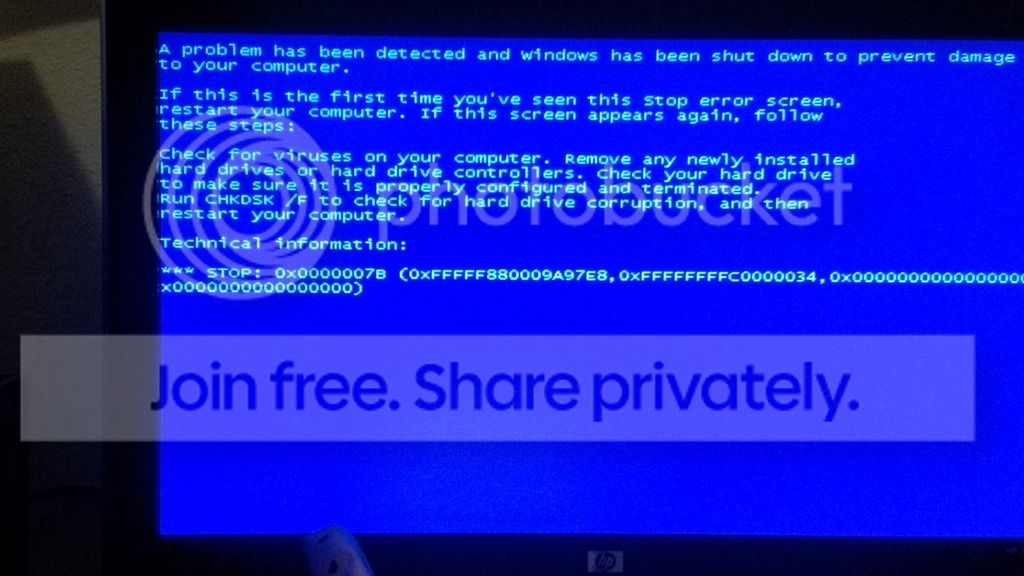
This started happening after I added new parts (will describe below). I listed my old rig's parts in my profile, but here's an overview.
My old rig is a HP Pavilion p6203w HP Support document - HP Support Center in a Apevia X-Sniper 2 case, with a nVidia GeForce GTX 660 graphics card, and a Corsair 800W PSU.
My new rig was the old rig, except I replaced the mobo, Ram, and CPU to:
mobo: ASRock Z75 Pro3 LGA 1155 Intel Z75 HDMI SATA 6Gb/s USB 3.0 ATX Intel Motherboard
CPU: Intel Core i3-3250 Ivy Bridge Dual-Core 3.5GHz LGA 1155 55W BX80637I33250 Desktop Processor Intel HD Graphics 2500
RAM: Team Xtreme 16GB (2 x 8GB) 240-Pin DDR3 SDRAM DDR3 2400 (PC3 19200) Desktop Memory Model TXD316G2400HC10QDC01
My Mobo just came back from RMA because it was DOA (They just gave me a new one), so I got to start it up, and it was doing well until it got to booting Windows. Two of the dots of the logo appear, then it BSODs and restarts. Nothing I've tried so far has helped. I already tired all options in Startup Repair (except restoring it to factory settings. I have too many programs that I can not afford losing, especially those it would be almost impossible to find again.), I've done a system Restore (For some reason, all of my restore points were gone except one that was dated to minutes after the first BSoD), I've run a chkdsk to look for anything in the harddrive, and I tried to start it in safe mode (got the same error). I tried removing all unncessisary hardware (I.E. graphics card, and all USB devices like keyboard and mouse), and I tried running with 1 stick of RAM, then swapped to the other stick of RAM. When I set up the harddrive, the distance from where it would sit and where the SATA ports were was too long for the original SATA2 cable, so I had to try the SATA3 cable. I tried the SATA3 cable plugged into the SATA2 and SATA3 ports on the motherboard, and I moved the harddrive onto the table next to the case so it could reach the ports using the shorter SATA2 cable, and I tried it in both the SATA2 and SATA3 ports as well.
I did other things too, but i can't even remember them at this point. I post them when they come back to me.
Anyways, when I looked up the error, most of what I found suggested the HDD was damaged, had a virus, or had bad partitions. I know for sure that is not the case because I am using it right now back in my old rig (Which is where I am posting from). This leads me to beleive it might be an issue with one of my new parts, or more likely, their drivers.
I can't test my mobo, RAM, or CPU without the other new 3 parts, because none of them are compatible with their old counterparts in my new rig. Also, I do not have access to a PC that is compatible with any of my new or old parts to test them on.
Sorry again if I was all over the place, or if I missed something. I'm extremely tired atm with this system and with typing this again.
I'm pretty sure I have everything hooked up correctly, but if you want I can take pictures just in case.
Also, I saw you have to include that file thingy in the attachments, so (obviously) that was run on my OLD rig seeing as I can't get close enough in my new rig to run something like that.
Thanks in advance for your help
http://h20564.www2.hp.com/hpsc/doc/public/display?docId=emr_na-c01859861
My problem is that when I boot up my system and Windows 7 starts to load, it gives me this BSOD:
This started happening after I added new parts (will describe below). I listed my old rig's parts in my profile, but here's an overview.
My old rig is a HP Pavilion p6203w HP Support document - HP Support Center in a Apevia X-Sniper 2 case, with a nVidia GeForce GTX 660 graphics card, and a Corsair 800W PSU.
My new rig was the old rig, except I replaced the mobo, Ram, and CPU to:
mobo: ASRock Z75 Pro3 LGA 1155 Intel Z75 HDMI SATA 6Gb/s USB 3.0 ATX Intel Motherboard
CPU: Intel Core i3-3250 Ivy Bridge Dual-Core 3.5GHz LGA 1155 55W BX80637I33250 Desktop Processor Intel HD Graphics 2500
RAM: Team Xtreme 16GB (2 x 8GB) 240-Pin DDR3 SDRAM DDR3 2400 (PC3 19200) Desktop Memory Model TXD316G2400HC10QDC01
My Mobo just came back from RMA because it was DOA (They just gave me a new one), so I got to start it up, and it was doing well until it got to booting Windows. Two of the dots of the logo appear, then it BSODs and restarts. Nothing I've tried so far has helped. I already tired all options in Startup Repair (except restoring it to factory settings. I have too many programs that I can not afford losing, especially those it would be almost impossible to find again.), I've done a system Restore (For some reason, all of my restore points were gone except one that was dated to minutes after the first BSoD), I've run a chkdsk to look for anything in the harddrive, and I tried to start it in safe mode (got the same error). I tried removing all unncessisary hardware (I.E. graphics card, and all USB devices like keyboard and mouse), and I tried running with 1 stick of RAM, then swapped to the other stick of RAM. When I set up the harddrive, the distance from where it would sit and where the SATA ports were was too long for the original SATA2 cable, so I had to try the SATA3 cable. I tried the SATA3 cable plugged into the SATA2 and SATA3 ports on the motherboard, and I moved the harddrive onto the table next to the case so it could reach the ports using the shorter SATA2 cable, and I tried it in both the SATA2 and SATA3 ports as well.
I did other things too, but i can't even remember them at this point. I post them when they come back to me.
Anyways, when I looked up the error, most of what I found suggested the HDD was damaged, had a virus, or had bad partitions. I know for sure that is not the case because I am using it right now back in my old rig (Which is where I am posting from). This leads me to beleive it might be an issue with one of my new parts, or more likely, their drivers.
I can't test my mobo, RAM, or CPU without the other new 3 parts, because none of them are compatible with their old counterparts in my new rig. Also, I do not have access to a PC that is compatible with any of my new or old parts to test them on.
Sorry again if I was all over the place, or if I missed something. I'm extremely tired atm with this system and with typing this again.
I'm pretty sure I have everything hooked up correctly, but if you want I can take pictures just in case.
Also, I saw you have to include that file thingy in the attachments, so (obviously) that was run on my OLD rig seeing as I can't get close enough in my new rig to run something like that.
Thanks in advance for your help
http://h20564.www2.hp.com/hpsc/doc/public/display?docId=emr_na-c01859861
My Computer
At a glance
Windows 7 Home Premium x64AMD Athlon II X2 2152x2 DDR2 PC2-6400nvidia GeForce GTX 660
- Computer type
- PC/Desktop
- Computer Manufacturer/Model Number
- HP/Custom Build
- OS
- Windows 7 Home Premium x64
- CPU
- AMD Athlon II X2 215
- Motherboard
- Pegatron M2N68-LA
- Memory
- 2x2 DDR2 PC2-6400
- Graphics Card(s)
- nvidia GeForce GTX 660
- Hard Drives
- Hitachi 500 GB SATA2
- PSU
- Corsair 800W
- Case
- Apevia X-Sniper 2
- Antivirus
- Norton 360
- Browser
- Morzilla Firefox


