New HD causes verrrrrrrrrrry slow start up

jakalad

New member
Local time
7:00 AM
Messages
8
Hi can anyone help me sort out an incredibly slow start up - 5minutes-following addition of an 300Gb IDE drive. Previously had 2nos 500Gb sata's and system booted up real fast but since I have added this 3rd drive the system appears to hang with the 'Windows Startin Up' message up for eternity. Jak
 

My Computer My Computer

At a glance

windows7
OS
windows7
What are your system specs and what make of hard rive have you fitted?
 

My Computer My Computer

At a glance

Win7 Ultimate x64 on Desktop / Win7 Ultimate ...AMD Phenom 965 X4 3.4Ghz cpu Black Edition12 Gb DDR3Nvidea Gforce GTX 470
Computer Manufacturer/Model Number
Dilithium Computers/Engineering (Myself) Star date 42.739285.5432.9
OS
Win7 Ultimate x64 on Desktop / Win7 Ultimate x86 on laptop / Win7 x86 Starter on Netbook
CPU
AMD Phenom 965 X4 3.4Ghz cpu Black Edition
Motherboard
Gigabyte 790XT
Memory
12 Gb DDR3
Graphics Card(s)
Nvidea Gforce GTX 470
Sound Card
Onboard Realtek hi-fi
Monitor(s) Displays
Lg 3D led 23"
Screen Resolution
1920x1080
Hard Drives
Loads maxstore sata 1 & 2/ loads of partitions + 1Tb Hitachi sata 2. 256Gb Crucial ssd.
PSU
OCZ 700W GameXstream
Case
Artec 10000
Cooling
On board + many case fans
Keyboard
Logitech wireless K350
Mouse
Inferno gaming mouse
Internet Speed
Talk talk. 10Mb
Other Info
My PC was hand built with matchsticks. xbox 360 controller. Printers,fax.........
Sorry should have noted them - ASUS P5E Premium with quad core 9450, 4gb of ram, 2 nos Seagate 500gb sata drives not in RAID and a 300gb samsung IDE. Latter was added last and is two thirds full.
 

My Computer My Computer

At a glance

windows7
OS
windows7
Hi jakalad and Welcome to the Forum!

Well, I would say that it may be Indexing the drive but this doesn't seem likely since it hangs at that starting screen.
Have you tried disabling the drive in the BIOS and see if your machine starts normally again? If so it definitely is this drive that's causing the slow start, but I can't really think of why that may be right now. I would start be checking the BIOS settings for your IDE setup and make sure that this drive hasn't been added as a boot device also. I know some stupid BIOS's will automatically put a newly installed drive as the 1st boot device sometimes (I know, it happened to me with a Phoenix BIOS)

Also, once you do finally boot, do you have any Event Viewer entries about this or any devices shown in Device Mgr with the yellow exclamation mark? And check what Disk Mgmt applet has to say about this drive once it boots with it installed/enabled again, anything may help us.

 

My Computer My Computer

At a glance

Vista Ult 64bit - Windows 7 Ult 7264 64bitIntel Core 2 Duo E67504 G's Crucial Ballistix TracerBFG Nvidia 8800 GTS 340
Computer Manufacturer/Model Number
Personal Build
OS
Vista Ult 64bit - Windows 7 Ult 7264 64bit
CPU
Intel Core 2 Duo E6750
Motherboard
Asus Commando
Memory
4 G's Crucial Ballistix Tracer
Graphics Card(s)
BFG Nvidia 8800 GTS 340
Sound Card
Creative Sound Blaster X-FI Platinum FATAL1TY
Monitor(s) Displays
2-22" HP W2207 LCD
Screen Resolution
1920 x 1080
Hard Drives
3 x 500G WD Caviar SATA II
PSU
Enermax Noise Taker II 600W
Case
NZXT Lexa Classic (dual doored & windowed)
Cooling
Zalman 9700 CPU cooler - 4 x 120mm, 1 x 90mm fans
Keyboard
Logitech MX 5500
Mouse
Logitech MX Revolution
Internet Speed
Blazing...
Hi can anyone help me sort out an incredibly slow start up - 5minutes-following addition of an 300Gb IDE drive. Previously had 2nos 500Gb sata's and system booted up real fast but since I have added this 3rd drive the system appears to hang with the 'Windows Startin Up' message up for eternity. Jak

Quick note, if this is a EIDE drive, check your jumpers
 

My Computer My Computer

At a glance

Windows 7 Pro x64 & Win7 Pre x64 / Ubuntu 9.1...Q6600 Quad Core 2 - 2.4Ghz4GB Kingston DDR2 800XFX 8800GT Alpha Dog Ed. X 2 SLI
Computer Manufacturer/Model Number
Custom Desktop & HP G60-120US
OS
Windows 7 Pro x64 & Win7 Pre x64 / Ubuntu 9.10 Beta
CPU
Q6600 Quad Core 2 - 2.4Ghz
Motherboard
EVGA - 680i SLI
Memory
4GB Kingston DDR2 800
Graphics Card(s)
XFX 8800GT Alpha Dog Ed. X 2 SLI
Sound Card
On Board
Monitor(s) Displays
24"Dell Wide Screen and Gateway 17" Widescreen & HP 15.4"
Screen Resolution
1920 x1200 (Dell) 1440 x 900(Gateway) & 1366x768 (HP Laptop)
Hard Drives
WD 500GB, Seagate 1.5 TB
PSU
Rosewell RX750
Case
Antec 900
Cooling
Zalman 8700
Keyboard
Saitek Cyborg & Logitech wireless
Mouse
Logitech G5 & Logitech wireless
Internet Speed
Cable - 20Mbs/sec DOWN 5Mbs/s UP
Quick note, if this is a EIDE drive, check your jumpers
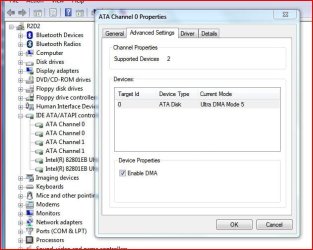
Jumpers are set to slave. Trying to transfer data over to SATA drives and notice transfer rate is very slow also - 1.59Mb/s. Wondering if the disk is in PIO rather than DMA but cant figure out how to determine settings in Windows7. When I go into System IDE/ATAPI controller does not have a primary and secondary flag nor is there an advanced option as in XP.

Took almost 3 hours to transfer barely 10Gb which is a pain given there is 250Gb of useful data on board.
 

My Computer My Computer

At a glance

windows7
OS
windows7
Jumpers are set to slave. Trying to transfer data over to SATA drives and notice transfer rate is very slow also - 1.59Mb/s. Wondering if the disk is in PIO rather than DMA but cant figure out how to determine settings in Windows7. When I go into System IDE/ATAPI controller does not have a primary and secondary flag nor is there an advanced option as in XP.

Took almost 3 hours to transfer barely 10Gb which is a pain given there is 250Gb of useful data on board.

Try making it master.
 

My Computer My Computer

At a glance

Windows 7 Pro x64 & Win7 Pre x64 / Ubuntu 9.1...Q6600 Quad Core 2 - 2.4Ghz4GB Kingston DDR2 800XFX 8800GT Alpha Dog Ed. X 2 SLI
Computer Manufacturer/Model Number
Custom Desktop & HP G60-120US
OS
Windows 7 Pro x64 & Win7 Pre x64 / Ubuntu 9.10 Beta
CPU
Q6600 Quad Core 2 - 2.4Ghz
Motherboard
EVGA - 680i SLI
Memory
4GB Kingston DDR2 800
Graphics Card(s)
XFX 8800GT Alpha Dog Ed. X 2 SLI
Sound Card
On Board
Monitor(s) Displays
24"Dell Wide Screen and Gateway 17" Widescreen & HP 15.4"
Screen Resolution
1920 x1200 (Dell) 1440 x 900(Gateway) & 1366x768 (HP Laptop)
Hard Drives
WD 500GB, Seagate 1.5 TB
PSU
Rosewell RX750
Case
Antec 900
Cooling
Zalman 8700
Keyboard
Saitek Cyborg & Logitech wireless
Mouse
Logitech G5 & Logitech wireless
Internet Speed
Cable - 20Mbs/sec DOWN 5Mbs/s UP
You should only have it jumpered as slave if there is another IDE drive at the top connector of the pair, otherwise it must be set as Master.

I find it strange that you can't find anything under System IDE/ATAPI controller in Device Manager.

Mind you my setup is 2 SATA HDD's and 4 IDE CD/DVD drives and no Raid involved anywhere as my M/B doesn't support it.

Did you initialize the drive properly in Disk Management and give it a drive letter etc. etc.?
 

Attachments

  • Capture.JPG
    Capture.JPG
    58.6 KB · Views: 115

My Computer My Computer

At a glance

Win 7 Ult SP1/Win 10 Pro (all x64)Intel® Core™ i7-975 Extreme O/C to 4.02 GHz, ...24GB Corsair Vengeance DDR3 SDRAM at 1600MHz ...1792 MB NVIDIA® GeForce® GTX 295 Dual Core
Computer type
PC/Desktop
Computer Manufacturer/Model Number
Alienware® ALX X58
OS
Win 7 Ult SP1/Win 10 Pro (all x64)
CPU
Intel® Core™ i7-975 Extreme O/C to 4.02 GHz, 8MB Cache
Motherboard
Asus® P6T Deluxe V2 X58 LGA1366
Memory
24GB Corsair Vengeance DDR3 SDRAM at 1600MHz - 6 x 4096MB
Graphics Card(s)
1792 MB NVIDIA® GeForce® GTX 295 Dual Core
Sound Card
Onboard Soundmax® High-Definition 7.1 Performance Audio
Monitor(s) Displays
Samsung XL2370 LED backlit 23" W/S 2ms response time
Screen Resolution
1920 X 1080
Hard Drives
2 x 500gb SATA II
1 x 1TB SATA II
1 external eSATA LaCie 3TB
(Non-RAID)
PSU
Alienware® 1200 Watt Multi-GPU
Case
Alienware® P2 ALX Chassis with AlienIce™ 3.0 Video Cooling
Cooling
Alienware® High-Perf. Liquid Cooling + Acoustic Dampening
Keyboard
Microsoft® Wireless Entertainment 8000 + Logitech® G15 Wired
Mouse
Microsoft® Wireless Laser 8000 + Logitech® G9 Wired
Internet Speed
1Gb/s
Antivirus
McAfee LiveSafe
Browser
Firefox - latest
Other Info
Using non-RAID on purpose as I find RAID to be too temperamental.
Now set to AHCI
I have disconnected the drive and Windows7 starts up in les than 60 secs compared to the 7 minutes.
WhenI first attached the IDE disk Windows7 actually loaded up the drivers automatically during bootup from the manufacturers site via the web and disc was already configured in the system. I have since removed and replaced it but did not expect this to upset system. It was certainly in disk management window as active.

I am equally thrown by lack of detail in Device manager. Not sure how to capture screen otherwise I would have done this. Jak
 

My Computer My Computer

At a glance

windows7
OS
windows7
i'm not sure if this my or may not cause it but what format is your drive in?
it maybe that your drive is formated in 16 or 32 bit and maybe win 7 is having
a hard time reading from it.

scrooge
 

My Computer My Computer

At a glance

win 7 ( 64 bit)Intel Core i7-870 Lynnfield 2.93GHz 8MB L3 Ca...G.SKILL Sniper Series 16GB (4 x 4GB) 240-Pin ...ATI Radeon HD6800 Series
Computer Manufacturer/Model Number
home build
OS
win 7 ( 64 bit)
CPU
Intel Core i7-870 Lynnfield 2.93GHz 8MB L3 Cache LGA 1156 95
Motherboard
ASUS P7P55 LX LGA 1156
Memory
G.SKILL Sniper Series 16GB (4 x 4GB) 240-Pin DDR3 SDRAM
Graphics Card(s)
ATI Radeon HD6800 Series
Sound Card
hdmi
Monitor(s) Displays
42" lg 3d tv
Screen Resolution
1920 x 1080
Hard Drives
1 ssd pci-e revodrive
4 seagate 1.5 tb
PSU
Rosewill BRONZE Series RBR1000-M 1000W Continuous@40°C, 80Pl
Case
CoolMaster 922
Cooling
CORSAIR CWCH60 Hydro Series H60 High Performance Liquid CPU
Keyboard
logtech
Mouse
logitect
Internet Speed
5 mbit
Not sure how to capture screen otherwise I would have done this. Jak

Use the snipping tool, Start/All Programs/Accessories/Snipping Tool.
 

My Computer My Computer

At a glance

Win 7 Ult SP1/Win 10 Pro (all x64)Intel® Core™ i7-975 Extreme O/C to 4.02 GHz, ...24GB Corsair Vengeance DDR3 SDRAM at 1600MHz ...1792 MB NVIDIA® GeForce® GTX 295 Dual Core
Computer type
PC/Desktop
Computer Manufacturer/Model Number
Alienware® ALX X58
OS
Win 7 Ult SP1/Win 10 Pro (all x64)
CPU
Intel® Core™ i7-975 Extreme O/C to 4.02 GHz, 8MB Cache
Motherboard
Asus® P6T Deluxe V2 X58 LGA1366
Memory
24GB Corsair Vengeance DDR3 SDRAM at 1600MHz - 6 x 4096MB
Graphics Card(s)
1792 MB NVIDIA® GeForce® GTX 295 Dual Core
Sound Card
Onboard Soundmax® High-Definition 7.1 Performance Audio
Monitor(s) Displays
Samsung XL2370 LED backlit 23" W/S 2ms response time
Screen Resolution
1920 X 1080
Hard Drives
2 x 500gb SATA II
1 x 1TB SATA II
1 external eSATA LaCie 3TB
(Non-RAID)
PSU
Alienware® 1200 Watt Multi-GPU
Case
Alienware® P2 ALX Chassis with AlienIce™ 3.0 Video Cooling
Cooling
Alienware® High-Perf. Liquid Cooling + Acoustic Dampening
Keyboard
Microsoft® Wireless Entertainment 8000 + Logitech® G15 Wired
Mouse
Microsoft® Wireless Laser 8000 + Logitech® G9 Wired
Internet Speed
1Gb/s
Antivirus
McAfee LiveSafe
Browser
Firefox - latest
Other Info
Using non-RAID on purpose as I find RAID to be too temperamental.
Now set to AHCI
i'm not sure if this my or may not cause it but what format is your drive in?
it maybe that your drive is formated in 16 or 32 bit and maybe win 7 is having
a hard time reading from it.

scrooge

It won't install to a FAT partition so that's not it.

Post back with more info on how it is cabled and what type of drive.
It may have dropped into PIO mode. This happens with consecutive read/write errors but can be corrected.
 

My Computer My Computer

At a glance

Vista Ultimate X64/ Windows 7 Dual-bootQ66004G OCZ PC2 8500 PlatinumEVGA 8800GTS Vid Card
Computer Manufacturer/Model Number
Self-Built
OS
Vista Ultimate X64/ Windows 7 Dual-boot
CPU
Q6600
Motherboard
ASUS P5K
Memory
4G OCZ PC2 8500 Platinum
Graphics Card(s)
EVGA 8800GTS Vid Card
Hard Drives
500G Seagate SATA
200G Seagate SATA
100G WD Caviar SATA
80G WD Caviar IDE
PSU
OCZ Elite 800W PSU
Case
RaidMax Smilodon Case
It is a new asus set-up using a 80 able on as slave /grey. Tried to check out if it was in PIO but not able to determine that.
What is the Snipping Tool - will investigate. Thanks Jak
 

My Computer My Computer

At a glance

windows7
OS
windows7

My Computer My Computer

At a glance

Vista Ult 64 bit Seven Ult RTM x64Intel Core2 Quad Q6600 2.40 gigahertzCrucial Ballistix 4x2GB PC2 6400NVIDIA GeForce 8600 GTS 256 MB
Computer Manufacturer/Model Number
Dell XPS420
OS
Vista Ult 64 bit Seven Ult RTM x64
CPU
Intel Core2 Quad Q6600 2.40 gigahertz
Memory
Crucial Ballistix 4x2GB PC2 6400
Graphics Card(s)
NVIDIA GeForce 8600 GTS 256 MB
Sound Card
Creative SB X-Fi audio
Monitor(s) Displays
HP w2207 + HPvs15
Screen Resolution
1680x1050 + 1024x768
Hard Drives
2-WD5000AAKS-500 GB
WD5000AAV-500 GB external
Keyboard
Microsoft Comfort Curve
Mouse
MX Revolution
Other Info
Wacom Intuos 2 Graphics Tablet
Experience Index=5.5
Back
Top