New HDD Into Computer Problems

Did you make a System Image backup using Win 7 Backup and Restore?
 

My Computer

Computer Manufacturer/Model Number
Toshiba Satellite S875D-S7239 laptop
OS
MS Windows 7 Ultimate SP1 64-bit
CPU
AMD A10-4600M
Motherboard
AMD Pumori (Socket FT1)
Memory
6.00 GB Dual-Channel DDR3 @ 798MHz (11-11-12-28)
Graphics Card(s)
AMD Radeon HD 7660G
Sound Card
High Definition Audio Device
Monitor(s) Displays
Generic PnP Monitor (1600x900@60Hz)
Screen Resolution
1600x900@60Hz
Hard Drives
SSD 119GB Corsair CSSD-V128GB2 ATA Device
Keyboard
Standard PS/2 Keyboard
Mouse
HP Wireless Optical Mobile Mouse Model FHA-3410
Internet Speed
What the local pub, local coffee shop offers.
Other Info
Optical Drive:MATSHITA BD-CMB UJ160B ATA Device


Also have an Asus ha1002xp netbook with Win 7 Ultimate installed.
yes i did
 

My Computer

Computer Manufacturer/Model Number
Hp-Pavilion Desktop All In One
OS
Microsoft Windows 7 Home Premium 64bit
CPU
AMD Athlon (tm) x2 Duel Core Processor 3250e
Motherboard
Hewlett Packard Capirona AMD 780G Chipset
Memory
DDr2 Channel# Duel Size 4096 Mbytes
Graphics Card(s)
Ati Radeon HD 3200
Sound Card
--
Monitor(s) Displays
--
Screen Resolution
1366x768
Hard Drives
Old - Seagate Barracuda 7200.12 500 Gbyte

New - (not Fully Installed yet) Western Digital Caviar Black WD1002FAEX 1TB 7200 RPM 64MB Cache SATA 6.0Gb/s 3.5" Internal Hard Drive -Bare Drive
PSU
--
Case
All in One
Cooling
--
Keyboard
Standard Hp Keyboard
Mouse
Standard Hp Mouse
Internet Speed
Wireless
Make a System Repair Disc.
A system repair disc can be made on any Win 7 computer.

What you must do although is make the disc on a Win 7 system that has the same "bittiness" as the win 7 on your dying disk.

The win 7 can be home, pro, ultimate, whatever but if you have 32 bit then you need to make the disc on a 32 bit system and likewise if you have 64 bit then you have to make the disc on a 64 bit system.

What you are going to do, after making the system repair disc is:
Remove the old hard disk.
Connect the new hard disk.
Boot up to the System Repair CD/DVD you made.
Connect the external usb drive.
Perform a System Image Restore whereby you will restore to the new drive.

Here's a little more detail.

CREATE AND RESTORE A SYSTEM IMAGE

CREATE A SYSTEM IMAGE BACKUP · START | type Backup your computer | Enter key
· Create a System Image (in left-hand pane)
· select where to save the backup | Next
· Select the drives to backup | Next | Start Backup | Finish

CREATE A SYSTEM RESTORE DISC
START | type System Repair | Enter | Create Disc

RESTORE A SYSTEM IMAGE BACKUP
· Boot from a System Repair Disc
· Connect the external backup drive which contains the backup image
· NEXT
· Restore your computer using a system image
that you created earlier
radio button | NEXT
· Use the latest available system image radio button | NEXT
· Format and repartition discs checkbox | NEXT | FINISH |YES

You've already made the System Image Backup to your external usb drive.

Procedure works. I've done it, precisely as written. Actually, the procedure is ridiculously simple.
 

My Computer

Computer Manufacturer/Model Number
Toshiba Satellite S875D-S7239 laptop
OS
MS Windows 7 Ultimate SP1 64-bit
CPU
AMD A10-4600M
Motherboard
AMD Pumori (Socket FT1)
Memory
6.00 GB Dual-Channel DDR3 @ 798MHz (11-11-12-28)
Graphics Card(s)
AMD Radeon HD 7660G
Sound Card
High Definition Audio Device
Monitor(s) Displays
Generic PnP Monitor (1600x900@60Hz)
Screen Resolution
1600x900@60Hz
Hard Drives
SSD 119GB Corsair CSSD-V128GB2 ATA Device
Keyboard
Standard PS/2 Keyboard
Mouse
HP Wireless Optical Mobile Mouse Model FHA-3410
Internet Speed
What the local pub, local coffee shop offers.
Other Info
Optical Drive:MATSHITA BD-CMB UJ160B ATA Device


Also have an Asus ha1002xp netbook with Win 7 Ultimate installed.
Just a quick note:

Be sure to disconnect the old drive.
This is very important.
 

My Computer

Computer Manufacturer/Model Number
Toshiba Satellite S875D-S7239 laptop
OS
MS Windows 7 Ultimate SP1 64-bit
CPU
AMD A10-4600M
Motherboard
AMD Pumori (Socket FT1)
Memory
6.00 GB Dual-Channel DDR3 @ 798MHz (11-11-12-28)
Graphics Card(s)
AMD Radeon HD 7660G
Sound Card
High Definition Audio Device
Monitor(s) Displays
Generic PnP Monitor (1600x900@60Hz)
Screen Resolution
1600x900@60Hz
Hard Drives
SSD 119GB Corsair CSSD-V128GB2 ATA Device
Keyboard
Standard PS/2 Keyboard
Mouse
HP Wireless Optical Mobile Mouse Model FHA-3410
Internet Speed
What the local pub, local coffee shop offers.
Other Info
Optical Drive:MATSHITA BD-CMB UJ160B ATA Device


Also have an Asus ha1002xp netbook with Win 7 Ultimate installed.
huh once again ive managed to mess somthing up! ok i tried to follow what you said but i get stuff totally different. i put my recovery cd in and it says thats its loading files. once thats done it takes me to the recovery screen but the only options i get to choose from are factory restore and run diagnostics. i tried to get into advanced boot options and use repair my computer from there but i dont have it. anything you can explain to help me along
 

My Computer

Computer Manufacturer/Model Number
Hp-Pavilion Desktop All In One
OS
Microsoft Windows 7 Home Premium 64bit
CPU
AMD Athlon (tm) x2 Duel Core Processor 3250e
Motherboard
Hewlett Packard Capirona AMD 780G Chipset
Memory
DDr2 Channel# Duel Size 4096 Mbytes
Graphics Card(s)
Ati Radeon HD 3200
Sound Card
--
Monitor(s) Displays
--
Screen Resolution
1366x768
Hard Drives
Old - Seagate Barracuda 7200.12 500 Gbyte

New - (not Fully Installed yet) Western Digital Caviar Black WD1002FAEX 1TB 7200 RPM 64MB Cache SATA 6.0Gb/s 3.5" Internal Hard Drive -Bare Drive
PSU
--
Case
All in One
Cooling
--
Keyboard
Standard Hp Keyboard
Mouse
Standard Hp Mouse
Internet Speed
Wireless
Probably my way of explaining things isn't all that clear.

What I'm going to do is ask some of the others to look at this thread and perhaps their approach to the problem will be more appropriate.

Many roads lead to Rome and the main thing is that you get to the coliseum.
 

My Computer

Computer Manufacturer/Model Number
Toshiba Satellite S875D-S7239 laptop
OS
MS Windows 7 Ultimate SP1 64-bit
CPU
AMD A10-4600M
Motherboard
AMD Pumori (Socket FT1)
Memory
6.00 GB Dual-Channel DDR3 @ 798MHz (11-11-12-28)
Graphics Card(s)
AMD Radeon HD 7660G
Sound Card
High Definition Audio Device
Monitor(s) Displays
Generic PnP Monitor (1600x900@60Hz)
Screen Resolution
1600x900@60Hz
Hard Drives
SSD 119GB Corsair CSSD-V128GB2 ATA Device
Keyboard
Standard PS/2 Keyboard
Mouse
HP Wireless Optical Mobile Mouse Model FHA-3410
Internet Speed
What the local pub, local coffee shop offers.
Other Info
Optical Drive:MATSHITA BD-CMB UJ160B ATA Device


Also have an Asus ha1002xp netbook with Win 7 Ultimate installed.
huh once again ive managed to mess somthing up! ok i tried to follow what you said but i get stuff totally different. i put my recovery cd in and it says thats its loading files. once thats done it takes me to the recovery screen but the only options i get to choose from are factory restore and run diagnostics. i tried to get into advanced boot options and use repair my computer from there but i dont have it. anything you can explain to help me along


Run the diagnostics tool, & post back
 

My Computer

OS
ME/XP/Vista/Win7
I think the way to do this is like this,
Connect the USB drive to the PC
Click on start orb:orb: type backup and click on "Back up and Restore" when it appears, in the new window that opens click on "Create a system image"
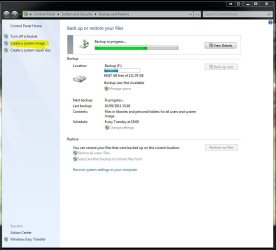
Capture.JPG

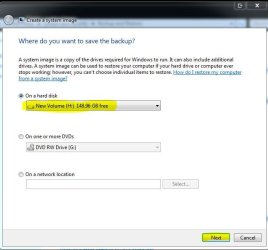
A new window will open and windows will suggest a drive for the backup which will probably be the USB drive. Make sure this is correct and click on next.

Capture1.JPG


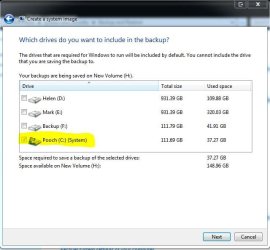
The next window shows the drive to be copied which should be your C:\ drive If you should also get the choice to copy another partition this will be your hidden HP repair partition click to save it as well then click on next.

Capture2.JPG

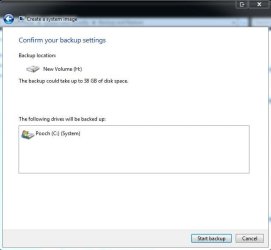
Now you get a confirmation window. click on start backup

Capture3.JPG

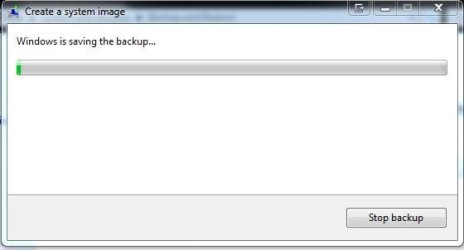
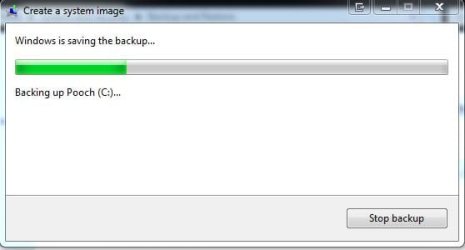
A new window will open showing the backup in progress

Capture4.JPG Capture5.JPG

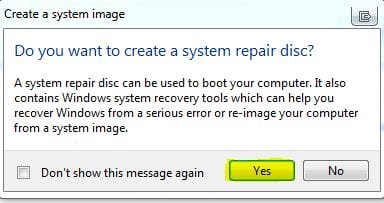
When the back up is almost finished a new window will open click on Yes

Capture6.JPG

Insert a blank CD/DVD into your DVD Rom and then on create disc

Capture7.JPG

Now you can change HDD's and replay the image

Points to note


The new drive needs to be the same size or bigger than the old one
If you do not copy you HP hidden repair partition you will be reliant on backup images to repair windows if it messes up IT IS VERY IMPORTANT TO KEEP YOUR IMAGE SAFE


My Computer

Computer Manufacturer/Model Number
Something I threw together
OS
Windows 7 Ultimate x64
CPU
Intel Core i7-2600K
Motherboard
Asus P8P67
Memory
16 GB G Skill F3-10666 CL9D-4GBRL
Graphics Card(s)
ATI Radeon HD 6870
Sound Card
ATI Radeon HDMI / Realtek ALC892
Monitor(s) Displays
2 x 22" standard monitors / LG32LC56v TV to watch films
Screen Resolution
1920 x1080
Hard Drives
2 x OCZ Vertex2 111.79GB
3 x Samsung103SJ
1 x Samsung103UJ
1 x WD3200BEVT
1 x Hitachi5K320-160
PSU
Thermaltake Toughpower Cable Management 750W
Case
Antec 300
Cooling
Noctua NH-U12P SE2 and 5 120mm Case fans
Keyboard
Microsoft Comfort Curve Keyboard 2000
Mouse
Hama M3110 / Logitech M305
Internet Speed
16000
Other Info
I have also used Fedora, Suse, Ubuntu Linux
And all other Windows from 95 to date except ME
Pooch,
New drive does not need to be same size or larger than old.

Common misconception. My ssd is smaller than my hdd. I imaged from one restored to the other using MS Backup and Restore.
 

My Computer

Computer Manufacturer/Model Number
Toshiba Satellite S875D-S7239 laptop
OS
MS Windows 7 Ultimate SP1 64-bit
CPU
AMD A10-4600M
Motherboard
AMD Pumori (Socket FT1)
Memory
6.00 GB Dual-Channel DDR3 @ 798MHz (11-11-12-28)
Graphics Card(s)
AMD Radeon HD 7660G
Sound Card
High Definition Audio Device
Monitor(s) Displays
Generic PnP Monitor (1600x900@60Hz)
Screen Resolution
1600x900@60Hz
Hard Drives
SSD 119GB Corsair CSSD-V128GB2 ATA Device
Keyboard
Standard PS/2 Keyboard
Mouse
HP Wireless Optical Mobile Mouse Model FHA-3410
Internet Speed
What the local pub, local coffee shop offers.
Other Info
Optical Drive:MATSHITA BD-CMB UJ160B ATA Device


Also have an Asus ha1002xp netbook with Win 7 Ultimate installed.
Pooch,
New drive does not need to be same size or larger than old.

Common misconception. My ssd is smaller than my hdd. I imaged from one restored to the other using MS Backup and Restore.
Very common as I have had problems with this in the past :( then we will just have to wait and see what happens.
 

My Computer

Computer Manufacturer/Model Number
Something I threw together
OS
Windows 7 Ultimate x64
CPU
Intel Core i7-2600K
Motherboard
Asus P8P67
Memory
16 GB G Skill F3-10666 CL9D-4GBRL
Graphics Card(s)
ATI Radeon HD 6870
Sound Card
ATI Radeon HDMI / Realtek ALC892
Monitor(s) Displays
2 x 22" standard monitors / LG32LC56v TV to watch films
Screen Resolution
1920 x1080
Hard Drives
2 x OCZ Vertex2 111.79GB
3 x Samsung103SJ
1 x Samsung103UJ
1 x WD3200BEVT
1 x Hitachi5K320-160
PSU
Thermaltake Toughpower Cable Management 750W
Case
Antec 300
Cooling
Noctua NH-U12P SE2 and 5 120mm Case fans
Keyboard
Microsoft Comfort Curve Keyboard 2000
Mouse
Hama M3110 / Logitech M305
Internet Speed
16000
Other Info
I have also used Fedora, Suse, Ubuntu Linux
And all other Windows from 95 to date except ME
I have had a think about this and what I am trying to say is;
The new drive has to be equal in size to or larger than the partitions to be copied ie C:\ partition + the hidden partition.
In my case it relates to drives as I have a complete drive for C:\ and the only way around it for me is to either shrink my C:\ partition or use third party software
 

My Computer

Computer Manufacturer/Model Number
Something I threw together
OS
Windows 7 Ultimate x64
CPU
Intel Core i7-2600K
Motherboard
Asus P8P67
Memory
16 GB G Skill F3-10666 CL9D-4GBRL
Graphics Card(s)
ATI Radeon HD 6870
Sound Card
ATI Radeon HDMI / Realtek ALC892
Monitor(s) Displays
2 x 22" standard monitors / LG32LC56v TV to watch films
Screen Resolution
1920 x1080
Hard Drives
2 x OCZ Vertex2 111.79GB
3 x Samsung103SJ
1 x Samsung103UJ
1 x WD3200BEVT
1 x Hitachi5K320-160
PSU
Thermaltake Toughpower Cable Management 750W
Case
Antec 300
Cooling
Noctua NH-U12P SE2 and 5 120mm Case fans
Keyboard
Microsoft Comfort Curve Keyboard 2000
Mouse
Hama M3110 / Logitech M305
Internet Speed
16000
Other Info
I have also used Fedora, Suse, Ubuntu Linux
And all other Windows from 95 to date except ME
I've actually went from a image of a larger drive to a smaller drive without issue as well.

That is, provided the amount used space on the imaged drive does not exceed the free space on the new drive.
Other than that, total disk size shouldn't matter.

I think a lot of it might just be the program used to do the imaging/restore.
Acronis has no issue with it either, and resizes the C partition at the restore.
 

My Computer

Computer Manufacturer/Model Number
Custom (Self Build)
OS
Windows 7 Home Premium 64bit
CPU
Intel Core i7 2700k
Motherboard
eVGA P67 SLI
Memory
8GB Mushkin Redline Ridgebacks @1866
Graphics Card(s)
EVGA GTX570 SC
Sound Card
XiFi Titanium HD
Monitor(s) Displays
LG W2453V
Screen Resolution
1920x1080
Hard Drives
Intel 320 80GB -- Intel X25-V 40GB --WD Black 1TB x2 -- WD Blue 640GB
PSU
Seasonic x750
Case
Corsair 600T SE White
Cooling
eVGA Superclocked CPU Cooler
Keyboard
Saitek Cyborg
Antivirus
Kaspersky
Browser
IE
Other Info
LG BD/DVD
Sorry if I am not making myself clear I know that it is possible with third party software but I was talking about Windows 7 built in backup, please see snip
 

Attachments

  • Capture.JPG
    Capture.JPG
    102.8 KB · Views: 7

My Computer

Computer Manufacturer/Model Number
Something I threw together
OS
Windows 7 Ultimate x64
CPU
Intel Core i7-2600K
Motherboard
Asus P8P67
Memory
16 GB G Skill F3-10666 CL9D-4GBRL
Graphics Card(s)
ATI Radeon HD 6870
Sound Card
ATI Radeon HDMI / Realtek ALC892
Monitor(s) Displays
2 x 22" standard monitors / LG32LC56v TV to watch films
Screen Resolution
1920 x1080
Hard Drives
2 x OCZ Vertex2 111.79GB
3 x Samsung103SJ
1 x Samsung103UJ
1 x WD3200BEVT
1 x Hitachi5K320-160
PSU
Thermaltake Toughpower Cable Management 750W
Case
Antec 300
Cooling
Noctua NH-U12P SE2 and 5 120mm Case fans
Keyboard
Microsoft Comfort Curve Keyboard 2000
Mouse
Hama M3110 / Logitech M305
Internet Speed
16000
Other Info
I have also used Fedora, Suse, Ubuntu Linux
And all other Windows from 95 to date except ME
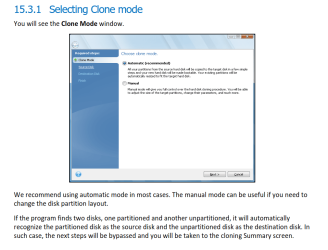
You can download Acronis True Image WD Edition Software, this is a free version of Acronis. You must have a WD HDD in your system in order to use it.

Install your old Seagate HDD and the new WD HDD, then clone the old hard drive to the new one.
Starting on page 83 of the User Manual.
It will resize the partitions to fit the larger HDD in automatic mode.
WD Free Acronis Cloning.PNG

I have just used this to clone a WD HDD to a Seagate HDD, it was easy and had no problems cloning from the failing WD drive.
Seagate also has an Acronis free version.

If you want to test the Seagate drive, D/L and run Seagate SeaTools – Short Drive Self Test and Long Drive Self Test.
 
Last edited:

My Computer

Computer type
PC/Desktop
Computer Manufacturer/Model Number
76~2.0
OS
Windows 7 Ult x64 - SP1/ Windows 8 Pro x64
CPU
Intel Core i5-3570K 4.6GHz
Motherboard
Gigabyte GA-Z77X UD3H, f18
Memory
8GB (2X4GB) DDR3 1600 Corsair Vengeance CL8 1.5v
Graphics Card(s)
Sapphire HD 7770 Vapor-X OC 1GB DDR5
Sound Card
Onboard VIA VT2021
Monitor(s) Displays
22" LCD Dell
Screen Resolution
1680x1050
Hard Drives
Samsung 840Pro 128GB SSD,
Seagate Barracuda 500GB SATA2 7200rpm 32MB cache, Seagate Barracuda 1TB SATA2 7200rpm 32MB cache,
PSU
Corsair HX650W
Case
Cooler Master Storm Scout
Cooling
Corsair H80 2x12cm Noctua NF P12 , 2x14cm case fans
Keyboard
Logitech Wave
Mouse
CM Sentinel
Internet Speed
Dismal
Antivirus
Avast
Browser
Opera Next
Other Info
Haswell laptop: HP Envy 17t-j, i7-4700MQ, GeForce 740M 2GB DDR3, 17.3" Full HD 1920x1080, 16GB RAM, Samsung 840 Pro 128GB, 1TB Hitachi 7200 HDD,
Desktop: eSATA ports,
External eSATA Seagate 500GB SATA2 7200rpm,
External WD USB 500GB
You can actually do it with 100% Win 7 software. Acronis and Partition Wizard are two 3rd party products which can make the job easier.

I've done it with exclusively MS software and also using Partition Wizard. I've not used Acronis for this purpose but very reliable people have told me that they personally used Acronis.
 

My Computer

Computer Manufacturer/Model Number
Toshiba Satellite S875D-S7239 laptop
OS
MS Windows 7 Ultimate SP1 64-bit
CPU
AMD A10-4600M
Motherboard
AMD Pumori (Socket FT1)
Memory
6.00 GB Dual-Channel DDR3 @ 798MHz (11-11-12-28)
Graphics Card(s)
AMD Radeon HD 7660G
Sound Card
High Definition Audio Device
Monitor(s) Displays
Generic PnP Monitor (1600x900@60Hz)
Screen Resolution
1600x900@60Hz
Hard Drives
SSD 119GB Corsair CSSD-V128GB2 ATA Device
Keyboard
Standard PS/2 Keyboard
Mouse
HP Wireless Optical Mobile Mouse Model FHA-3410
Internet Speed
What the local pub, local coffee shop offers.
Other Info
Optical Drive:MATSHITA BD-CMB UJ160B ATA Device


Also have an Asus ha1002xp netbook with Win 7 Ultimate installed.
Hmmmm....

My recommendation is to get any and all files you need off the dying drive and onto that external drive (you would be better off doing this from a computer with a working OS), then remove any and all drives from your computer except for the new HDD.
Put in the Windows Install disk and completely format the drive and give it a fresh install.
Install just the OS onto the HDD and make sure it works, then get your backup files and everything onto the new drive.
You will need to reinstall all your programs and everything, but it should fix all the problems (unless the old drive dies on you).

Hopefully that helps.

~Lordbob
 

My Computer

Computer Manufacturer/Model Number
Hera
OS
Windows 7 Ultimate x64, Mint 9
CPU
Intel i5-2500k
Motherboard
ASUS P8P67 Pro
Memory
2x 4Gb Corsair VENGEANCE DDR3-1600
Graphics Card(s)
NVidia GeForce N260GTX Twin Frozr
Sound Card
Realtek HD OnBoard Audio
Monitor(s) Displays
ASUS 24" Monitor
Screen Resolution
1920x1080
Hard Drives
G.SKILL Phoenix Series 60GB SATA II MLC Internal Solid State Drive (SSD)
SAMSUNG Spinpoint F3R 1TB 7200 RPM 32MB Cache SATA II
PSU
Cooler Master Real Power Pro 750W
Case
Cooler Master Haf 932
Cooling
Fans
Keyboard
Razer Tarantula
Mouse
Razer Lachesis
Internet Speed
not fast enough
He has already made an image backup.

True, he needs to make sure that he can mount the vhd from the backup so that he can recover any files later.

He also has a new drive which he desires to use and to simply restore the image that he made to the new drive.

He has a large external usb drive which contains the image backup made with Win 7 Backup and Restore.
 

My Computer

Computer Manufacturer/Model Number
Toshiba Satellite S875D-S7239 laptop
OS
MS Windows 7 Ultimate SP1 64-bit
CPU
AMD A10-4600M
Motherboard
AMD Pumori (Socket FT1)
Memory
6.00 GB Dual-Channel DDR3 @ 798MHz (11-11-12-28)
Graphics Card(s)
AMD Radeon HD 7660G
Sound Card
High Definition Audio Device
Monitor(s) Displays
Generic PnP Monitor (1600x900@60Hz)
Screen Resolution
1600x900@60Hz
Hard Drives
SSD 119GB Corsair CSSD-V128GB2 ATA Device
Keyboard
Standard PS/2 Keyboard
Mouse
HP Wireless Optical Mobile Mouse Model FHA-3410
Internet Speed
What the local pub, local coffee shop offers.
Other Info
Optical Drive:MATSHITA BD-CMB UJ160B ATA Device


Also have an Asus ha1002xp netbook with Win 7 Ultimate installed.
He has already made an image backup.

True, he needs to make sure that he can mount the vhd from the backup so that he can recover any files later.

He also has a new drive which he desires to use and to simply restore the image that he made to the new drive.

He has a large external usb drive which contains the image backup made with Win 7 Backup and Restore.
I guess I should have asked more specifically.
Did he make a full backup of the system (to which he can restore to an empty drive) or did he just make a system restore disk (which I THINK requires an already installed OS... could be wrong)?

~Lordbob
 

My Computer

Computer Manufacturer/Model Number
Hera
OS
Windows 7 Ultimate x64, Mint 9
CPU
Intel i5-2500k
Motherboard
ASUS P8P67 Pro
Memory
2x 4Gb Corsair VENGEANCE DDR3-1600
Graphics Card(s)
NVidia GeForce N260GTX Twin Frozr
Sound Card
Realtek HD OnBoard Audio
Monitor(s) Displays
ASUS 24" Monitor
Screen Resolution
1920x1080
Hard Drives
G.SKILL Phoenix Series 60GB SATA II MLC Internal Solid State Drive (SSD)
SAMSUNG Spinpoint F3R 1TB 7200 RPM 32MB Cache SATA II
PSU
Cooler Master Real Power Pro 750W
Case
Cooler Master Haf 932
Cooling
Fans
Keyboard
Razer Tarantula
Mouse
Razer Lachesis
Internet Speed
not fast enough
If the procedure given in Brink's tutorial for making a full system image backup was followed correctly, then he has made a full image backup.
 

My Computer

Computer Manufacturer/Model Number
Toshiba Satellite S875D-S7239 laptop
OS
MS Windows 7 Ultimate SP1 64-bit
CPU
AMD A10-4600M
Motherboard
AMD Pumori (Socket FT1)
Memory
6.00 GB Dual-Channel DDR3 @ 798MHz (11-11-12-28)
Graphics Card(s)
AMD Radeon HD 7660G
Sound Card
High Definition Audio Device
Monitor(s) Displays
Generic PnP Monitor (1600x900@60Hz)
Screen Resolution
1600x900@60Hz
Hard Drives
SSD 119GB Corsair CSSD-V128GB2 ATA Device
Keyboard
Standard PS/2 Keyboard
Mouse
HP Wireless Optical Mobile Mouse Model FHA-3410
Internet Speed
What the local pub, local coffee shop offers.
Other Info
Optical Drive:MATSHITA BD-CMB UJ160B ATA Device


Also have an Asus ha1002xp netbook with Win 7 Ultimate installed.
Back
Top