Hi all, thanks in advance for your feedbcak. right, ive got windows seven installed on my p bell easynote mx37 s 200 laptop 250gb hdd. for dome unknown reason when i install my new 750gb toshiba mk7559gsxp hdd it will NOT accept windows. ive tried everything i know, from fresh install to system image restore. i have read in places that i need to install Rapid storage technology from intel and in other places have read that i need to change the enable disk controller in bios. i kniow this is going to be something SO simple that ive overlooked something. thanks again for any help.
Your description of your problem is so broad it could mean anything. Could you describe exactly what is going wrong with the installation? Is it that the installer cannot find a drive to install to? Or does the installation crash? Do you get ant error messages?
My Computer
At a glance
Windows 7 64 Bit Home Premium SP1i7-3820GSkill F3-14900CL9Q - 16GBEVGA GeForce GTX660 - Driver 352.86
Computer type
PC/Desktop
Computer Manufacturer/Model Number
Home Built - Jan 2013
OS
Windows 7 64 Bit Home Premium SP1
CPU
i7-3820
Motherboard
Asus P9X79-PRO - Bios 4608
Memory
GSkill F3-14900CL9Q - 16GB
Graphics Card(s)
EVGA GeForce GTX660 - Driver 352.86
Sound Card
On board Realtek ALC898
Monitor(s) Displays
Acer S271HL
Screen Resolution
1920 x 1080
Hard Drives
#1- Samsung 840 Pro Series
#2- Western Digital WD1002FAEX Sata3 Black
#3- Western Digital WD1002FAEX Sata3 Black
PSU
Corsair CMPSU-850TX-V2 - 850 watt (by Seasonic)
Case
Corsair Obsidian 550D
Cooling
Standard 3 120mm case fans, Cooler Master Hyper 212 EVO
hi, first i reinstall on 250gb hd with no problems then comes the 750gb hdd. when i install seven it reboots then goes straight to install again, asif it didnt write to the hdd. when i can actually get it to write to the drive it wont use it as a bootable device. the most common error i get is "enable disk controller in bios" or similar. and also something like this computers hardware may not support booting to this device.
If you go into the BIOS settings, can you see the 750GB hard drive listed as recognized there?
Also, check the back of both drives. Are the connectors exactly the same? I'm wondering if the new drive is not making good contact in the connections.
My Computer
At a glance
Windows 7 64 Bit Home Premium SP1i7-3820GSkill F3-14900CL9Q - 16GBEVGA GeForce GTX660 - Driver 352.86
Computer type
PC/Desktop
Computer Manufacturer/Model Number
Home Built - Jan 2013
OS
Windows 7 64 Bit Home Premium SP1
CPU
i7-3820
Motherboard
Asus P9X79-PRO - Bios 4608
Memory
GSkill F3-14900CL9Q - 16GB
Graphics Card(s)
EVGA GeForce GTX660 - Driver 352.86
Sound Card
On board Realtek ALC898
Monitor(s) Displays
Acer S271HL
Screen Resolution
1920 x 1080
Hard Drives
#1- Samsung 840 Pro Series
#2- Western Digital WD1002FAEX Sata3 Black
#3- Western Digital WD1002FAEX Sata3 Black
PSU
Corsair CMPSU-850TX-V2 - 850 watt (by Seasonic)
Case
Corsair Obsidian 550D
Cooling
Standard 3 120mm case fans, Cooler Master Hyper 212 EVO
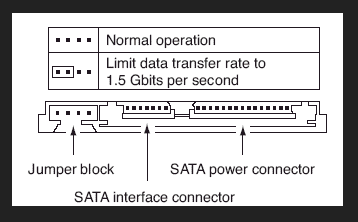
Yes it sees both. I have also externally connected to test for bad sectors etc. it's just when this particular drive is in it won't accept it. All connections are fine.there is one thing I have noticed which is at the side of the Sata connectors there is 4 small gold pins. ??? Maybe for jumpers to lower speed or external power???
That's what I was thinking. The laptop is 2008 October. The hdd is dec 2011 toshiba mk7559gsxp. So would these 4 pins be to connect the jumpers to? And if so would eBay be the place to buy them? Thanks very much for you speedy answers.
The jumper is just a very small plastic block that fits over 2 of the pins. There is no cables or anything like that.
I would look up the specs for the laptop to see what the SATA controller speed is before you go chasing a red herring here. You could just have a defective hard drive.
My Computer
At a glance
Windows 7 64 Bit Home Premium SP1i7-3820GSkill F3-14900CL9Q - 16GBEVGA GeForce GTX660 - Driver 352.86
Computer type
PC/Desktop
Computer Manufacturer/Model Number
Home Built - Jan 2013
OS
Windows 7 64 Bit Home Premium SP1
CPU
i7-3820
Motherboard
Asus P9X79-PRO - Bios 4608
Memory
GSkill F3-14900CL9Q - 16GB
Graphics Card(s)
EVGA GeForce GTX660 - Driver 352.86
Sound Card
On board Realtek ALC898
Monitor(s) Displays
Acer S271HL
Screen Resolution
1920 x 1080
Hard Drives
#1- Samsung 840 Pro Series
#2- Western Digital WD1002FAEX Sata3 Black
#3- Western Digital WD1002FAEX Sata3 Black
PSU
Corsair CMPSU-850TX-V2 - 850 watt (by Seasonic)
Case
Corsair Obsidian 550D
Cooling
Standard 3 120mm case fans, Cooler Master Hyper 212 EVO
I wonder if you cloned the 250G drive to the 750G drive, instead of doing a clean install, whether it would make any difference.
My Computer
At a glance
W10 Pro desktop, W11 laptop, W11 Pro tablet (...3.7Ghz 8700K i7, i7-11800H, i7-1065G716G desktop, 16G laptop, 4G tabletAMD Radeon RX580, RTX 3060, Intel Iris Plus
Computer type
PC/Desktop
Computer Manufacturer/Model Number
Home Built desktop, Dell G15 5511 Gaming laptop,MS Surface Pro 7 tablet
OS
W10 Pro desktop, W11 laptop, W11 Pro tablet (all 64-bit)
CPU
3.7Ghz 8700K i7, i7-11800H, i7-1065G7
Motherboard
ASUS TUF Z370-Pro Gaming in desktop
Memory
16G desktop, 16G laptop, 4G tablet
Graphics Card(s)
AMD Radeon RX580, RTX 3060, Intel Iris Plus
Sound Card
High Definition Audio (Built-in to mobo)
Monitor(s) Displays
Samsung U32J59 32" (2x), 15.6", 12"
Screen Resolution
3840x2160, 3840x2160, 1920x1080, 2160x1440
Hard Drives
500G SSD for OS; 2T, 10T & 15T HDDs for Data on Desktop, 1TB SSD laptop, 128G SSD tablet.
PSU
Corsair CX 750M
Case
Antec 100
Cooling
CM 212+
Keyboard
IBM Model M - used continuously since 1986
Mouse
Microsoft Pro IntelliMouse
Internet Speed
400M down 8M up
Antivirus
Windows Defender
Browser
FireFox
Other Info
Built my first computer (8Mhz 8088cpu, 640K RAM, 20MB HDD, 2 360K floppy drives) in 1985 and have been building them for myself, relatives and friends ever since.
Well tbh it's the 3rd drive I've had. I returned 2 thinking they were damaged. The drive does work as I have had it tested. I'll get the full specs and let you know the outcome. Thanks again very much.
Hi there. I attached a link to the cloning process (it's important to note where the new drive is supposed to be located). This link is from Acronis, hope it helps.
wel, ive tried the jumpers and no joy. after more research i have found out that it may be the BIOS as after trying BIOSagentplus it states bios updates available. the laptop in question is a packard bell mx37-s-200, will be windows 7 ultimate. and current BIOS is 219 by american megatrends. i cannot for the life of me locate just a .exe file later than 214. again many thaks for any info.
You should find and download the Drive Diagnostics software for your brand of hard drive.
Seagate/Maxtor has "SeaTools". Western Digital has "Drive Diagnostics". Hitachi has "Drive Fitness Test".
Download the program ISO, burn to a CD, and boot from the CD to test the drive.
My Computer
At a glance
Windows 7 64 Bit Home Premium SP1i7-3820GSkill F3-14900CL9Q - 16GBEVGA GeForce GTX660 - Driver 352.86
Computer type
PC/Desktop
Computer Manufacturer/Model Number
Home Built - Jan 2013
OS
Windows 7 64 Bit Home Premium SP1
CPU
i7-3820
Motherboard
Asus P9X79-PRO - Bios 4608
Memory
GSkill F3-14900CL9Q - 16GB
Graphics Card(s)
EVGA GeForce GTX660 - Driver 352.86
Sound Card
On board Realtek ALC898
Monitor(s) Displays
Acer S271HL
Screen Resolution
1920 x 1080
Hard Drives
#1- Samsung 840 Pro Series
#2- Western Digital WD1002FAEX Sata3 Black
#3- Western Digital WD1002FAEX Sata3 Black
PSU
Corsair CMPSU-850TX-V2 - 850 watt (by Seasonic)
Case
Corsair Obsidian 550D
Cooling
Standard 3 120mm case fans, Cooler Master Hyper 212 EVO
I also notice when using the install cd that when it shows 7.9gb I click refresh and it says no drives where found. Then backup then install windows option and it shows up again. :-/