
New HP Envy 6 - Facing problems with backup and partitioning.

SkratAttack

New member
Local time
11:11 PM
Messages
5
Hello.

I recently purchased the new HP Envy 6.

1. I am unable to do a the standard windows 'create a system backup' in the Backup and Restore option. After a while, it gives a 0x80070002 error saying 'The system cannot find the file specified' ; and my External hard drive autoplays. I have found quite a few similar problems online but none of the solutions have worked. I tried doing a factory restore, failed again.

2. While partitioning the hard drive using Disk Management, I was easily able to shrink the C: to 125 GB but faced problems when creating a new volume. It asks to create the Basic ton Dynamic Disk and then fails to do so. Apparently there are 4 primary volumes already - System, c:, Recovery and HP tools. So how do I allocate the remaining?

3. The HP Envy 6 does not have an optical drive, so how do I best create a backup of my OS?

Thank you.
 

My Computer My Computer

At a glance

MS Windows 7 Home Basic 64bit SP1Intel Core i5 @ 1.70GHz Ivy Bridge 22nm Techn...4.00 GB Single-Channel DDR3 @ 798MHz (11-11-1...Intel(R) HD Graphics 4000 Radeon (TM) HD 7670M
Computer Manufacturer/Model Number
HP Envy 6-1002tx laptop
OS
MS Windows 7 Home Basic 64bit SP1
CPU
Intel Core i5 @ 1.70GHz Ivy Bridge 22nm Technology
Motherboard
Hewlett-Packard 1897 (U3E1)
Memory
4.00 GB Single-Channel DDR3 @ 798MHz (11-11-11-28)
Graphics Card(s)
Intel(R) HD Graphics 4000 Radeon (TM) HD 7670M
Sound Card
IDT High Definition Audio CODEC
Monitor(s) Displays
Generic PnP Monitor
Screen Resolution
(1366x768@60Hz)
Hard Drives
466GB Hitachi Hitachi HTS545050A7E380 (RAID)
I can't help with question 1. I gave up on Windows Backup and Restore due to peculiarities such as you are experiencing.

Question 2: Whatever you do, do NOT convert or accept dynamic disks.

Question 3: Most would tell you to use an external disc. It's a good idea to have one to back up your personal data, in addition to the OS. Not sure, but you might be able to back up the OS to a USB stick.

The best single thing you can do now is to post a picture of Windows Disk Management so we can see your current partition arrangement. You may have to convert C to a logical drive, but the picture is needed.
 

My Computer My Computer

At a glance

Windows 7 Home Premium SP1, 64-bitIntel Skylake i5-6600K, not overclocked8 GB HyperX DDR4-2666 (2 x 4 GB)none; graphics are integrated on CPU
Computer type
PC/Desktop
Computer Manufacturer/Model Number
Ignatz Special; 4 speed manual gearbox; factory air conditioning; one of one
OS
Windows 7 Home Premium SP1, 64-bit
CPU
Intel Skylake i5-6600K, not overclocked
Motherboard
AsRock Z170M Extreme 4, micro ATX
Memory
8 GB HyperX DDR4-2666 (2 x 4 GB)
Graphics Card(s)
none; graphics are integrated on CPU
Sound Card
onboard: Realtek ALC1150; external: USB Behringer UF0-202
Monitor(s) Displays
Dell S2340M 23 inch IPS
Screen Resolution
1600 x 900
Hard Drives
System: Crucial MX100 series SSD, 128 GB;
Data: Samsung Spinpoint 103SJ, 1 TB;
Backup: WD Caviar Green WD30EZRX-00D8PB0, 3 TB
PSU
Rosewill SilentNight 500 watt fanless, semi-modular
Case
Antec Solo II
Cooling
Noctua NH-U12S; Noctua F12 intake, Noctua S12A exhaust
Keyboard
Microsoft 200 6JH-00001 USB
Mouse
Dell or Microsoft optical wired; USB
Antivirus
Microsoft Security Essentials and Malwarebytes Premium
Browser
Pale Moon
Other Info
All fans PWM; speeds at idle: CPU circa 500 rpm; intake circa 600 rpm; exhaust circa 600 rpm; CPU temps 27 idle and 47 C load in a warm room (27 C/81 F) when running Intel Extreme Tuning Utility stress test.
Well, I THINK I've solved the partitioning issue. I converted the Recovery partition to logical, keeping the C: as primary. Hope this is okay.

The major issue remains the backup. I cannot find a freeware that will make a system image of my OS on my external hard drive. There is no optical drive, so can't make a repair/backup disk.
 

My Computer My Computer

At a glance

MS Windows 7 Home Basic 64bit SP1Intel Core i5 @ 1.70GHz Ivy Bridge 22nm Techn...4.00 GB Single-Channel DDR3 @ 798MHz (11-11-1...Intel(R) HD Graphics 4000 Radeon (TM) HD 7670M
Computer Manufacturer/Model Number
HP Envy 6-1002tx laptop
OS
MS Windows 7 Home Basic 64bit SP1
CPU
Intel Core i5 @ 1.70GHz Ivy Bridge 22nm Technology
Motherboard
Hewlett-Packard 1897 (U3E1)
Memory
4.00 GB Single-Channel DDR3 @ 798MHz (11-11-11-28)
Graphics Card(s)
Intel(R) HD Graphics 4000 Radeon (TM) HD 7670M
Sound Card
IDT High Definition Audio CODEC
Monitor(s) Displays
Generic PnP Monitor
Screen Resolution
(1366x768@60Hz)
Hard Drives
466GB Hitachi Hitachi HTS545050A7E380 (RAID)
SkratAttack,
You did the one thing you should have not done!
No, it is not OK.
Go put things back like they were.

Then, carry out following:HOW TO POST A SNAPSHOT OF DISK MANAGEMENT DISPLAY
Run disk management:
WIN |
type DISKMGMT.MSC | ENTER
This method gives you a display without the unneeded navigation pane.
WIN=key with Microsoft logo on top.

Maximize the output of Disk Management:
ALT-Spacebar key combo | X key (selects Maximize) |
Drag the field separators (such as between Status and Capacity) to show entire field.


Make a snapshot:
WIN |
type SNIPPING | ENTER | New
Drag the cursor around the area you want to snip.
File | Save as | select save location and name | Save


Post the snapshot:
Post a File or Screenshot in Seven Forums


============================================
============================================

We need full and complete System Specs:

Update your SevenForums System Specs
User CP (located on the top menu bar) |
Your Profile | Edit System Spec
(left-hand column)

To gather info, use Speccy (my favorite) or SIW or System Info

In the System Manufacturer Block, enter:
Manufacturer and Model and
ADD the word laptop, desktop, netbook or tablet.
For example:
Toshiba Satellite L305D notebook.

Provide full windows version info, for example:
MS Windows 7 Ultimate SP1 64-bit

Use the “Other Info” block for Optical Reader,
Mouse, touchpad, wifi adapter, speakers, monitor, etc

Scroll down and click on SAVE CHANGES.

You will find that in Speccy, you can select info from the display
using your mouse/touchpad and then paste that info into your specs.

SIW is a marvelous program, but the free version does not offer
this capability.

========================================================

There is zero wrong with the one and only backup software that I use and recommend, namely,
Win 7 Backup and Restore.

Yes, you always want to back up to an external drive. What would you do if your internal drive failed? You would be without a backup.

When we get your partitioning problem solved, then I'll show you how to use Win 7 Backup and Restore.
 

My Computer My Computer

At a glance

MS Windows 7 Ultimate SP1 64-bitAMD A10-4600M6.00 GB Dual-Channel DDR3 @ 798MHz (11-11-12-28)AMD Radeon HD 7660G
Computer Manufacturer/Model Number
Toshiba Satellite S875D-S7239 laptop
OS
MS Windows 7 Ultimate SP1 64-bit
CPU
AMD A10-4600M
Motherboard
AMD Pumori (Socket FT1)
Memory
6.00 GB Dual-Channel DDR3 @ 798MHz (11-11-12-28)
Graphics Card(s)
AMD Radeon HD 7660G
Sound Card
High Definition Audio Device
Monitor(s) Displays
Generic PnP Monitor (1600x900@60Hz)
Screen Resolution
1600x900@60Hz
Hard Drives
SSD 119GB Corsair CSSD-V128GB2 ATA Device
Keyboard
Standard PS/2 Keyboard
Mouse
HP Wireless Optical Mobile Mouse Model FHA-3410
Internet Speed
What the local pub, local coffee shop offers.
Other Info
Optical Drive:MATSHITA BD-CMB UJ160B ATA Device


Also have an Asus ha1002xp netbook with Win 7 Ultimate installed.
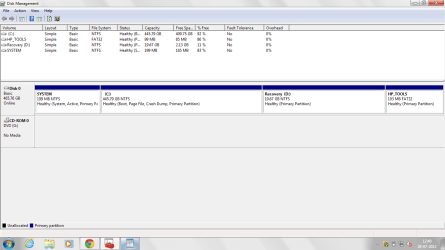
Well, I did as you said and reverted all changes. Here is an image of my Disk management.
Untitled.png

I'll have to convert one of them to logical, no? HP Tools doesn't budge, so that leaves one of C: and Recovery.

Thanks.
 

My Computer My Computer

At a glance

MS Windows 7 Home Basic 64bit SP1Intel Core i5 @ 1.70GHz Ivy Bridge 22nm Techn...4.00 GB Single-Channel DDR3 @ 798MHz (11-11-1...Intel(R) HD Graphics 4000 Radeon (TM) HD 7670M
Computer Manufacturer/Model Number
HP Envy 6-1002tx laptop
OS
MS Windows 7 Home Basic 64bit SP1
CPU
Intel Core i5 @ 1.70GHz Ivy Bridge 22nm Technology
Motherboard
Hewlett-Packard 1897 (U3E1)
Memory
4.00 GB Single-Channel DDR3 @ 798MHz (11-11-11-28)
Graphics Card(s)
Intel(R) HD Graphics 4000 Radeon (TM) HD 7670M
Sound Card
IDT High Definition Audio CODEC
Monitor(s) Displays
Generic PnP Monitor
Screen Resolution
(1366x768@60Hz)
Hard Drives
466GB Hitachi Hitachi HTS545050A7E380 (RAID)
Oh yes. HP and their unfriendly way of using partitions.

The easiest approach for you may be to make your HP recovery DVDs and then get rid of the HP Tools and HP Recovery partitions.

Let me ask one of the other chaps who has seen many of these. My approach with HP is to simply wipe the disk clean and install Win 7 and then download any special software needed, but he can probably give you other tips.

Don't know if he has already gone to bed or not. If already asleep, then you'll need to wait till tomorrow for an answer giving you the options that he recommends.
 

My Computer My Computer

At a glance

MS Windows 7 Ultimate SP1 64-bitAMD A10-4600M6.00 GB Dual-Channel DDR3 @ 798MHz (11-11-12-28)AMD Radeon HD 7660G
Computer Manufacturer/Model Number
Toshiba Satellite S875D-S7239 laptop
OS
MS Windows 7 Ultimate SP1 64-bit
CPU
AMD A10-4600M
Motherboard
AMD Pumori (Socket FT1)
Memory
6.00 GB Dual-Channel DDR3 @ 798MHz (11-11-12-28)
Graphics Card(s)
AMD Radeon HD 7660G
Sound Card
High Definition Audio Device
Monitor(s) Displays
Generic PnP Monitor (1600x900@60Hz)
Screen Resolution
1600x900@60Hz
Hard Drives
SSD 119GB Corsair CSSD-V128GB2 ATA Device
Keyboard
Standard PS/2 Keyboard
Mouse
HP Wireless Optical Mobile Mouse Model FHA-3410
Internet Speed
What the local pub, local coffee shop offers.
Other Info
Optical Drive:MATSHITA BD-CMB UJ160B ATA Device


Also have an Asus ha1002xp netbook with Win 7 Ultimate installed.
Well, herein lies the major problem. My laptop does not have a CD/DVD drive, so I cannot make any recovery/repair disks. Which is why I'm having trouble making a backup system image as well.
 

My Computer My Computer

At a glance

MS Windows 7 Home Basic 64bit SP1Intel Core i5 @ 1.70GHz Ivy Bridge 22nm Techn...4.00 GB Single-Channel DDR3 @ 798MHz (11-11-1...Intel(R) HD Graphics 4000 Radeon (TM) HD 7670M
Computer Manufacturer/Model Number
HP Envy 6-1002tx laptop
OS
MS Windows 7 Home Basic 64bit SP1
CPU
Intel Core i5 @ 1.70GHz Ivy Bridge 22nm Technology
Motherboard
Hewlett-Packard 1897 (U3E1)
Memory
4.00 GB Single-Channel DDR3 @ 798MHz (11-11-11-28)
Graphics Card(s)
Intel(R) HD Graphics 4000 Radeon (TM) HD 7670M
Sound Card
IDT High Definition Audio CODEC
Monitor(s) Displays
Generic PnP Monitor
Screen Resolution
(1366x768@60Hz)
Hard Drives
466GB Hitachi Hitachi HTS545050A7E380 (RAID)
I don't know what the options are then with your model. I suspect if you were to visit the HP site, that you will find out how to make backup media for your notebook.
 

My Computer My Computer

At a glance

MS Windows 7 Ultimate SP1 64-bitAMD A10-4600M6.00 GB Dual-Channel DDR3 @ 798MHz (11-11-12-28)AMD Radeon HD 7660G
Computer Manufacturer/Model Number
Toshiba Satellite S875D-S7239 laptop
OS
MS Windows 7 Ultimate SP1 64-bit
CPU
AMD A10-4600M
Motherboard
AMD Pumori (Socket FT1)
Memory
6.00 GB Dual-Channel DDR3 @ 798MHz (11-11-12-28)
Graphics Card(s)
AMD Radeon HD 7660G
Sound Card
High Definition Audio Device
Monitor(s) Displays
Generic PnP Monitor (1600x900@60Hz)
Screen Resolution
1600x900@60Hz
Hard Drives
SSD 119GB Corsair CSSD-V128GB2 ATA Device
Keyboard
Standard PS/2 Keyboard
Mouse
HP Wireless Optical Mobile Mouse Model FHA-3410
Internet Speed
What the local pub, local coffee shop offers.
Other Info
Optical Drive:MATSHITA BD-CMB UJ160B ATA Device


Also have an Asus ha1002xp netbook with Win 7 Ultimate installed.
greg,
I think you might want to take a look at his DiskManagement snapshot.
 

My Computer My Computer

At a glance

MS Windows 7 Ultimate SP1 64-bitAMD A10-4600M6.00 GB Dual-Channel DDR3 @ 798MHz (11-11-12-28)AMD Radeon HD 7660G
Computer Manufacturer/Model Number
Toshiba Satellite S875D-S7239 laptop
OS
MS Windows 7 Ultimate SP1 64-bit
CPU
AMD A10-4600M
Motherboard
AMD Pumori (Socket FT1)
Memory
6.00 GB Dual-Channel DDR3 @ 798MHz (11-11-12-28)
Graphics Card(s)
AMD Radeon HD 7660G
Sound Card
High Definition Audio Device
Monitor(s) Displays
Generic PnP Monitor (1600x900@60Hz)
Screen Resolution
1600x900@60Hz
Hard Drives
SSD 119GB Corsair CSSD-V128GB2 ATA Device
Keyboard
Standard PS/2 Keyboard
Mouse
HP Wireless Optical Mobile Mouse Model FHA-3410
Internet Speed
What the local pub, local coffee shop offers.
Other Info
Optical Drive:MATSHITA BD-CMB UJ160B ATA Device


Also have an Asus ha1002xp netbook with Win 7 Ultimate installed.
I did, Karl. What did I miss? It looks exactly like standard preinstalled HP disk config.

What we've learned over the years here is that what's safest to do to add another partition(s) if you want to keep functional the Recovery and HP Diagnostics Tools is to convert C to Logical then shrink it to add any needed Logical partitions.
 
I did, Karl. What did I miss? It looks exactly like standard preinstalled HP disk config.

What we've learned over the years here is that what's safest to do to add another partition(s) if you want to keep functional the Recovery and HP Diagnostics Tools is to convert C to Logical then shrink it to add any needed Logical partitions.

Hello. I tried doing as you said but when I try converting the C: to logical, I get a warning message that states, 'The selected partition is a system partition. The operation might cause your system to be unbootable. '

I'm unsure as to whether i should proceed.
 

My Computer My Computer

At a glance

MS Windows 7 Home Basic 64bit SP1Intel Core i5 @ 1.70GHz Ivy Bridge 22nm Techn...4.00 GB Single-Channel DDR3 @ 798MHz (11-11-1...Intel(R) HD Graphics 4000 Radeon (TM) HD 7670M
Computer Manufacturer/Model Number
HP Envy 6-1002tx laptop
OS
MS Windows 7 Home Basic 64bit SP1
CPU
Intel Core i5 @ 1.70GHz Ivy Bridge 22nm Technology
Motherboard
Hewlett-Packard 1897 (U3E1)
Memory
4.00 GB Single-Channel DDR3 @ 798MHz (11-11-11-28)
Graphics Card(s)
Intel(R) HD Graphics 4000 Radeon (TM) HD 7670M
Sound Card
IDT High Definition Audio CODEC
Monitor(s) Displays
Generic PnP Monitor
Screen Resolution
(1366x768@60Hz)
Hard Drives
466GB Hitachi Hitachi HTS545050A7E380 (RAID)
The System boot files are on the partiition labeled "System" as signified by the System and Active labels. If you're converting C to Logical to shrink it to add additional Logical sub-partitions then it will not affect the ability of WIn7 to boot.
 
Back
Top