New Install - Big Problem

mewnlite

New member
Local time
6:28 PM
Messages
41
Location
Iowa
I have been running the RC version of W7 for quite some time, but I have now received my downloaded Windows 7 Professional DVD. I actually have 4 physical hard drives and the RC version was installed on the 1st partition of the 4th drive and had the drive letter J. The first and second partitions of drive 1 are Vista and XP, with drive letters C and D respectfully. All my Documents are stored on another drive (H) and can be accessed from any of my operating systems. I deleted the J partiton on drive 4 and reformatted it in NTFS. Then I booted up with my new Windows 7 DVD and installed Windows 7 on the drive J partition. Lo and behold when it all got installed, it is now calling itself as installed on drive C! And it has changed all my other drive letters putting them all out of kilter. I did not have that problem with the RC version. I purposely set it not to activate because I don't want it activated until I'm sure everything is right. So now I need to start all over but this time I want the Windows 7 installation to be on Drive J.
Actually, it *is* on the right drive and right partition, but I know you can't just change the drive letter.
What did I do wrong and how do I get it right?
I *do* have an Acronis image of the old RC version that I can put back, but if I'm not mistaken, I can't do an upgrade to the RC version.
Thanks for any help you may offer.
 

My Computer

Computer Manufacturer/Model Number
Motherboard ID 08/01/2008-C55-MCP51-P5N-D-00
OS
Windows 7
CPU
QuadCore Intel Core 2 Quad Q6600, 2400 MHz (9 x 267)
Motherboard
Asus P5N-D
Memory
8 Gb
Graphics Card(s)
NVIDIA GeForce 9800 GT (512)
Sound Card
Realtek ALC883 @ nVIDIA nForce 430i (MCP51)-High Definition
Monitor(s) Displays
Acer AL2216W [22" LCD] (LA10C0414013)
Screen Resolution
1680 X 1050
PSU
850W
Internet Speed
20Mb
I don't understand, what's out of kilter? You wouldn't be accessing files between operating systems, would you? If not, why do you care what each OS partition calls itself? Other than wanting to see the same drive letter designations, is something actually not working?

Damon

ps I believe that there was another thread here not too long ago where someone's Win7 drive letter changed, and the conclusion at the end was that it didn't really matter as long as everything worked
 

My Computer

OS
Win7
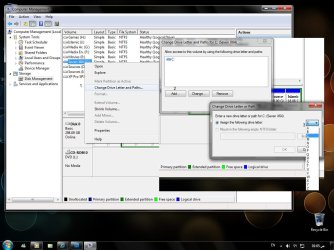
i think u can use partition manager from the device manager to change the drive letter
here is some screens to help
but i dont recomend this method it does it only on the installed os not (temp) and will effect to have a missing drive in the order
but here is it anyway
here.jpg
 

My Computer

Computer Manufacturer/Model Number
ECS
OS
Windows 7 Ultimate x64 - XP Pro. Sp3
CPU
Intel P4 HT 631-OC 3.75-
Motherboard
ECS G31T-M7
Memory
2*1GB
Graphics Card(s)
Intel GMA3100 - G33/G31 Express Chipset -
Sound Card
VIA HD Built-in
Monitor(s) Displays
Samsung
Screen Resolution
1152 x 864
Hard Drives
WDC320 SATA
PSU
40W
Cooling
Stock Fan
Keyboard
Media
Mouse
Optical
Internet Speed
1Mb
Other Info
LAN:
Realtek8139/810x
Atheros L2 10/100
Problem there is that everything in the registry is pointing to C drive. If I changed the physical drive letter to J then I would be in deep doodoo I think. I wish there were some kind of app that would comb the registry and change drive letters... :confused:
 

My Computer

Computer Manufacturer/Model Number
Motherboard ID 08/01/2008-C55-MCP51-P5N-D-00
OS
Windows 7
CPU
QuadCore Intel Core 2 Quad Q6600, 2400 MHz (9 x 267)
Motherboard
Asus P5N-D
Memory
8 Gb
Graphics Card(s)
NVIDIA GeForce 9800 GT (512)
Sound Card
Realtek ALC883 @ nVIDIA nForce 430i (MCP51)-High Definition
Monitor(s) Displays
Acer AL2216W [22" LCD] (LA10C0414013)
Screen Resolution
1680 X 1050
PSU
850W
Internet Speed
20Mb
One thing you could try is to run the install off the DVD but from within the RC copy, when you get your options choose a custom install and select to install on the partition you require.

As the actual c: drive is in use it may set the second install to another letter leaving the RC as c:.

I have known this to happen when running setup from within an active OS before but not sure if this has been corrected in the RTM/GA disks
 

My Computers

System One System Two

  • Computer type
    PC/Desktop
    Computer Manufacturer/Model Number
    ChillBlast - Custom to my design
    OS
    Windows 11 Pro x64 [Latest Release and Release Preview]
    CPU
    Ryzen 9 5950X, 3.8 - 5.2 MHz
    Motherboard
    Asus Prime X570-Pro
    Memory
    64GB [2 x 32GB] DDR4 3200MHz
    Graphics Card(s)
    4GB NVIDIA GEFORCE GTX 1650 Ti
    Sound Card
    On-board SPDIF to 5.1 System + HDMI [5.1 system]
    Monitor(s) Displays
    32" UHD 32 Bit HDR Monitor + 43" UHD 4K 32Bit HDR TV
    Screen Resolution
    2 x 3840 x 2160 @60Hz
    Hard Drives
    1TB M2 SSD OS, 500GB Fast Access SSD, 2 x 8TB Data + Various Externals from 1TB to 4TB, 10TB NAS
    PSU
    NZXT C750 80 PLUS Gold 750W Modular PSU
    Case
    Workstation Case [Matt Black]
    Cooling
    NZXT Kraken X63 280mm CPU Cooler +2x Quiet Case fans
    Keyboard
    Logitech Wireless MX Keys & K400 + others
    Mouse
    Logitech Wireless MX Master 3S
    Internet Speed
    920 MB Down 50 MB Up
    Antivirus
    BitDefender Total Security Pro
    Browser
    Chrome (always run latest Non-Beta)
    Other Info
    Also run ...
    Laptop - Quad 8GB - Windows 10 Pro x64
    Nexus 7 Android tablet x2
    Samsung 10.2" tablet
    Blackview TAB 8 4G Android Tablet c/w Keyboard
    Wacom Intuos Pro Medium Pen Pad
    Wacom Intuos Pro Small Pen Pad
    Wacom Expresskeys Remote
    Loopdeck+ Graphics Controller
    Shuttle Pro v2 Control
  • Computer type
    Laptop
    System Manufacturer/Model Number
    Dell XPS 17 10750H
    OS
    Windows 11 Pro x64 Latest RP
    CPU
    Intel I7 10750H 5.0GHz
    Motherboard
    Dell XPS
    Memory
    32GB [2x16GB] DDR4 2933 MHz
    Graphics Card(s)
    nVidia GTX1650Ti 4 GB GDDR6
    Sound Card
    Stock [Realtek] 4 Speaker
    Monitor(s) Displays
    17" IPS UHD+ Infinity Edge Touchscreen
    Screen Resolution
    3840 x 2400
    Hard Drives
    2TB M2 NVMe, 4TB External + various 500GB & 1TB External NVMe (also have access to spinner HDD from
    PSU
    Stock
    Case
    Stock XPS Aluminium & Carbon Fibre
    Cooling
    Stock - Active Fan Control
    Keyboard
    Backlit + Various Logitech
    Mouse
    Stock Track Pad + Logitech MX Trackball
    Internet Speed
    72 MB Down 18MB Up
    Browser
    Chrome
    Other Info
    Also run ...
    Laptop - Quad 8GB - Windows 10 Pro x64
    Nexus 7 Android tablet x2
    10.2" tablet
    Sony Z3 Android Smartphone
    Wacom Intuos Pro Medium Pen Pad
    Wacom Intuos Pro Small Pen Pad
    Wacom Expresskeys Remote
    Loopdeck+ Graphics Controller
    Shuttle Pro v2 Control Pad
    10TB NAS
err.. you can change drive letters.... right click your Computer icon on the desktop or start menu and go to manage.
Under storage click disk management, you can than rename drives.....

Just for a little info

and also if you plug a har drie in that you know is formatted and it doesn't show up, come here and make sure its set active.
 

My Computer

Computer Manufacturer/Model Number
Custom Built - TheTeZ
OS
Windows 7 -x6
CPU
Intel Core 2 Extreme QX9650 Processor- (Quad)
Motherboard
Asus P5N-D Motherboard
Memory
OCZ Platnum 8gb(2gbx4) PC 6400 DDR2 800MHz
Graphics Card(s)
EVGA 01G-P3-1145-TR GeForce GTS 250 Video Card
Sound Card
Realtek ALC883
Monitor(s) Displays
19" WideScreen Mag Innovision & Acer X203H Vertical Mount
Screen Resolution
1440x900 & 1600x900
Hard Drives
Western Digital WD7500AADS Caviar Green Hard Drive - 750GB
Western Digital WD500
Hitachi 1TB Serial ATA HD
PSU
Kingwin Mach 1 Modular Power Supply
Case
NZXT Tempest ATX Mid-Tower Case -- AKA Flow Master
Cooling
Thermaltake SpinQ CPU Cooler - Aerocool Touch 1000 LCD Panel
Drives will not display in Windows until they have a drive letter allocated but only one partition should ever be marked as "active" as this is where the Boot-loader resides
 

My Computers

System One System Two

  • Computer type
    PC/Desktop
    Computer Manufacturer/Model Number
    ChillBlast - Custom to my design
    OS
    Windows 11 Pro x64 [Latest Release and Release Preview]
    CPU
    Ryzen 9 5950X, 3.8 - 5.2 MHz
    Motherboard
    Asus Prime X570-Pro
    Memory
    64GB [2 x 32GB] DDR4 3200MHz
    Graphics Card(s)
    4GB NVIDIA GEFORCE GTX 1650 Ti
    Sound Card
    On-board SPDIF to 5.1 System + HDMI [5.1 system]
    Monitor(s) Displays
    32" UHD 32 Bit HDR Monitor + 43" UHD 4K 32Bit HDR TV
    Screen Resolution
    2 x 3840 x 2160 @60Hz
    Hard Drives
    1TB M2 SSD OS, 500GB Fast Access SSD, 2 x 8TB Data + Various Externals from 1TB to 4TB, 10TB NAS
    PSU
    NZXT C750 80 PLUS Gold 750W Modular PSU
    Case
    Workstation Case [Matt Black]
    Cooling
    NZXT Kraken X63 280mm CPU Cooler +2x Quiet Case fans
    Keyboard
    Logitech Wireless MX Keys & K400 + others
    Mouse
    Logitech Wireless MX Master 3S
    Internet Speed
    920 MB Down 50 MB Up
    Antivirus
    BitDefender Total Security Pro
    Browser
    Chrome (always run latest Non-Beta)
    Other Info
    Also run ...
    Laptop - Quad 8GB - Windows 10 Pro x64
    Nexus 7 Android tablet x2
    Samsung 10.2" tablet
    Blackview TAB 8 4G Android Tablet c/w Keyboard
    Wacom Intuos Pro Medium Pen Pad
    Wacom Intuos Pro Small Pen Pad
    Wacom Expresskeys Remote
    Loopdeck+ Graphics Controller
    Shuttle Pro v2 Control
  • Computer type
    Laptop
    System Manufacturer/Model Number
    Dell XPS 17 10750H
    OS
    Windows 11 Pro x64 Latest RP
    CPU
    Intel I7 10750H 5.0GHz
    Motherboard
    Dell XPS
    Memory
    32GB [2x16GB] DDR4 2933 MHz
    Graphics Card(s)
    nVidia GTX1650Ti 4 GB GDDR6
    Sound Card
    Stock [Realtek] 4 Speaker
    Monitor(s) Displays
    17" IPS UHD+ Infinity Edge Touchscreen
    Screen Resolution
    3840 x 2400
    Hard Drives
    2TB M2 NVMe, 4TB External + various 500GB & 1TB External NVMe (also have access to spinner HDD from
    PSU
    Stock
    Case
    Stock XPS Aluminium & Carbon Fibre
    Cooling
    Stock - Active Fan Control
    Keyboard
    Backlit + Various Logitech
    Mouse
    Stock Track Pad + Logitech MX Trackball
    Internet Speed
    72 MB Down 18MB Up
    Browser
    Chrome
    Other Info
    Also run ...
    Laptop - Quad 8GB - Windows 10 Pro x64
    Nexus 7 Android tablet x2
    10.2" tablet
    Sony Z3 Android Smartphone
    Wacom Intuos Pro Medium Pen Pad
    Wacom Intuos Pro Small Pen Pad
    Wacom Expresskeys Remote
    Loopdeck+ Graphics Controller
    Shuttle Pro v2 Control Pad
    10TB NAS
i think u can use partition manager from the device manager to change the drive letter
here is some screens to help
but i dont recomend this method it does it only on the installed os not (temp) and will effect to have a missing drive in the order
but here is it anyway
View attachment 33812

You cannot change the partition letter on a system drive. MS tutorial for doing this is only if the drive letters change mysteriously. You will definitely boink your install.

There is no mystery here. Win7 arranges drive letters so that it is always the C: drive when you are in it. This has no effect whatsoever on your file storage or referencing of other drives.

Test drive it for awhile and see. You are all set to bail out of XP and Vista with your future OS lettered C: This should occur around.......tomorrow.
 
i think u can use partition manager from the device manager to change the drive letter
here is some screens to help
but i dont recomend this method it does it only on the installed os not (temp) and will effect to have a missing drive in the order
but here is it anyway
View attachment 33812

You cannot change the partition letter on a system drive. MS tutorial for doing this is only if the drive letters change mysteriously. You will definitely boink your install.

There is no mystery here. Win7 arranges drive letters so that it is always the C: drive when you are in it. This has no effect whatsoever on your file storage or referencing of other drives.

Test drive it for awhile and see. You are all set to bail out of XP and Vista with your future OS lettered C: This should occur around.......tomorrow.
Actually, bailing out of Vista NOW would solve my problem since it is installed on C drive anyway. Since I posted, I have reinstalled Win7 three more times. The last time, I added a partition to the tail end of my 3rd physical hard drive and tried it there.. It still comes up as C.
I still don't understand why I was able to install RC 7100 and have it come up as J. I can't imagine they changed anything in the final release that would change that.
OK. I never liked Vista anyway and rarely went in to it. So I guess it will now become history. However, XP will probably remain my OS of choice for quite some time.
Thanks for your input!
 

My Computer

Computer Manufacturer/Model Number
Motherboard ID 08/01/2008-C55-MCP51-P5N-D-00
OS
Windows 7
CPU
QuadCore Intel Core 2 Quad Q6600, 2400 MHz (9 x 267)
Motherboard
Asus P5N-D
Memory
8 Gb
Graphics Card(s)
NVIDIA GeForce 9800 GT (512)
Sound Card
Realtek ALC883 @ nVIDIA nForce 430i (MCP51)-High Definition
Monitor(s) Displays
Acer AL2216W [22" LCD] (LA10C0414013)
Screen Resolution
1680 X 1050
PSU
850W
Internet Speed
20Mb
i think u can use partition manager from the device manager to change the drive letter
here is some screens to help
but i dont recomend this method it does it only on the installed os not (temp) and will effect to have a missing drive in the order
but here is it anyway
View attachment 33812

You cannot change the partition letter on a system drive. MS tutorial for doing this is only if the drive letters change mysteriously. You will definitely boink your install.

There is no mystery here. Win7 arranges drive letters so that it is always the C: drive when you are in it. This has no effect whatsoever on your file storage or referencing of other drives.

Test drive it for awhile and see. You are all set to bail out of XP and Vista with your future OS lettered C: This should occur around.......tomorrow.
Actually, bailing out of Vista NOW would solve my problem since it is installed on C drive anyway. Since I posted, I have reinstalled Win7 three more times. The last time, I added a partition to the tail end of my 3rd physical hard drive and tried it there.. It still comes up as C.
I still don't understand why I was able to install RC 7100 and have it come up as J. I can't imagine they changed anything in the final release that would change that.
OK. I never liked Vista anyway and rarely went in to it. So I guess it will now become history. However, XP will probably remain my OS of choice for quite some time.
Thanks for your input!

And that is just what I have done. No more Vista and Windows 7 is on C drive. The rest of the drives show up just as they should. With the help of VistaBootPro (which works in WIndows 7 too) I got access back to Windows XP on drive D, and I can still even boot up the RC 7100 which I restored back to drive J.
As a side note, I had the 64 bit RC version, but have decided to go with the 32 bit version on the new install. So far it rocks but it'll take me at least all weekend to get everything installed back again.
 

My Computer

Computer Manufacturer/Model Number
Motherboard ID 08/01/2008-C55-MCP51-P5N-D-00
OS
Windows 7
CPU
QuadCore Intel Core 2 Quad Q6600, 2400 MHz (9 x 267)
Motherboard
Asus P5N-D
Memory
8 Gb
Graphics Card(s)
NVIDIA GeForce 9800 GT (512)
Sound Card
Realtek ALC883 @ nVIDIA nForce 430i (MCP51)-High Definition
Monitor(s) Displays
Acer AL2216W [22" LCD] (LA10C0414013)
Screen Resolution
1680 X 1050
PSU
850W
Internet Speed
20Mb
You say you have gone with the 32bit - Your specs state you have 8MB of RAM this will of course not be available to other than the 64bit Windows 7, 32bit being limited to 3-3.5 MB.

Seems a strange choice :confused:
 

My Computers

System One System Two

  • Computer type
    PC/Desktop
    Computer Manufacturer/Model Number
    ChillBlast - Custom to my design
    OS
    Windows 11 Pro x64 [Latest Release and Release Preview]
    CPU
    Ryzen 9 5950X, 3.8 - 5.2 MHz
    Motherboard
    Asus Prime X570-Pro
    Memory
    64GB [2 x 32GB] DDR4 3200MHz
    Graphics Card(s)
    4GB NVIDIA GEFORCE GTX 1650 Ti
    Sound Card
    On-board SPDIF to 5.1 System + HDMI [5.1 system]
    Monitor(s) Displays
    32" UHD 32 Bit HDR Monitor + 43" UHD 4K 32Bit HDR TV
    Screen Resolution
    2 x 3840 x 2160 @60Hz
    Hard Drives
    1TB M2 SSD OS, 500GB Fast Access SSD, 2 x 8TB Data + Various Externals from 1TB to 4TB, 10TB NAS
    PSU
    NZXT C750 80 PLUS Gold 750W Modular PSU
    Case
    Workstation Case [Matt Black]
    Cooling
    NZXT Kraken X63 280mm CPU Cooler +2x Quiet Case fans
    Keyboard
    Logitech Wireless MX Keys & K400 + others
    Mouse
    Logitech Wireless MX Master 3S
    Internet Speed
    920 MB Down 50 MB Up
    Antivirus
    BitDefender Total Security Pro
    Browser
    Chrome (always run latest Non-Beta)
    Other Info
    Also run ...
    Laptop - Quad 8GB - Windows 10 Pro x64
    Nexus 7 Android tablet x2
    Samsung 10.2" tablet
    Blackview TAB 8 4G Android Tablet c/w Keyboard
    Wacom Intuos Pro Medium Pen Pad
    Wacom Intuos Pro Small Pen Pad
    Wacom Expresskeys Remote
    Loopdeck+ Graphics Controller
    Shuttle Pro v2 Control
  • Computer type
    Laptop
    System Manufacturer/Model Number
    Dell XPS 17 10750H
    OS
    Windows 11 Pro x64 Latest RP
    CPU
    Intel I7 10750H 5.0GHz
    Motherboard
    Dell XPS
    Memory
    32GB [2x16GB] DDR4 2933 MHz
    Graphics Card(s)
    nVidia GTX1650Ti 4 GB GDDR6
    Sound Card
    Stock [Realtek] 4 Speaker
    Monitor(s) Displays
    17" IPS UHD+ Infinity Edge Touchscreen
    Screen Resolution
    3840 x 2400
    Hard Drives
    2TB M2 NVMe, 4TB External + various 500GB & 1TB External NVMe (also have access to spinner HDD from
    PSU
    Stock
    Case
    Stock XPS Aluminium & Carbon Fibre
    Cooling
    Stock - Active Fan Control
    Keyboard
    Backlit + Various Logitech
    Mouse
    Stock Track Pad + Logitech MX Trackball
    Internet Speed
    72 MB Down 18MB Up
    Browser
    Chrome
    Other Info
    Also run ...
    Laptop - Quad 8GB - Windows 10 Pro x64
    Nexus 7 Android tablet x2
    10.2" tablet
    Sony Z3 Android Smartphone
    Wacom Intuos Pro Medium Pen Pad
    Wacom Intuos Pro Small Pen Pad
    Wacom Expresskeys Remote
    Loopdeck+ Graphics Controller
    Shuttle Pro v2 Control Pad
    10TB NAS
And that is just what I have done. No more Vista and Windows 7 is on C drive. The rest of the drives show up just as they should. With the help of VistaBootPro (which works in WIndows 7 too) I got access back to Windows XP on drive D, and I can still even boot up the RC 7100 which I restored back to drive J.
As a side note, I had the 64 bit RC version, but have decided to go with the 32 bit version on the new install. So far it rocks but it'll take me at least all weekend to get everything installed back again.

Like Barman58 said, you might want to re-think the 32bit, if you have 8GB RAM, you'll be much better off with 64bit Win7. Win7 32but will allow a max RAM of less than 4GB.

Win7 does take the drive letter C, when you boot into Vista it will have the drive letter C, Not sure with XP as I haven't dual booted it with Win7.

This allows all your programs to run with the C drive, everyone (programs) is happy.

Since you have deleted Vista, problem solved.

You can use Windows Easy Transfer - Transfer To & From Computers to get your user settings, you will still have to install the programs. You can download WET for XP if you need to.
Windows Easy Transfer for transferring from Windows XP (64 bit) to Windows 7

You might be surprised how many people are deleting XP in a week from installing Win7, if you need it for a program then you can run Windows XP Mode

Keep it as long as you like, of coarse.
 

My Computer

Computer type
PC/Desktop
Computer Manufacturer/Model Number
76~2.0
OS
Windows 7 Ult x64 - SP1/ Windows 8 Pro x64
CPU
Intel Core i5-3570K 4.6GHz
Motherboard
Gigabyte GA-Z77X UD3H, f18
Memory
8GB (2X4GB) DDR3 1600 Corsair Vengeance CL8 1.5v
Graphics Card(s)
Sapphire HD 7770 Vapor-X OC 1GB DDR5
Sound Card
Onboard VIA VT2021
Monitor(s) Displays
22" LCD Dell
Screen Resolution
1680x1050
Hard Drives
Samsung 840Pro 128GB SSD,
Seagate Barracuda 500GB SATA2 7200rpm 32MB cache, Seagate Barracuda 1TB SATA2 7200rpm 32MB cache,
PSU
Corsair HX650W
Case
Cooler Master Storm Scout
Cooling
Corsair H80 2x12cm Noctua NF P12 , 2x14cm case fans
Keyboard
Logitech Wave
Mouse
CM Sentinel
Internet Speed
Dismal
Antivirus
Avast
Browser
Opera Next
Other Info
Haswell laptop: HP Envy 17t-j, i7-4700MQ, GeForce 740M 2GB DDR3, 17.3" Full HD 1920x1080, 16GB RAM, Samsung 840 Pro 128GB, 1TB Hitachi 7200 HDD,
Desktop: eSATA ports,
External eSATA Seagate 500GB SATA2 7200rpm,
External WD USB 500GB
He went away, so I wonder if he even saw the last two posts.

Think he'll ever know that he can only use 4gigs of his 8 gigs on that 32 bit OS?
 
Yes, I got off into another forum with a new problem involving drivers for my TV card.

OK, here's the reason I went with 32 bit and now that I actually did, I am glad.
An HP Deskjet 722C printer which didn't work in the 64 bit RC version. It does now.
Paintbrush (remember Paintbrush?) :-) It works better in Windows 7 than it did in XP!
And wouldn't run at all in the 64 bit RC version.
Laplink Gold 11, which is *very* important to me, wouldn't work in the 64 bit version.
It works in the 32 bit version. It automatically backs up everything of importance that has changed during the day to another computer at 5:30 AM every morning.
So with me it was a compatability thing. I do a little movie and graphic editing, but nothing that requires over 3.25 Gb of memory.
The Vista installation I had was 64 bit, and I never *did* like that. But I think it was just Vista that I didn't like. Every computer I ever worked on that had Vista was painstakingly slooooow... 64 bit or not.
 

My Computer

Computer Manufacturer/Model Number
Motherboard ID 08/01/2008-C55-MCP51-P5N-D-00
OS
Windows 7
CPU
QuadCore Intel Core 2 Quad Q6600, 2400 MHz (9 x 267)
Motherboard
Asus P5N-D
Memory
8 Gb
Graphics Card(s)
NVIDIA GeForce 9800 GT (512)
Sound Card
Realtek ALC883 @ nVIDIA nForce 430i (MCP51)-High Definition
Monitor(s) Displays
Acer AL2216W [22" LCD] (LA10C0414013)
Screen Resolution
1680 X 1050
PSU
850W
Internet Speed
20Mb
Win7 does take the drive letter C, when you boot into Vista it will have the drive letter C, Not sure with XP as I haven't dual booted it with Win7.

This allows all your programs to run with the C drive, everyone (programs) is happy.
the operating system you run generaly assigns drive letters, so where the o.s. is installed will be C. if you boot into xp, xp will assign that partition to C and give 7 something else. and vice versa.
 

My Computer

Computer Manufacturer/Model Number
Custom Built - TheTeZ
OS
Windows 7 -x6
CPU
Intel Core 2 Extreme QX9650 Processor- (Quad)
Motherboard
Asus P5N-D Motherboard
Memory
OCZ Platnum 8gb(2gbx4) PC 6400 DDR2 800MHz
Graphics Card(s)
EVGA 01G-P3-1145-TR GeForce GTS 250 Video Card
Sound Card
Realtek ALC883
Monitor(s) Displays
19" WideScreen Mag Innovision & Acer X203H Vertical Mount
Screen Resolution
1440x900 & 1600x900
Hard Drives
Western Digital WD7500AADS Caviar Green Hard Drive - 750GB
Western Digital WD500
Hitachi 1TB Serial ATA HD
PSU
Kingwin Mach 1 Modular Power Supply
Case
NZXT Tempest ATX Mid-Tower Case -- AKA Flow Master
Cooling
Thermaltake SpinQ CPU Cooler - Aerocool Touch 1000 LCD Panel
Yes, I got off into another forum with a new problem involving drivers for my TV card.

OK, here's the reason I went with 32 bit and now that I actually did, I am glad.
An HP Deskjet 722C printer which didn't work in the 64 bit RC version. It does now.
Paintbrush (remember Paintbrush?) :-) It works better in Windows 7 than it did in XP!
And wouldn't run at all in the 64 bit RC version.
Laplink Gold 11, which is *very* important to me, wouldn't work in the 64 bit version.
It works in the 32 bit version. It automatically backs up everything of importance that has changed during the day to another computer at 5:30 AM every morning.
So with me it was a compatability thing. I do a little movie and graphic editing, but nothing that requires over 3.25 Gb of memory.
The Vista installation I had was 64 bit, and I never *did* like that. But I think it was just Vista that I didn't like. Every computer I ever worked on that had Vista was painstakingly slooooow... 64 bit or not.

They say you need 64 bit with more than 4 gigs RAM, but I think a better standard is what programs you use that can run in it, or run better.

I gave up on 64 myself when the only programs I use than supposedly benefitted from it was Internet Explorer and it made that buggy as hell.
 
Well with everything trying to move to x64 a lot of software has come out, its definitely worth it, drivers and software are now both there.
 

My Computer

Computer Manufacturer/Model Number
Custom Built - TheTeZ
OS
Windows 7 -x6
CPU
Intel Core 2 Extreme QX9650 Processor- (Quad)
Motherboard
Asus P5N-D Motherboard
Memory
OCZ Platnum 8gb(2gbx4) PC 6400 DDR2 800MHz
Graphics Card(s)
EVGA 01G-P3-1145-TR GeForce GTS 250 Video Card
Sound Card
Realtek ALC883
Monitor(s) Displays
19" WideScreen Mag Innovision & Acer X203H Vertical Mount
Screen Resolution
1440x900 & 1600x900
Hard Drives
Western Digital WD7500AADS Caviar Green Hard Drive - 750GB
Western Digital WD500
Hitachi 1TB Serial ATA HD
PSU
Kingwin Mach 1 Modular Power Supply
Case
NZXT Tempest ATX Mid-Tower Case -- AKA Flow Master
Cooling
Thermaltake SpinQ CPU Cooler - Aerocool Touch 1000 LCD Panel
Back
Top