Solved New install does nothing

RoWin7

New member
Power User
Local time
4:08 PM
Messages
1,406
Location
NYS, US
I have a HPE-240F that's been totally wiped. I'm trying to install a 7 disc, but the monitor says only "no signal, going to sleep." Can't get into the BIOS. I've already checked all the wires. I think the HD is an SSD, much smaller than a regular HD. Are these different to boot up?
 

My Computer

Computer type
PC/Desktop
Computer Manufacturer/Model Number
HP p6-2020t
OS
Win 7 Ult 64-bit
CPU
G620 2.6GHZ Pentium R
Memory
6 GB
Monitor(s) Displays
25" HPLV2311
Screen Resolution
1920 x 1200
Hard Drives
1 SATA, 1 exterior SATA
Case
HP
Cooling
PSU
Antivirus
Glasswire
Browser
Waterfox; Firefox; Chrome for work
Other Info
Firewall--Glasswire
Similar specs in Gateway DX4200
Verizon FIOS Wired network

1 other Win7 computer-- has SSD
You appear to have a 2010-era HP Pavilion Elite HPE-240f Desktop PC which originally came with Windows 7 Home Premium 64-bit.
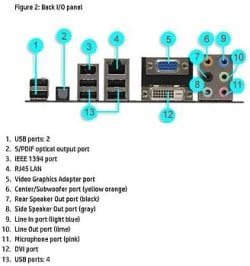
Its motherboard panel on the rear of its case has a blue VGA port and a white DVI port.
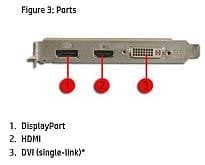
It may have originally come with a ATI Radeon 5570 graphics card which has a black DisplayPort and a black HDMI port and a white DVI port.
Which one of those motherboard or graphics card video ports is your monitor connected to?
What is the description of your monitor, and what type of video ports does it have?

That HP desktop originally came with a 1 TB SATA 3.5" hard disk drive(HDD).
If yours has a SATA 2.5" solid state drive(SSD), its original HDD has obviously been replaced.
Exactly how and by who did the SSD get wiped out?
 

My Computer

Computer type
PC/Desktop
Computer Manufacturer/Model Number
Dell OptiPlex 9020
OS
Windows 7 Professional SP1 64-bit
CPU
Intel Core i7-4790 3.60 GHz
Memory
32 GB DDR3-1600 MHz
Graphics Card(s)
Integrated Intel HD Graphics 4600
Monitor(s) Displays
Viewsonic 32" LCD
Hard Drives
Kingston SATA 3 240 GB SSD
Internet Speed
Spectrum Internet 1000 Mbps
Monitor's plugged into blue VGA port. I believe all the original hardware is still in there, although I usually rely on the BIOS and Belarc to tell me. Reading from the original label still on the side:

Intel core i5-650
8 GB DDR3
1 TB HD
Blue-ray player and superMulti DVD
Wireless LAN
ATI Radeon HD5570

(Reading from HD itself:) Crucial M500 2.5 SSD CT240M500SSD1 The way this is screwed in tells me it's the original HD.
Monitor (my own) HP LE1711


Here's the story: my friend's husband was a retired computer engineer. When he passed on, his wife had all 10 of his computers completely wiped by a pro. She didn't realize that she needed to have only the data wiped.

I took the 2 computers with the best hardware, and I've put Win7 and all my programs into the one I'm on now (see my sig.) I want the 240F just for my online work. I've set up several computers from scratch, and have never had this problem

I can switch the monitor if you think that's the problem. Duh, don't know why I didn't think of that.:o:o
 
Last edited:

My Computer

Computer type
PC/Desktop
Computer Manufacturer/Model Number
HP p6-2020t
OS
Win 7 Ult 64-bit
CPU
G620 2.6GHZ Pentium R
Memory
6 GB
Monitor(s) Displays
25" HPLV2311
Screen Resolution
1920 x 1200
Hard Drives
1 SATA, 1 exterior SATA
Case
HP
Cooling
PSU
Antivirus
Glasswire
Browser
Waterfox; Firefox; Chrome for work
Other Info
Firewall--Glasswire
Similar specs in Gateway DX4200
Verizon FIOS Wired network

1 other Win7 computer-- has SSD
Doesn't work with a functioning monitor either. Duh, could be the DVD player too... Do I have to change it out to test it, or something easier?
 

My Computer

Computer type
PC/Desktop
Computer Manufacturer/Model Number
HP p6-2020t
OS
Win 7 Ult 64-bit
CPU
G620 2.6GHZ Pentium R
Memory
6 GB
Monitor(s) Displays
25" HPLV2311
Screen Resolution
1920 x 1200
Hard Drives
1 SATA, 1 exterior SATA
Case
HP
Cooling
PSU
Antivirus
Glasswire
Browser
Waterfox; Firefox; Chrome for work
Other Info
Firewall--Glasswire
Similar specs in Gateway DX4200
Verizon FIOS Wired network

1 other Win7 computer-- has SSD
HERE is the product specifications section for the HP Pavilion Elite HPE-240f Desktop PC.
From what you posted and said, yours appears to have all of its original hardware, except for its storage drive.
It appears that its original 1 TB SATA hard disk drive has been replaced with a 240 GB SATA solid state drive.
Once you're successful in getting Windows 7 Home Premium 64-bit installed, you should see faster and snappier performance with using a SSD instead of a HDD.

If the original ATI Radeon HD5570 graphics card is still installed, but you have the HP LE1711 monitor's VGA port connected to the desktop motherboard's VGA port, that's probably why the monitor is showing a "no signal" message.
When a graphics card is installed, the motherboard's video ports are usually disabled in the BIOS.

Just to confirm everything, is this what the video ports look like on the motherboard panel (5, 12) and on the graphics card (1, 2, 3)?
 

Attachments

  • mobo panel.JPG
    mobo panel.JPG
    27.9 KB · Views: 15
  • graphics card.JPG
    graphics card.JPG
    12.1 KB · Views: 15

My Computer

Computer type
PC/Desktop
Computer Manufacturer/Model Number
Dell OptiPlex 9020
OS
Windows 7 Professional SP1 64-bit
CPU
Intel Core i7-4790 3.60 GHz
Memory
32 GB DDR3-1600 MHz
Graphics Card(s)
Integrated Intel HD Graphics 4600
Monitor(s) Displays
Viewsonic 32" LCD
Hard Drives
Kingston SATA 3 240 GB SSD
Internet Speed
Spectrum Internet 1000 Mbps
That's it. You're saying the mobo is using a DVI card? I just put in a DVI--> VGA adapter from an old (yes, I know they're ALL old) nonfunctional machine.

Yay!! Monitor says "MBR error, Press any key to boot from floppy." Do I have to tell you there's no floppy? ;) Do you have a little time to get me past that?
 
Last edited:

My Computer

Computer type
PC/Desktop
Computer Manufacturer/Model Number
HP p6-2020t
OS
Win 7 Ult 64-bit
CPU
G620 2.6GHZ Pentium R
Memory
6 GB
Monitor(s) Displays
25" HPLV2311
Screen Resolution
1920 x 1200
Hard Drives
1 SATA, 1 exterior SATA
Case
HP
Cooling
PSU
Antivirus
Glasswire
Browser
Waterfox; Firefox; Chrome for work
Other Info
Firewall--Glasswire
Similar specs in Gateway DX4200
Verizon FIOS Wired network

1 other Win7 computer-- has SSD
Why are you putting a DVI-To-VGA adapter on the motherboard panel which already has a VGA port(5)?
You need to put a DVI-to-VGA adapter on the graphics card because it does not have a VGA port.
You then connect a VGA cable between the two.
 

My Computer

Computer type
PC/Desktop
Computer Manufacturer/Model Number
Dell OptiPlex 9020
OS
Windows 7 Professional SP1 64-bit
CPU
Intel Core i7-4790 3.60 GHz
Memory
32 GB DDR3-1600 MHz
Graphics Card(s)
Integrated Intel HD Graphics 4600
Monitor(s) Displays
Viewsonic 32" LCD
Hard Drives
Kingston SATA 3 240 GB SSD
Internet Speed
Spectrum Internet 1000 Mbps
Yes, I moved it. We cross-posted.

I was also thinking of putting in a functional HD from a dead computer, with Win 7 and all 55 of my programs, but don't know if it will work on a diff mobo and CPU. What do you think?
I already have the Win Prod. key.
 

My Computer

Computer type
PC/Desktop
Computer Manufacturer/Model Number
HP p6-2020t
OS
Win 7 Ult 64-bit
CPU
G620 2.6GHZ Pentium R
Memory
6 GB
Monitor(s) Displays
25" HPLV2311
Screen Resolution
1920 x 1200
Hard Drives
1 SATA, 1 exterior SATA
Case
HP
Cooling
PSU
Antivirus
Glasswire
Browser
Waterfox; Firefox; Chrome for work
Other Info
Firewall--Glasswire
Similar specs in Gateway DX4200
Verizon FIOS Wired network

1 other Win7 computer-- has SSD
I'm not there, so I don't know if the white DVI port on the motherboard and the white DVI port on the graphics card are both identical.
If they are, a DVI-To-VGA adapter on the graphics card and a VGA cable connecting the 2 VGA ports should get your monitor working properly.

You cannot remove a HDD containing Windows 7 and 55 programs from one computer and then install that same HDD in another computer which has different hardware.
If you do, when you start that computer, you will see a "no boot device found" or some other message.
 

My Computer

Computer type
PC/Desktop
Computer Manufacturer/Model Number
Dell OptiPlex 9020
OS
Windows 7 Professional SP1 64-bit
CPU
Intel Core i7-4790 3.60 GHz
Memory
32 GB DDR3-1600 MHz
Graphics Card(s)
Integrated Intel HD Graphics 4600
Monitor(s) Displays
Viewsonic 32" LCD
Hard Drives
Kingston SATA 3 240 GB SSD
Internet Speed
Spectrum Internet 1000 Mbps
Forget about moving the HD. Didn't hurt to ask.

The monitor's working, and F2 brought up the setup screen. So I'm in business.

Many thanks :D
 

My Computer

Computer type
PC/Desktop
Computer Manufacturer/Model Number
HP p6-2020t
OS
Win 7 Ult 64-bit
CPU
G620 2.6GHZ Pentium R
Memory
6 GB
Monitor(s) Displays
25" HPLV2311
Screen Resolution
1920 x 1200
Hard Drives
1 SATA, 1 exterior SATA
Case
HP
Cooling
PSU
Antivirus
Glasswire
Browser
Waterfox; Firefox; Chrome for work
Other Info
Firewall--Glasswire
Similar specs in Gateway DX4200
Verizon FIOS Wired network

1 other Win7 computer-- has SSD
I'm glad to hear you finally got the monitor to work.

Did you get the disc drive to work, or did you have to replace it?

What exactly are you using to re-install Windows 7 Home Premium SP1 64-bit?

If you need help afterwards with getting it up-to-date to its official January 2020 "end of life" date, my guide HERE will be very helpful to you.

If you're familiar with and plan to use Simplix UpdatePack7R2 21.4.15 instead to get it unofficially up-to-date to April 2021, that's even better and is a much quicker and easier process.
 

My Computer

Computer type
PC/Desktop
Computer Manufacturer/Model Number
Dell OptiPlex 9020
OS
Windows 7 Professional SP1 64-bit
CPU
Intel Core i7-4790 3.60 GHz
Memory
32 GB DDR3-1600 MHz
Graphics Card(s)
Integrated Intel HD Graphics 4600
Monitor(s) Displays
Viewsonic 32" LCD
Hard Drives
Kingston SATA 3 240 GB SSD
Internet Speed
Spectrum Internet 1000 Mbps
Hardware isn't my high point. It changes too fast, and since I keep my machines till they die, I'm always behind.

Everything's working fine. I'm using my own disk with the product key that's already on the case. But the installation didn't ask me for the product key. I'm familiar with Simplix and the EOL workaround, but I'll see if your tutorial has anything to add.

The Win 7 networking drives me nuts, even after setting up 4 or 5 machines. I'll probably post in the Networking board when it's time to do it.
 

My Computer

Computer type
PC/Desktop
Computer Manufacturer/Model Number
HP p6-2020t
OS
Win 7 Ult 64-bit
CPU
G620 2.6GHZ Pentium R
Memory
6 GB
Monitor(s) Displays
25" HPLV2311
Screen Resolution
1920 x 1200
Hard Drives
1 SATA, 1 exterior SATA
Case
HP
Cooling
PSU
Antivirus
Glasswire
Browser
Waterfox; Firefox; Chrome for work
Other Info
Firewall--Glasswire
Similar specs in Gateway DX4200
Verizon FIOS Wired network

1 other Win7 computer-- has SSD
If your disc contains only the Windows 7 Home Premium SP1 64-bit operating system, and it is NOT a factory restore disc which contains the apps and bloatware that come in a new factory brand PC, you should use the current Simplix UpdatePack7R2 tool afterwards so you can bring it up to date to April 2021.

All but one of my Dell PC's are 4th generation, and the other one is 6th generation, so I don't exactly keep up with new technology either. I need PC's that can install and run Windows 7 without having to deal with hardware and driver issues, so that's the main reason why I stick with older technology. I have no need for 9th or 10th or 11th generation technology.

Anyway, good luck with getting Windows 7 installed and up to date.
 

My Computer

Computer type
PC/Desktop
Computer Manufacturer/Model Number
Dell OptiPlex 9020
OS
Windows 7 Professional SP1 64-bit
CPU
Intel Core i7-4790 3.60 GHz
Memory
32 GB DDR3-1600 MHz
Graphics Card(s)
Integrated Intel HD Graphics 4600
Monitor(s) Displays
Viewsonic 32" LCD
Hard Drives
Kingston SATA 3 240 GB SSD
Internet Speed
Spectrum Internet 1000 Mbps
Don't discs contain all the versions, with the product key determining which version will be installed?
 

My Computer

Computer type
PC/Desktop
Computer Manufacturer/Model Number
HP p6-2020t
OS
Win 7 Ult 64-bit
CPU
G620 2.6GHZ Pentium R
Memory
6 GB
Monitor(s) Displays
25" HPLV2311
Screen Resolution
1920 x 1200
Hard Drives
1 SATA, 1 exterior SATA
Case
HP
Cooling
PSU
Antivirus
Glasswire
Browser
Waterfox; Firefox; Chrome for work
Other Info
Firewall--Glasswire
Similar specs in Gateway DX4200
Verizon FIOS Wired network

1 other Win7 computer-- has SSD
Back
Top