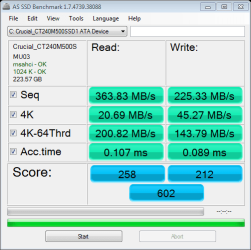
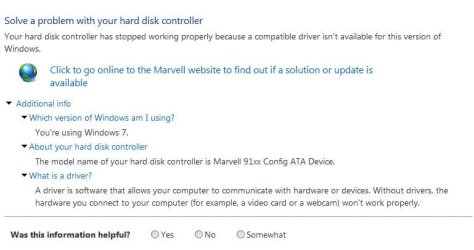
I just installed a new SSD to replace my old HDD. I disconnected all my HDD except the boot HDD and newly installed SSD. After booting into windows I initiallized the SSD in disk manager then used Macrium Reflect to clone the drive. My MB has a 6GB/s Connector on the Marvell Chipset which I used for the SSD to get the best performance.
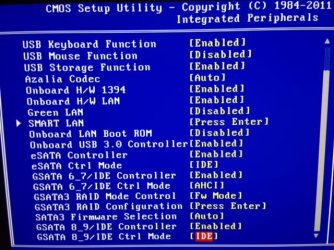
I then changed the BIOS to for that controller to ahci from IDE
Is there anything else I should do to maximize it's performance?
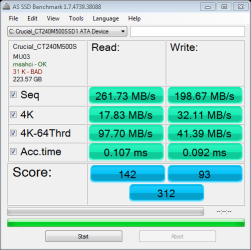
Is the speed appropriate for a Crucial M500 240GB
Why does the benchmark say I have 31K Bad
9) SATA2_0/1/2/3/4/5 (SATA 3Gb/s Connectors, Controlled by ICH10R)
The SATA connectors conform to SATA 3Gb/s standard and are compatible with SATA 1.5Gb/s stan*dard. Each SATA connector supports a single SATA device. The ICH10R controller supports RAID 0, RAID 1, RAID 5, and RAID 10. Refer to Chapter 5, "Configuring SATA Hard Drive(s)," for instructions on configuring a RAID array.
10) GSATA2_8/9 (SATA 3Gb/s Connectors, Controlled by GIGABYTE SATA2)
The SATA connectors conform to SATA 3Gb/s standard and are compatible with SATA 1.5Gb/s standard. Each SATA connector supports a single SATA device. The GIGABYTE SATA2 controller supports RAID 0, RAID 1, and JBOD. Refer to Chapter 5, "Configuring SATA Hard Drive(s)," for instructions on configuring a RAID array.
11) GSATA3_6/7 (SATA 6Gb/s Connectors, Controlled by Marvell 9128)
The SATA connectors conform to SATA 6Gb/s standard and are compatible with SATA 3Gb/s and SATA 1.5Gb/s standards. Each SATA connector supports a single SATA device. The Marvell 9128 supports RAID 0 and RAID 1. Refer to Chapter 5, "Configuring SATA Hard Drive(s)," for instructions on configur*ing a RAID array.
I then changed the BIOS to for that controller to ahci from IDE
Is there anything else I should do to maximize it's performance?
Is the speed appropriate for a Crucial M500 240GB
Why does the benchmark say I have 31K Bad
9) SATA2_0/1/2/3/4/5 (SATA 3Gb/s Connectors, Controlled by ICH10R)
The SATA connectors conform to SATA 3Gb/s standard and are compatible with SATA 1.5Gb/s stan*dard. Each SATA connector supports a single SATA device. The ICH10R controller supports RAID 0, RAID 1, RAID 5, and RAID 10. Refer to Chapter 5, "Configuring SATA Hard Drive(s)," for instructions on configuring a RAID array.
10) GSATA2_8/9 (SATA 3Gb/s Connectors, Controlled by GIGABYTE SATA2)
The SATA connectors conform to SATA 3Gb/s standard and are compatible with SATA 1.5Gb/s standard. Each SATA connector supports a single SATA device. The GIGABYTE SATA2 controller supports RAID 0, RAID 1, and JBOD. Refer to Chapter 5, "Configuring SATA Hard Drive(s)," for instructions on configuring a RAID array.
11) GSATA3_6/7 (SATA 6Gb/s Connectors, Controlled by Marvell 9128)
The SATA connectors conform to SATA 6Gb/s standard and are compatible with SATA 3Gb/s and SATA 1.5Gb/s standards. Each SATA connector supports a single SATA device. The Marvell 9128 supports RAID 0 and RAID 1. Refer to Chapter 5, "Configuring SATA Hard Drive(s)," for instructions on configur*ing a RAID array.
Attachments
My Computer
At a glance
Windows 7 Pro 64Biti7 5820KCORSAIR Vengeance LPX 16GB 288-Pin DDR4 SDRAMMSI GeForce GTX 970 100ME 4GB
- Computer type
- PC/Desktop
- Computer Manufacturer/Model Number
- Custom Build
- OS
- Windows 7 Pro 64Bit
- CPU
- i7 5820K
- Motherboard
- MSI X99A SLI KRAIT EDITION LGA 2011-v3
- Memory
- CORSAIR Vengeance LPX 16GB 288-Pin DDR4 SDRAM
- Graphics Card(s)
- MSI GeForce GTX 970 100ME 4GB
- PSU
- Corsair RM850X 850W
- Antivirus
- Microsoft Security Essentials