New laptop setup, SSD questions

blue skies

New member
Member
VIP
Local time
1:26 PM
Messages
117
I ordered a new laptop that should be delivered tomorrow, and I was hoping someone could answer a few questions for me. This is the laptop I ordered: Buy.com - Toshiba Satellite U845W 14.4" Core i5 6GB Widescreen Ultrabook
Toshiba Satellite U845W-S410 14.4" Widescreen Ultrabook, Intel Core i5-3317U, 6GB DDR3, 500GB HDD, 32GB SSD, Windows 7 Home Premium (64-Bit) - PSU5RU-00Q003
I have never had a SSD before. The Windows 7 will be already installed on the SSD. I was mainly wondering how I go about installing the programs that I use. The SSD is only 32 GB. How much space does the OS take up, and is it advisable to install all or most programs on the SSD (or at least certain programs I use often - Firefox, Thunderbird) - or do those use too much space?

My other question is... I believe Toshiba installs a lot of crapware on their machines. Is it possible to download a clean copy of Windows 7 Home Premium and use the activation key that comes with my notebook to replace the operating system? Or should I just uninstall as much of it as possible?

When I received my current desktop computer, I didn't realize how helpful it would have been to create a partition for just the OS and programs, keeping my data separate. It would have made the backup process much simpler for me. I am hoping to do a better job setting this one up. Any advice or recommendations are appreciated! :)
 

My Computer My Computer

Computer type
Laptop
Computer Manufacturer/Model Number
Toshiba Satellite U845W-S410
OS
Windows 7 Home Premium 64 bit
CPU
Intel ® Core™ i5-3317U Processor
Memory
6GB DDR3 1600MHz
Graphics Card(s)
Mobile Intel ® HD Graphics with 64MB-1696MB dynamically allo
Monitor(s) Displays
All-in-one -- Generic PnP Monitor
Screen Resolution
14.4” diagonal widescreen TruBrite ® TFT display at 1792 x 7
Hard Drives
500GB (5400 RPM, Serial ATA) with dedicated 32GB mSATA SSD disk
cache
Keyboard
Logitech
Mouse
Logitech
I have been searching for more information about SSD/HDD, and came across the advice quoted below to

1. Move the Windows paging file to the HDD
3. Move the Windows restore points off the SSD.

Would either of these be useful and perhaps give me a little extra space for at least a few main programs? I am thinking my email program will be way too big, and Firefox itself might fit, but if I stream a movie or something would it automatically be temporarily saving all that data to the SSD also?


Programs and files on SSD vs HDD for max performance... - config-customize - windows-7
First thing you always want to do if you have your boot disk as SSD and second internal HDD get the Windows paging file off of the SSD. Reasons are that SSDs are expensive, the page file takes up some space but that is neglegeable, the paging file is constantly changing and parts are over written which is bad for an SSD because SSD has shorter life time of rewrites then HDD so the page file is needlessly eating away at parts of your precious SSD.

To do this click start>right click computer>properties>on left side tab click "advanced system settings" you need administrative rights>Performance>go to advanced tab>under virtual memory select "change">uncheck "Automatically manage" at top>now all your partitions should be listed, in this order select a partition on your HDD. Easiest to select system managed because if you don't know what your doing you can degrade windows performance>Now select you SSD partition and pick none.
Remember you did this because later if you want to format and repartition that drive it won't let you until you go back in and re/move page file to a new partition. Forgetting and having to figure out errors causes headaches and I speak from personal experience.

It opens page file up to fragmentation. I just make partition only for page file and if fragmentation is a problem, ill just reformat the partition. No harm done to anything else. If you choose to make partition for page file make it atleast the size of your ram, 1.5 x ram is better go no bigger than 2 x ram or your wasting space, especially if you have a lot of ram and windows doesn't do much paging...


Third is to check for Windows restore points because they can take up lots of space, move them off of your SSD or delete them/disable new ones from being made if you don't need them. I only keep until a little after a windows update or installing new drivers until I am pretty sure everything is running fine, and I typically only keep one. My preference though! I make my own drive images and backup. Google for a tutorial dealing with those restore points, there are tons.
 

My Computer My Computer

Computer type
Laptop
Computer Manufacturer/Model Number
Toshiba Satellite U845W-S410
OS
Windows 7 Home Premium 64 bit
CPU
Intel ® Core™ i5-3317U Processor
Memory
6GB DDR3 1600MHz
Graphics Card(s)
Mobile Intel ® HD Graphics with 64MB-1696MB dynamically allo
Monitor(s) Displays
All-in-one -- Generic PnP Monitor
Screen Resolution
14.4” diagonal widescreen TruBrite ® TFT display at 1792 x 7
Hard Drives
500GB (5400 RPM, Serial ATA) with dedicated 32GB mSATA SSD disk
cache
Keyboard
Logitech
Mouse
Logitech

My Computer My Computer

Computer Manufacturer/Model Number
Customized build from CyberPower
OS
Windows 7 Home Premium 64bit SP 1
CPU
Intel i5 2500k
Motherboard
Asus P8P67 Deluxe
Memory
8 gigabytes Corsair PC3-12800 DDR3
Graphics Card(s)
EVGA GeForce GTX 460 superclocked
Sound Card
Integrated
Monitor(s) Displays
ViewSonic 23" LCD
Screen Resolution
1980 x 1080
Hard Drives
120 Gb Samsung 840 Pro SSD
120 Gb Kingston Hyper X SSD
1 Tb WD Caviar Black HDD
PSU
Coolermaster 1000 watt modular
Case
Coolermaster HAF X full tower
Cooling
Coolermaster Hyper 212 plus
Keyboard
Logitech USB
Mouse
Microsoft 3 button
Internet Speed
download 1.5 Mb/sec upload 300Kb/sec
32gb will be cutting it pretty close. Remember that you'll want some "free space" also, say 10%? Since it will be coming with the ssd installed already , most of the little things should be taken care of for you. I'd check and see if your hibernation is turned off if I were you. Also, I'd consider just canceling your page file for C. If you're a "regular" user you shouldn't need it with the amount of RAM installed. (always room for more though!:D)

And yes , you are entirely correct about the amount of crap/bloatware that will come with your Toshiba. I owned one...... I know:( ...... you'll love your machine after you get all that stuff cleaned up though, I'm sure. Just follow LittleJay's link and all will be revealed to you:cool:.
 

My Computer My Computer

Computer type
Laptop
Computer Manufacturer/Model Number
MSI GE72VR Apache Pro-416
OS
Windows 10x64 Build 1709
CPU
Intel i7 7700HQ Kaby Lake
Motherboard
Micro-Star Intl. MS-179B (U3C1)
Memory
16 GB DDR4 @2400
Graphics Card(s)
Nvidia Geforce GTX 1060
Screen Resolution
1920x1080 120Hz
Hard Drives
256 GB Nvme M.2 SSD

1TB HDD@7200
Cooling
Cooler Blast 4
Keyboard
Steel Series
Antivirus
Bit Defender Free
Browser
Edge
Thank you for the link to the clean install tutorial, LittleJay. I haven't had a chance to look at it yet, but I plan to study it. I've never installed an OS before.

Thank you for your reply Indianacarnie. I am assuming that SSD have the same size discrepancy that HDDs have, so that an advertised 32 GB SSD will only give me 29.822 GB of storage space. Ninety percent of that is only 26.840 GB. Microsoft says you need 20 GB for Windows 7. So that gives me very little extra space.

I wonder if Toshiba installed their crapware on the HDD or the SDD?

I am also wondering if I can/should install only 64-Bit programs to the SSD? Does it matter? On my current computer the 32-bit programs are automatically installed in the (x86) folder. I wonder if all the folders will be already set up on both drives?

Should I install MSE on the SSD? Any issue there?

Sorry if any of these are stupid questions. I am still pretty confused about having to separate drives and how it all works together.

Thanks again for the help!
 

My Computer My Computer

Computer type
Laptop
Computer Manufacturer/Model Number
Toshiba Satellite U845W-S410
OS
Windows 7 Home Premium 64 bit
CPU
Intel ® Core™ i5-3317U Processor
Memory
6GB DDR3 1600MHz
Graphics Card(s)
Mobile Intel ® HD Graphics with 64MB-1696MB dynamically allo
Monitor(s) Displays
All-in-one -- Generic PnP Monitor
Screen Resolution
14.4” diagonal widescreen TruBrite ® TFT display at 1792 x 7
Hard Drives
500GB (5400 RPM, Serial ATA) with dedicated 32GB mSATA SSD disk
cache
Keyboard
Logitech
Mouse
Logitech
I wonder if the 32gb SSD isn't intended for a cache file to speed up HD. Those we've seen have all been 32 gb.

We have helped users install Win7 to them, though, so after checking if Win7 is already installed on it, if you want to do so you may need to delete and format it first with our help which is how this has worked before. This causes the booted installer to see the SSD so you can install there.

You may also need to turn off a RAID setting in BIOS (most often by changing SATA controller to AHCI before reinstall) and onboard Intel Rapid Storage technology in some cases. We can get into this more if these come into play.

So it's a challenge to install the OS to the small SSD intended for use as a cache drive but we can help you as we have with about a dozen of these already.

Step 14 in Clean Reinstall - Factory OEM Windows 7 also shows how to link the data easiest from the HDD.
 
Last edited:
Thank you Gregrocker. I looked at your awesome Clean Install tutorial a little while ago. It is very well done.

You may also have to turn off a RAID setting in BIOS and Intel Rapid Storage technology in some cases.
I have come across these terms before, but I'm not really familiar with them. I also read a bit about small SSDs being used as a cache, but to tell you the truth, it is mostly over my head.

I am getting a little nervous and starting to wonder whether I should just follow your easier: http://www.sevenforums.com/tutorials/219576-clean-up-factory-bloatware.html instead of doing a clean install.

I am curious to see how the computer is set up, and whether Toshiba installed the OS on the 32 gb SSD. I believe that was how it was described in a video review I watched a few days ago, but I'm not certain.

Darn, I wish the SSD that is just a little bit larger. A quick boot time will be nice, but I'm not sure how much of a speed increase I will get if most of my programs are on the HDD.

I don't play any games so that's not an issue. I thought it would be nice to have my browser and media player on the SSD. If I could have Thunderbird on the SSD too, that would be nice, but I would have to have all of the data stored on the HDD. Same with Firefox.

How would I go about making sure that the programs I install on the SSD don't store any big data files on the SSD? Does it depend on whether or not I can tweak each program? Change the destination path for the programs folders? A more global Windows setting I can change? Am I making any sense? :o
 

My Computer My Computer

Computer type
Laptop
Computer Manufacturer/Model Number
Toshiba Satellite U845W-S410
OS
Windows 7 Home Premium 64 bit
CPU
Intel ® Core™ i5-3317U Processor
Memory
6GB DDR3 1600MHz
Graphics Card(s)
Mobile Intel ® HD Graphics with 64MB-1696MB dynamically allo
Monitor(s) Displays
All-in-one -- Generic PnP Monitor
Screen Resolution
14.4” diagonal widescreen TruBrite ® TFT display at 1792 x 7
Hard Drives
500GB (5400 RPM, Serial ATA) with dedicated 32GB mSATA SSD disk
cache
Keyboard
Logitech
Mouse
Logitech
When you get the new computer, why don't you post a screen shot of your disk management and we can take a look at it, if you like and advise you further.
 

My Computer My Computer

Computer Manufacturer/Model Number
Customized build from CyberPower
OS
Windows 7 Home Premium 64bit SP 1
CPU
Intel i5 2500k
Motherboard
Asus P8P67 Deluxe
Memory
8 gigabytes Corsair PC3-12800 DDR3
Graphics Card(s)
EVGA GeForce GTX 460 superclocked
Sound Card
Integrated
Monitor(s) Displays
ViewSonic 23" LCD
Screen Resolution
1980 x 1080
Hard Drives
120 Gb Samsung 840 Pro SSD
120 Gb Kingston Hyper X SSD
1 Tb WD Caviar Black HDD
PSU
Coolermaster 1000 watt modular
Case
Coolermaster HAF X full tower
Cooling
Coolermaster Hyper 212 plus
Keyboard
Logitech USB
Mouse
Microsoft 3 button
Internet Speed
download 1.5 Mb/sec upload 300Kb/sec
When you get the new computer, why don't you post a screen shot of your disk management and we can take a look at it, if you like and advise you further.
That's a good idea because it is not clear whether the OS is really installed on the SSD or whether the SSD is only used as a buffer. A 6GB RAM system with full size pagefile and full size hiberfile would barely fit on 32GBs. But when 'tuned', it will fit easily.

Then 32GB would be plenty for the OS and all programs (no big games though) if done correctly. I have 6 systems with 6 SSDs and they all run around 25GB for the OS, All my programs and the pagefile of 2GBs.

Moving the pagefile is not a good idea. With 6GB of RAM, it will probably hardly be used. I always reduce the pagefile to 2GB. And I also delete the hiberfile completely.

ad3) You cannot move the restore points to another device or partition. That is only possible with the Windows server editions. You can, however, reduce the shadowstorage to nil (which is 300MB).
 

My Computer My Computer

Computer Manufacturer/Model Number
HP, Dell, Gateway, Toshiba - 4 laptops and 2 desktops
OS
Vista, Windows7, Mint Mate, Zorin, Windows 8
CPU
from 1.6GHz Duo to i7
Monitor(s) Displays
2x HP w2207
Hard Drives
5x HDD, 7x SSD, 12x Externals
Keyboard
with trackball - no mices
Mouse
Trackball mice
Internet Speed
DSL 6000
When you get the new computer, why don't you post a screen shot of your disk management and we can take a look at it, if you like and advise you further.
I will definitely do that.

That's a good idea because it is not clear whether the OS is really installed on the SSD or whether the SSD is only used as a buffer. A 6GB RAM system with full size pagefile and full size hiberfile would barely fit on 32GBs. But when 'tuned', it will fit easily.

Then 32GB would be plenty for the OS and all programs (no big games though) if done correctly. I have 6 systems with 6 SSDs and they all run around 25GB for the OS, All my programs and the pagefile of 2GBs.

Moving the pagefile is not a good idea. With 6GB of RAM, it will probably hardly be used. I always reduce the pagefile to 2GB. And I also delete the hiberfile completely.

ad3) You cannot move the restore points to another device or partition. That is only possible with the Windows server editions. You can, however, reduce the shadowstorage to nil (which is 300MB).
That is all very good to know. It seems I will only be able to use up to 26 GB total, so the fact that you are able to run the OS, all your programs and a 2 GB pagefile gives me a lot of hope.

Thank you for your help! :)
 

My Computer My Computer

Computer type
Laptop
Computer Manufacturer/Model Number
Toshiba Satellite U845W-S410
OS
Windows 7 Home Premium 64 bit
CPU
Intel ® Core™ i5-3317U Processor
Memory
6GB DDR3 1600MHz
Graphics Card(s)
Mobile Intel ® HD Graphics with 64MB-1696MB dynamically allo
Monitor(s) Displays
All-in-one -- Generic PnP Monitor
Screen Resolution
14.4” diagonal widescreen TruBrite ® TFT display at 1792 x 7
Hard Drives
500GB (5400 RPM, Serial ATA) with dedicated 32GB mSATA SSD disk
cache
Keyboard
Logitech
Mouse
Logitech
But again, the setup in these systems is sometimes very different. So only the Disk Management screenshot will tell us how to proceed..
 

My Computer My Computer

Computer Manufacturer/Model Number
HP, Dell, Gateway, Toshiba - 4 laptops and 2 desktops
OS
Vista, Windows7, Mint Mate, Zorin, Windows 8
CPU
from 1.6GHz Duo to i7
Monitor(s) Displays
2x HP w2207
Hard Drives
5x HDD, 7x SSD, 12x Externals
Keyboard
with trackball - no mices
Mouse
Trackball mice
Internet Speed
DSL 6000
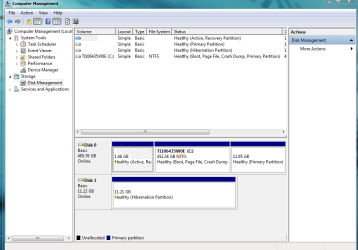
Here is my disk management screen cap:

disk management.PNG
 

My Computer My Computer

Computer type
Laptop
Computer Manufacturer/Model Number
Toshiba Satellite U845W-S410
OS
Windows 7 Home Premium 64 bit
CPU
Intel ® Core™ i5-3317U Processor
Memory
6GB DDR3 1600MHz
Graphics Card(s)
Mobile Intel ® HD Graphics with 64MB-1696MB dynamically allo
Monitor(s) Displays
All-in-one -- Generic PnP Monitor
Screen Resolution
14.4” diagonal widescreen TruBrite ® TFT display at 1792 x 7
Hard Drives
500GB (5400 RPM, Serial ATA) with dedicated 32GB mSATA SSD disk
cache
Keyboard
Logitech
Mouse
Logitech
Well, that's as I suspected. The SSD is not even identified as a seperate unit. They put this hiberfile on it (probably for fast boot) and the rest is hidden and probably used as buffer for the HDD.

The setup of the HDD is knid of strange too. I wonder what the idea of this seperate 12GB primary partition is.
 

My Computer My Computer

Computer Manufacturer/Model Number
HP, Dell, Gateway, Toshiba - 4 laptops and 2 desktops
OS
Vista, Windows7, Mint Mate, Zorin, Windows 8
CPU
from 1.6GHz Duo to i7
Monitor(s) Displays
2x HP w2207
Hard Drives
5x HDD, 7x SSD, 12x Externals
Keyboard
with trackball - no mices
Mouse
Trackball mice
Internet Speed
DSL 6000
I would not change anything until you scope it out fully to understand exactly what you're dealing with. There are a number of approaches to do this which I'll outline here based on seeing several of these over the past year:

The full 32 gb SSD is not shown. Type CMD in Start Search box, right click to Run as Admin, type Diskpart, then List Disk to see the actual size of all disks onboard. The 32gb may show up there. If so select it using Sel Disk # then Detail part. Grab a screenshot with Snipping Tool.

You may also be able to see more in a map format using free Partition Wizard bootable CD which shows hidden OEM partitions. A camera snap posted back would be helpful.

It may in a be RAID so that it isnt' shown until unRAID'ed. Boot into BIOS setup to check the SATA controller setting. Is it RAID? In the past it had to be changed to AHCI so that 32 gb would show up independently to delete, partition and format with Partition Wizard CD. This makes it visible to the Win7 installer to choose for install.

First thing I would do is make your Recovery disks following the steps in your setup literature or online Manual, or accessing Toshiba Recovery in All Programs to find the app.

I would also call Toshiba Tech Support to ask them where the 32 gb partition is and if it can be used for Win7 install. They may not be forthcoming since they work from scripts that may withhold this information, even warn you that to change this will void your tech support warranty. Just say you're trying to understand your system better but never disclose what you intend to do with your property, even after you've clean reinstalled. If you ever need to ship it back under warranty first run the Recovery disks or a backup image you've made of the factory preinstall.
 
Last edited:
I would not change anything until you scope it out fully to understand exactly what you're dealing with.
I was determined to try a clean install on my next computer, but I think this situation is just way too complicated for me.

Thanks again to everyone who replied with advice and suggestions. I was expecting the 32 gb SSD to contain the OS and to be very straightforward and accessible. I guess I will have to leave it the way it is, try to remove as much extraneous junk as possible, and just live with that.

I will probably need to remove a lot from the start menu too. This notebook is using a ton of memory even when I don't have any programs open. Stupid Toshiba factory install. :(
 

My Computer My Computer

Computer type
Laptop
Computer Manufacturer/Model Number
Toshiba Satellite U845W-S410
OS
Windows 7 Home Premium 64 bit
CPU
Intel ® Core™ i5-3317U Processor
Memory
6GB DDR3 1600MHz
Graphics Card(s)
Mobile Intel ® HD Graphics with 64MB-1696MB dynamically allo
Monitor(s) Displays
All-in-one -- Generic PnP Monitor
Screen Resolution
14.4” diagonal widescreen TruBrite ® TFT display at 1792 x 7
Hard Drives
500GB (5400 RPM, Serial ATA) with dedicated 32GB mSATA SSD disk
cache
Keyboard
Logitech
Mouse
Logitech
Yeah, Toshiba puts a lot of stuff on their PCs. Just get rid of all that stuff in the startups. You need to keep only the AV program and anything you put there yourself, e.g. Sidebar (gadgets).

Removing things from the startups does not mean that those programs will not run. They will be loaded when called. But if they are out of the startups, you will boot faster and have a smaller RAM footprint at idle.
 

My Computer My Computer

Computer Manufacturer/Model Number
HP, Dell, Gateway, Toshiba - 4 laptops and 2 desktops
OS
Vista, Windows7, Mint Mate, Zorin, Windows 8
CPU
from 1.6GHz Duo to i7
Monitor(s) Displays
2x HP w2207
Hard Drives
5x HDD, 7x SSD, 12x Externals
Keyboard
with trackball - no mices
Mouse
Trackball mice
Internet Speed
DSL 6000
I went to look at startup, but when I type msconfig in the search box, nothing shows up. I went to look for the folder in PCHEALTH, and it's not there.
 

My Computer My Computer

Computer type
Laptop
Computer Manufacturer/Model Number
Toshiba Satellite U845W-S410
OS
Windows 7 Home Premium 64 bit
CPU
Intel ® Core™ i5-3317U Processor
Memory
6GB DDR3 1600MHz
Graphics Card(s)
Mobile Intel ® HD Graphics with 64MB-1696MB dynamically allo
Monitor(s) Displays
All-in-one -- Generic PnP Monitor
Screen Resolution
14.4” diagonal widescreen TruBrite ® TFT display at 1792 x 7
Hard Drives
500GB (5400 RPM, Serial ATA) with dedicated 32GB mSATA SSD disk
cache
Keyboard
Logitech
Mouse
Logitech

My Computer My Computer

Computer Manufacturer/Model Number
HP, Dell, Gateway, Toshiba - 4 laptops and 2 desktops
OS
Vista, Windows7, Mint Mate, Zorin, Windows 8
CPU
from 1.6GHz Duo to i7
Monitor(s) Displays
2x HP w2207
Hard Drives
5x HDD, 7x SSD, 12x Externals
Keyboard
with trackball - no mices
Mouse
Trackball mice
Internet Speed
DSL 6000
In msconfig, you have to click on the startup tab. But best is to use WinPatrol to manage startups. And that program is also useful to protect your registry. Download WinPatrol 26.1.2013.0 - FileHippo.com
No, I mean I can't even get to msconfig. It's missing on this notebook.

ETA: ok, I just retyped it again after waking it back up, and it finally showed up. I tried so many times before and it just wouldn't show.
 

My Computer My Computer

Computer type
Laptop
Computer Manufacturer/Model Number
Toshiba Satellite U845W-S410
OS
Windows 7 Home Premium 64 bit
CPU
Intel ® Core™ i5-3317U Processor
Memory
6GB DDR3 1600MHz
Graphics Card(s)
Mobile Intel ® HD Graphics with 64MB-1696MB dynamically allo
Monitor(s) Displays
All-in-one -- Generic PnP Monitor
Screen Resolution
14.4” diagonal widescreen TruBrite ® TFT display at 1792 x 7
Hard Drives
500GB (5400 RPM, Serial ATA) with dedicated 32GB mSATA SSD disk
cache
Keyboard
Logitech
Mouse
Logitech
Back
Top