New mail announcement

sbuxman

New member
Member
VIP
Local time
6:51 PM
Messages
194
Hi,

I have an ACER AS1410 Netbook with Win 7 Home Premium and 4 GB RAM.

Was wondering if there's a simple to reasonably simple :D free app that I can download and install which will announce the arrival of new mail to my gmail inbox? Ideally, I'd prefer a tone that makes such an announcement, but anything will do, even if it has to be voice ;)

Thanks for any help!

sbuxman
 

My Computer

Computer type
PC/Desktop
Computer Manufacturer/Model Number
Dell Inc. XPS 8300
OS
Microsoft Windows 7 Home Premium 64-bit 7601 Multiprocessor Free Service Pack 1
CPU
Intel(R) Core(TM) i7-2600 CPU @ 3.40GHz
Motherboard
Dell Inc. 0Y2MRG
Memory
8.00 GB
Graphics Card(s)
AMD Radeon HD 6450
Sound Card
(1) Realtek High Definition Audio (2) Intel(R) Display Aud
Monitor(s) Displays
Samsung SA300/SA350 [Monitor] (21.7"vis)
Screen Resolution
1920 x 1080 x 32 bits (4294967296 colors) @ 60 Hz
Hard Drives
(1) ST31500341AS ATA Device (2) Generic- Compact Flash USB Device (3) Generic- MS/MS-Pro USB Device (4) Generic- SD/MMC USB Device (5) Generic- SM/xD-Picture USB Device
PSU
Dell 460W for i7 configuration
Case
mid-size tower
Keyboard
Dell Inc. standard keyboard
Mouse
Dell Inc. wired mouse
Internet Speed
Verizon FIOS
Antivirus
Microsoft Security Essentials
Browser
I.E. 11 default/Chrome
Have you given thought to Windows Mail. It is very easy, it downloads mail from your email account, to your computer and gives a chime when you get mail.
 

My Computer

Computer type
PC/Desktop
Computer Manufacturer/Model Number
Dell XPS 420
OS
Windows 10, Home Clean Install
CPU
Intel Core2 processsor Q8200(2.33Ghz 1333FSB) Quad Core Tech
Motherboard
Dell
Memory
6 gb
Graphics Card(s)
ATI Radeon 256MB HD3650
Sound Card
Intergrated 7.1 Channel Audio
Monitor(s) Displays
Dell SP2009W 20"
Hard Drives
640 GB Serial ATA Hard drive
Cooling
Fan
Keyboard
Dell USB Keyboard
Mouse
Dell Premium Optical USB
Internet Speed
DSL 2.85
I don't think this works with IE though

Turn desktop notifications on or off

  1. Open Gmail.
  2. Click the gear in the top right.
    A31C0031923C4E7E5C2F153531C269EDE377
  3. Select Settings.
  4. Scroll down to the Desktop Notifications section (stay in the "General" tab).
  5. Choose one of the options:
    • New mail notifications on: If you use inbox categories, you’ll only be notified about messages in Primary.
    • Important mail notifications on: You’ll be notified about every incoming messages marked as important. Learn more about importance ranking.
    • Mail notifications off
  6. Click Save Changes at the bottom of the page.
 

My Computer

Computer type
PC/Desktop
Computer Manufacturer/Model Number
Dude Build
OS
Windows 10 Pro X64
CPU
Intel(R) Core(TM) i5-3570K CPU OC@ 4.5GHZ Turbo
Motherboard
MSI Z77A-G45 Gaming
Memory
8.00 GB DDR3 1600Mhz
Graphics Card(s)
MSI Gaming X GTX 1070
Sound Card
Realtek High Definition
Monitor(s) Displays
Dell S23O9W, HP L1710
Screen Resolution
DELL-1920 x 1080 HP-1280 x1024
Hard Drives
Crucial m4 256 SSD, WD 7200RPM 500GB WD 1TB
PSU
Seasonic X650 GOLD
Case
Zalman Z12
Cooling
Antec Kuhler 920
Keyboard
Logitech
Mouse
MSI DS100 Interceptor
Internet Speed
50 down and 5 up
Antivirus
MSE
Browser
Chrome, IE 11
Other Info
Logitech X-620 Speakers
Have you given thought to Windows Mail. It is very easy, it downloads mail from your email account, to your computer and gives a chime when you get mail.

There's a lot of other stuff that installs with Mail, and I real don't want all of it!:confused:
 

My Computer

Computer type
PC/Desktop
Computer Manufacturer/Model Number
Dell Inc. XPS 8300
OS
Microsoft Windows 7 Home Premium 64-bit 7601 Multiprocessor Free Service Pack 1
CPU
Intel(R) Core(TM) i7-2600 CPU @ 3.40GHz
Motherboard
Dell Inc. 0Y2MRG
Memory
8.00 GB
Graphics Card(s)
AMD Radeon HD 6450
Sound Card
(1) Realtek High Definition Audio (2) Intel(R) Display Aud
Monitor(s) Displays
Samsung SA300/SA350 [Monitor] (21.7"vis)
Screen Resolution
1920 x 1080 x 32 bits (4294967296 colors) @ 60 Hz
Hard Drives
(1) ST31500341AS ATA Device (2) Generic- Compact Flash USB Device (3) Generic- MS/MS-Pro USB Device (4) Generic- SD/MMC USB Device (5) Generic- SM/xD-Picture USB Device
PSU
Dell 460W for i7 configuration
Case
mid-size tower
Keyboard
Dell Inc. standard keyboard
Mouse
Dell Inc. wired mouse
Internet Speed
Verizon FIOS
Antivirus
Microsoft Security Essentials
Browser
I.E. 11 default/Chrome
You can pick and choose what you want
 

My Computer

Computer type
PC/Desktop
Computer Manufacturer/Model Number
Dell XPS 420
OS
Windows 10, Home Clean Install
CPU
Intel Core2 processsor Q8200(2.33Ghz 1333FSB) Quad Core Tech
Motherboard
Dell
Memory
6 gb
Graphics Card(s)
ATI Radeon 256MB HD3650
Sound Card
Intergrated 7.1 Channel Audio
Monitor(s) Displays
Dell SP2009W 20"
Hard Drives
640 GB Serial ATA Hard drive
Cooling
Fan
Keyboard
Dell USB Keyboard
Mouse
Dell Premium Optical USB
Internet Speed
DSL 2.85
I don't think this works with IE though

Turn desktop notifications on or off

  1. Open Gmail.
  2. Click the gear in the top right.
    A31C0031923C4E7E5C2F153531C269EDE377
  3. Select Settings.
  4. Scroll down to the Desktop Notifications section (stay in the "General" tab).
  5. Choose one of the options:
    • New mail notifications on: If you use inbox categories, you’ll only be notified about messages in Primary.
    • Important mail notifications on: You’ll be notified about every incoming messages marked as important. Learn more about importance ranking.
    • Mail notifications off
  6. Click Save Changes at the bottom of the page.

I already have everything selected per the above and I do get a flashing message in the lower right-hand corner of my screen when I receive new mail, but no tone, and an audible sound is what I really would like. Can anyone one help iwth a fix?

Thank you.
 

My Computer

Computer type
PC/Desktop
Computer Manufacturer/Model Number
Dell Inc. XPS 8300
OS
Microsoft Windows 7 Home Premium 64-bit 7601 Multiprocessor Free Service Pack 1
CPU
Intel(R) Core(TM) i7-2600 CPU @ 3.40GHz
Motherboard
Dell Inc. 0Y2MRG
Memory
8.00 GB
Graphics Card(s)
AMD Radeon HD 6450
Sound Card
(1) Realtek High Definition Audio (2) Intel(R) Display Aud
Monitor(s) Displays
Samsung SA300/SA350 [Monitor] (21.7"vis)
Screen Resolution
1920 x 1080 x 32 bits (4294967296 colors) @ 60 Hz
Hard Drives
(1) ST31500341AS ATA Device (2) Generic- Compact Flash USB Device (3) Generic- MS/MS-Pro USB Device (4) Generic- SD/MMC USB Device (5) Generic- SM/xD-Picture USB Device
PSU
Dell 460W for i7 configuration
Case
mid-size tower
Keyboard
Dell Inc. standard keyboard
Mouse
Dell Inc. wired mouse
Internet Speed
Verizon FIOS
Antivirus
Microsoft Security Essentials
Browser
I.E. 11 default/Chrome
You can pick and choose what you want

The download from File Hippo is "wlsetup.web," and when I double-clicked it, the installation started with no option for choices of what to install.
 

My Computer

Computer type
PC/Desktop
Computer Manufacturer/Model Number
Dell Inc. XPS 8300
OS
Microsoft Windows 7 Home Premium 64-bit 7601 Multiprocessor Free Service Pack 1
CPU
Intel(R) Core(TM) i7-2600 CPU @ 3.40GHz
Motherboard
Dell Inc. 0Y2MRG
Memory
8.00 GB
Graphics Card(s)
AMD Radeon HD 6450
Sound Card
(1) Realtek High Definition Audio (2) Intel(R) Display Aud
Monitor(s) Displays
Samsung SA300/SA350 [Monitor] (21.7"vis)
Screen Resolution
1920 x 1080 x 32 bits (4294967296 colors) @ 60 Hz
Hard Drives
(1) ST31500341AS ATA Device (2) Generic- Compact Flash USB Device (3) Generic- MS/MS-Pro USB Device (4) Generic- SD/MMC USB Device (5) Generic- SM/xD-Picture USB Device
PSU
Dell 460W for i7 configuration
Case
mid-size tower
Keyboard
Dell Inc. standard keyboard
Mouse
Dell Inc. wired mouse
Internet Speed
Verizon FIOS
Antivirus
Microsoft Security Essentials
Browser
I.E. 11 default/Chrome
It may have changed since I downloaded Windows 2012, and glad that I did. I will look to see what I can find.
 

My Computer

Computer type
PC/Desktop
Computer Manufacturer/Model Number
Dell XPS 420
OS
Windows 10, Home Clean Install
CPU
Intel Core2 processsor Q8200(2.33Ghz 1333FSB) Quad Core Tech
Motherboard
Dell
Memory
6 gb
Graphics Card(s)
ATI Radeon 256MB HD3650
Sound Card
Intergrated 7.1 Channel Audio
Monitor(s) Displays
Dell SP2009W 20"
Hard Drives
640 GB Serial ATA Hard drive
Cooling
Fan
Keyboard
Dell USB Keyboard
Mouse
Dell Premium Optical USB
Internet Speed
DSL 2.85
You can pick and choose what you want

The download from File Hippo is "wlsetup.web," and when I double-clicked it, the installation started with no option for choices of what to install.

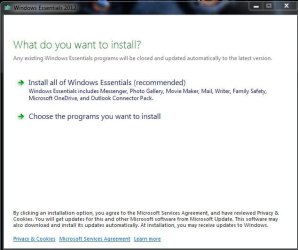
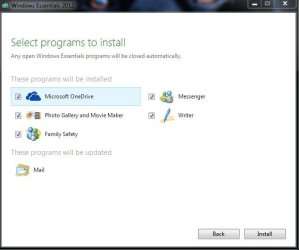
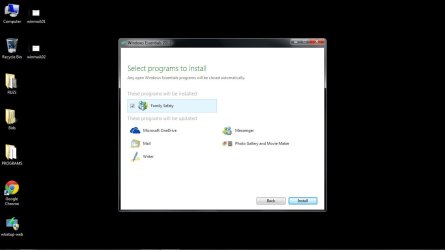
I just downloaded latest version from filehippo, Windows Live Mail 16.4.3528 and ran the installer wlsetup.web and I did get the option to select what I wanted to install.
Capture.JPG

Capture1.JPG
 

My Computer

Computer Manufacturer/Model Number
Put together
OS
Win7 Pro-64 Bit
CPU
i7-2600-3.4GHz
Motherboard
ASRock Z68M
Memory
8 GIG DDR3
Graphics Card(s)
onboard
Sound Card
onboard
Hard Drives
Seagate 1TB 7200RPM
PSU
680 W
Case
black
Cooling
stock fans
Keyboard
Microsoft
Mouse
Microsoft optical
You can pick and choose what you want

The download from File Hippo is "wlsetup.web," and when I double-clicked it, the installation started with no option for choices of what to install.

I just downloaded latest version from filehippo, Windows Live Mail 16.4.3528 and ran the installer wlsetup.web and I did get the option to select what I wanted to install.
View attachment 350071

View attachment 350072

Exactly, I see them, too, but I don't want to install Microsoft OneDrive, Messenger, Photo Gallery and Movie Maker, Writer, and Family Safety. I thought I was installing something called Windows Mail, so I could easily be notified by a tone when I receive incoming email in a host of providers' inboxes...:confused:

What am I missing?
 

My Computer

Computer type
PC/Desktop
Computer Manufacturer/Model Number
Dell Inc. XPS 8300
OS
Microsoft Windows 7 Home Premium 64-bit 7601 Multiprocessor Free Service Pack 1
CPU
Intel(R) Core(TM) i7-2600 CPU @ 3.40GHz
Motherboard
Dell Inc. 0Y2MRG
Memory
8.00 GB
Graphics Card(s)
AMD Radeon HD 6450
Sound Card
(1) Realtek High Definition Audio (2) Intel(R) Display Aud
Monitor(s) Displays
Samsung SA300/SA350 [Monitor] (21.7"vis)
Screen Resolution
1920 x 1080 x 32 bits (4294967296 colors) @ 60 Hz
Hard Drives
(1) ST31500341AS ATA Device (2) Generic- Compact Flash USB Device (3) Generic- MS/MS-Pro USB Device (4) Generic- SD/MMC USB Device (5) Generic- SM/xD-Picture USB Device
PSU
Dell 460W for i7 configuration
Case
mid-size tower
Keyboard
Dell Inc. standard keyboard
Mouse
Dell Inc. wired mouse
Internet Speed
Verizon FIOS
Antivirus
Microsoft Security Essentials
Browser
I.E. 11 default/Chrome
Uncheck everything except for the mail programme.
 

My Computer

Computer Manufacturer/Model Number
Put together
OS
Win7 Pro-64 Bit
CPU
i7-2600-3.4GHz
Motherboard
ASRock Z68M
Memory
8 GIG DDR3
Graphics Card(s)
onboard
Sound Card
onboard
Hard Drives
Seagate 1TB 7200RPM
PSU
680 W
Case
black
Cooling
stock fans
Keyboard
Microsoft
Mouse
Microsoft optical
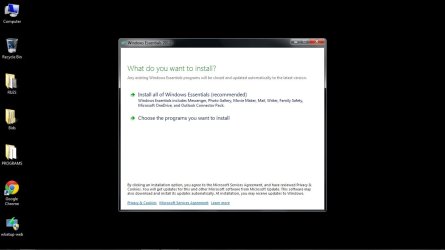
The three files below are what show, in numerical order, as I double-click the installer, wlsetup-web.exe, and get to the page to install. I select Mail and deselect the one component showing with an "x" ...there are no other components showing an "x"...and then start the installation. I'm told that the entire Windows Live program is installing. Is this what I should see? There is no box to tick with an "x" next to Mail, so I just want to make sure.

Thanks.
 

Attachments

  • winmail.01.jpg
    winmail.01.jpg
    47.6 KB · Views: 0
  • winmail.02.jpg
    winmail.02.jpg
    47.6 KB · Views: 0
  • winmail.03.jpg
    winmail.03.jpg
    37.3 KB · Views: 1

My Computer

Computer type
PC/Desktop
Computer Manufacturer/Model Number
Dell Inc. XPS 8300
OS
Microsoft Windows 7 Home Premium 64-bit 7601 Multiprocessor Free Service Pack 1
CPU
Intel(R) Core(TM) i7-2600 CPU @ 3.40GHz
Motherboard
Dell Inc. 0Y2MRG
Memory
8.00 GB
Graphics Card(s)
AMD Radeon HD 6450
Sound Card
(1) Realtek High Definition Audio (2) Intel(R) Display Aud
Monitor(s) Displays
Samsung SA300/SA350 [Monitor] (21.7"vis)
Screen Resolution
1920 x 1080 x 32 bits (4294967296 colors) @ 60 Hz
Hard Drives
(1) ST31500341AS ATA Device (2) Generic- Compact Flash USB Device (3) Generic- MS/MS-Pro USB Device (4) Generic- SD/MMC USB Device (5) Generic- SM/xD-Picture USB Device
PSU
Dell 460W for i7 configuration
Case
mid-size tower
Keyboard
Dell Inc. standard keyboard
Mouse
Dell Inc. wired mouse
Internet Speed
Verizon FIOS
Antivirus
Microsoft Security Essentials
Browser
I.E. 11 default/Chrome
The pics show and tell you that you already have the mail programme and a few others that will be updated if you chose to install family safety. Look in programmes and features and see if windows live essentials is installed, or click start orb and type into search windows live mail and see if it shows in menu list.
 

My Computer

Computer Manufacturer/Model Number
Put together
OS
Win7 Pro-64 Bit
CPU
i7-2600-3.4GHz
Motherboard
ASRock Z68M
Memory
8 GIG DDR3
Graphics Card(s)
onboard
Sound Card
onboard
Hard Drives
Seagate 1TB 7200RPM
PSU
680 W
Case
black
Cooling
stock fans
Keyboard
Microsoft
Mouse
Microsoft optical
Thank you, I appreciate the help! Live mail is, in fact, already installed, but Microsoft wants too much identifying information, principally zip code, if I wish to create a new account or update an old one, so I'll pass and continue to struggle with Gmail Notifier : /
 

My Computer

Computer type
PC/Desktop
Computer Manufacturer/Model Number
Dell Inc. XPS 8300
OS
Microsoft Windows 7 Home Premium 64-bit 7601 Multiprocessor Free Service Pack 1
CPU
Intel(R) Core(TM) i7-2600 CPU @ 3.40GHz
Motherboard
Dell Inc. 0Y2MRG
Memory
8.00 GB
Graphics Card(s)
AMD Radeon HD 6450
Sound Card
(1) Realtek High Definition Audio (2) Intel(R) Display Aud
Monitor(s) Displays
Samsung SA300/SA350 [Monitor] (21.7"vis)
Screen Resolution
1920 x 1080 x 32 bits (4294967296 colors) @ 60 Hz
Hard Drives
(1) ST31500341AS ATA Device (2) Generic- Compact Flash USB Device (3) Generic- MS/MS-Pro USB Device (4) Generic- SD/MMC USB Device (5) Generic- SM/xD-Picture USB Device
PSU
Dell 460W for i7 configuration
Case
mid-size tower
Keyboard
Dell Inc. standard keyboard
Mouse
Dell Inc. wired mouse
Internet Speed
Verizon FIOS
Antivirus
Microsoft Security Essentials
Browser
I.E. 11 default/Chrome
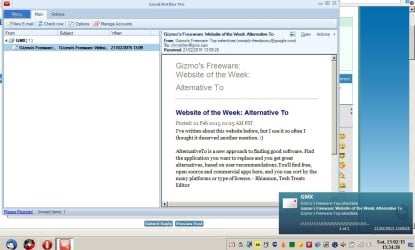
An alternative solution?

You could take a look at Gmail Notifier Pro if you like.

You don't need to use the paid for version and you don't need to set it as your default email client.

If you install it you can set it to notify you of new mail with either a pop up alert or a sound notification or both. It works best with IMAP Gmail and you can add other email accounts. You can choose to read mail in Gmail Pro or else read mail via launching your browser.

Gmail Notifier.jpg

You can set message check delay and message check frequency. You don't need to let it start with windows. You can run it on demand.

Read limitations in free version here: Download Gmail Notifier Pro - MajorGeeks
 
Last edited:

My Computer

Computer type
Laptop
Computer Manufacturer/Model Number
ASUS
OS
Microsoft Windows 7 Home Premium 64-bit 7601 Multiprocessor Free Service Pack 1
CPU
AMD C-60 APU with Radeon(tm) HD Graphics
Motherboard
ASUSTeK COMPUTER INC. X501U
Memory
4.00 GB
Graphics Card(s)
AMD Radeon HD 6290 Graphics
Sound Card
(1) AMD High Definition Audio Device (2) Realtek High Defi
Screen Resolution
1366 x 768 x 32 bits (4294967296 colors) @ 60 Hz
Hard Drives
Hitachi HTS545050A7E380 SATA Disk Device
Antivirus
Comodo CIS & FW, SecureAplus App Whitelisting, Threatfire
Browser
Cyberfox 64bit, Opera 64bit, Airfox
Other Info
Spy-The-Spy, HitmanPro.Alert, Norton Connect Safe, MJRegWatcher, BitDefender TrafficLight, Voodoo Shield, Zemana AntiMalware
Back
Top