New Motherboard Fail Windows Upgrade Please help

Marine16

New member
Local time
1:09 AM
Messages
17
Okay so here is the whole situation, 1st i was using windows vista x64 bit until recently i replaced my motherboard seeing as the previous crashed, i bought a gigabyte x58 UD3R and x3 2GB DDR3 memory sticks, with replacing the motherboard i was told i would need to reinstall windows, seeing as that the mother board, hard drive, etc all came together because i bought the computer straight off the factory so with replacing my motherboard and memory i don't have a windows vista x64 bit disk to "reinstall windows" so i just bought windows 7 upgrade disk hoping that i could just instal windows 7 with the upgrade disk. But when i load the disk i click on custom(advanced) installation and the installation begins it completes "expanding files" then installing updates etc then restarts. After my computer restarts it comes right back to the windows 7 installation screen again and ask me to reinstall windows 7 AGAIN.. and this is on going repeating itself over and over and over until my hard drive is full. I just formatted my hard drives to get all my space back but, i want to know why my computer isn't booting windows 7 when it says it's been installed? It seems as if it is only booting off of my CD/DVD drive and i don't know what to do please help!:cry:
 

My Computer My Computer

OS
Windows 64 bit
CPU
Intel Core i7 980
Motherboard
Gigabyte X57 UD3R
Memory
x3 2GB DDR3
Graphics Card(s)
GeForce 9800
PSU
Rocket Fish 500W
Case
NZXT Phantom
Keyboard
Razor
Mouse
Razor
Internet Speed
8Mghz
If you manually changed your boot order to boot from the CD/DVD first, you have to switch it back to the hard drive on the first reboot. You only want to boot from the CD/DVD once to start the install.
 

My Computer My Computer

Computer type
PC/Desktop
Computer Manufacturer/Model Number
Home Built
OS
Windows 10 Education 64 bit
CPU
AMD Phenom II X4 980 Black Edition Deneb 3.7GHz
Motherboard
Asus M4N68T-M V2 µATX Motherboard
Memory
8GB 4GBx2 Kingston PC10600 DDR3 1333 Memory
Graphics Card(s)
Zotac NVIDIA Geforce GT640 2 Gig DDR3 PCIe
Sound Card
VIA VT1708s High Definition Audio 8-channel Onboard
Monitor(s) Displays
22" LG E2242 1080p and 2 19" I-INC AG191D
Screen Resolution
1280x1024 - 1920x1080 - 1280x1024
Hard Drives
Crucial M100 256 GB SSD and 500 GB WD Blue SATA
PSU
Thermaltake TR 620
Case
Power Up Black ATX Mid-Tower Case
Cooling
Stock heatsink and fan
Keyboard
Logitech Wireless K350 Wave
Mouse
Logitech Wireless M570 Trackman Wheel
Internet Speed
80 Mbps Down 30 Mbps Up
Antivirus
Windows Defender
Browser
Internet Explorer 11
Other Info
HP DVD1040e Lightscribe - External USB2
There should be a message during POST to the effect 'press any key to boot from CD\DVD' If you dont press anything it will go to the next device in the boot order, providing that is the HDD\SSD then there would be no problem.
 

My Computer My Computer

Computer Manufacturer/Model Number
DIY
OS
Windows 7 home premium x64
CPU
AMD FX-4100 AM3+ 3.6GHz 12MB Black Edition
Motherboard
Asus M5A97 Pro
Memory
Crsair vengeance 12Gb DDR3 1600MHz CL9
Graphics Card(s)
Asus GTX 560 1GB
Sound Card
Realtek onboard
Monitor(s) Displays
Hanns G 1680x1050 native
Hard Drives
OCZ 128Gb Petrol ssd
2x500 Gb Samsung
PSU
OCZ StealthXstream II 500W
Internet Speed
8Mb or better
When i try to boot up my computer without a cd/dvd in the drive it goes to a screen saying Verfying DMI pool data..... and under it after like 5 minutes it will say CD/DVD Boot: Enter a systems disk and press enter, what kind of disk is a systems disk? because it says i completed the windows 7 install soooo?
 

My Computer My Computer

OS
Windows 64 bit
CPU
Intel Core i7 980
Motherboard
Gigabyte X57 UD3R
Memory
x3 2GB DDR3
Graphics Card(s)
GeForce 9800
PSU
Rocket Fish 500W
Case
NZXT Phantom
Keyboard
Razor
Mouse
Razor
Internet Speed
8Mghz
Also it seems as it is not regonizing my HDD because when i tell it to boot from HDD it skips it and jumps straight to boot CD/DVD
 

My Computer My Computer

OS
Windows 64 bit
CPU
Intel Core i7 980
Motherboard
Gigabyte X57 UD3R
Memory
x3 2GB DDR3
Graphics Card(s)
GeForce 9800
PSU
Rocket Fish 500W
Case
NZXT Phantom
Keyboard
Razor
Mouse
Razor
Internet Speed
8Mghz
Does the HD show up in BIOS setup? What is it's SATA controller setting there?

Try setting HD first to boot, then boot the 7 DVD from the one-time BIOS Boot Menu key given on first boot screen.

During installation, use Custom>Drive Options to delete everything on HD, repartition and format for install. Accept the 100mb SysReserved partition which places Repair console on F8 Advanced Boot Tools menu.
 
How do i repartition my HDD after i click delete in driver options?
 

My Computer My Computer

OS
Windows 64 bit
CPU
Intel Core i7 980
Motherboard
Gigabyte X57 UD3R
Memory
x3 2GB DDR3
Graphics Card(s)
GeForce 9800
PSU
Rocket Fish 500W
Case
NZXT Phantom
Keyboard
Razor
Mouse
Razor
Internet Speed
8Mghz
Do i have to instal my C: and D: drivers before i can instal windows 7? because if so i do not have a disk for those two drivers, they came with the factory computer when i bought it without the disks.
 

My Computer My Computer

OS
Windows 64 bit
CPU
Intel Core i7 980
Motherboard
Gigabyte X57 UD3R
Memory
x3 2GB DDR3
Graphics Card(s)
GeForce 9800
PSU
Rocket Fish 500W
Case
NZXT Phantom
Keyboard
Razor
Mouse
Razor
Internet Speed
8Mghz


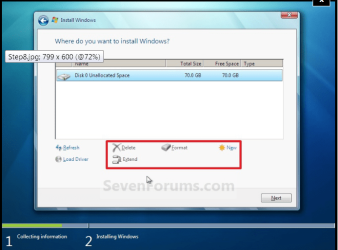
i never get past this image it always goes to a screen saying restarting your computer to continue then it just reboots the installation DVD putting me back at this screen


My Computer My Computer

OS
Windows 64 bit
CPU
Intel Core i7 980
Motherboard
Gigabyte X57 UD3R
Memory
x3 2GB DDR3
Graphics Card(s)
GeForce 9800
PSU
Rocket Fish 500W
Case
NZXT Phantom
Keyboard
Razor
Mouse
Razor
Internet Speed
8Mghz


i never get past this image it always goes to a screen saying restarting your computer to continue then it just reboots the installation DVD putting me back at this screen


You're still not "pressing any key to start CD/DVD" are you ?;)
 

My Computer My Computer

Computer type
PC/Desktop
Computer Manufacturer/Model Number
self build
OS
win 7 ultimate32bit, Win8.1pro wmc 32bit
CPU
amd phenom x4 9600
Motherboard
asus m2n32-sli deluxe
Memory
corsair twinxs 2x2gb
Graphics Card(s)
2x nvidia 1gb 8500gt
Sound Card
onboard
Monitor(s) Displays
23" PB Viseo 233d
Screen Resolution
1920x1080
Hard Drives
maxtor sata 500gb
maxtor sata 320gb
fujitsu sata200gb
PSU
oryxx tornado 750w
Case
thermaltake xaser lll
Cooling
artic freezer64 pro + 7 case fans
How much of the install completes? Does it go through the first or second restart? Is that when it starts over? If so, don't press any key when prompted except to first start the install.

The fail you describe sounds like it could also be a bad installer. Where did you get Win7? Did you burn the DVD yourself? Try burning another using ImgBurn at 4x speed with verify.

If this is a known-good installer, try wiping the HD of all boot sector code: SSD - HDD Optimize for Windows Reinstallation - Windows 7 Forums

Do i have to instal my C: and D: drivers before i can instal windows 7? because if so i do not have a disk for those two drivers, they came with the factory computer when i bought it without the disks.

No the Win7 installer is driver-complete (this is not XP) with newer quickly arriving after install via optional Windows Updates.


i never get past this image it always goes to a screen saying restarting your computer to continue then it just reboots the installation DVD putting me back at this screen


You're still not "pressing any key to start CD/DVD" are you ?;)

A screen saying press any key to start CD/DVD never comes up on my screen so no i'm not pressing a key

and Gregrocker: the installation goes all the way to where it says installing updates then puts a check mark beside it and then takes me to a screen that says restarting computer to continue and i end up back where i started, also i bought this disk "New" off of Amazon.com i have replaced everything in my computer except my gfx card hard drive and cd/dvd drive so i don't know if hard drives have to be "compatiable" with the motherboard but i know the gfx card is.

Also, this screen both of you talk about where it says "Press any key to start CD/DVD" i never see any screen like that at all the only way my installation disk boots is it takes me to a screen with a lot of numbers and stuff that looks like listings and under it says "Analyzing DMI Pool Data.........."
Then like 5-10 minutes later under that i see CD/DVD Boot: and then my installation DVD is booted. and it does that every single time, right after it says "Restating computer to continue."
 

My Computer My Computer

OS
Windows 64 bit
CPU
Intel Core i7 980
Motherboard
Gigabyte X57 UD3R
Memory
x3 2GB DDR3
Graphics Card(s)
GeForce 9800
PSU
Rocket Fish 500W
Case
NZXT Phantom
Keyboard
Razor
Mouse
Razor
Internet Speed
8Mghz
Try removing the DVD from the drive just as it says it is Restarting the Installation.

You have tried it both with DVD drive set first to boot, and HD set first to boot?

Normally this problem is solved by setting HD first to boot then using the one-time BIOS Boot Menu key to trigger the DVD at the beginning of the install. This keeps it from recycling install at restart.

Do you have the latest BIOS update for your mobo? If so, try resetting the CMOS: Clear CMOS - 3 Ways to Clear the CMOS - Reset BIOS. Then set HD as first to boot.

You can also try installing from flash stick: Install UltraISO trial, on File tab open DVD, on Bootable tab Write Disk Img, Format, Write. Boot under USB or HD's.
 
Try removing the DVD from the drive just as it says it is Restarting the Installation.

You have tried it both with DVD drive set first to boot, and HD set first to boot?

Normally this problem is solved by setting HD first to boot then using the one-time BIOS Boot Menu key to trigger the DVD at the beginning of the install. This keeps it from recycling install at restart.

Do you have the latest BIOS update for your mobo? If so, try resetting the CMOS: Clear CMOS - 3 Ways to Clear the CMOS - Reset BIOS. Then set HD as first to boot.

You can also try installing from flash stick: Install UltraISO trial, on File tab open DVD, on Bootable tab Write Disk Img, Format, Write. Boot under USB or HD's.

I'm currently doing the thing with the diskpart where you clean all my HDD's so i can try those things after but i have A few questions, how do i use the one-time BIOS boot menu to trigger the DVD and how do i get the latest BIOS update for my mb?
 

My Computer My Computer

OS
Windows 64 bit
CPU
Intel Core i7 980
Motherboard
Gigabyte X57 UD3R
Memory
x3 2GB DDR3
Graphics Card(s)
GeForce 9800
PSU
Rocket Fish 500W
Case
NZXT Phantom
Keyboard
Razor
Mouse
Razor
Internet Speed
8Mghz
Look on the Support Downloads webpage for your model mobo for the latest BIOS version. Read the information carefully about updating BIOS. If needed seek help on new mobo from their included Tech Support.

Most mobos have a one-time BIOS boot menu key given on first boot screen. This is often F12 on Giga mobos. I assumed you were using it or would have asked when first suggested since it solves this problem most times.

Googling your mobo also discovers Enabling Legacy USB in BIOS setup solves some of these problems.
 
i have a boot menu but it doesn't say "one-time boot menu"
 

My Computer My Computer

OS
Windows 64 bit
CPU
Intel Core i7 980
Motherboard
Gigabyte X57 UD3R
Memory
x3 2GB DDR3
Graphics Card(s)
GeForce 9800
PSU
Rocket Fish 500W
Case
NZXT Phantom
Keyboard
Razor
Mouse
Razor
Internet Speed
8Mghz
It can be BBS (Bios Boot Screen), BIOS Boot Menu, one-time BIOS Boot menu, etc. It has different names on different mobos. Try F12.
 
Never mind i found my one-time boot menu but, i can't continue troubleshooting until it's done cleaning my disk, i have a 500gb HDD
 

My Computer My Computer

OS
Windows 64 bit
CPU
Intel Core i7 980
Motherboard
Gigabyte X57 UD3R
Memory
x3 2GB DDR3
Graphics Card(s)
GeForce 9800
PSU
Rocket Fish 500W
Case
NZXT Phantom
Keyboard
Razor
Mouse
Razor
Internet Speed
8Mghz
Back
Top