

A while back we shared how internet-scale deep learning techniques deployed to Bing image search stack helped us improve results to a variety of tricky queries. Today we would like to share how our image search is evolving further towards a more intelligent and more precise search engine through multi-granularity matches, improved understanding of user queries, images and webpages, as well as the relationships between them.
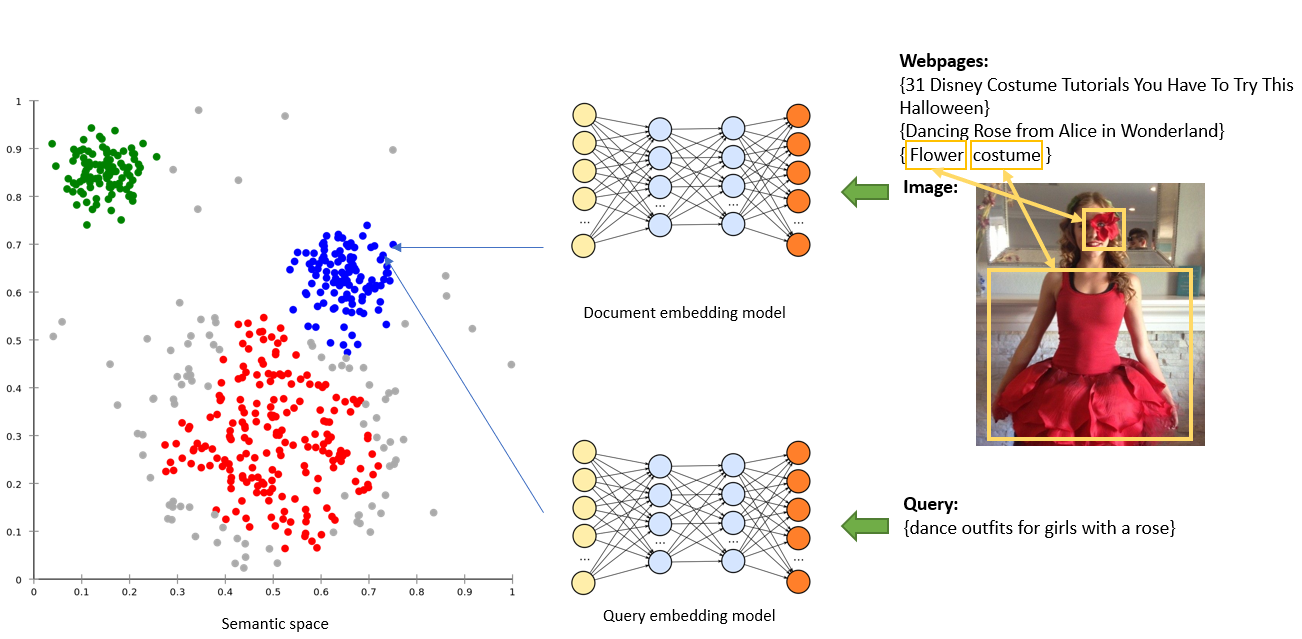
As we have discussed in last post, Bing image search has employed many deep learning techniques to map both query and document into semantic space greatly improving our search quality. There are however still many hard cases where users search for objects with specific context or attributes (for example: {blonde man with a mustache}, {dance outfits for girls with a rose}) which cannot be satisfied by current search stack. This prompted us to develop further enhancements. The new vector-match, attribute-match and Best Representative Query match techniques help address these problems.
Vector match
Take the image below as an example, humans can easily relate the query {dance outfits for girls with a rose} to this image or its surrounding text, but for machines it’s much harder. It is obvious to humans that the query and the image/webpages are semantically similar. As we explained in the previous post, Bing maps every query and document to semantic space which helps us find better results. With recent advancements we incorporated BERT/Transformer technology leveraging 1) pre-trained knowledge to better interpret text information - especially for above mentioned hard cases; 2) attention mechanism to embed the image and webpage with the awareness of each other, so that the embedded document is a good summarization of the salient areas of the image and the key points on the webpage.
Attribute match
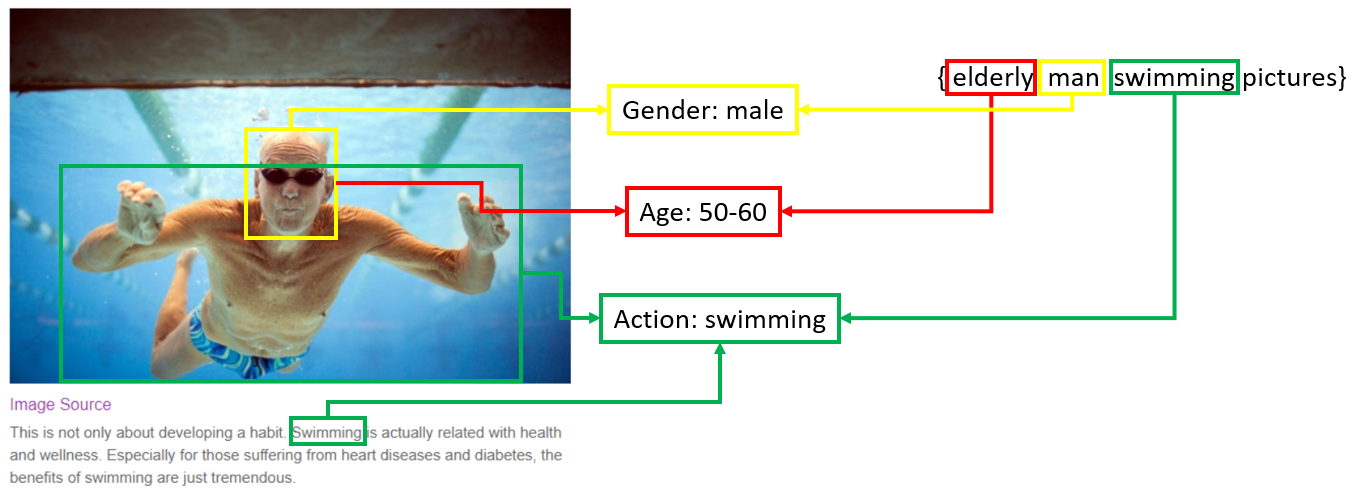
In many cases, a user’s query may contain multiple fine-grained attributes (not likely to be found in the text on page) all of which need to be satisfied. As their number grows, it gets harder to represent the whole query (or a suitable result image) with a single vector. To handle this increased complexity, we started developing techniques to extract a select set of object attributes from both query and candidate documents, and to use these attributes for matching. As shown in the example below, we applied attribute detectors to the query {elderly man swimming pictures} and found that there are some attributes describing the person’s appearance and behavior. Despite the webpage having insufficient textual information for this image, we are now able to detect certain similar attributes from the image content and its surrounding text. Now the query and document can be considered a “precise match” since they share the same attributes. The attribute detectors were trained at the same time using multi-task optimization strategy and can be easily scaled to any attributes of an object.
While we welcome you to try it out, note that this technology is in its early stages and currently supports only a limited set of scenarios and attributes.
BRQ match
In addition to above matching solutions, we also worked to enrich the ‘classic’ metadata for the images as much as possible. With higher quality metadata not only can the traditional query term matching methods retrieve more relevant documents but also the described vector match and attribute match approaches work so much better.
One of the most useful types of metadata is called “BRQ” - Best Representative Query. Best Representative Query for a given image is a query that the image would be a good result for. Because BRQs resemble user queries, they can be naturally and easily matched to incoming queries. BRQs are typically a good summarization of the main topics of the webpage and the major image content. The process of generating BRQs for Bing images also heavily relies on many modern deep learning techniques.
The picture below depicts two approaches to generating BRQs used in our search stack.
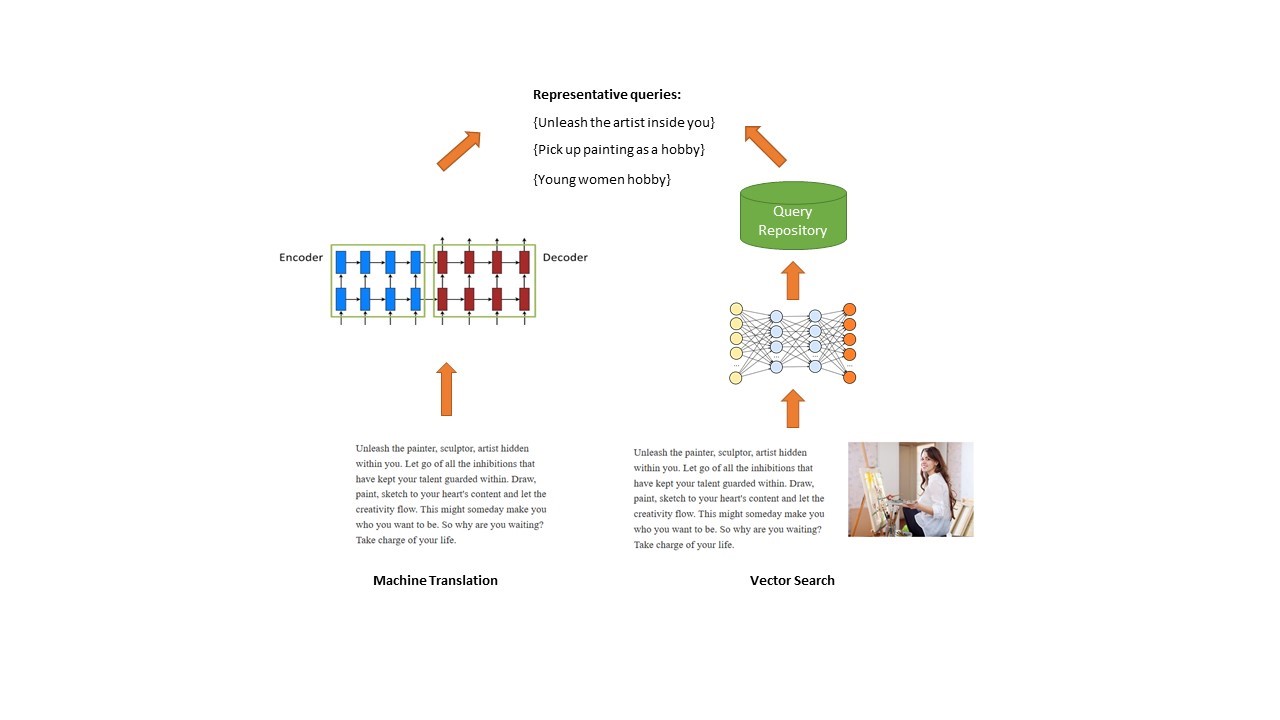
The first approach is to use Machine Translation model (usually in encoder-decoder mode) to generate BRQs. Traditionally Machine Translation techniques are used for translating from a source language to a target language, for example, from English to French. Here, however, the text on the webpage is considered as ‘source’ and fed into the encoder, and the generated query-like text from the decoder is in this case our ‘target’. In this way, we ‘translate’ the long text on the webpage into short phrases/queries. The above method however only leverages textual information to generate our BRQs.
The other approach takes advantage of the vector search technique and additionally incorporates image information. We embed the text from the webpage together with the image into a single semantic vector, and then search for the nearest neighbors in a query repository. Only the queries within a similarity threshold will be considered representative for this image.
Combining these two approaches lets us generate a much richer set of BRQ candidates which leads to better search results.
Summary
When all described multi-granularity and BRQ based enhancements were incorporated into the Bing stack, Bing Image Search took another step away from simple query term matching towards deeper semantic understanding of user queries and moving us even further along the way from being an excellent search engine to a truly intelligent one.
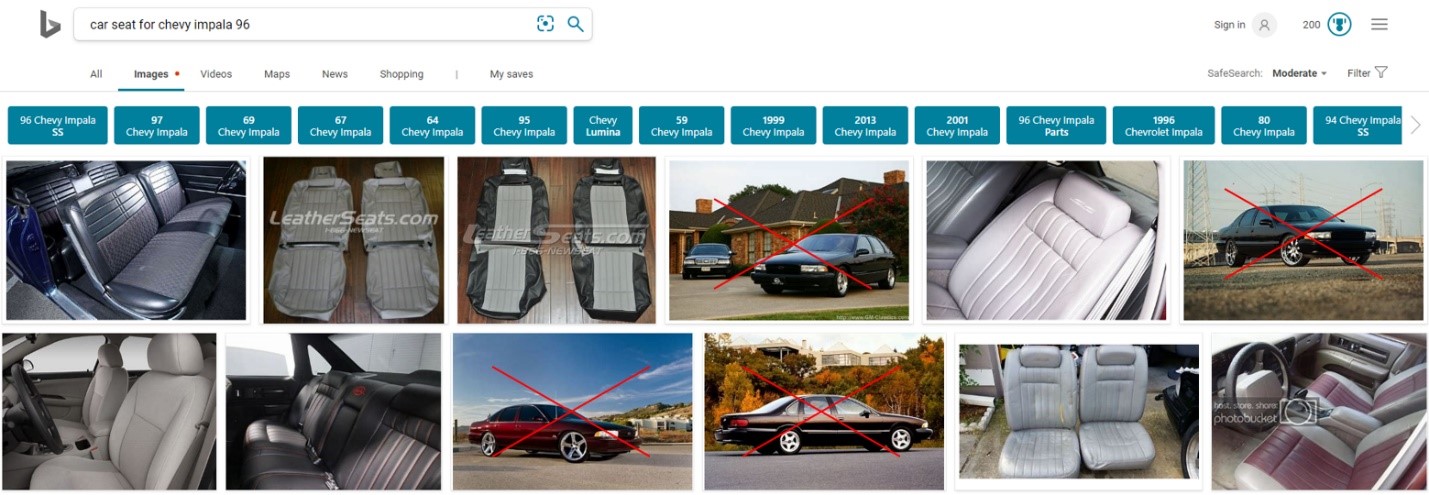
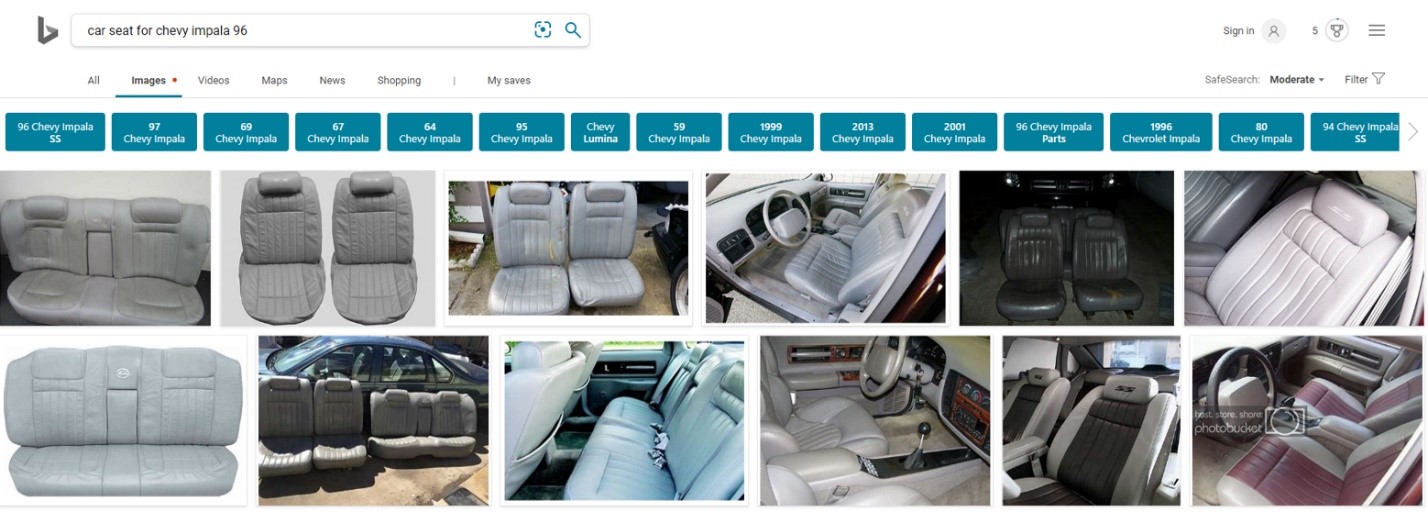
The following examples show how Bing results for one of the tricky queries ({car seat for Chevy impala 96}) evolved over the past two years continuously improving with incremental incorporation of deep learning techniques in the Bing stack.
Two years ago Bing Image Search was showing mostly cars instead of car seats for this query:
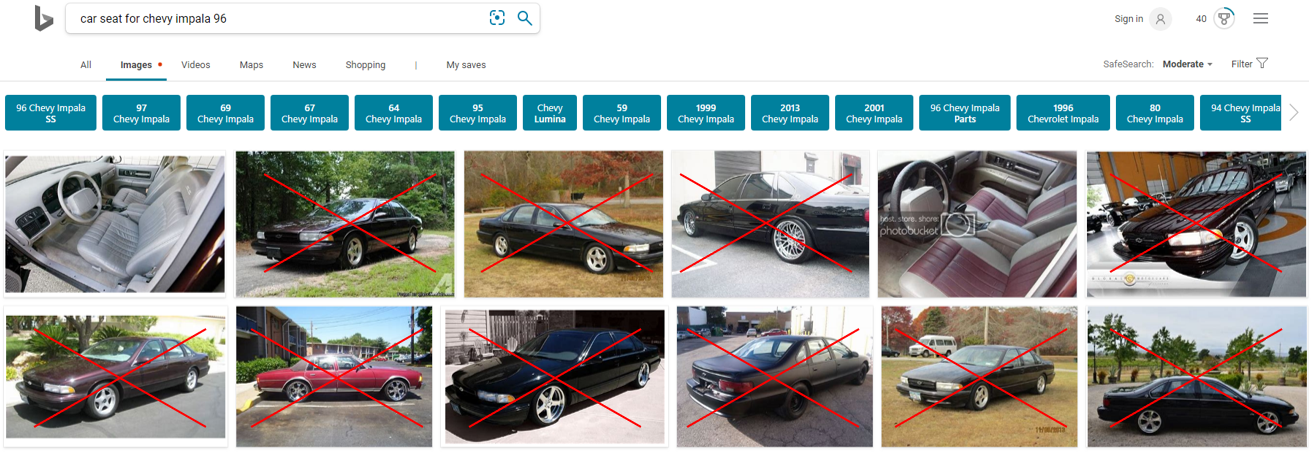
Half a year ago, after initial wave of deep learning integration we could see a definite reduction in undesired car images:
Finally, today Bing returns much cleaner and more relevant results:
We hope that our improvements will help you find on Bing what you are looking for even faster. Deep learning techniques are a set of very exciting and promising tools lending themselves very well to both text and image. We are hard at work applying them to an ever-increasing number of aspects in our stack to take our search quality even higher. Keep your eyes peeled for new features and enhancements!
In the meantime if you have any feedback, do let us know using Bing Listens or simply click on ‘Feedback’ on Bing Image Search!
- Bing Image Search Relevance Team
Source: Multi-granularity matching for Bing Image Search | Search Quality Insights
My Computer
At a glance
64-bit Windows 11 Pro for WorkstationsIntel i7-8700K OC'd to 5 GHz64 GB (4x16GB) G.SKILL TridentZ RGB DDR4 3600...ASUS ROG-STRIX-GTX1080TI-O11G-GAMING
- Computer type
- PC/Desktop
- Computer Manufacturer/Model Number
- Self built custom
- OS
- 64-bit Windows 11 Pro for Workstations
- CPU
- Intel i7-8700K OC'd to 5 GHz
- Motherboard
- ASUS ROG Maximus XI Formula Z390
- Memory
- 64 GB (4x16GB) G.SKILL TridentZ RGB DDR4 3600 MHz
- Graphics Card(s)
- ASUS ROG-STRIX-GTX1080TI-O11G-GAMING
- Sound Card
- Integrated
- Monitor(s) Displays
- 2 x Samsung Odyssey G7 27"
- Screen Resolution
- 2560x1440
- Hard Drives
- 1TB Samsung 990 PRO M.2,
4TB Samsung 990 PRO PRO M.2,
TerraMaster F8 SSD Plus NAS
- PSU
- Seasonic Prime Titanium 850W
- Case
- Thermaltake Core P3
- Cooling
- Corsair Hydro H115i
- Keyboard
- Logitech wireless K800
- Mouse
- Logitech MX Master 4
- Internet Speed
- 2 Gb/s Download and 100 Mb/s Upload
- Antivirus
- Malwarebyte Anti-Malware Premium
- Browser
- Google Chrome
- Other Info
- Logitech Z625 speaker system,
Logitech BRIO 4K Pro webcam,
HP Color LaserJet Pro MFP M477fdn,
APC SMART-UPS RT 1000 XL - SURT1000XLI,
Galaxy S23 Plus phone


