Solved New on here: need some help please

I see now that the original Sony Vista drivers are only available in 32 bit: Graphics Driver nVidia - 7.15R - 7.15.11.128 54.45 Mb 17/03/2008. 32 bit

Have you searched the Nvidia site for the latest driver? When you search for GeForce 8400M GT it provides several beta, current and past drivers - one of which may work. I would also first use the auto-detect app: Drivers | GeForce

Well I've just got round to trying the above link you suggested from an earlier post, and surprisingly the first Beta driver worked! :)

I did try the Nvidia website (UK) where you can search (NVIDIA Driver Downloads - Advanced Search) for drivers, and the same driver that I've just downloaded is listed, but I was apprehensive to download a Beta version.
 

My Computer My Computer

At a glance

Windows 7 Ultimate x64
Computer type
Laptop
Computer Manufacturer/Model Number
Sony Vaio FZ38M
OS
Windows 7 Ultimate x64
But...I've just lost the use of the FN keys...hmm
 

My Computer My Computer

At a glance

Windows 7 Ultimate x64
Computer type
Laptop
Computer Manufacturer/Model Number
Sony Vaio FZ38M
OS
Windows 7 Ultimate x64
If you were following the Clean Reinstall tutorial as you were supposed to have, you'd see that the function keys are dealt with at the end in the Special Note for Sony Vaio Owners.
 
Ok, well I did the clean install way before this so you know...

Anyway, my computer driver looks also like it is in need of a driver...

Says: Acpix64 pc

Advice?

Edit: I think it is ok because under processor it does state my processor.
 

My Computer My Computer

At a glance

Windows 7 Ultimate x64
Computer type
Laptop
Computer Manufacturer/Model Number
Sony Vaio FZ38M
OS
Windows 7 Ultimate x64
Did you enable Automatically deliver drivers via Windows Update (Step 3) then run all rounds of Important and Optional Windows Updates with reboots, until no more are available?

If the driver is still missing after that then double click on it, on Driver tab, select Update, then Automatic to maually search Windows Update.

If that fails then trace it's make and model using Hardware Identification to download the driver from the maker's Support Downloads webpage, or search via Google for Win7 or Vista drivers.

If all else fails this is the rare case with older hardware where you can install DriverMax for it's one free Driver Update per day to find just that driver. Then uninstall it as it is only to be trusted with one-off older driver searches where all else fails.
 
There's no problems now, thanks.

What exactly should I NOT uncheck on msconfig>startup and services? There's things like intel corporation stuff. I've kept my AV checked, but its difficult to know what to remove.
 

My Computer My Computer

At a glance

Windows 7 Ultimate x64
Computer type
Laptop
Computer Manufacturer/Model Number
Sony Vaio FZ38M
OS
Windows 7 Ultimate x64
You should be following the steps in Clean Reinstall - Factory OEM Windows 7 which explain that you don't need anything other than AV checked in msconfig>Startup or >Services tabs after ticking Hide all MS Services box.

The only exceptions are if you use sync, gadgets, stickies or need a messenger ready when you start up.
 
What's sync?
 

My Computer My Computer

At a glance

Windows 7 Ultimate x64
Computer type
Laptop
Computer Manufacturer/Model Number
Sony Vaio FZ38M
OS
Windows 7 Ultimate x64
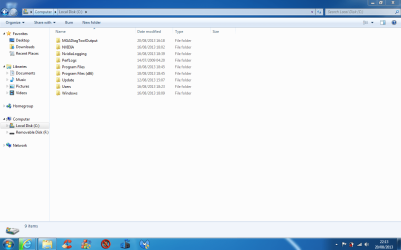
Thanks. I've noticed mgs diag tool output folder in c drive. Event log or something is there.

Is this do with the disk check I did with Puran? If so can I delete it?
 

My Computer My Computer

At a glance

Windows 7 Ultimate x64
Computer type
Laptop
Computer Manufacturer/Model Number
Sony Vaio FZ38M
OS
Windows 7 Ultimate x64
MGA, not MGS should I say.

I also recall clicking on event log file in the folder and it wanted to extract it. Once I did that it allowed me to see it in disk management. When I deleted the extracted file it wouldn't let me view the saved logs.

If you're saying I can delete the folder then all good.

Overall performance is fine.

Will post one up soon.

Thanks
 

My Computer My Computer

At a glance

Windows 7 Ultimate x64
Computer type
Laptop
Computer Manufacturer/Model Number
Sony Vaio FZ38M
OS
Windows 7 Ultimate x64
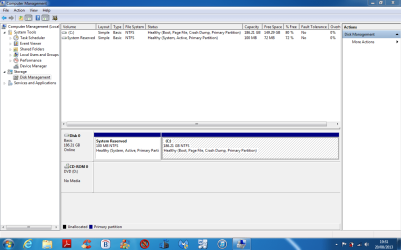
Disk Management capture

What you think?
 

Attachments

  • Capture.PNG
    Capture.PNG
    43.8 KB · Views: 5

My Computer My Computer

At a glance

Windows 7 Ultimate x64
Computer type
Laptop
Computer Manufacturer/Model Number
Sony Vaio FZ38M
OS
Windows 7 Ultimate x64
Looks correct.

Once you're sure there's no other issues you can mark the thread Solved at top.
 
Looks correct.

Once you're sure there's no other issues you can mark the thread Solved at top.

Will do.

Definitely no problem in deleting the folder?
 

Attachments

  • Capture.PNG
    Capture.PNG
    46 KB · Views: 4
  • Capture1.PNG
    Capture1.PNG
    47.8 KB · Views: 3

My Computer My Computer

At a glance

Windows 7 Ultimate x64
Computer type
Laptop
Computer Manufacturer/Model Number
Sony Vaio FZ38M
OS
Windows 7 Ultimate x64
Where did you get Win7 Ultimate and how it is activated?

Check in Computer>Properties to see it is activated.

The mgadiag is a test normally run to see if WIn7 is genuine. Since we didn't have you run it (that I can see) it may have been triggererd by a Windows Update to check your activation. As long as you have Genuine Win7 you don't have to worry about it.

And yes, you can delete the file.
 
Back
Top