
Solved New PC build - Win 7 initial boot help

adierolfe

New member
Member
Local time
12:49 PM
Messages
33
Location
Wales, UK
Hi guys. Just built a pc and having trouble with Win 7 on the initial boot up. I keep getting

Reboot and Select proper Boot device
or Insert Boot Media in selected Boot device and press a key

I've been in the BIOS and select 1st boot fron dvd/cd drive. The dvd drive powers up and spins the win 7 disc but keep getting the same message. I've tried swapping the sata cables.

Been looking at it for nearly 2 hours now. HDD has power (recognised in BIOS) and it is a new official Win 7 installation disc.

Please help
 

My Computer My Computer

At a glance

Windows 7 home prem 64bitIntel Pentium G850, Socket 1155, Dual Core, 2...4GB Corsair Value DDR3 PC3-10600 (1333)1GB XFX Radeon HD 7770
OS
Windows 7 home prem 64bit
CPU
Intel Pentium G850, Socket 1155, Dual Core, 2.90GHz
Motherboard
MSI H61M-P31 (G3) Motherboard
Memory
4GB Corsair Value DDR3 PC3-10600 (1333)
Graphics Card(s)
1GB XFX Radeon HD 7770
Hard Drives
500GB Seagate ST500DM002 Barracuda SATA 6Gb/s, 7200rpm
PSU
500W Storm Silent LPJ19-25
Case
Corsair Carbide 300R Mid-Tower Gaming Case

My Computer My Computer

At a glance

Windows 10 Pro x64 ; Xubuntu x64Intel i7 860 @ 2.80 GHz O/C'ed to 4.0GHz16GB Corsair Vengance DDR3 @ 661 MHz Dual Cha...EVGA NVidia GTX 560 1024MB
Computer type
PC/Desktop
Computer Manufacturer/Model Number
Golden Mk. I.4
OS
Windows 10 Pro x64 ; Xubuntu x64
CPU
Intel i7 860 @ 2.80 GHz O/C'ed to 4.0GHz
Motherboard
Gigabyte P55A-UD3R Rev.1. Award BIOS F13
Memory
16GB Corsair Vengance DDR3 @ 661 MHz Dual Channel (9-9-9-24)
Graphics Card(s)
EVGA NVidia GTX 560 1024MB
Sound Card
Realtek Integrated
Monitor(s) Displays
Dual Samsung SyncMaster 2494HS
Screen Resolution
1920*1080 and 1920*1080
Hard Drives
1*Samsung 840 EVO 120GB SSD;
1*OCZ Vertex 2 60GB SSD;
2*Samsung F3 SpinPoint 1TB in RAID0;
1*Samsung F1 SpinPoint 1TB;
2*Western Digital 1TB External USB 3.0
1*Western Digital 500GB External USB 3.0
1*Seagate 500GB External USB 2.0
PSU
Thermaltake ToughPower QFan 750W
Case
Thermaltake Element S VK60001W2Z
Cooling
Corsair H60 Water Cooling, 2*230mm and 2*80mm case fans
Keyboard
Logitech G110
Mouse
Logitech MX518
hi, the disc looks good and is official so not sure how is could be poorly written?

Does it make a difference that my pc is not Dell?
 

My Computer My Computer

At a glance

Windows 7 home prem 64bitIntel Pentium G850, Socket 1155, Dual Core, 2...4GB Corsair Value DDR3 PC3-10600 (1333)1GB XFX Radeon HD 7770
OS
Windows 7 home prem 64bit
CPU
Intel Pentium G850, Socket 1155, Dual Core, 2.90GHz
Motherboard
MSI H61M-P31 (G3) Motherboard
Memory
4GB Corsair Value DDR3 PC3-10600 (1333)
Graphics Card(s)
1GB XFX Radeon HD 7770
Hard Drives
500GB Seagate ST500DM002 Barracuda SATA 6Gb/s, 7200rpm
PSU
500W Storm Silent LPJ19-25
Case
Corsair Carbide 300R Mid-Tower Gaming Case
No difference whatsover.
 

My Computer My Computer

At a glance

Windows 10 Pro x64 ; Xubuntu x64Intel i7 860 @ 2.80 GHz O/C'ed to 4.0GHz16GB Corsair Vengance DDR3 @ 661 MHz Dual Cha...EVGA NVidia GTX 560 1024MB
Computer type
PC/Desktop
Computer Manufacturer/Model Number
Golden Mk. I.4
OS
Windows 10 Pro x64 ; Xubuntu x64
CPU
Intel i7 860 @ 2.80 GHz O/C'ed to 4.0GHz
Motherboard
Gigabyte P55A-UD3R Rev.1. Award BIOS F13
Memory
16GB Corsair Vengance DDR3 @ 661 MHz Dual Channel (9-9-9-24)
Graphics Card(s)
EVGA NVidia GTX 560 1024MB
Sound Card
Realtek Integrated
Monitor(s) Displays
Dual Samsung SyncMaster 2494HS
Screen Resolution
1920*1080 and 1920*1080
Hard Drives
1*Samsung 840 EVO 120GB SSD;
1*OCZ Vertex 2 60GB SSD;
2*Samsung F3 SpinPoint 1TB in RAID0;
1*Samsung F1 SpinPoint 1TB;
2*Western Digital 1TB External USB 3.0
1*Western Digital 500GB External USB 3.0
1*Seagate 500GB External USB 2.0
PSU
Thermaltake ToughPower QFan 750W
Case
Thermaltake Element S VK60001W2Z
Cooling
Corsair H60 Water Cooling, 2*230mm and 2*80mm case fans
Keyboard
Logitech G110
Mouse
Logitech MX518
Did I miss something? You said "initial bootup" implying you have already installed....correct? Have I misread your post?
 

My Computer My Computer

At a glance

Windows 10 Pro x64 ; Xubuntu x64Intel i7 860 @ 2.80 GHz O/C'ed to 4.0GHz16GB Corsair Vengance DDR3 @ 661 MHz Dual Cha...EVGA NVidia GTX 560 1024MB
Computer type
PC/Desktop
Computer Manufacturer/Model Number
Golden Mk. I.4
OS
Windows 10 Pro x64 ; Xubuntu x64
CPU
Intel i7 860 @ 2.80 GHz O/C'ed to 4.0GHz
Motherboard
Gigabyte P55A-UD3R Rev.1. Award BIOS F13
Memory
16GB Corsair Vengance DDR3 @ 661 MHz Dual Channel (9-9-9-24)
Graphics Card(s)
EVGA NVidia GTX 560 1024MB
Sound Card
Realtek Integrated
Monitor(s) Displays
Dual Samsung SyncMaster 2494HS
Screen Resolution
1920*1080 and 1920*1080
Hard Drives
1*Samsung 840 EVO 120GB SSD;
1*OCZ Vertex 2 60GB SSD;
2*Samsung F3 SpinPoint 1TB in RAID0;
1*Samsung F1 SpinPoint 1TB;
2*Western Digital 1TB External USB 3.0
1*Western Digital 500GB External USB 3.0
1*Seagate 500GB External USB 2.0
PSU
Thermaltake ToughPower QFan 750W
Case
Thermaltake Element S VK60001W2Z
Cooling
Corsair H60 Water Cooling, 2*230mm and 2*80mm case fans
Keyboard
Logitech G110
Mouse
Logitech MX518
Is this a guaranteed fix then?

I'm new to all this so bear with me as I like things in laymen terms
 

My Computer My Computer

At a glance

Windows 7 home prem 64bitIntel Pentium G850, Socket 1155, Dual Core, 2...4GB Corsair Value DDR3 PC3-10600 (1333)1GB XFX Radeon HD 7770
OS
Windows 7 home prem 64bit
CPU
Intel Pentium G850, Socket 1155, Dual Core, 2.90GHz
Motherboard
MSI H61M-P31 (G3) Motherboard
Memory
4GB Corsair Value DDR3 PC3-10600 (1333)
Graphics Card(s)
1GB XFX Radeon HD 7770
Hard Drives
500GB Seagate ST500DM002 Barracuda SATA 6Gb/s, 7200rpm
PSU
500W Storm Silent LPJ19-25
Case
Corsair Carbide 300R Mid-Tower Gaming Case
Did you perform the initial installation?
 

My Computer My Computer

At a glance

Windows 10 Pro x64 ; Xubuntu x64Intel i7 860 @ 2.80 GHz O/C'ed to 4.0GHz16GB Corsair Vengance DDR3 @ 661 MHz Dual Cha...EVGA NVidia GTX 560 1024MB
Computer type
PC/Desktop
Computer Manufacturer/Model Number
Golden Mk. I.4
OS
Windows 10 Pro x64 ; Xubuntu x64
CPU
Intel i7 860 @ 2.80 GHz O/C'ed to 4.0GHz
Motherboard
Gigabyte P55A-UD3R Rev.1. Award BIOS F13
Memory
16GB Corsair Vengance DDR3 @ 661 MHz Dual Channel (9-9-9-24)
Graphics Card(s)
EVGA NVidia GTX 560 1024MB
Sound Card
Realtek Integrated
Monitor(s) Displays
Dual Samsung SyncMaster 2494HS
Screen Resolution
1920*1080 and 1920*1080
Hard Drives
1*Samsung 840 EVO 120GB SSD;
1*OCZ Vertex 2 60GB SSD;
2*Samsung F3 SpinPoint 1TB in RAID0;
1*Samsung F1 SpinPoint 1TB;
2*Western Digital 1TB External USB 3.0
1*Western Digital 500GB External USB 3.0
1*Seagate 500GB External USB 2.0
PSU
Thermaltake ToughPower QFan 750W
Case
Thermaltake Element S VK60001W2Z
Cooling
Corsair H60 Water Cooling, 2*230mm and 2*80mm case fans
Keyboard
Logitech G110
Mouse
Logitech MX518
Did I miss something? You said "initial bootup" implying you have already installed....correct? Have I misread your post?


No. I cant install Win 7. Its a PC built today i have just turned on and cant get Win 7 to install
 

My Computer My Computer

At a glance

Windows 7 home prem 64bitIntel Pentium G850, Socket 1155, Dual Core, 2...4GB Corsair Value DDR3 PC3-10600 (1333)1GB XFX Radeon HD 7770
OS
Windows 7 home prem 64bit
CPU
Intel Pentium G850, Socket 1155, Dual Core, 2.90GHz
Motherboard
MSI H61M-P31 (G3) Motherboard
Memory
4GB Corsair Value DDR3 PC3-10600 (1333)
Graphics Card(s)
1GB XFX Radeon HD 7770
Hard Drives
500GB Seagate ST500DM002 Barracuda SATA 6Gb/s, 7200rpm
PSU
500W Storm Silent LPJ19-25
Case
Corsair Carbide 300R Mid-Tower Gaming Case
If this is a new mobo it's likely EFI. Watch this video:


Follow these steps to install to UEFI (Unified Extensible Firmware Interface) - Install Windows 7 with - Windows 7 Forums

If this is problematic or for any other reason you want to bypass UEFI to install normally to an MBR HD:

Unplug all other HD's and peripherals,

Boot into BIOS setup, reset to defaults, save changes. If an EFI BIOS, enable Legacy BIOS or Compatibility Support Module, set DVD drive first to boot, HD second. Then set SATA controller to AHCI. Save changes and Exit.

Then boot into installer DVD or flash stick burned or written using tool and latest ISO for your licensed OS version here.

At first installer screen Press Shift + F10 to open a Command Box, type:

DISKPART
LIST DISK
SELECT DISK 0 (after confirming Windows 7 target HD #)
CLEAN
CREATE PARTITION PRIMARY SIZE=102400 (for 100gb partition, adjust as desired)
FORMAT FS=NTFS LABEL="WINDOWS 7"
ACTIVE
EXIT
EXIT

Next click Install Now, then Custom install to Clean Install Windows 7 to the partition you created. If it fails then report back at which step and the verbatim error message.

In addition read over these steps to understand the tools and methods which work best to get and maintain a perfect Clean Reinstall - Factory OEM Windows 7. The steps are the same for retail.

After install you can adjust partition size or Create new partitions for data, etc. in Disk Mgmt.You are creating the partition here for the purpose of marking it Active which overcomes certain install failures.
 
OK. Please follow my suggestions in post #2 - if the DVD player is properly connected, then the likely problem is the installation DVD.
 

My Computer My Computer

At a glance

Windows 10 Pro x64 ; Xubuntu x64Intel i7 860 @ 2.80 GHz O/C'ed to 4.0GHz16GB Corsair Vengance DDR3 @ 661 MHz Dual Cha...EVGA NVidia GTX 560 1024MB
Computer type
PC/Desktop
Computer Manufacturer/Model Number
Golden Mk. I.4
OS
Windows 10 Pro x64 ; Xubuntu x64
CPU
Intel i7 860 @ 2.80 GHz O/C'ed to 4.0GHz
Motherboard
Gigabyte P55A-UD3R Rev.1. Award BIOS F13
Memory
16GB Corsair Vengance DDR3 @ 661 MHz Dual Channel (9-9-9-24)
Graphics Card(s)
EVGA NVidia GTX 560 1024MB
Sound Card
Realtek Integrated
Monitor(s) Displays
Dual Samsung SyncMaster 2494HS
Screen Resolution
1920*1080 and 1920*1080
Hard Drives
1*Samsung 840 EVO 120GB SSD;
1*OCZ Vertex 2 60GB SSD;
2*Samsung F3 SpinPoint 1TB in RAID0;
1*Samsung F1 SpinPoint 1TB;
2*Western Digital 1TB External USB 3.0
1*Western Digital 500GB External USB 3.0
1*Seagate 500GB External USB 2.0
PSU
Thermaltake ToughPower QFan 750W
Case
Thermaltake Element S VK60001W2Z
Cooling
Corsair H60 Water Cooling, 2*230mm and 2*80mm case fans
Keyboard
Logitech G110
Mouse
Logitech MX518
Unplug all other HD's and peripherals,

When you say unplug all other HD's and peripherals, I only have the 1 HD connected. I dont want to unplug that do i?
 

My Computer My Computer

At a glance

Windows 7 home prem 64bitIntel Pentium G850, Socket 1155, Dual Core, 2...4GB Corsair Value DDR3 PC3-10600 (1333)1GB XFX Radeon HD 7770
OS
Windows 7 home prem 64bit
CPU
Intel Pentium G850, Socket 1155, Dual Core, 2.90GHz
Motherboard
MSI H61M-P31 (G3) Motherboard
Memory
4GB Corsair Value DDR3 PC3-10600 (1333)
Graphics Card(s)
1GB XFX Radeon HD 7770
Hard Drives
500GB Seagate ST500DM002 Barracuda SATA 6Gb/s, 7200rpm
PSU
500W Storm Silent LPJ19-25
Case
Corsair Carbide 300R Mid-Tower Gaming Case
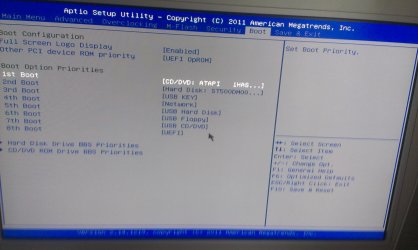
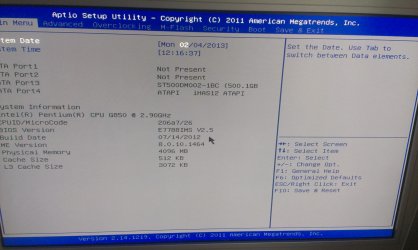
Hope these pics help.IMAG0168.jpg

IMAG0167.jpg
 

My Computer My Computer

At a glance

Windows 7 home prem 64bitIntel Pentium G850, Socket 1155, Dual Core, 2...4GB Corsair Value DDR3 PC3-10600 (1333)1GB XFX Radeon HD 7770
OS
Windows 7 home prem 64bit
CPU
Intel Pentium G850, Socket 1155, Dual Core, 2.90GHz
Motherboard
MSI H61M-P31 (G3) Motherboard
Memory
4GB Corsair Value DDR3 PC3-10600 (1333)
Graphics Card(s)
1GB XFX Radeon HD 7770
Hard Drives
500GB Seagate ST500DM002 Barracuda SATA 6Gb/s, 7200rpm
PSU
500W Storm Silent LPJ19-25
Case
Corsair Carbide 300R Mid-Tower Gaming Case
It looks like an MBR bios......do you see anything called UEFI in that Bios screen? Since you can see the DVD drive in tje BIOS, Im still inclined to suspect bad media since yoou cannot boot from the DVD installatiom disc.
 

My Computer My Computer

At a glance

Windows 10 Pro x64 ; Xubuntu x64Intel i7 860 @ 2.80 GHz O/C'ed to 4.0GHz16GB Corsair Vengance DDR3 @ 661 MHz Dual Cha...EVGA NVidia GTX 560 1024MB
Computer type
PC/Desktop
Computer Manufacturer/Model Number
Golden Mk. I.4
OS
Windows 10 Pro x64 ; Xubuntu x64
CPU
Intel i7 860 @ 2.80 GHz O/C'ed to 4.0GHz
Motherboard
Gigabyte P55A-UD3R Rev.1. Award BIOS F13
Memory
16GB Corsair Vengance DDR3 @ 661 MHz Dual Channel (9-9-9-24)
Graphics Card(s)
EVGA NVidia GTX 560 1024MB
Sound Card
Realtek Integrated
Monitor(s) Displays
Dual Samsung SyncMaster 2494HS
Screen Resolution
1920*1080 and 1920*1080
Hard Drives
1*Samsung 840 EVO 120GB SSD;
1*OCZ Vertex 2 60GB SSD;
2*Samsung F3 SpinPoint 1TB in RAID0;
1*Samsung F1 SpinPoint 1TB;
2*Western Digital 1TB External USB 3.0
1*Western Digital 500GB External USB 3.0
1*Seagate 500GB External USB 2.0
PSU
Thermaltake ToughPower QFan 750W
Case
Thermaltake Element S VK60001W2Z
Cooling
Corsair H60 Water Cooling, 2*230mm and 2*80mm case fans
Keyboard
Logitech G110
Mouse
Logitech MX518
on the first pic.

'other PCI device ROM priority' is set to 'UEFI OpRom' or can change to 'Legacy OpRom'

or on 8th boot it just says UEFI
 

My Computer My Computer

At a glance

Windows 7 home prem 64bitIntel Pentium G850, Socket 1155, Dual Core, 2...4GB Corsair Value DDR3 PC3-10600 (1333)1GB XFX Radeon HD 7770
OS
Windows 7 home prem 64bit
CPU
Intel Pentium G850, Socket 1155, Dual Core, 2.90GHz
Motherboard
MSI H61M-P31 (G3) Motherboard
Memory
4GB Corsair Value DDR3 PC3-10600 (1333)
Graphics Card(s)
1GB XFX Radeon HD 7770
Hard Drives
500GB Seagate ST500DM002 Barracuda SATA 6Gb/s, 7200rpm
PSU
500W Storm Silent LPJ19-25
Case
Corsair Carbide 300R Mid-Tower Gaming Case
If it was faulty media would #2 solve it?
 

My Computer My Computer

At a glance

Windows 7 home prem 64bitIntel Pentium G850, Socket 1155, Dual Core, 2...4GB Corsair Value DDR3 PC3-10600 (1333)1GB XFX Radeon HD 7770
OS
Windows 7 home prem 64bit
CPU
Intel Pentium G850, Socket 1155, Dual Core, 2.90GHz
Motherboard
MSI H61M-P31 (G3) Motherboard
Memory
4GB Corsair Value DDR3 PC3-10600 (1333)
Graphics Card(s)
1GB XFX Radeon HD 7770
Hard Drives
500GB Seagate ST500DM002 Barracuda SATA 6Gb/s, 7200rpm
PSU
500W Storm Silent LPJ19-25
Case
Corsair Carbide 300R Mid-Tower Gaming Case
Did you watch the video I posted? If you built the PC you should know about the parts you used, and you have a new generation UEFI BIOS. I would also read the motherboard Manual from its Support Downloads webpage.

Since DVD drive is set to boot in UEFI mode you'll need to either change it to normal mode or follow the special steps to install to UEFI (Unified Extensible Firmware Interface) - Install Windows 7 with - Windows 7 Forums.

There should be other settings - probably on the BIOS Advanced tab - to set to Legacy BIOS or Compatibility Support Module allowing EFI, Legacy or both modes.
 
Hi. Turns out the dvd drive wont read any discs I use. Putting Win 7 onto USB like post #2 said work.

Just need to send back the faulty drive now.

Thanks guys
 

My Computer My Computer

At a glance

Windows 7 home prem 64bitIntel Pentium G850, Socket 1155, Dual Core, 2...4GB Corsair Value DDR3 PC3-10600 (1333)1GB XFX Radeon HD 7770
OS
Windows 7 home prem 64bit
CPU
Intel Pentium G850, Socket 1155, Dual Core, 2.90GHz
Motherboard
MSI H61M-P31 (G3) Motherboard
Memory
4GB Corsair Value DDR3 PC3-10600 (1333)
Graphics Card(s)
1GB XFX Radeon HD 7770
Hard Drives
500GB Seagate ST500DM002 Barracuda SATA 6Gb/s, 7200rpm
PSU
500W Storm Silent LPJ19-25
Case
Corsair Carbide 300R Mid-Tower Gaming Case
Back
Top