New pc case and mobo p5b-vm do green light on board

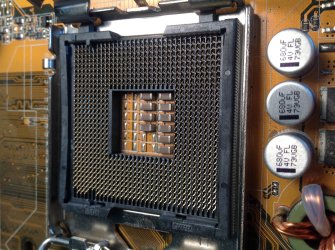
If you are talking about the CPU Pins inside the CPU socket, you'll have to send it back to the Manufacturer to have the socket replaced, unless you can straighten the pins without breaking one.
 

My Computers My Computers

  • At a glance

    Windows 11 ProRyzen 9 5900X32GB G Skill DDR4-3600EVGA RTX 3080 FTW 3 Ultra
    Computer type
    PC/Desktop
    Computer Manufacturer/Model Number
    ALWAYS UNDER CONSTRUCTION
    OS
    Windows 11 Pro
    CPU
    Ryzen 9 5900X
    Motherboard
    Asus X570 Crosshair Viii Hero
    Memory
    32GB G Skill DDR4-3600
    Graphics Card(s)
    EVGA RTX 3080 FTW 3 Ultra
    Sound Card
    On Board/Sennheiser PC37X Headset
    Monitor(s) Displays
    3 X Asus 27"
    Screen Resolution
    2560x1440
    Hard Drives
    2 X 1 TB NVME drives
    PSU
    EVGA 850
    Case
    Phanteks Eclipse P400A
    Cooling
    EVGA 280 AIO
    Keyboard
    Logitech G510s/ Logitech G13
    Mouse
    Logitech G502
    Internet Speed
    24/1
    Antivirus
    ESET/MBAM Pro/SAS Pro
    Browser
    Chrome/ Firefox/ Edge
  • At a glance

    Windows 11 ProIntel Ultra 9 288V32 GB LPDDR5X 8533
    Computer type
    Laptop
    System Manufacturer/Model Number
    Dell 16 Plus
    OS
    Windows 11 Pro
    CPU
    Intel Ultra 9 288V
    Memory
    32 GB LPDDR5X 8533
    Monitor(s) Displays
    16" Mini-LED HDR600 Touch 90 Hz
    Screen Resolution
    2560X1600
    Hard Drives
    1 TB NVME
I'll take a picture
 

My Computer My Computer

At a glance

windows 7 home premium 64 bit
Computer Manufacturer/Model Number
hp
OS
windows 7 home premium 64 bit
actually i went back one more time and got it back to the original position, but only issue is i'm not getting video
 

My Computer My Computer

At a glance

windows 7 home premium 64 bit
Computer Manufacturer/Model Number
hp
OS
windows 7 home premium 64 bit
Do you have the Graphics Card installed? If so are the power wires completely seated? Was the card installed last time it ran or not? Are you sure the monitor is plugged in correctly, to the graphics card if it is installed or to the rear motherboard connectors if it is not installed?

Do you have graphics if you boot into BIOS? If you do, use set the defaults settings like you did before. ( optimized defaults or setup defaults)

Every single pin in the CPU socket must fit into the corresponding holes in the CPU. Every pin controls some function between the Motherboard and CPU. If even 1 is out of place, bent, broken or damaged, some function of the board will not work, if it runs at all.

You can try the procedure I gave in this post http://www.sevenforums.com/hardware...reen-light-board-post3260674.html#post3260674 if you want to, just use the same battery. Leave it out for a minimum of 20 minutes. When installed, if it works, go to BIOS and run setup defaults again. Set the date and time, as before.

Try disconnecting bot wires from the hard drives and the DVD/CD drive and try to go into BIOS again.
 

My Computers My Computers

  • At a glance

    Windows 11 ProRyzen 9 5900X32GB G Skill DDR4-3600EVGA RTX 3080 FTW 3 Ultra
    Computer type
    PC/Desktop
    Computer Manufacturer/Model Number
    ALWAYS UNDER CONSTRUCTION
    OS
    Windows 11 Pro
    CPU
    Ryzen 9 5900X
    Motherboard
    Asus X570 Crosshair Viii Hero
    Memory
    32GB G Skill DDR4-3600
    Graphics Card(s)
    EVGA RTX 3080 FTW 3 Ultra
    Sound Card
    On Board/Sennheiser PC37X Headset
    Monitor(s) Displays
    3 X Asus 27"
    Screen Resolution
    2560x1440
    Hard Drives
    2 X 1 TB NVME drives
    PSU
    EVGA 850
    Case
    Phanteks Eclipse P400A
    Cooling
    EVGA 280 AIO
    Keyboard
    Logitech G510s/ Logitech G13
    Mouse
    Logitech G502
    Internet Speed
    24/1
    Antivirus
    ESET/MBAM Pro/SAS Pro
    Browser
    Chrome/ Firefox/ Edge
  • At a glance

    Windows 11 ProIntel Ultra 9 288V32 GB LPDDR5X 8533
    Computer type
    Laptop
    System Manufacturer/Model Number
    Dell 16 Plus
    OS
    Windows 11 Pro
    CPU
    Intel Ultra 9 288V
    Memory
    32 GB LPDDR5X 8533
    Monitor(s) Displays
    16" Mini-LED HDR600 Touch 90 Hz
    Screen Resolution
    2560X1600
    Hard Drives
    1 TB NVME
ok so i tryed it with and without the gpu no video either time other than that the connections during the whole process the only difference was that the disk drive and hd were connected, altho i did try it with out those 2 connected but same issue. i'll try taking out the battery again see if that helps.
 

My Computer My Computer

At a glance

windows 7 home premium 64 bit
Computer Manufacturer/Model Number
hp
OS
windows 7 home premium 64 bit
Left out the Battery for a good half hr or so still no video
 

My Computer My Computer

At a glance

windows 7 home premium 64 bit
Computer Manufacturer/Model Number
hp
OS
windows 7 home premium 64 bit
also I tried removing and connecting the video cord while it was on but it just goes to sleep
 

My Computer My Computer

At a glance

windows 7 home premium 64 bit
Computer Manufacturer/Model Number
hp
OS
windows 7 home premium 64 bit
I'm not sure what else to advise you. It looks like the bent CPU Pins, did you in. You can try to boot from the Windows installation disk and see if you get video then. If you don't, then It must be the CPU Pins on your motherboard.
 

My Computers My Computers

  • At a glance

    Windows 11 ProRyzen 9 5900X32GB G Skill DDR4-3600EVGA RTX 3080 FTW 3 Ultra
    Computer type
    PC/Desktop
    Computer Manufacturer/Model Number
    ALWAYS UNDER CONSTRUCTION
    OS
    Windows 11 Pro
    CPU
    Ryzen 9 5900X
    Motherboard
    Asus X570 Crosshair Viii Hero
    Memory
    32GB G Skill DDR4-3600
    Graphics Card(s)
    EVGA RTX 3080 FTW 3 Ultra
    Sound Card
    On Board/Sennheiser PC37X Headset
    Monitor(s) Displays
    3 X Asus 27"
    Screen Resolution
    2560x1440
    Hard Drives
    2 X 1 TB NVME drives
    PSU
    EVGA 850
    Case
    Phanteks Eclipse P400A
    Cooling
    EVGA 280 AIO
    Keyboard
    Logitech G510s/ Logitech G13
    Mouse
    Logitech G502
    Internet Speed
    24/1
    Antivirus
    ESET/MBAM Pro/SAS Pro
    Browser
    Chrome/ Firefox/ Edge
  • At a glance

    Windows 11 ProIntel Ultra 9 288V32 GB LPDDR5X 8533
    Computer type
    Laptop
    System Manufacturer/Model Number
    Dell 16 Plus
    OS
    Windows 11 Pro
    CPU
    Intel Ultra 9 288V
    Memory
    32 GB LPDDR5X 8533
    Monitor(s) Displays
    16" Mini-LED HDR600 Touch 90 Hz
    Screen Resolution
    2560X1600
    Hard Drives
    1 TB NVME
Well I looked again and had to straighten it a little further (if you can't tell by the picture which ones they were look at the 3rd dot on the bottom right and the 2 pins that were bent are to the left of that) either way I guess it is test time again
 

Attachments

  • image.jpeg
    image.jpeg
    709.1 KB · Views: 1

My Computer My Computer

At a glance

windows 7 home premium 64 bit
Computer Manufacturer/Model Number
hp
OS
windows 7 home premium 64 bit
The picture rotated again what I meant by bottom was the side with those silver capacitors
 

My Computer My Computer

At a glance

windows 7 home premium 64 bit
Computer Manufacturer/Model Number
hp
OS
windows 7 home premium 64 bit
Woohoo it worked I got video
 

My Computer My Computer

At a glance

windows 7 home premium 64 bit
Computer Manufacturer/Model Number
hp
OS
windows 7 home premium 64 bit
OK, good luck.
 

My Computers My Computers

  • At a glance

    Windows 11 ProRyzen 9 5900X32GB G Skill DDR4-3600EVGA RTX 3080 FTW 3 Ultra
    Computer type
    PC/Desktop
    Computer Manufacturer/Model Number
    ALWAYS UNDER CONSTRUCTION
    OS
    Windows 11 Pro
    CPU
    Ryzen 9 5900X
    Motherboard
    Asus X570 Crosshair Viii Hero
    Memory
    32GB G Skill DDR4-3600
    Graphics Card(s)
    EVGA RTX 3080 FTW 3 Ultra
    Sound Card
    On Board/Sennheiser PC37X Headset
    Monitor(s) Displays
    3 X Asus 27"
    Screen Resolution
    2560x1440
    Hard Drives
    2 X 1 TB NVME drives
    PSU
    EVGA 850
    Case
    Phanteks Eclipse P400A
    Cooling
    EVGA 280 AIO
    Keyboard
    Logitech G510s/ Logitech G13
    Mouse
    Logitech G502
    Internet Speed
    24/1
    Antivirus
    ESET/MBAM Pro/SAS Pro
    Browser
    Chrome/ Firefox/ Edge
  • At a glance

    Windows 11 ProIntel Ultra 9 288V32 GB LPDDR5X 8533
    Computer type
    Laptop
    System Manufacturer/Model Number
    Dell 16 Plus
    OS
    Windows 11 Pro
    CPU
    Intel Ultra 9 288V
    Memory
    32 GB LPDDR5X 8533
    Monitor(s) Displays
    16" Mini-LED HDR600 Touch 90 Hz
    Screen Resolution
    2560X1600
    Hard Drives
    1 TB NVME
I got into bios set the time and date set, I also set system defaults 2 things the cpu temp read 45 degrees celcious on my other pc it was in the lower 30's also the fan rpm text was in red running over 1750 rpm
 

My Computer My Computer

At a glance

windows 7 home premium 64 bit
Computer Manufacturer/Model Number
hp
OS
windows 7 home premium 64 bit
I'm glad it worked. That is too hot for the CPU at idle. You can clean and reapply the paste and cooler without removing the CPU! If that's what is needed. Check and make sure the CPU cooler is firmly attached.
 

My Computers My Computers

  • At a glance

    Windows 11 ProRyzen 9 5900X32GB G Skill DDR4-3600EVGA RTX 3080 FTW 3 Ultra
    Computer type
    PC/Desktop
    Computer Manufacturer/Model Number
    ALWAYS UNDER CONSTRUCTION
    OS
    Windows 11 Pro
    CPU
    Ryzen 9 5900X
    Motherboard
    Asus X570 Crosshair Viii Hero
    Memory
    32GB G Skill DDR4-3600
    Graphics Card(s)
    EVGA RTX 3080 FTW 3 Ultra
    Sound Card
    On Board/Sennheiser PC37X Headset
    Monitor(s) Displays
    3 X Asus 27"
    Screen Resolution
    2560x1440
    Hard Drives
    2 X 1 TB NVME drives
    PSU
    EVGA 850
    Case
    Phanteks Eclipse P400A
    Cooling
    EVGA 280 AIO
    Keyboard
    Logitech G510s/ Logitech G13
    Mouse
    Logitech G502
    Internet Speed
    24/1
    Antivirus
    ESET/MBAM Pro/SAS Pro
    Browser
    Chrome/ Firefox/ Edge
  • At a glance

    Windows 11 ProIntel Ultra 9 288V32 GB LPDDR5X 8533
    Computer type
    Laptop
    System Manufacturer/Model Number
    Dell 16 Plus
    OS
    Windows 11 Pro
    CPU
    Intel Ultra 9 288V
    Memory
    32 GB LPDDR5X 8533
    Monitor(s) Displays
    16" Mini-LED HDR600 Touch 90 Hz
    Screen Resolution
    2560X1600
    Hard Drives
    1 TB NVME
Yea a couple were loose but for some odd reason when I powered it on afterwards the temp got higher
 

My Computer My Computer

At a glance

windows 7 home premium 64 bit
Computer Manufacturer/Model Number
hp
OS
windows 7 home premium 64 bit
Would too much paste cause this?
 

My Computer My Computer

At a glance

windows 7 home premium 64 bit
Computer Manufacturer/Model Number
hp
OS
windows 7 home premium 64 bit
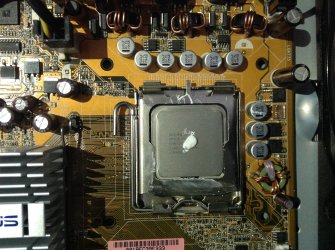
Yes. The video I showed you shows the right amount. 1 blob in the middle, between the size of a pea and an uncooked grain of rice. Let the pressure of putting on the cooler spread it. Make sure the old piece is perfectly clean, both the CPU and the cooler.
 

My Computers My Computers

  • At a glance

    Windows 11 ProRyzen 9 5900X32GB G Skill DDR4-3600EVGA RTX 3080 FTW 3 Ultra
    Computer type
    PC/Desktop
    Computer Manufacturer/Model Number
    ALWAYS UNDER CONSTRUCTION
    OS
    Windows 11 Pro
    CPU
    Ryzen 9 5900X
    Motherboard
    Asus X570 Crosshair Viii Hero
    Memory
    32GB G Skill DDR4-3600
    Graphics Card(s)
    EVGA RTX 3080 FTW 3 Ultra
    Sound Card
    On Board/Sennheiser PC37X Headset
    Monitor(s) Displays
    3 X Asus 27"
    Screen Resolution
    2560x1440
    Hard Drives
    2 X 1 TB NVME drives
    PSU
    EVGA 850
    Case
    Phanteks Eclipse P400A
    Cooling
    EVGA 280 AIO
    Keyboard
    Logitech G510s/ Logitech G13
    Mouse
    Logitech G502
    Internet Speed
    24/1
    Antivirus
    ESET/MBAM Pro/SAS Pro
    Browser
    Chrome/ Firefox/ Edge
  • At a glance

    Windows 11 ProIntel Ultra 9 288V32 GB LPDDR5X 8533
    Computer type
    Laptop
    System Manufacturer/Model Number
    Dell 16 Plus
    OS
    Windows 11 Pro
    CPU
    Intel Ultra 9 288V
    Memory
    32 GB LPDDR5X 8533
    Monitor(s) Displays
    16" Mini-LED HDR600 Touch 90 Hz
    Screen Resolution
    2560X1600
    Hard Drives
    1 TB NVME
I have re applied the paste 3 times now and I can't seem to get it lower than 45
 

My Computer My Computer

At a glance

windows 7 home premium 64 bit
Computer Manufacturer/Model Number
hp
OS
windows 7 home premium 64 bit
In fact the temp rose to 55 after a few min
 

My Computer My Computer

At a glance

windows 7 home premium 64 bit
Computer Manufacturer/Model Number
hp
OS
windows 7 home premium 64 bit
This good?
 

Attachments

  • image.jpeg
    image.jpeg
    707.4 KB · Views: 1

My Computer My Computer

At a glance

windows 7 home premium 64 bit
Computer Manufacturer/Model Number
hp
OS
windows 7 home premium 64 bit
Back
Top