New PC Lags/freezes

strugglez

New member
Local time
1:46 PM
Messages
18
Hey Guys,

I don't really know what's causing this, but thought i would seek advice as it annoys me so much, i thought i bought a beast of a machine, and it just doesn't seem to be running as expected.

I got this pc through a PC store, online, I'll list the specs of it and try to describe what it does to the best of my ability.

The specs are as follows:

Intel Core i7-2600 CPU @ 3.40GHz (Quad Core)
16GB ram.
GeForce GTX570 SC 1.2GB

I guess i could just post the link to what i bought anyway, here it is.
PB Tech - WKSPB6320W : PB 6320W Intel I7 2600 QUAD CORE 3.4GHz/ 16GB DDR3 GAMING 1600MHz RAM / 1TB SATA3 HDD / GTX570 VGA /BLUE RAY COMBO DRIVE/ Windows 7 HOME PREMIUM 64Bit /690 GAMING CASE/ Wireless N Ready.

The problem/s i have are more relating to programs just having a delayed response every now and then, no particular time. It is mainly to do with Interenet explorer, and i have also noticed MSN lags very badly when i type in the box for the messanger.

Other applications do it such as itunes, but mainly when interenet explorer is running. Also times of heavy tasks such as a CClean, took a while, which i thought being a new computer with nothing much on it at all, even at startup, should take 2 minutes...

Any help is greatly appreciated.

Thanks

Struggles.


My Computer My Computer

OS
Windows 7 Ultimate
CPU
P4 3.4Ghz
Memory
1Gig Ram
i'm no computer guru but the only thing you should be using IE for is to download firefox or chrome or opera.
 

My Computer My Computer

Computer Manufacturer/Model Number
homemade
OS
windows 7 32 bit
CPU
intel core 2 duo
Motherboard
gigabyte 945gcm-s2c
Memory
2 gigs
Graphics Card(s)
nvidia
Sound Card
internal
Monitor(s) Displays
22" acer
Hard Drives
250 gig maxtor
i'm no computer guru but the only thing you should be using IE for is to download firefox or chrome or opera.

Sweeping generalisations such as this are of no use to anyone seeking an solution to their problem.

The thread starter is asking why his new computer isn't performing as it should, not whether or not he should be using a particular browser, all of which have their devotees or detractors.

Have a look at this excellent tutorial, which offers suggestions on improving your Windows 7 performance.

http://www.sevenforums.com/tutorials/11728-optimize-windows-7-a.html
 

My Computer My Computer

Computer Manufacturer/Model Number
HP Pavilion Elite 495UK
OS
Windows 7 Ultimate SP1 64-Bit
CPU
Intel Core i7 870 @ 2.93GHz
Motherboard
MSI 2A9C (CPU1)
Memory
8Gb Dual-Channel DDR3 @ 664MHz
Graphics Card(s)
nVidia GeForce GTX 460 1024MB dedicated RAM
Sound Card
Realtek HD Audio
Monitor(s) Displays
HP2310i
Screen Resolution
1920 x 1080
Hard Drives
1x1954GB Hitachi HDS22020ALA 330 (RAID), 1x1954GB Hitachi External for backup and storage
PSU
460W
Case
HP Elite
Cooling
Air cooled
Keyboard
Logitech K750 solar-powered keyboard
Mouse
Logitech Wireless M180 mouse
Internet Speed
2Mb
Other Info
Pure Avanti Flow Internet Radio with iPod Dock, 64Gb iPod, HP USB Speakers, Sony MDR-V500 Headphones, Sony Vaio F-Series Laptop
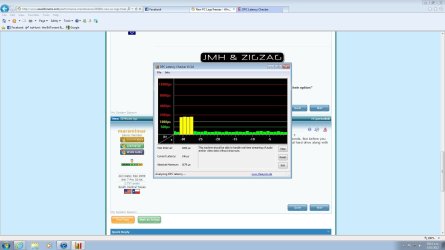
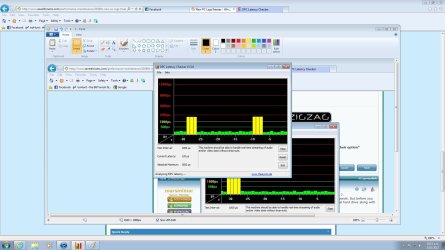
Do what seavixen suggests first because it is more likely but it may just be a corrupt driver. Run this free latency checker to verify it.

DPC Latency Checker
 

My Computer My Computer

Computer Manufacturer/Model Number
HP Pavillion dv-7 1005 Tx
OS
Win 8 Release candidate 8400
CPU
[email protected]
Memory
4 gigs
Graphics Card(s)
Nvidia 9600M
Sound Card
HD built-in
Monitor(s) Displays
17" Wxga
Screen Resolution
1440x900
Cooling
none
Internet Speed
45Mb down 5Mb up
Your computer specs are great so take a look at this tutorial on how to optimize Windows 7. (Not everything will apply to you.) Feel free to experiment and see how your machine responds. But before you do anything I'd very strongly urge you to create a full system image on a separate external hard drive along with the companion system repair disk. Just in case. ;)

http://www.sevenforums.com/tutorials/11728-optimize-windows-7-a.html

EDIT: I see seavixen beat me again!
 

My Computer My Computer

Computer type
Laptop
Computer Manufacturer/Model Number
Sony Vaio VPCEB47GM Laptop
OS
Win 7 Pro 64-bit
CPU
Intel i5 2.4 Ghz
Memory
8GB DDR3
Graphics Card(s)
Intel HD 3000
Sound Card
IDT High Definition
Monitor(s) Displays
15.6 WGXA Anti-Glare LED
Screen Resolution
1280x800
Hard Drives
640Gb 7200rpm
Antivirus
MSE
Browser
Opera (primary) with IE9 backup
Hey, Thanks for all the replies, It's nice to see some help!
I Have just gone through a rough time with a breakup as well, so this is helping me keep occupied.

I took some images, but i noticed some spikes in the graphs, so i don't know how to annalyse this data, so hopefully this means something.

Oh, and i also thought and looked at the optimise windows 7 page... But i find it really hard to beleive that i should really need to do anything apart from maybe check for newer drivers or get A SSD for my main drive... as my PC is new with pretty good equipment, would that not be fair to say?


Oh, and i tried different things, I dunno if it's fixed it fully, but i used CCleaner and it seems to have fully fixed msn, I'll have to wait and see if other programs are cleared up/stopped freezing up.

I am guessing cache and that should be cleared constantly then?
 

Attachments

  • 1.jpg
    1.jpg
    120.6 KB · Views: 24
  • 2.jpg
    2.jpg
    177.4 KB · Views: 18
Last edited:

My Computer My Computer

OS
Windows 7 Ultimate
CPU
P4 3.4Ghz
Memory
1Gig Ram
Helllo strugglez,

There are many reasons why a PC " behaves" this way.

These annoying " gliches" may be caused by an overloaded hard drive, overworked CPU, Malware, running 2 AV 's, unnecessary data, Browser addons or you may have unnecessary programs running in the background etc....


* Did your computer come preloaded with Anti Virus Software?
If so what was it & how did you remove it?

* Please list ALL of your Current Security software.

* Some further reading for you...

Use Advanced Tools to Troubleshoot Performance Problems in Windows 7 - How-To Geek

Fix Windows system performance problems on slow Windows computers

http://www.sevenforums.com/tutorials/89919-troubleshooting-internet-explorer-issues.html

http://www.sevenforums.com/tutorials/1222-internet-explorer-reset.html
 

My Computer My Computer

Computer Manufacturer/Model Number
LAPTOP. HP Pavilion dv7-4010TX .
OS
Win 7 Ultimate 64-bit. SP1.
CPU
Intel i7 -720QM.[1.6GHz Turbo Boost 2.8GHz. 6MB Cache.]
Memory
8 DDR 3 RAM. 1066MHZ
Graphics Card(s)
ATI 1024 MB. DDR3. Radeon HD5650
Monitor(s) Displays
17.3" High Definition Brightview LCD. LED Backlit.
Screen Resolution
1600 x 900.
Hard Drives
640GB
Case
Laptop / notebook.
Mouse
Logitech Anywhere mouse. MX.
Internet Speed
ADSL [ but too slow ]
Work through these troubleshooting steps to resolve repeat errors in the logs, utilize System resources, and test your hardware (especially RAM) for faults.

Was there any time since you bought the machine that it was working fine with no hangs?

Be sure to achieve a Clean Boot so that programs running in the background are eliminated.
 
Back
Top