New pc ,problem when i try to install windows 7 from USB flash drive

Rambibg

New member
Local time
1:51 PM
Messages
6
I have made bootable usb using win to flash with Microsoft software ( the original one)
and also SARDU
i try on 2 different flash drivers on 2 extra pcs all runs extra.... but today when i bought my new pc
ASUS-P8B75-V--B75--LGA1155
I7-3770 /3.4G/8M/BOX/LGA1155
2X4G DDR3 1600 A-DATA
1TB WD Caviar Blue 7200rpm 64MB SATA3 WD10EZEX
SAPPHIRE HD7950 3G GD5 LITE -
Thermaltake Commander MS-I Black USB3.0 VN400A1W2N
PSU SEASONIC SS-520GB BRONZE -

The problem is, when i select option to boot from usb(using f8) I get black screen whit
blinking cursor and it wont move on from that point, but when i use the same usb on other computers it boots perfectly (black screen whit blinking cursor disapears after 30 sec).

Does anyone know solution for this?

I DO NOT HAVE DVD/CD at all i never buy one, because i dont use one, and i aways have installed windows from flash drive.. but now.. i think i have serious issue.

When i press f8 i get this

Realtek Boot Agent

Sata PA:wdc ( long name here xD) 953869mb

Sandisk Cruzer 8.02 3839 mb

Sandisk cruzer 8.02 18mb

i select the windows one (3839) nothing happens, i try to select everything else nothing happen? please guys help me out ..i just bought a pc for 1000$ and i cant install windows?
 

My Computer My Computer

At a glance

62 home premium
OS
62 home premium
ty for
As your ASUS-P8B75-V--B75 has a uEFI BIOS.
UEFI Bootable USB Flash Drive - Create in Windows

How to install Windows 64 bit on a uEFI BIOS:
UEFI (Unified Extensible Firmware Interface) - Install Windows 7 with

by the way
okey.. is it possible for me to install any drivers before i have windows installed? its new pc i have nothing on, only bioss i mean i have never installed drivers before windows? so is it possible?:D
 

My Computer My Computer

At a glance

62 home premium
OS
62 home premium
It does not work again.
Thats what i have done

i got a usb with windows 7 on it from a friend it does work on the pc im right now ( also my flash drive works too) i try 32/64 bit works

i try that on my new machine nothing happens it does not work
i change Priority from bios to be first second and so on, it does not work
everytime it just loaaaaaaaad like its gonna start and I get black screen whit
blinking cursor.

When i remove the flash drive, i got the message " please insert boot device ... " so i put the flash in, press a key
aaaaaand here we go again
I get black screen whit
blinking cursor

everything i try i basicly stuck on this
BlinkingCursor.jpg

and thats it
 

My Computer My Computer

At a glance

62 home premium
OS
62 home premium
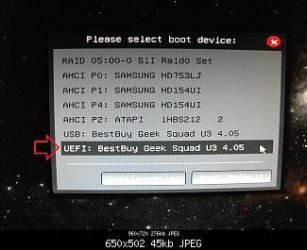
Are you boot from the uEFI Drive?

USB
UEFI_USB_Boot_Menu.jpg

DVD
Windows 8 Downgrade-006 SB.PNG


Where do you buy your DVD from?
 

My Computer My Computer

At a glance

ME/XP/Vista/Win7
OS
ME/XP/Vista/Win7
Are you boot from the uEFI Drive?
Y E S

Mine windows was original i used the pc @ work to transfer on my usb flash drive, the other 2 flash drive i got where pirate windows but they worked on my mate pc so yea )
 

My Computer My Computer

At a glance

62 home premium
OS
62 home premium
Did you follow the tutorial & format the USB Pendrive to FAT32?
 

My Computer My Computer

At a glance

ME/XP/Vista/Win7
OS
ME/XP/Vista/Win7
Yes mate i did.
I follow them, and this is not the first time i re install my windows, i have done it alot.
its the 9 or 10 time from usb and before that i have done it for alteast 20 times on my brother/mine my wife pc's.
When i google i see alot of people with the same problem and they buy a CD/dvd drive.
i think its some kind of bios problem to be honest, or something similar.
 

My Computer My Computer

At a glance

62 home premium
OS
62 home premium
Try the Windows 7 DVD.
 

My Computer My Computer

At a glance

ME/XP/Vista/Win7
OS
ME/XP/Vista/Win7
i do NOT have cd/dvd burner
im gonna buy
LG GH24NS95 DVD RW SATA BLACK
 

My Computer My Computer

At a glance

62 home premium
OS
62 home premium
You can also bypass the EFI BIOS to install normally to an MBR format HD:

Unplug all other HD's and peripherals,

Boot into BIOS setup to enable Legacy BIOS if present. Next check BIOS Boot order for an EFI Boot Disk and if present remove it, set DVD drive first to boot, HD second. Then set SATA controller to AHCI. Save changes and Exit.

Then boot into installer DVD or flash stick burned or written using tool and latest ISO for your licensed OS version here.

At first installer screen Press Shift + F10 to open a Command Box, type:

DISKPART
LIST DISK
SELECT DISK 0 (after confirming Windows 7 target HD #)
CLEAN
CREATE PARTITION PRIMARY SIZE=102400 (for 100gb partition, adjust as desired)
FORMAT FS=NTFS LABEL="WINDOWS 7"
ACTIVE
EXIT
EXIT

Next click Install Now, then Custom install to Clean Install Windows 7 to the partition you created. If it fails then report back at which step and the verbatim error message.

In addition read over these steps to understand the tools and methods which work best to get and maintain a perfect Clean Reinstall - Factory OEM Windows 7. The steps are the same for retail.
 
Back
Top