
New RAID Array and Clean Install Win7HP-Help with RAID Driver Install

laopa

New member
Local time
1:53 AM
Messages
19
Hi :confused:,

RAID and Win 7 Home Premium newbie. Short version of long story - replaced old dead RAID Drives in Win XP system with (2) new 500GB Drives plus plan to upgrade RAM to 8GB (would have liked more but $$$) and install new OS = WIN 7 Home Premium 64 Bit.

MB is GA-EP45-UD3R Rev 1.1 and I am having trouble figuring out how to get, prepare and install the Intel RAID Drivers for 64 Bit Win 7 HP.

My main problem is that on the Gigabyte site they offer two RAID Drives.

Intel SATA Preinstall driver (For AHCI / RAID Mode) Note: Press F6 during Windows setup to read from floppy. OS: Windows XP 64bit,Windows Server 2003 64bit 8.9.0.1023 0.32 MB 2009/08/11
Intel SATA RAID/AHCI Driver OS: Windows XP 32bit, Windows XP 64bit, Windows Vista 32bit,Windows Vista 64bit,Windows 7 32bit,Windows 7 64bit,Windows Server 2003 32bit,Windows Server 2003 64bit 8.9.0.1023 13.10 MB 2009/08/11

The first "pre-install" driver extract to a 64Bit (bootdisk - Win XP 64?) and the second "I do not know when to use it" Driver extracts to a (iata_cd.exe).

This is where I am totally lost. Which RAID Driver and from where do I install during the clean install of Win 7.

I get the need for a USB Stick/Thumb Drive with the RAID Driver on it that Win 7 will ask to be pointed at, but which Driver????

I cannot extract anything from the iata_cd.exe. Tried 7-Zip, Universal Extractor and File Alyser - I do not see a Win 7 64Bit Raid Driver??

Do I point Win 7 at the whole file??

The first Driver states that it is for Win XP 64 Bit or Win Server 2003 64 Bit but it is extractable?

My new RAM and OS will arrive in the next couple of days so I really need help with this. :o
 
Last edited:

My Computer

OS
Win 7 Home Premium 64 Bit
Memory
8 MB
Hard Drives
2 X Seagate 500GB in RAID Array
Antivirus
Emsisoft Anti-Malware & Online Armor Firewall
The pre-install driver will allow setup to install the files correcty on the RAID array this is offered for XP only.

When you have created the RAID array in the BIOS Utility and you launch the windows 7 setup does it show the new array as a possible install location? If so there is no need for a pre-install driver (Win7 supports a variety of RAID setup out of the box).

If you do need a pre-install driver, you have not been offered one for Win7/Vista on the Manufacturers website. The only solution to this I have found is to Download "7lite/Nlite" and build the "post install" driver into the win7 image then burn a new disk (or burn to USB pen for faster install).

Hope this helps.
 

My Computer

Computer type
PC/Desktop
Computer Manufacturer/Model Number
Self Build
OS
Windows 7 Ultimate x64
CPU
Intel Core2 Quad Q8300 2.5Ghz
Motherboard
Asus P5QD Turbo
Memory
Kingston HyperX 4x1GB DDR2 1066Mhz
Graphics Card(s)
Asus/Nvidia 9500GT 1GB
Sound Card
On-Board HD
Monitor(s) Displays
22" Widescreen TFT
Screen Resolution
1920x1080
Hard Drives
2x 320Gb Seagate SATAII RAID 0
2x 80Gb Seagate SATAII RAID 0
1x 1tb hybrid (8gb ssd)
PSU
650w
Case
ATX
Cooling
140mm front, 120mm Rear, 80mm Chipset + stock CPU and GPU
Keyboard
Plastic one
Mouse
Plastic one
Internet Speed
4Mbps
Other Info
Laptop: HP Elitebook 2560p
i5 @2.7Ghz 4GB DDR3
Hi,

Thanks for the rapid reply. At this stage I had not tried to install Win 7 64bit but the new RAM and OS Pack arrived this morning so I guess that's next.

The only solution to this I have found is to Download "7lite/Nlite" and build the "post install" driver into the Windows 7 image then burn a new disk (or burn to USB pen for faster install).

Now I have a headache.

If Plan A does not work I will be back because that scares me.

Thanks ... I will be back asap. Hopefully full of good cheer, good will and happiness.
 

My Computer

OS
Win 7 Home Premium 64 Bit
Memory
8 MB
Hard Drives
2 X Seagate 500GB in RAID Array
Antivirus
Emsisoft Anti-Malware & Online Armor Firewall
Hi,

Followed the link and it leads to a Tutorial. I could not find any links to Download the actual Drivers the Tutorial refers to.

Did I miss something?

Thanks for the reply.
 

My Computer

OS
Win 7 Home Premium 64 Bit
Memory
8 MB
Hard Drives
2 X Seagate 500GB in RAID Array
Antivirus
Emsisoft Anti-Malware & Online Armor Firewall
Click on the download button below for the driver


Download


My Computer

Computer Manufacturer/Model Number
Custom Built
OS
Windows 7 Ultimate 32-Bit & Windows 7 Ultimate 64-Bit
CPU
Intel Core i7 CPU 950 @ 3.07GHz
Motherboard
ASUS P6T DELUXE V2
Memory
OCZ 6GB (3 x 2GB) 240-Pin DDR3 SDRAM DDR3 1600 OCZ3X1600R2
Graphics Card(s)
ATI Radeon HD 5700 Series
Sound Card
OnBoard
Hard Drives
WD6400AACS-00M3B0 (640GB SATA )
PSU
CORSAIR 850w
Case
NZXT LEXA
Cooling
Intel Stock Heatsink Fan
Keyboard
Microsoft Wireless Laser Keyboard 7000
Mouse
Microsoft Wireless Laser Mouse 7000
Did you read the tutorial? It shows where to insert the driver during install which is what I said it was for.
 
Greg , I believe he wanted to know where to get the drivers cause the link didn't mention it . But I added the download of the driver on my post above .
 

My Computer

Computer Manufacturer/Model Number
Custom Built
OS
Windows 7 Ultimate 32-Bit & Windows 7 Ultimate 64-Bit
CPU
Intel Core i7 CPU 950 @ 3.07GHz
Motherboard
ASUS P6T DELUXE V2
Memory
OCZ 6GB (3 x 2GB) 240-Pin DDR3 SDRAM DDR3 1600 OCZ3X1600R2
Graphics Card(s)
ATI Radeon HD 5700 Series
Sound Card
OnBoard
Hard Drives
WD6400AACS-00M3B0 (640GB SATA )
PSU
CORSAIR 850w
Case
NZXT LEXA
Cooling
Intel Stock Heatsink Fan
Keyboard
Microsoft Wireless Laser Keyboard 7000
Mouse
Microsoft Wireless Laser Mouse 7000
Hi,

Yes I read the Tutorial and it refers to
1) Copy your SATA drivers to a disk. (Floppy, CD, USB)
.

The Tutorial does not show a link of where to get this Driver.

In the discussion after the Tutorial "theog" supplies this link

[QUOTE Hi alarober,

You will need drivers for your Sata Controller, NOT DRIVERS FOR YOUR HD.

As you have a Intel download from here: http://downloadcenter.intel.com/Sear...ntel®+RST[/QUOTE]

That link ...


.... leads to a general Intel screen asking you to fill in details of your system etc and contains a banner which says in red letters - No Downloads Available.
 

My Computer

OS
Win 7 Home Premium 64 Bit
Memory
8 MB
Hard Drives
2 X Seagate 500GB in RAID Array
Antivirus
Emsisoft Anti-Malware & Online Armor Firewall
Laopa

Click here the driver is there click on the DOWNLOAD button
 

My Computer

Computer Manufacturer/Model Number
Custom Built
OS
Windows 7 Ultimate 32-Bit & Windows 7 Ultimate 64-Bit
CPU
Intel Core i7 CPU 950 @ 3.07GHz
Motherboard
ASUS P6T DELUXE V2
Memory
OCZ 6GB (3 x 2GB) 240-Pin DDR3 SDRAM DDR3 1600 OCZ3X1600R2
Graphics Card(s)
ATI Radeon HD 5700 Series
Sound Card
OnBoard
Hard Drives
WD6400AACS-00M3B0 (640GB SATA )
PSU
CORSAIR 850w
Case
NZXT LEXA
Cooling
Intel Stock Heatsink Fan
Keyboard
Microsoft Wireless Laser Keyboard 7000
Mouse
Microsoft Wireless Laser Mouse 7000
I was replying to the comment that if the RAID is not shown to select during install one must slipstream its driver into the Win7 installer. Because Laopa was flustered by this I thought it would be helpful to show how drivers can be loaded at that screen.

Good help, Vista King, providing the driver itself.
 
Hi,

The link supplied by VistaKing leads to the same Driver as listed in my initial post. The ID Number and Date have changed but it looks exactly like the same driver.


It is a self extracting file that ends up at iata_cd.exe which I cannot extract and see any specific Win 7 64 Bit RAID Driver.

As I asked in my initial post ...do I point Win 7 64 bit at this iata_cd.exe if and when it requests a SATA RAID Driver?
 

My Computer

OS
Win 7 Home Premium 64 Bit
Memory
8 MB
Hard Drives
2 X Seagate 500GB in RAID Array
Antivirus
Emsisoft Anti-Malware & Online Armor Firewall
Did you run the .exe to see what it generates? It likely extracts the driver files so you can place them on a stick or CD to see which one the Win7 installer wants (probably an .inf or .sys file).

I'll take a look now.

Is there a specific reason you want RAID, which Win7 doesn't much like? It's a lot easier to install to one HD by itself, then use the other one for storage. You wouldn't have to go through all of this.
 
Intel is having an issue on the link for the F6 version of the raid driver
 

My Computer

Computer Manufacturer/Model Number
Custom Built
OS
Windows 7 Ultimate 32-Bit & Windows 7 Ultimate 64-Bit
CPU
Intel Core i7 CPU 950 @ 3.07GHz
Motherboard
ASUS P6T DELUXE V2
Memory
OCZ 6GB (3 x 2GB) 240-Pin DDR3 SDRAM DDR3 1600 OCZ3X1600R2
Graphics Card(s)
ATI Radeon HD 5700 Series
Sound Card
OnBoard
Hard Drives
WD6400AACS-00M3B0 (640GB SATA )
PSU
CORSAIR 850w
Case
NZXT LEXA
Cooling
Intel Stock Heatsink Fan
Keyboard
Microsoft Wireless Laser Keyboard 7000
Mouse
Microsoft Wireless Laser Mouse 7000
Hi,

As my old RAID (1) Array died my only thought has been to set up a new one and as I can no longer find XP OS I went for more RAM and Win 7 64 bit and here I am.

The drives in the array that died (mirror broke) are totally accessible via a SATA HDD enclosure, so no data lost, and I had/have a 1.5TB external Drive for backup.

I found the RAID (1) useful with occasional issues with Win XP. Redundancy is good .. well obviously not always.

It seemed like a good idea at the time and too late now .. me thinks. Not really but I need to see if it works.
 

My Computer

OS
Win 7 Home Premium 64 Bit
Memory
8 MB
Hard Drives
2 X Seagate 500GB in RAID Array
Antivirus
Emsisoft Anti-Malware & Online Armor Firewall
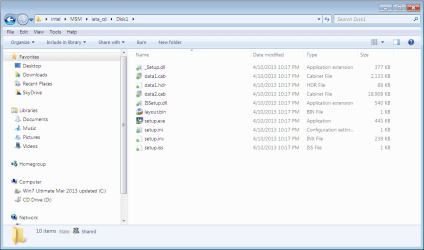
Using Universal Extractor I was able to extract the .exe down to these:

Capture.PNG

I don't see the driver there but it may need to be extracted further from the .bin or .cab files.

One of our Driver or Hardware experts should know how this is handled or spot the correct download on the Giga Support Downloads page since it would have to have a free-standing driver available for cases such as this: GIGABYTE - Motherboard - Socket 775 - GA-EP45-UD3R (rev. 1.1)

You can also choose to break the RAID by installing easily to one HD and then use the other for storage and file and image backup which is a more modern method.
 
Hi,

So, got frustrated with the whole thing, stuck in the new OS Win 7 64 Bit disk and it is installing. It picked up the RAID (1) Array and is off doing its thing.

Touching wood. I will be back later with the outcome. Either way.

Thanks for all the support
 

My Computer

OS
Win 7 Home Premium 64 Bit
Memory
8 MB
Hard Drives
2 X Seagate 500GB in RAID Array
Antivirus
Emsisoft Anti-Malware & Online Armor Firewall
Hi,

Yeah I got that far with Universal Extractor and another nifty program from the Spybot S&D guys called FileAlyser.

What they both produced was beyond me.
 

My Computer

OS
Win 7 Home Premium 64 Bit
Memory
8 MB
Hard Drives
2 X Seagate 500GB in RAID Array
Antivirus
Emsisoft Anti-Malware & Online Armor Firewall
So OK,

It is installed and running. Now all the fun of loading all the programs etc.

Thanks for all the help.

laopa
 

My Computer

OS
Win 7 Home Premium 64 Bit
Memory
8 MB
Hard Drives
2 X Seagate 500GB in RAID Array
Antivirus
Emsisoft Anti-Malware & Online Armor Firewall
Back
Top