New rig won't POST!

Cheers Nigel, I'll take the dog a quick walk and the start over, J:D
 

My Computer

Computer Manufacturer/Model Number
The Monolith. 3.1
OS
Windows 7 Home Premium 64 bit
CPU
i7 [email protected]
Motherboard
Gigabyte Z77-D3H
Memory
2x4GB Corsair Vegeance DDR3
Graphics Card(s)
XFX GTX 260 Black Edition
Sound Card
none-through large stereo hi fi
Monitor(s) Displays
Croosover 27MDP LED IPS Dell 2408 WFP
Screen Resolution
2560x1440 1920x1200
Hard Drives
1x Samsung 840Pro 128GB SSD
1x Samsung Spinpoint F1 1TB
PSU
Corsair AX 850 Watt
Case
Cooler Master ACTS 840
Cooling
Be Quiet! Dark Rock Pro
Keyboard
Enermax Aurora
Mouse
Logitech Ballmouse
Internet Speed
20MBPS
Led connections

John, as Nigel suggested: Take a break and take the dog out for a stroll:)
Come back to it and connect the remaining LED pins.
Again I use strong caution here, the pins are small and very delicate use gentle pressure when you complete installing them.
 

My Computer

Computer Manufacturer/Model Number
Custom Build
OS
Windows 7 7600 1 X64
CPU
AMD PHENOM II X 550 PROCESSOR 3.1 ghz
Motherboard
ASUS M4A78-TE
Memory
Corsair 4 gig ddr 3
Graphics Card(s)
ati radeon 3300
Sound Card
ati hd
Monitor(s) Displays
syncmaster 2033sw
Screen Resolution
1600X900 60 hz refresh
Hard Drives
twin_seagates SATA's 1 TB & 500 Gig, hitachi_slimline 160 gig
PSU
antec_550 watt
Case
cooler master GLite
Cooling
stock_heat sink
Internet Speed
20mbs up/ 1.5mbs down
Other Info
favorite child "stewie"
favorite dog "brian"
Hi there
I've had something like this in the past.

1) At power on does the CPU fan stay on or even start.

2) I found on some mother boards you could only get the system to work by connecting the power switch and power led in the mobo to the connectors in the case and then pressing on the RESET / Power switch on the case. If you did't do this or didn't have these connected the system would NEVER power on at all so no post possible.

3) the Auxiliary CPU power -- is it a standard 4 pin one or one of the newer versions with more pins (most older boards have the 4 pin connector).

If you've got the wrong one or haven't plugged it in then no go.

4) Take EVERYTHING out of the mobo apart from the CPU and the video card -- even the memory sticks and keyboard and see if at least the machine will power on properly (Fans whirring and CPU fan starting).If you have an onboard video card make sure you haven't disabled it if you are testing without using an external video card. If you are using an external video card disable the onboard video.

Even if you have an external card I would still test with the onboard video if the board has one first.

5) add keyboard and memory slots one at a time -- you should at this stage see something of a BIOS message even with 0K of memory installed.

If you get 5) working add peripherals in bits until whole system is ready.

Don't do any fancy overclocking / adjustments until you've got some type of decent BIOS Post messages..

If all this fails then the chances are only one of 2 possibilities

1) the CPU is incomaptable with the board -- happens more than you think

2) CPU / Motherboard is defective -- the CPU's are actually far more rugged than you think and with Zero Force Insertion its unlikely you've got damaged pins etc so defective equipment is not normally likely -- I've built loads of machines over the years and NEVER had a broken CPU. (I've dropped them / mis treated them etc -- never had a problem).

Motherboards are sometimes not compatable with memory / cpu but that's another problem.

Cheers
jimbo
 

My Computer

Computer type
PC/Desktop
Computer Manufacturer/Model Number
Custom built, several laptops HP/ASUS
OS
Linux CENTOS 7 / various Windows OS'es and servers
CPU
Intel i7 Intel i5
Memory
8GB, 16GB
Graphics Card(s)
On Motherboard
Sound Card
Realtek HD audio
Monitor(s) Displays
Apple Cinema display, Samsung LCD
Screen Resolution
1920 X 1080
Hard Drives
4 X 1TB SATA
Mouse
Toshiba wireless laser
Internet Speed
> 20MB up
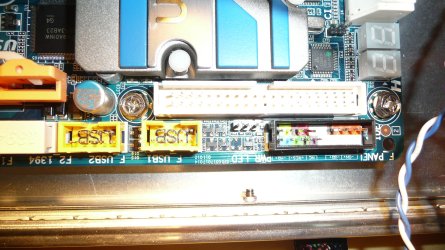
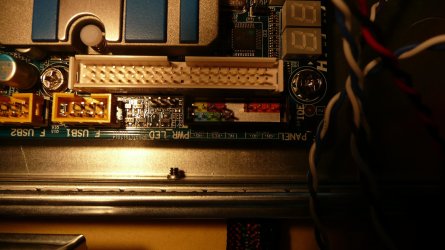
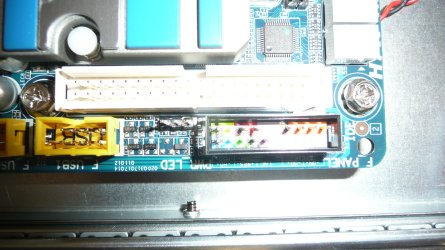
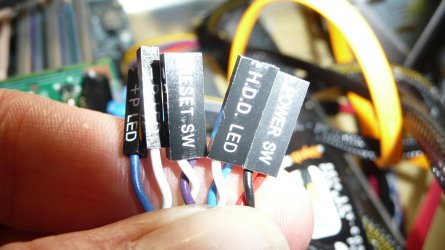
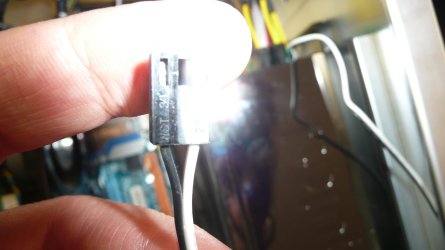
Well I had a walk with the dog but failed to take mind off this build. Here are some pics of the area concerned and the micro connectors I have also the black and white cabled connector that comes out of the psu with the main bundle. This seems to have WST 34 written on it. Think I need new glasses for this job.

This is the mobo pins:
 

Attachments

  • P1010126.JPG
    P1010126.JPG
    646.7 KB · Views: 20
  • P1010125.jpg
    P1010125.jpg
    458.2 KB · Views: 14
  • P1010118.JPG
    P1010118.JPG
    550.4 KB · Views: 16

My Computer

Computer Manufacturer/Model Number
The Monolith. 3.1
OS
Windows 7 Home Premium 64 bit
CPU
i7 [email protected]
Motherboard
Gigabyte Z77-D3H
Memory
2x4GB Corsair Vegeance DDR3
Graphics Card(s)
XFX GTX 260 Black Edition
Sound Card
none-through large stereo hi fi
Monitor(s) Displays
Croosover 27MDP LED IPS Dell 2408 WFP
Screen Resolution
2560x1440 1920x1200
Hard Drives
1x Samsung 840Pro 128GB SSD
1x Samsung Spinpoint F1 1TB
PSU
Corsair AX 850 Watt
Case
Cooler Master ACTS 840
Cooling
Be Quiet! Dark Rock Pro
Keyboard
Enermax Aurora
Mouse
Logitech Ballmouse
Internet Speed
20MBPS
And here are the connectors I have. The second one is the one that comes off the psu:
 

Attachments

  • P1010122.jpg
    P1010122.jpg
    376.7 KB · Views: 13
  • P1010124.JPG
    P1010124.JPG
    270 KB · Views: 12

My Computer

Computer Manufacturer/Model Number
The Monolith. 3.1
OS
Windows 7 Home Premium 64 bit
CPU
i7 [email protected]
Motherboard
Gigabyte Z77-D3H
Memory
2x4GB Corsair Vegeance DDR3
Graphics Card(s)
XFX GTX 260 Black Edition
Sound Card
none-through large stereo hi fi
Monitor(s) Displays
Croosover 27MDP LED IPS Dell 2408 WFP
Screen Resolution
2560x1440 1920x1200
Hard Drives
1x Samsung 840Pro 128GB SSD
1x Samsung Spinpoint F1 1TB
PSU
Corsair AX 850 Watt
Case
Cooler Master ACTS 840
Cooling
Be Quiet! Dark Rock Pro
Keyboard
Enermax Aurora
Mouse
Logitech Ballmouse
Internet Speed
20MBPS

My Computer

Computer Manufacturer/Model Number
Self-Built in July 2009
OS
Windows 7 Ultimate x64
CPU
Intel Q9550 2.83Ghz OC'd to 3.40Ghz
Motherboard
Gigabyte GA-EP45-UD3R rev. 1.1, F12 BIOS
Memory
8GB G.Skill PI DDR2-800, 4-4-4-12 timings
Graphics Card(s)
EVGA 1280MB Nvidia GeForce GTX570
Sound Card
Realtek ALC899A 8 channel onboard audio
Monitor(s) Displays
23" Acer x233H
Screen Resolution
1920x1080
Hard Drives
Intel X25-M 80GB Gen 2 SSD
Western Digital 1TB Caviar Black, 32MB cache. WD1001FALS
PSU
Corsair 620HX modular
Case
Antec P182
Cooling
stock
Keyboard
ABS M1 Mechanical
Mouse
Logitech G9 Laser Mouse
Internet Speed
15/2 cable modem
Other Info
Windows and Linux enthusiast. Logitech G35 Headset.
Jimbo. Good to have you onboard.
1)Yes the CPU Noctua HSF comes on and stays on.
2)Haven't got to that stage yet as I'm unsure where to stick the connecters. See above.
3) Don't know. Which is the Auxilliary power. Wherever it is I don't have it connected
4) I've tried that apart from removing the RAM and ,yes, it powers up.
5) I've tried all sorts of combinations. I was at this 12 hours yesterday. Everything powers up in the case except my GTX 260. That shows no sign of life at all. I swapped it out for my old 8800 GTS 512 and that powers up, fan spins etc.

As I said in my op the mobo, cpu, ram and Noctua HSF came in an overclocked bundle (i7 [email protected]) and have supposedly been thoroughly stress tested for 24 hours so I don't think they are incompatible.
I just don't know how to connect it all up.

Thanks for your input, John:confused:
 

My Computer

Computer Manufacturer/Model Number
The Monolith. 3.1
OS
Windows 7 Home Premium 64 bit
CPU
i7 [email protected]
Motherboard
Gigabyte Z77-D3H
Memory
2x4GB Corsair Vegeance DDR3
Graphics Card(s)
XFX GTX 260 Black Edition
Sound Card
none-through large stereo hi fi
Monitor(s) Displays
Croosover 27MDP LED IPS Dell 2408 WFP
Screen Resolution
2560x1440 1920x1200
Hard Drives
1x Samsung 840Pro 128GB SSD
1x Samsung Spinpoint F1 1TB
PSU
Corsair AX 850 Watt
Case
Cooler Master ACTS 840
Cooling
Be Quiet! Dark Rock Pro
Keyboard
Enermax Aurora
Mouse
Logitech Ballmouse
Internet Speed
20MBPS
I have the same MB.

Look in your manual. Page 27, F PANAL (front panal header) this shows where the connectors go. You will notice the speaker pins, this is for the MB speaker that beeps on startup. Once you have the speaker installed you will get beeps that will help you trouble shoot your startup. See page 99 for beep codes.

Hope this helps.
Tommy
 

My Computer

Computer Manufacturer/Model Number
Home made
OS
win 7
CPU
Intel i7 920
Motherboard
Gigabyte
Memory
12G trichannal
Graphics Card(s)
Ati 4770
Monitor(s) Displays
Sceptre 24in
Internet Speed
20/5mb
Ok, in looking at your connections on the left;

The hard drive LED goes into the lower left 2 pins in the block. Generally speaking, the colored cables are the positives...while white and black are usually the negatives. Thus the blue cable for the HDD LED should plug into the first pin from the left.

The reset switch is just to the right of the HDD. The positive here in the purple cable. Thus, the purple connection should be in the 4th pin from the left.

The power switch goes right above the reset switch into the upper row. The red cable is the positive end. Thus it should go in the 3rd pin from the left.

The two power LED connections go onto the block of 3 pins between that F Panel block and the first yellow USB block. These cables are labeled + which is the blue one and - which is the white one. You will have to look at your motherboard manual to find which of those 3 pins is positive and which is negative. One pin will go unused.


As far as the speaker goes...it's possible that your case will not come with a PC Speaker. My latest case, the Antec P183 did not come with a case speaker. So, those pins are unused on my mobo.

Antec maintains that many new mobos come with speakers built-in...so hence reason they don't include speaker with case. If you have a need for it...most case manufactures will send you one. Or you could get one 3rd party as well.


Unfortunately, I don't think these connections are your problems. Typically if the power switch is wrong, pushing the power button or reset does nothing. If the LED's are backwards, the lights will either be on solid or will blink at exactly the wrong time...but won't prevent the machine from running.

I truly believe you have a CPU problem here. I'd remove it from the board and attempt to reseat it. Otherwise, it's possible that your overclocked CPU has a problem...and hence reason I don't usually recommend buying a machine that is pre-overclocked.
 

My Computer

Computer Manufacturer/Model Number
Self-Built in July 2009
OS
Windows 7 Ultimate x64
CPU
Intel Q9550 2.83Ghz OC'd to 3.40Ghz
Motherboard
Gigabyte GA-EP45-UD3R rev. 1.1, F12 BIOS
Memory
8GB G.Skill PI DDR2-800, 4-4-4-12 timings
Graphics Card(s)
EVGA 1280MB Nvidia GeForce GTX570
Sound Card
Realtek ALC899A 8 channel onboard audio
Monitor(s) Displays
23" Acer x233H
Screen Resolution
1920x1080
Hard Drives
Intel X25-M 80GB Gen 2 SSD
Western Digital 1TB Caviar Black, 32MB cache. WD1001FALS
PSU
Corsair 620HX modular
Case
Antec P182
Cooling
stock
Keyboard
ABS M1 Mechanical
Mouse
Logitech G9 Laser Mouse
Internet Speed
15/2 cable modem
Other Info
Windows and Linux enthusiast. Logitech G35 Headset.
Thanks Tommy. So all the connectors shown in the first picture above go within that box? Apart from the red area which I used as power switch it's not clear where I put the others.
Also. I can't see what you mean about speaker pns and don't seem to have a speaker connector. What does it look like?

Thanks for your help, J
 

My Computer

Computer Manufacturer/Model Number
The Monolith. 3.1
OS
Windows 7 Home Premium 64 bit
CPU
i7 [email protected]
Motherboard
Gigabyte Z77-D3H
Memory
2x4GB Corsair Vegeance DDR3
Graphics Card(s)
XFX GTX 260 Black Edition
Sound Card
none-through large stereo hi fi
Monitor(s) Displays
Croosover 27MDP LED IPS Dell 2408 WFP
Screen Resolution
2560x1440 1920x1200
Hard Drives
1x Samsung 840Pro 128GB SSD
1x Samsung Spinpoint F1 1TB
PSU
Corsair AX 850 Watt
Case
Cooler Master ACTS 840
Cooling
Be Quiet! Dark Rock Pro
Keyboard
Enermax Aurora
Mouse
Logitech Ballmouse
Internet Speed
20MBPS
Thanks Tommy. So all the connectors shown in the first picture above go within that box?
No, go read my post. Everything goes within the box with the exception of the power LED...which is just to the left of the box between the box and the first yellow USB connector.

Also. I can't see what you mean about speaker pns and don't seem to have a speaker connector. What does it look like?
A speaker connection would be a 4 pin black connector just like all of the others that you have. It would say speaker or SPKR on it. Since you don't have one...don't worry about it. You just won't use any of the 4 pins that are showing on the upper right side of that block.
 

My Computer

Computer Manufacturer/Model Number
Self-Built in July 2009
OS
Windows 7 Ultimate x64
CPU
Intel Q9550 2.83Ghz OC'd to 3.40Ghz
Motherboard
Gigabyte GA-EP45-UD3R rev. 1.1, F12 BIOS
Memory
8GB G.Skill PI DDR2-800, 4-4-4-12 timings
Graphics Card(s)
EVGA 1280MB Nvidia GeForce GTX570
Sound Card
Realtek ALC899A 8 channel onboard audio
Monitor(s) Displays
23" Acer x233H
Screen Resolution
1920x1080
Hard Drives
Intel X25-M 80GB Gen 2 SSD
Western Digital 1TB Caviar Black, 32MB cache. WD1001FALS
PSU
Corsair 620HX modular
Case
Antec P182
Cooling
stock
Keyboard
ABS M1 Mechanical
Mouse
Logitech G9 Laser Mouse
Internet Speed
15/2 cable modem
Other Info
Windows and Linux enthusiast. Logitech G35 Headset.
Go ahead and install your connectors, we may not need the speakers. If it doesn't work first power on press your reset button sometimes this will turn it on.

Tommy
 

My Computer

Computer Manufacturer/Model Number
Home made
OS
win 7
CPU
Intel i7 920
Motherboard
Gigabyte
Memory
12G trichannal
Graphics Card(s)
Ati 4770
Monitor(s) Displays
Sceptre 24in
Internet Speed
20/5mb
Ok. I've connected as you have suggested pp. I'm getting power plus 2 LEDs on the top panel of the case, The reset button is not working (the power button is and I can do a hard shutdown.
Do you think I should connect up my monitor and see if it posts?

Thanks, John
 

My Computer

Computer Manufacturer/Model Number
The Monolith. 3.1
OS
Windows 7 Home Premium 64 bit
CPU
i7 [email protected]
Motherboard
Gigabyte Z77-D3H
Memory
2x4GB Corsair Vegeance DDR3
Graphics Card(s)
XFX GTX 260 Black Edition
Sound Card
none-through large stereo hi fi
Monitor(s) Displays
Croosover 27MDP LED IPS Dell 2408 WFP
Screen Resolution
2560x1440 1920x1200
Hard Drives
1x Samsung 840Pro 128GB SSD
1x Samsung Spinpoint F1 1TB
PSU
Corsair AX 850 Watt
Case
Cooler Master ACTS 840
Cooling
Be Quiet! Dark Rock Pro
Keyboard
Enermax Aurora
Mouse
Logitech Ballmouse
Internet Speed
20MBPS
Ok. I've connected as you have suggested pp. I'm getting power plus 2 LEDs on the top panel of the case, The reset button is not working (the power button is and I can do a hard shutdown.
Do you think I should connect up my monitor and see if it posts?

Thanks, John

Yes, by all means try. If the reset button continues to not work, reverse the connection of that plug. It's possible it's labeled wrong or mobo is wrong.
 

My Computer

Computer Manufacturer/Model Number
Self-Built in July 2009
OS
Windows 7 Ultimate x64
CPU
Intel Q9550 2.83Ghz OC'd to 3.40Ghz
Motherboard
Gigabyte GA-EP45-UD3R rev. 1.1, F12 BIOS
Memory
8GB G.Skill PI DDR2-800, 4-4-4-12 timings
Graphics Card(s)
EVGA 1280MB Nvidia GeForce GTX570
Sound Card
Realtek ALC899A 8 channel onboard audio
Monitor(s) Displays
23" Acer x233H
Screen Resolution
1920x1080
Hard Drives
Intel X25-M 80GB Gen 2 SSD
Western Digital 1TB Caviar Black, 32MB cache. WD1001FALS
PSU
Corsair 620HX modular
Case
Antec P182
Cooling
stock
Keyboard
ABS M1 Mechanical
Mouse
Logitech G9 Laser Mouse
Internet Speed
15/2 cable modem
Other Info
Windows and Linux enthusiast. Logitech G35 Headset.
Well I reversed the reset button but still nothing. Tried it both ways a couple of times but no luck.
Going to connect the monitor and try to post. Back soon, J
 

My Computer

Computer Manufacturer/Model Number
The Monolith. 3.1
OS
Windows 7 Home Premium 64 bit
CPU
i7 [email protected]
Motherboard
Gigabyte Z77-D3H
Memory
2x4GB Corsair Vegeance DDR3
Graphics Card(s)
XFX GTX 260 Black Edition
Sound Card
none-through large stereo hi fi
Monitor(s) Displays
Croosover 27MDP LED IPS Dell 2408 WFP
Screen Resolution
2560x1440 1920x1200
Hard Drives
1x Samsung 840Pro 128GB SSD
1x Samsung Spinpoint F1 1TB
PSU
Corsair AX 850 Watt
Case
Cooler Master ACTS 840
Cooling
Be Quiet! Dark Rock Pro
Keyboard
Enermax Aurora
Mouse
Logitech Ballmouse
Internet Speed
20MBPS
Hi Folks.

I've had a POST!
I connected up the micro connectors according to pparks outline and got LEDs plus power but no reset.
Next I found and connected the auxilliary 12v power cable at top left on the mobo.
This reasulted in a post screen plus an overlay box about boot fails and settings and press any key to continue. This didn't work so I don't have a keyboard or mouse. Both are usb devices and my Kone mouse is very temperamental about drivers.
I tried the reset button and this time it worked and I got a Gigabyte splash screen but this failed after a few seconds.
So I seem to be going in the right direction. My friend is bringing over an old psi mouse and keyboard so I'll try that.
Any further guidance most welcome.

Cheers, John:)
 

My Computer

Computer Manufacturer/Model Number
The Monolith. 3.1
OS
Windows 7 Home Premium 64 bit
CPU
i7 [email protected]
Motherboard
Gigabyte Z77-D3H
Memory
2x4GB Corsair Vegeance DDR3
Graphics Card(s)
XFX GTX 260 Black Edition
Sound Card
none-through large stereo hi fi
Monitor(s) Displays
Croosover 27MDP LED IPS Dell 2408 WFP
Screen Resolution
2560x1440 1920x1200
Hard Drives
1x Samsung 840Pro 128GB SSD
1x Samsung Spinpoint F1 1TB
PSU
Corsair AX 850 Watt
Case
Cooler Master ACTS 840
Cooling
Be Quiet! Dark Rock Pro
Keyboard
Enermax Aurora
Mouse
Logitech Ballmouse
Internet Speed
20MBPS
Well guys I think I'm well on the way. I installed my 1TB drive from my old system and booted into W7 (still have dual boot choice)
I'm using a psi keyboard amd mouse and haven't sorted out all the cabling inside and the system fans.
Curiously, I daisy chained the three large system fans together and they all ran but I lost the LEDs on the mobo and my internet connection so I must be doing something wrong there. Any help with that would be great.
It's weird that fans should disable the motherboard and cut the connection. I have to have the fans and intend installing a further 4 Akasa Apaches inside bit the big 10" system fans are pretty crucial and I can't see any other way to power them.
I'm much happier now that my machine lives and I couldn't have done it without your help. It's bedtime now but I'll be back tomorrow with further problems no doubt but I think I've got past the worst

Once again a thousand thanks, John:party:
 

My Computer

Computer Manufacturer/Model Number
The Monolith. 3.1
OS
Windows 7 Home Premium 64 bit
CPU
i7 [email protected]
Motherboard
Gigabyte Z77-D3H
Memory
2x4GB Corsair Vegeance DDR3
Graphics Card(s)
XFX GTX 260 Black Edition
Sound Card
none-through large stereo hi fi
Monitor(s) Displays
Croosover 27MDP LED IPS Dell 2408 WFP
Screen Resolution
2560x1440 1920x1200
Hard Drives
1x Samsung 840Pro 128GB SSD
1x Samsung Spinpoint F1 1TB
PSU
Corsair AX 850 Watt
Case
Cooler Master ACTS 840
Cooling
Be Quiet! Dark Rock Pro
Keyboard
Enermax Aurora
Mouse
Logitech Ballmouse
Internet Speed
20MBPS
When I built my computer, I was in the same position and looked around the net etc for a answer, my probem was I missed one connection from the cpu (and missed it like 5 times redoing all the connections) It was the power for the cpu, it wouldn't post or anything without it, just start up to a black screen. Might be worth a try to look over every connection you can in case you've missed something.

Forgot to thank you for your help Kawaii and most importantly forgot to welcome you to 7forums.
Great place and great people as you can see:D
 

My Computer

Computer Manufacturer/Model Number
The Monolith. 3.1
OS
Windows 7 Home Premium 64 bit
CPU
i7 [email protected]
Motherboard
Gigabyte Z77-D3H
Memory
2x4GB Corsair Vegeance DDR3
Graphics Card(s)
XFX GTX 260 Black Edition
Sound Card
none-through large stereo hi fi
Monitor(s) Displays
Croosover 27MDP LED IPS Dell 2408 WFP
Screen Resolution
2560x1440 1920x1200
Hard Drives
1x Samsung 840Pro 128GB SSD
1x Samsung Spinpoint F1 1TB
PSU
Corsair AX 850 Watt
Case
Cooler Master ACTS 840
Cooling
Be Quiet! Dark Rock Pro
Keyboard
Enermax Aurora
Mouse
Logitech Ballmouse
Internet Speed
20MBPS
Lots of good advice and very patient help here. I'm glad I read all the way through to the end before I tried to post any suggestions of my own.

I have the exact same basic rig as far as CPU, MB, and RAM. Once you get it all set up you are going to absolutely love it. :D
 

My Computer

Computer Manufacturer/Model Number
Self
OS
Main - Windows 7 Pro SP1 64-Bit; 2nd - Windows Server 2008 R2
CPU
Main - Core i7 2600K; 2nd - Core i7 920
Motherboard
Main - Asus P8Z68-V Pro/Gen3; 2nd - Gigabyte GA-EX58-UDR3
Memory
Main - 16GB Corsair Vengeance; 2nd - 12GB Corsair Vengeance
Graphics Card(s)
Main - XFX Radeon 6870 1GB; 2nd - XFX Radeon 4870 1GB
Sound Card
Both: Onboard Realtek Azalia
Monitor(s) Displays
Main - Hann 25" + I-INC 25" + Acer 23"; 2nd - Upgrading Soon
Screen Resolution
Main - 1920x1080 (All Three Monitors); 2nd - Upgrading Soon
Hard Drives
Main - (1) Crucial M4 128GB (Boot)
Main - (1) Seagate 2TB 64MB Cache (Data)
Main - (1) Seagate 2TB 64MB Cache (Data Backup)
2nd - (1) Intel X25-M SSD 80GB (Boot)
2nd - (3) Seagate 1TB 32MB Cache (Data Backup)
2nd - (1) Seagate 320GB (Because)
PSU
Main - OCZ 600W Modular; 2nd - OCZ 600W
Case
Main - Thermaltake Element G; 2nd - NZXT something or other
Cooling
Main - Corsair H80; 2nd - Prolimatech Megahalems
Keyboard
Main - Razer Reclusa; 2nd - Old MS Keyboard
Mouse
Main - Logitech MX Revolution; 2nd - Old MS Mouse
Internet Speed
20Mbps Time-Warner Cable
When I built my computer, I was in the same position and looked around the net etc for a answer, my probem was I missed one connection from the cpu (and missed it like 5 times redoing all the connections) It was the power for the cpu, it wouldn't post or anything without it, just start up to a black screen. Might be worth a try to look over every connection you can in case you've missed something.

Forgot to thank you for your help Kawaii and most importantly forgot to welcome you to 7forums.
Great place and great people as you can see:D

No problem at all! And thank you ^^ I been browsing this site and vistax64 for a while, and saw your problem and signed up to reply to it :P Glad you got it working! ^^
 

My Computer

Computer Manufacturer/Model Number
Kawaii Momo-chan ;o (Me)
OS
Windows 7 Ultimate x64 (Party Pack Promotion)
CPU
Intel Q6600 @~2.4GHz
Motherboard
MSI P45 NEO2
Memory
8GB (4x2GB) G.Skill 800MHz
Graphics Card(s)
ATI/AMD 4870 512MB
Sound Card
On Board 7.1 HD (Realtek)
Monitor(s) Displays
SAMSUNG SyncMaster 2053BW
Hard Drives
WD 750GB (Main/OS)
WD 500GB (Secondary/Media)
WD 1TB (External/Back/Archival of old data)
PSU
850 Watt Termaltak Modular
Case
ANTEC 900
Cooling
Air cooling
Back
Top