new SSD crucial M4 installed, whats next?

socrgy9

New member
Power User
Local time
4:04 AM
Messages
306
i just installed my new crucial M4 SSD. i went the easy way and bought the 20$ program to swap the OS automatically.

what do i do now? how do i make sure trim is enabled, and how do i know if its AHCI, and should i update firmware?

thanks, sorry. i'm very new to SSDs
 
Last edited:

My Computer My Computer

At a glance

windows 7 64bit on bothAMD FX-8350 @4.6GHz/Intel Core i7-3610QM @2.3GHz16GB G.Skill 1866MHz/8GB dual channel 1600MHztwo Sapphire HD7970 OC 3Gb in crossfire/GTX66...
Computer type
PC/Desktop
Computer Manufacturer/Model Number
Custom Build and MSI GE60 0ND laptop
OS
windows 7 64bit on both
CPU
AMD FX-8350 @4.6GHz/Intel Core i7-3610QM @2.3GHz
Motherboard
ASUS M5A99X EVO R2.0/MS-16GA
Memory
16GB G.Skill 1866MHz/8GB dual channel 1600MHz
Graphics Card(s)
two Sapphire HD7970 OC 3Gb in crossfire/GTX660M 2Gb
Sound Card
Realtek HD Audio/Realtek HD Audio with THX TruStudio Pro
Monitor(s) Displays
Hanns-G 27" 1080p /Generic PnP Monitor
Screen Resolution
both 1920x1080p 60Hz
Hard Drives
250GB Samsung 840 EVO SSD,
1TB WD Blue
3x2TB WD Greens
/Samsung 840 EVO mSATA
PSU
Corsair HX750/laptop psu
Case
NZXT Source 530
Cooling
CoolerMaster Hyper 212 Evo
Keyboard
Logitech G710+/laptop keyboard by steelseries
Mouse
Logitec G500s/Logitec G500
Internet Speed
50Mbps down/1-3 Mbps up
Other Info
Scythe Kaze Master Pro 5.25 fan controller; APC Back-UPS XS 1500
ok i'm sorry. i should have done some digging and i'd have found my answers LoL.

can an admin delete this thread please? thanks
 

My Computer My Computer

At a glance

windows 7 64bit on bothAMD FX-8350 @4.6GHz/Intel Core i7-3610QM @2.3GHz16GB G.Skill 1866MHz/8GB dual channel 1600MHztwo Sapphire HD7970 OC 3Gb in crossfire/GTX66...
Computer type
PC/Desktop
Computer Manufacturer/Model Number
Custom Build and MSI GE60 0ND laptop
OS
windows 7 64bit on both
CPU
AMD FX-8350 @4.6GHz/Intel Core i7-3610QM @2.3GHz
Motherboard
ASUS M5A99X EVO R2.0/MS-16GA
Memory
16GB G.Skill 1866MHz/8GB dual channel 1600MHz
Graphics Card(s)
two Sapphire HD7970 OC 3Gb in crossfire/GTX660M 2Gb
Sound Card
Realtek HD Audio/Realtek HD Audio with THX TruStudio Pro
Monitor(s) Displays
Hanns-G 27" 1080p /Generic PnP Monitor
Screen Resolution
both 1920x1080p 60Hz
Hard Drives
250GB Samsung 840 EVO SSD,
1TB WD Blue
3x2TB WD Greens
/Samsung 840 EVO mSATA
PSU
Corsair HX750/laptop psu
Case
NZXT Source 530
Cooling
CoolerMaster Hyper 212 Evo
Keyboard
Logitech G710+/laptop keyboard by steelseries
Mouse
Logitec G500s/Logitec G500
Internet Speed
50Mbps down/1-3 Mbps up
Other Info
Scythe Kaze Master Pro 5.25 fan controller; APC Back-UPS XS 1500
Hi there
if it's W7 you are installing just leave it --should be running fine. You don't need TRIM or whatever.

Shame you had to spend 20 USD on the imaging software -- however if you've done it well OK.

Don't forget if you are "Cloning" your old installation there might be a small system partition -- you need to copy this too to the SSD and set this partition to ACTIVE (download GPARTED or Partition wizard and make a bootable media so you can manipulate partitions if you need to).

If you are unfortunate to get a BSOD on first re-boot just boot the windows install disk and choose repair system -- that will usually always work in these cases.

An SSD is one of the best things you can get for a system BTW. Don't get too used to it since "There's no going back" once you've got it up and running.

Cheers
jimbo
 

My Computer My Computer

At a glance

Linux CENTOS 7 / various Windows OS'es and se...Intel i7 Intel i58GB, 16GBOn Motherboard
Computer type
PC/Desktop
Computer Manufacturer/Model Number
Custom built, several laptops HP/ASUS
OS
Linux CENTOS 7 / various Windows OS'es and servers
CPU
Intel i7 Intel i5
Memory
8GB, 16GB
Graphics Card(s)
On Motherboard
Sound Card
Realtek HD audio
Monitor(s) Displays
Apple Cinema display, Samsung LCD
Screen Resolution
1920 X 1080
Hard Drives
4 X 1TB SATA
Mouse
Toshiba wireless laser
Internet Speed
> 20MB up
Glad to hear you figured it out. Please list what you found out as others that might be thinking of doing the same thing could use the information on what to do and what not to do. Every little bit helps.
 

My Computer My Computer

At a glance

Windows 7 Ultimate 64 bitAMD Phenom II X4 965 Black EditionGSkill 4 X 2 GB PC 8500XFX Radeon HD 6790 D
Computer Manufacturer/Model Number
Custom built
OS
Windows 7 Ultimate 64 bit
CPU
AMD Phenom II X4 965 Black Edition
Motherboard
Gigabyte GA-MA790X-DS4
Memory
GSkill 4 X 2 GB PC 8500
Graphics Card(s)
XFX Radeon HD 6790 D
Sound Card
On board RealTek HD
Monitor(s) Displays
Dual monitors:Samsung SyncMaster S20B300
Screen Resolution
1600 X 900
Hard Drives
Seagate Barracuda 1TB (primary)
Seagate Barracuda 2 X 320 GB
PSU
Ultra X4 750 watt fully modular
Case
Thermaltake Overseer RX 1 full tower
Cooling
Core-Contact 92 mm CPU Cooler
Keyboard
Logitech G510
Mouse
Razor DeathAdder
Internet Speed
50/5 Mbps UL/DL
Other Info
Optical: Super Muliti DVD burner w/lightscribe, Hauppauge WinTV HVR-1800
Hi there
if it's W7 you are installing just leave it --should be running fine. You don't need TRIM or whatever.

Shame you had to spend 20 USD on the imaging software -- however if you've done it well OK.

Don't forget if you are "Cloning" your old installation there might be a small system partition -- you need to copy this too to the SSD and set this partition to ACTIVE (download GPARTED or Partition wizard and make a bootable media so you can manipulate partitions if you need to).

If you are unfortunate to get a BSOD on first re-boot just boot the windows install disk and choose repair system -- that will usually always work in these cases.

An SSD is one of the best things you can get for a system BTW. Don't get too used to it since "There's no going back" once you've got it up and running.

Cheers
jimbo

I have my ears perked on this subject since I hope to be getting one in the near future. I had though the $20 program was for more than just imaging. Doesn't it align the SSD and do a few other things?
 

My Computer My Computer

At a glance

Windows 7 Home Premium 32-Bit - Build 7600 SP1Intel Core i3-2120 3.30GhzKingston 4 GB DDR3 1333 mhzAMD Radeon HD6670
Computer type
PC/Desktop
Computer Manufacturer/Model Number
Custom Build
OS
Windows 7 Home Premium 32-Bit - Build 7600 SP1
CPU
Intel Core i3-2120 3.30Ghz
Motherboard
Asus P8Z68-V LX Intel Z68 Socket H2 ATX
Memory
Kingston 4 GB DDR3 1333 mhz
Graphics Card(s)
AMD Radeon HD6670
Sound Card
Sound Blaster Audigy SE 24-Bit
Monitor(s) Displays
Asus VE228
Screen Resolution
1440 X 900
Hard Drives
OCZ Vertex 3 120 GB Sata 3 SSD ==
Kingston SH103/S3 120 G Hyper X 120 GB SSD ==
Western Digital 500 GB Caviar Green 7200 RPM ==
PSU
Corsair CX600M == 600 Watt
Case
NZXT Apollo - Silver with Clear Side Panel
Cooling
Three 120 mm Fans
Keyboard
Microsoft Natural 4000
Mouse
Microsoft Custom Optical 3000
Internet Speed
AT&T Fiber Optic Wireless Network
Antivirus
Microsoft Security Essentials
Browser
Chrome
Other Info
120 mm Blue LED Fan -- Three Blue LED Lazer Light Sticks
Hi there
if it's W7 you are installing just leave it --should be running fine. You don't need TRIM or whatever.

Shame you had to spend 20 USD on the imaging software -- however if you've done it well OK.

Don't forget if you are "Cloning" your old installation there might be a small system partition -- you need to copy this too to the SSD and set this partition to ACTIVE (download GPARTED or Partition wizard and make a bootable media so you can manipulate partitions if you need to).

If you are unfortunate to get a BSOD on first re-boot just boot the windows install disk and choose repair system -- that will usually always work in these cases.

An SSD is one of the best things you can get for a system BTW. Don't get too used to it since "There's no going back" once you've got it up and running.

Cheers
jimbo

I have my ears perked on this subject since I hope to be getting one in the near future. I had though the $20 program was for more than just imaging. Doesn't it align the SSD and do a few other things?

SSD's are at the lowest prices I've seen in awhile. 128 GB drives are dipping below $100.00.

I got the Samsung 830 128GB and I haven't had a single problem with it. I basically did a fresh install, ran the Samsung software to disable Super Fetch, Defragmentation, Indexing Service, and apply the Samsung Power Configuration. Those can also be disabled, manually, but the software does it in in about 5 seconds.

I checked to see if Trim was enabled and it was. I applied a few more tweaks and I was done.

If you go back to Windows 7 on a HDD, it will seem slow in comparison.
 

My Computer My Computer

At a glance

Windows 7 Home Premium 64 bitIntel Core i7-4790G.SKILL 8GB (2 x 4GB) DDR3 F3-10666CL9D-8GBNTAMD Radeon R7 250
Computer type
PC/Desktop
Computer Manufacturer/Model Number
Custom Build
OS
Windows 7 Home Premium 64 bit
CPU
Intel Core i7-4790
Motherboard
GA-Z87X-D3H
Memory
G.SKILL 8GB (2 x 4GB) DDR3 F3-10666CL9D-8GBNT
Graphics Card(s)
AMD Radeon R7 250
Sound Card
Realtek ALC892
Monitor(s) Displays
Samsung UN32EH5000, Dell 1703FPT
Screen Resolution
1920 x 1080, 1280 x 1024
Hard Drives
WD5003AZEX
WD10EZEX
Samsung HD103SJ
Samsung 128 GB 840 PRO
PSU
SeaSonic M12II SS-500GM
Case
Fractal Design Define R4
Cooling
Zalman CNPS9900ALED
Keyboard
Logitech K800
Mouse
Logitech M705
Internet Speed
16 Mbps
Antivirus
Avast
Browser
Firefox
Other Info
Bose Companion 2 Multimedia Speakers
**UPDATE** well, i found out TRIM is enabled by default by windows 7 and its good for SSD's. linustechtips has a great video explaining trim on youtube.

i ended up following the tutorial from this forum on how to diable the defrag in windows 7. i never used it anyways on my old hard drive. i used a seperate program called AusLogics Boostspeed for defrag and system maintenance.

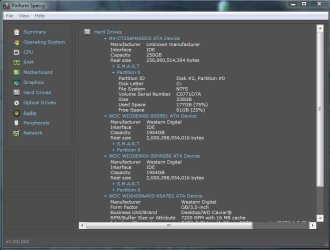
as far as IDE and AHCI, i still don't understand them, or what they are, but i have found that all of my drives are currently running in IDE mode and everything has been running great for 2 weeks now.

bigmck,
the Paragon Migrate OS to SSD did everything for me! one of the best 20$'s ive spent on my computer. i had already formatted the SSD and attempted doing the partition work myself. it cleaned the SSD, partitioned it properly, turned it into a C: and basically copy/pasted everything from my old C: to the SSD. all i had to do was change the boot drive in my mobo bios.
 

Attachments

  • Capture3.JPG
    Capture3.JPG
    62.8 KB · Views: 32

My Computer My Computer

At a glance

windows 7 64bit on bothAMD FX-8350 @4.6GHz/Intel Core i7-3610QM @2.3GHz16GB G.Skill 1866MHz/8GB dual channel 1600MHztwo Sapphire HD7970 OC 3Gb in crossfire/GTX66...
Computer type
PC/Desktop
Computer Manufacturer/Model Number
Custom Build and MSI GE60 0ND laptop
OS
windows 7 64bit on both
CPU
AMD FX-8350 @4.6GHz/Intel Core i7-3610QM @2.3GHz
Motherboard
ASUS M5A99X EVO R2.0/MS-16GA
Memory
16GB G.Skill 1866MHz/8GB dual channel 1600MHz
Graphics Card(s)
two Sapphire HD7970 OC 3Gb in crossfire/GTX660M 2Gb
Sound Card
Realtek HD Audio/Realtek HD Audio with THX TruStudio Pro
Monitor(s) Displays
Hanns-G 27" 1080p /Generic PnP Monitor
Screen Resolution
both 1920x1080p 60Hz
Hard Drives
250GB Samsung 840 EVO SSD,
1TB WD Blue
3x2TB WD Greens
/Samsung 840 EVO mSATA
PSU
Corsair HX750/laptop psu
Case
NZXT Source 530
Cooling
CoolerMaster Hyper 212 Evo
Keyboard
Logitech G710+/laptop keyboard by steelseries
Mouse
Logitec G500s/Logitec G500
Internet Speed
50Mbps down/1-3 Mbps up
Other Info
Scythe Kaze Master Pro 5.25 fan controller; APC Back-UPS XS 1500
Back
Top