New SSD detected in bios but not by install, requires drivers

mm2222

New member
Local time
12:43 AM
Messages
11
I have a HP and I am trying to do a clean install of Windows 7. My SSD is detected in the Bios. But during the Windows 7 installation, the part where I supposed to select which hd/partitioned to install Windows 7 on, my hdd is not listed. It ask for drivers but I think I have the wrong ones or am doing it wrong?
 

My Computer My Computer

At a glance

W7 64bit
OS
W7 64bit
Need abit more info
Type of system ? laptop
What type of drive/how is it connected ? sata
Bios type ? efi
Is it a new drive ?
 

My Computer My Computer

At a glance

Win7 Ultimate X64Intel i5 3570K8GB DDR3 1600Onboard
Computer type
PC/Desktop
Computer Manufacturer/Model Number
Pauly Special
OS
Win7 Ultimate X64
CPU
Intel i5 3570K
Motherboard
Gigabyte Z77X-DS3H
Memory
8GB DDR3 1600
Graphics Card(s)
Onboard
Sound Card
Onboard
Screen Resolution
1280x1024
Hard Drives
Samsung 840 Evo SSD (OS)
1TB Spinner (Data)
PSU
800W Arctic
Case
Cooler Master
Cooling
3x120mm Fans
Keyboard
MS Wireless
Mouse
MS Wireless
Internet Speed
20M
Need abit more info
Type of system ? laptop
What type of drive/how is it connected ? sata
Bios type ? efi
Is it a new drive ?

Hp M9652Uk desktop
Silicon Power 2.5" 60gb ssd
Sata connected
Brand new drive
Not sure bios efi means? How can I check
Thanks
 

My Computer My Computer

At a glance

W7 64bit
OS
W7 64bit
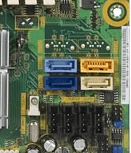
Your mobos sata ports are all different colours not sure why or if its relevant
Capture.PNG

If you boot into windows on old disk does it show ?

Have you unplugged original HDDs ?
If not i would try unplugging and putting your new drive in original sata port (should be sata0)
If drive still doesnt show you could try accessing it through disk part commands
Press shift + F10 when at installer screen you mentioned then type diskpart, then list disk, see if it shows, if it does you can manipulate disk from there to partition and setup for install
Alternatively you can do this from a command prompt within windows or at boot

Check your diskmanagment window to see if disk is listed
start>type diskmgmt.msc>enter
if your not sure post a snip of it

 

My Computer My Computer

At a glance

Win7 Ultimate X64Intel i5 3570K8GB DDR3 1600Onboard
Computer type
PC/Desktop
Computer Manufacturer/Model Number
Pauly Special
OS
Win7 Ultimate X64
CPU
Intel i5 3570K
Motherboard
Gigabyte Z77X-DS3H
Memory
8GB DDR3 1600
Graphics Card(s)
Onboard
Sound Card
Onboard
Screen Resolution
1280x1024
Hard Drives
Samsung 840 Evo SSD (OS)
1TB Spinner (Data)
PSU
800W Arctic
Case
Cooler Master
Cooling
3x120mm Fans
Keyboard
MS Wireless
Mouse
MS Wireless
Internet Speed
20M
Your mobos sata ports are all different colours not sure why or if its relevant
View attachment 251453

If you boot into windows on old disk does it show ?

Have you unplugged original HDDs ?
If not i would try unplugging and putting your new drive in original sata port (should be sata0)
If drive still doesnt show you could try accessing it through disk part commands
Press shift + F10 when at installer screen you mentioned then type diskpart, then list disk, see if it shows, if it does you can manipulate disk from there to partition and setup for install
Alternatively you can do this from a command prompt within windows or at boot

Check your diskmanagment window to see if disk is listed
start>type diskmgmt.msc>enter
if your not sure post a snip of it
It shows if connect my laptop,
There is no Sata 0 just 1,2,3,4
 

My Computer My Computer

At a glance

W7 64bit
OS
W7 64bit
Back
Top