
New SSD OS shows as Disk 1 after Image restore – Fix?

rudhawk

New member
Member
Local time
8:47 PM
Messages
22
New SSD OS shows as Disk 1 after Image restore – Fix?

Why is my SSD (64gb) showing as Disk 1 (and how do I fix it).


I used Macrium to image and restore Win 7 from an IDE HDD (a fresh/clean install as the only HDD). I have a dual boot and the 2nd HDD (Sata 1) was unplugged when I created the image.


After creating the image, I unplugged the IDE and hooked up the SSD (previously formatted) and restored the image. I then booted the SSD and all went well.


I then shutdown, reinstalled the 2nd HDD (Sata 1) made sure the SSD was [FONT=&quot]1st [/FONT] to boot and rebooted.


Now, my SSD shows as Disk 1. I must have missed a step somewhere. Where did I go wrong?
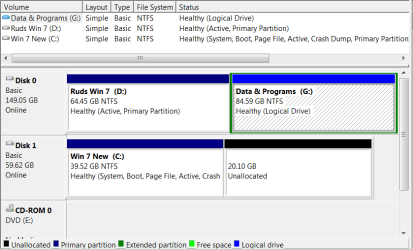

Computer Management_2014-03-20_14-59-21.png
 

My Computer My Computer

At a glance

Microsoft Windows 7 Home Premium 64-bit 7601 ...Intel(R) Core(TM)2 Duo CPU E8400 @ 3.00GHz Wo...Patriot Viper 4GB (2 x 2GB) 240-Pin DDR2 SDRA...ATI Radeon HD 4600 Series (4650) +ARCTIC Acce...
Computer type
PC/Desktop
Computer Manufacturer/Model Number
Custom
OS
Microsoft Windows 7 Home Premium 64-bit 7601 Multiprocessor Free Service Pack 1
CPU
Intel(R) Core(TM)2 Duo CPU E8400 @ 3.00GHz Wolfdale
Motherboard
Gigabyte Technology Co., Ltd. EP45-UD3R
Memory
Patriot Viper 4GB (2 x 2GB) 240-Pin DDR2 SDRAM DDR2
Graphics Card(s)
ATI Radeon HD 4600 Series (4650) +ARCTIC Accelero L2 Plus VG
Sound Card
(1) Realtek High Definition Audio (2) Unimodem Full-Duplex
Monitor(s) Displays
Dell 1908FP & P2312H - Digital
Screen Resolution
1280 x 1024 x 32 bits (4294967296 colors) @ 60 Hz
Hard Drives
(1) INTEL SSDSC2CW120A3 ATA Device (2) SanDisk SDSSDA120G ATA Device (3) ST500DM002-1BD142 ATA Device (4) WDC WD2500AAKS-22B3A0 ATA Device (5) WDC WD5000AAKS-00V1A0 ATA Device (6) Brother MFC-J875DW USB Device
PSU
Corsair VX550W
Case
Antec 300 ATX
Cooling
Xigmatek Nepartak S983 H.D.T. with 92mm fan, Yate Loon 140mm
Keyboard
Dell Wired USB Keyboard Standard 104-key Model SK-8115 E1456
Mouse
Logitech 3-Button USB Optical Wheel Mouse
Internet Speed
Down 7.7 Mbps Up 1.93 Mbps
Antivirus
MS Security Essentials
Browser
Firefox 54.0.1
Other Info
3 additional 120mm case fans SpeedFan shows following temps: #1 43C, #2-36C, #3-(-2C)?, GPU-42C Rocketfish - 2-Port USB 3.0 PCI Express Interface Card Multi Model: RF-P2USB3 Also, LSI Soft Modem
Why is my SSD (64gb) showing as Disk 1 (and how do I fix it).


I used Macrium to image and restore Win 7 from an IDE HDD (a fresh/clean install as the only HDD). I have a dual boot and the 2nd HDD (Sata 1) was unplugged when I created the image.


After creating the image, I unplugged the IDE and hooked up the SSD (previously formatted) and restored the image. I then booted the SSD and all went well.


I then shutdown, reinstalled the 2nd HDD (Sata 1) made sure the SSD was [FONT=&quot]1st [/FONT] to boot and rebooted.


Now, my SSD shows as Disk 1. I must have missed a step somewhere. Where did I go wrong?


View attachment 311156

Check the following link for some information;

Disk drive numbers may not correspond to the SATA channel numbers when you install Windows on a computer that has multiple SATA or RAID disks

HTH
 

My Computer My Computer

At a glance

Windows 7 Professional x64Intel i5 quad processor16 GBRadeon HD 5770
Computer type
PC/Desktop
Computer Manufacturer/Model Number
Custom Built
OS
Windows 7 Professional x64
CPU
Intel i5 quad processor
Motherboard
DP67BG
Memory
16 GB
Graphics Card(s)
Radeon HD 5770
Sound Card
Realtek High Definition Audio
Monitor(s) Displays
Samsung SyncMaster
Screen Resolution
1920X1080
Hard Drives
WD 2TB (SATA Internal)
WD 1TB (USB External)
PSU
Corsair GS800
Case
Tower (Generic)
Cooling
3 Internal Fans
Keyboard
MS Wireless
Mouse
MS Optical Wired
Internet Speed
54 mbps
Antivirus
Emsisoft
Browser
IE-Version 9, Palemoon-Version 24.2.0
Thanks. That's an interesting read. With all the pc's i've dual booted, swapping HDD's in and out and all around - I've never run into this before. I guess you never learn until you have a problem.
 

My Computer My Computer

At a glance

Microsoft Windows 7 Home Premium 64-bit 7601 ...Intel(R) Core(TM)2 Duo CPU E8400 @ 3.00GHz Wo...Patriot Viper 4GB (2 x 2GB) 240-Pin DDR2 SDRA...ATI Radeon HD 4600 Series (4650) +ARCTIC Acce...
Computer type
PC/Desktop
Computer Manufacturer/Model Number
Custom
OS
Microsoft Windows 7 Home Premium 64-bit 7601 Multiprocessor Free Service Pack 1
CPU
Intel(R) Core(TM)2 Duo CPU E8400 @ 3.00GHz Wolfdale
Motherboard
Gigabyte Technology Co., Ltd. EP45-UD3R
Memory
Patriot Viper 4GB (2 x 2GB) 240-Pin DDR2 SDRAM DDR2
Graphics Card(s)
ATI Radeon HD 4600 Series (4650) +ARCTIC Accelero L2 Plus VG
Sound Card
(1) Realtek High Definition Audio (2) Unimodem Full-Duplex
Monitor(s) Displays
Dell 1908FP & P2312H - Digital
Screen Resolution
1280 x 1024 x 32 bits (4294967296 colors) @ 60 Hz
Hard Drives
(1) INTEL SSDSC2CW120A3 ATA Device (2) SanDisk SDSSDA120G ATA Device (3) ST500DM002-1BD142 ATA Device (4) WDC WD2500AAKS-22B3A0 ATA Device (5) WDC WD5000AAKS-00V1A0 ATA Device (6) Brother MFC-J875DW USB Device
PSU
Corsair VX550W
Case
Antec 300 ATX
Cooling
Xigmatek Nepartak S983 H.D.T. with 92mm fan, Yate Loon 140mm
Keyboard
Dell Wired USB Keyboard Standard 104-key Model SK-8115 E1456
Mouse
Logitech 3-Button USB Optical Wheel Mouse
Internet Speed
Down 7.7 Mbps Up 1.93 Mbps
Antivirus
MS Security Essentials
Browser
Firefox 54.0.1
Other Info
3 additional 120mm case fans SpeedFan shows following temps: #1 43C, #2-36C, #3-(-2C)?, GPU-42C Rocketfish - 2-Port USB 3.0 PCI Express Interface Card Multi Model: RF-P2USB3 Also, LSI Soft Modem
Mine did the same thing until I installed the Intel sata drivers, try it, even though you used an image.

You say you put the 2nd hard drive on sata port #1, it should be on #2

An IDE hard drive will always show 1st on the list above a sata drive. It uses a different channel then the sata does. (disregard this if you`re using all sata drives)
I say this only because you mentioned an IDE drive :D
 

My Computer My Computer

At a glance

Windows 10 Pro x64Intel Core i7 6700KGSkill TridentZ RGB 16GB 3600 16-16-16-36EVGA GTX 980 Ti SC x2
Computer type
PC/Desktop
Computer Manufacturer/Model Number
Skylake Special #666
OS
Windows 10 Pro x64
CPU
Intel Core i7 6700K
Motherboard
Asus Sabertooth Z170 Mark 1
Memory
GSkill TridentZ RGB 16GB 3600 16-16-16-36
Graphics Card(s)
EVGA GTX 980 Ti SC x2
Sound Card
Realtek High Definition
Monitor(s) Displays
AOC G2460PG
Screen Resolution
1920 x 1080 144Hz
Hard Drives
Samsung 860 Pro 256GB, Seagate Barracuda 4TB x2
PSU
EVGA 1000 P2, EVGA White Custom Braided Cables
Case
Corsair Vengeance C70 Gunmetal Black
Cooling
Corsair H100i v2, Corsair ML120 x2, Thermal Grizzly Kryonaut
Keyboard
Logitech G910 Orion Spectrum
Mouse
Logitech G700s
Internet Speed
Verizon Fios Quantum Gateway 75/75
Antivirus
Windows Defender, Malwarebytes Free 3.8.3
Browser
Chrome
Other Info
Corsair SP120 x4, LG Blu-ray Drive, Durabrand HT-395 100 Watt Dolby Digital Amp, Corsair H2100 Wireless 7.1 Headset
It probably shows as Disk 1 because it is on Port 1 on the mobo.
 

My Computer My Computer

At a glance

Vista, Windows7, Mint Mate, Zorin, Windows 8from 1.6GHz Duo to i7
Computer Manufacturer/Model Number
HP, Dell, Gateway, Toshiba - 4 laptops and 2 desktops
OS
Vista, Windows7, Mint Mate, Zorin, Windows 8
CPU
from 1.6GHz Duo to i7
Monitor(s) Displays
2x HP w2207
Hard Drives
5x HDD, 7x SSD, 12x Externals
Keyboard
with trackball - no mices
Mouse
Trackball mice
Internet Speed
DSL 6000
Back
Top