
New to SSD's. First install attempt with bad read/writes

njneer75

New member
Local time
12:44 PM
Messages
10
Hi everyone, first time poster here. Maybe you all can help me figure out what i did wrong.

I switched over from a hdd to a ssd for the first time. I installed the new 120gb Patriot Pyro on my sata mobo and took the advice from some other posts here about doing a quick win7 backup/restore to get my OS back on the new ssd. Everything seemed to work fine. Booted up first time with no problem. Thought everything was okay until i started gaming. Noticed significant decrease in performance. Did a couple of speed tests on the read/write for my ssd. I know that no ssd is gonna perform to factory specs but mine is horribly low. Patriot describes this Pyro model as having 550 give or take a few on the read/write. Im getting less than 150 on multiple tests with different software. Anything that you all can see thats an obvious mistake with my install process and maybe how to fix? thanks in advance.

*Major Update*

I called Gigabyte and this particular model mobo is only Sata2 @ 3gbs and does not have the capability in the bios to set AHCI mode. Is this my major issue?
 
Last edited:

My Computer My Computer

At a glance

windows 7 home premium 64bitAMD Phenom II X4 965 ti black box8 Gb CorsairNvidia FeForce GTX 460
Computer Manufacturer/Model Number
custom
OS
windows 7 home premium 64bit
CPU
AMD Phenom II X4 965 ti black box
Motherboard
Gigabyte M68MT-S2P
Memory
8 Gb Corsair
Graphics Card(s)
Nvidia FeForce GTX 460
Sound Card
Creative Soundblaster Audigy
Hard Drives
1- 120Gb Patriot Pyro SSD
1- 500gb standard HDD
What port is it plugged into? Makes a huge difference.
 

My Computer My Computer

At a glance

Windows 7 Pro x64 -- PCLinuxOS KDE4 FullMonty...i7-875k @ Turbo - 7,6,5,5 - 3.6ghzCorsair CMD8GX3M4A1600C8 8gbAsus EAH5850 DirectCU/2DIS/1GD5
Computer Manufacturer/Model Number
Custom
OS
Windows 7 Pro x64 -- PCLinuxOS KDE4 FullMonty 2011
CPU
i7-875k @ Turbo - 7,6,5,5 - 3.6ghz
Motherboard
Asus P7P55D-E Deluxe
Memory
Corsair CMD8GX3M4A1600C8 8gb
Graphics Card(s)
Asus EAH5850 DirectCU/2DIS/1GD5
Sound Card
On Board
Monitor(s) Displays
Samsung SyncMaster T220 - Panasonic VT30a 50"
Screen Resolution
1680x1050 -
Hard Drives
Corsair Force 3 SSD 120GB x 2 ::
WD VelociRaptor 150GB WD1500HLFS x 2
PSU
Corsair HX-850 Power Supply
Case
Coolmaster HAF 932
Cooling
Corsair H50
Keyboard
Logitech Wireless MK700
Mouse
Logitech Wireless MX620
Internet Speed
Good enough for now
Other Info
Voip. Insanely cheap phone calls.
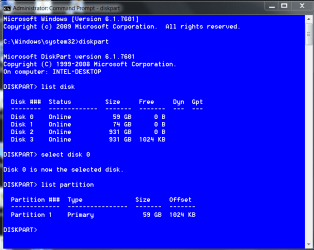
When You restored the image it did not slign your SSD. To check, open a elevated compemand prompt. (click start, type cmd in the search box, right click the cmd snd select run as administrator) In the box thst opens type diskpart and press enter, when it responds diskpart, type list disk and press enter, It will list every drive in your computer and give each a number. (Hopefully, yours is drive 0) type selrct disk 0 (or the number given for your SSD. Next type list partition and press enter. It will show each partition on the drive with it's size and offset. The offset is your alignment. Use the snipping tool and take a snip of the window, save it to your desktop (or wherever it is easy to find) use the paperclip icon at the top of the reply window here to attach it. The alignment must be divisible by 4, but if you have the 100MB partition the results can be confusing. If that is the case, it can be fixed with this tutorial.

EDIT: to help, this is what it should look like.

diskpart alignment.PNG
 

My Computers My Computers

  • At a glance

    Windows 11 ProRyzen 9 5900X32GB G Skill DDR4-3600EVGA RTX 3080 FTW 3 Ultra
    Computer type
    PC/Desktop
    Computer Manufacturer/Model Number
    ALWAYS UNDER CONSTRUCTION
    OS
    Windows 11 Pro
    CPU
    Ryzen 9 5900X
    Motherboard
    Asus X570 Crosshair Viii Hero
    Memory
    32GB G Skill DDR4-3600
    Graphics Card(s)
    EVGA RTX 3080 FTW 3 Ultra
    Sound Card
    On Board/Sennheiser PC37X Headset
    Monitor(s) Displays
    3 X Asus 27"
    Screen Resolution
    2560x1440
    Hard Drives
    2 X 1 TB NVME drives
    PSU
    EVGA 850
    Case
    Phanteks Eclipse P400A
    Cooling
    EVGA 280 AIO
    Keyboard
    Logitech G510s/ Logitech G13
    Mouse
    Logitech G502
    Internet Speed
    24/1
    Antivirus
    ESET/MBAM Pro/SAS Pro
    Browser
    Chrome/ Firefox/ Edge
  • At a glance

    Windows 11 ProIntel Ultra 9 288V32 GB LPDDR5X 8533
    Computer type
    Laptop
    System Manufacturer/Model Number
    Dell 16 Plus
    OS
    Windows 11 Pro
    CPU
    Intel Ultra 9 288V
    Memory
    32 GB LPDDR5X 8533
    Monitor(s) Displays
    16" Mini-LED HDR600 Touch 90 Hz
    Screen Resolution
    2560X1600
    Hard Drives
    1 TB NVME
What port is it plugged into? Makes a huge difference.


Not sure, there are 3 sata ports on my mobo. im not home right now but i think i remember that 1 port is a different color from the other two, any way for me to tell which port my primary ssd is on? i also had a hdd and an optical drive hooked up on the other two ports when i did the install
 

My Computer My Computer

At a glance

windows 7 home premium 64bitAMD Phenom II X4 965 ti black box8 Gb CorsairNvidia FeForce GTX 460
Computer Manufacturer/Model Number
custom
OS
windows 7 home premium 64bit
CPU
AMD Phenom II X4 965 ti black box
Motherboard
Gigabyte M68MT-S2P
Memory
8 Gb Corsair
Graphics Card(s)
Nvidia FeForce GTX 460
Sound Card
Creative Soundblaster Audigy
Hard Drives
1- 120Gb Patriot Pyro SSD
1- 500gb standard HDD
It should be doing better than that. Check out the tutorial essenbe posted.
 

My Computer My Computer

At a glance

Windows 7 Pro x64 -- PCLinuxOS KDE4 FullMonty...i7-875k @ Turbo - 7,6,5,5 - 3.6ghzCorsair CMD8GX3M4A1600C8 8gbAsus EAH5850 DirectCU/2DIS/1GD5
Computer Manufacturer/Model Number
Custom
OS
Windows 7 Pro x64 -- PCLinuxOS KDE4 FullMonty 2011
CPU
i7-875k @ Turbo - 7,6,5,5 - 3.6ghz
Motherboard
Asus P7P55D-E Deluxe
Memory
Corsair CMD8GX3M4A1600C8 8gb
Graphics Card(s)
Asus EAH5850 DirectCU/2DIS/1GD5
Sound Card
On Board
Monitor(s) Displays
Samsung SyncMaster T220 - Panasonic VT30a 50"
Screen Resolution
1680x1050 -
Hard Drives
Corsair Force 3 SSD 120GB x 2 ::
WD VelociRaptor 150GB WD1500HLFS x 2
PSU
Corsair HX-850 Power Supply
Case
Coolmaster HAF 932
Cooling
Corsair H50
Keyboard
Logitech Wireless MK700
Mouse
Logitech Wireless MX620
Internet Speed
Good enough for now
Other Info
Voip. Insanely cheap phone calls.
When you do the diskpart I posted above, when you do the list disk command, it usually lists them in order. But, your mobo manual should tell you the port numbers.
 

My Computers My Computers

  • At a glance

    Windows 11 ProRyzen 9 5900X32GB G Skill DDR4-3600EVGA RTX 3080 FTW 3 Ultra
    Computer type
    PC/Desktop
    Computer Manufacturer/Model Number
    ALWAYS UNDER CONSTRUCTION
    OS
    Windows 11 Pro
    CPU
    Ryzen 9 5900X
    Motherboard
    Asus X570 Crosshair Viii Hero
    Memory
    32GB G Skill DDR4-3600
    Graphics Card(s)
    EVGA RTX 3080 FTW 3 Ultra
    Sound Card
    On Board/Sennheiser PC37X Headset
    Monitor(s) Displays
    3 X Asus 27"
    Screen Resolution
    2560x1440
    Hard Drives
    2 X 1 TB NVME drives
    PSU
    EVGA 850
    Case
    Phanteks Eclipse P400A
    Cooling
    EVGA 280 AIO
    Keyboard
    Logitech G510s/ Logitech G13
    Mouse
    Logitech G502
    Internet Speed
    24/1
    Antivirus
    ESET/MBAM Pro/SAS Pro
    Browser
    Chrome/ Firefox/ Edge
  • At a glance

    Windows 11 ProIntel Ultra 9 288V32 GB LPDDR5X 8533
    Computer type
    Laptop
    System Manufacturer/Model Number
    Dell 16 Plus
    OS
    Windows 11 Pro
    CPU
    Intel Ultra 9 288V
    Memory
    32 GB LPDDR5X 8533
    Monitor(s) Displays
    16" Mini-LED HDR600 Touch 90 Hz
    Screen Resolution
    2560X1600
    Hard Drives
    1 TB NVME
What port is it plugged into? Makes a huge difference.


Not sure, there are 3 sata ports on my mobo. im not home right now but i think i remember that 1 port is a different color from the other two, any way for me to tell which port my primary ssd is on? i also had a hdd and an optical drive hooked up on the other two ports when i did the install
That sounds like a Sata3 port and that would be OK. I agree with the others, you have an alignment problem. That can degrade the performance by up to 300%.

Before you do anything, check the alignment and let us kow what it says - copy the command prompt result here. See under "Verification" at the end of this tutorial: http://www.sevenforums.com/tutorials/113967-ssd-alignment.html?ltr=S
 

My Computer My Computer

At a glance

Vista, Windows7, Mint Mate, Zorin, Windows 8from 1.6GHz Duo to i7
Computer Manufacturer/Model Number
HP, Dell, Gateway, Toshiba - 4 laptops and 2 desktops
OS
Vista, Windows7, Mint Mate, Zorin, Windows 8
CPU
from 1.6GHz Duo to i7
Monitor(s) Displays
2x HP w2207
Hard Drives
5x HDD, 7x SSD, 12x Externals
Keyboard
with trackball - no mices
Mouse
Trackball mice
Internet Speed
DSL 6000
ok i'll check the mobo manual for port info. what exactly am i looking for? what port should the ssd be on?
 

My Computer My Computer

At a glance

windows 7 home premium 64bitAMD Phenom II X4 965 ti black box8 Gb CorsairNvidia FeForce GTX 460
Computer Manufacturer/Model Number
custom
OS
windows 7 home premium 64bit
CPU
AMD Phenom II X4 965 ti black box
Motherboard
Gigabyte M68MT-S2P
Memory
8 Gb Corsair
Graphics Card(s)
Nvidia FeForce GTX 460
Sound Card
Creative Soundblaster Audigy
Hard Drives
1- 120Gb Patriot Pyro SSD
1- 500gb standard HDD
ok i'll check the mobo manual for port info. what exactly am i looking for? what port should the ssd be on?
I think you are OK.
 

My Computer My Computer

At a glance

Vista, Windows7, Mint Mate, Zorin, Windows 8from 1.6GHz Duo to i7
Computer Manufacturer/Model Number
HP, Dell, Gateway, Toshiba - 4 laptops and 2 desktops
OS
Vista, Windows7, Mint Mate, Zorin, Windows 8
CPU
from 1.6GHz Duo to i7
Monitor(s) Displays
2x HP w2207
Hard Drives
5x HDD, 7x SSD, 12x Externals
Keyboard
with trackball - no mices
Mouse
Trackball mice
Internet Speed
DSL 6000
Thanks for all the helpful replies so far. When i get home in a few hours i'll jump into all the suggestions and get those screenshots up on post. Just thinking ahead a little....

If i wanted to start over, since I have a good recent backup of my hard drive and a ssd that is obviously in good working order, what would be the suggested course of action to wipe the drive and start over with doing all this the right way from the beginning. Im assuming that i did/did not do something during my initial install and would like to know for future reference how to get it right from the start.
 

My Computer My Computer

At a glance

windows 7 home premium 64bitAMD Phenom II X4 965 ti black box8 Gb CorsairNvidia FeForce GTX 460
Computer Manufacturer/Model Number
custom
OS
windows 7 home premium 64bit
CPU
AMD Phenom II X4 965 ti black box
Motherboard
Gigabyte M68MT-S2P
Memory
8 Gb Corsair
Graphics Card(s)
Nvidia FeForce GTX 460
Sound Card
Creative Soundblaster Audigy
Hard Drives
1- 120Gb Patriot Pyro SSD
1- 500gb standard HDD
You can check this tutorial - it will be more difficult if you have the 100MB partition. And it depends also what image you have. If it is from the Windows7 imaging program, you will have difficulties.
 

My Computer My Computer

At a glance

Vista, Windows7, Mint Mate, Zorin, Windows 8from 1.6GHz Duo to i7
Computer Manufacturer/Model Number
HP, Dell, Gateway, Toshiba - 4 laptops and 2 desktops
OS
Vista, Windows7, Mint Mate, Zorin, Windows 8
CPU
from 1.6GHz Duo to i7
Monitor(s) Displays
2x HP w2207
Hard Drives
5x HDD, 7x SSD, 12x Externals
Keyboard
with trackball - no mices
Mouse
Trackball mice
Internet Speed
DSL 6000
When You restored the image it did not slign your SSD. To check, open a elevated compemand prompt. (click start, type cmd in the search box, right click the cmd snd select run as administrator) In the box thst opens type diskpart and press enter, when it responds diskpart, type list disk and press enter, It will list every drive in your computer and give each a number. (Hopefully, yours is drive 0) type selrct disk 0 (or the number given for your SSD. Next type list partition and press enter. It will show each partition on the drive with it's size and offset. The offset is your alignment. Use the snipping tool and take a snip of the window, save it to your desktop (or wherever it is easy to find) use the paperclip icon at the top of the reply window here to attach it. The alignment must be divisible by 4, but if you have the 100MB partition the results can be confusing. If that is the case, it can be fixed with this tutorial.

EDIT: to help, this is what it should look like.

View attachment 191528


Here is the snippet you were asking for....weird. It shows I have 2 partitions on the save drive although i did not create two.
 

Attachments

  • Capture.PNG
    Capture.PNG
    19.5 KB · Views: 32

My Computer My Computer

At a glance

windows 7 home premium 64bitAMD Phenom II X4 965 ti black box8 Gb CorsairNvidia FeForce GTX 460
Computer Manufacturer/Model Number
custom
OS
windows 7 home premium 64bit
CPU
AMD Phenom II X4 965 ti black box
Motherboard
Gigabyte M68MT-S2P
Memory
8 Gb Corsair
Graphics Card(s)
Nvidia FeForce GTX 460
Sound Card
Creative Soundblaster Audigy
Hard Drives
1- 120Gb Patriot Pyro SSD
1- 500gb standard HDD
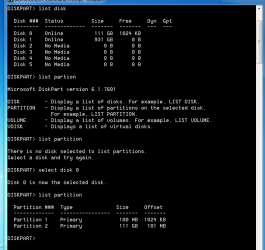
The first partition is the system reserve. Both partitions look OK.

Check to see if you have the latest firmware on the SSD.
 

My Computer My Computer

At a glance

Windows 7 Pro x64 -- PCLinuxOS KDE4 FullMonty...i7-875k @ Turbo - 7,6,5,5 - 3.6ghzCorsair CMD8GX3M4A1600C8 8gbAsus EAH5850 DirectCU/2DIS/1GD5
Computer Manufacturer/Model Number
Custom
OS
Windows 7 Pro x64 -- PCLinuxOS KDE4 FullMonty 2011
CPU
i7-875k @ Turbo - 7,6,5,5 - 3.6ghz
Motherboard
Asus P7P55D-E Deluxe
Memory
Corsair CMD8GX3M4A1600C8 8gb
Graphics Card(s)
Asus EAH5850 DirectCU/2DIS/1GD5
Sound Card
On Board
Monitor(s) Displays
Samsung SyncMaster T220 - Panasonic VT30a 50"
Screen Resolution
1680x1050 -
Hard Drives
Corsair Force 3 SSD 120GB x 2 ::
WD VelociRaptor 150GB WD1500HLFS x 2
PSU
Corsair HX-850 Power Supply
Case
Coolmaster HAF 932
Cooling
Corsair H50
Keyboard
Logitech Wireless MK700
Mouse
Logitech Wireless MX620
Internet Speed
Good enough for now
Other Info
Voip. Insanely cheap phone calls.
Also, see if you are in ahci mode in bios.
 

My Computers My Computers

  • At a glance

    Windows 11 ProRyzen 9 5900X32GB G Skill DDR4-3600EVGA RTX 3080 FTW 3 Ultra
    Computer type
    PC/Desktop
    Computer Manufacturer/Model Number
    ALWAYS UNDER CONSTRUCTION
    OS
    Windows 11 Pro
    CPU
    Ryzen 9 5900X
    Motherboard
    Asus X570 Crosshair Viii Hero
    Memory
    32GB G Skill DDR4-3600
    Graphics Card(s)
    EVGA RTX 3080 FTW 3 Ultra
    Sound Card
    On Board/Sennheiser PC37X Headset
    Monitor(s) Displays
    3 X Asus 27"
    Screen Resolution
    2560x1440
    Hard Drives
    2 X 1 TB NVME drives
    PSU
    EVGA 850
    Case
    Phanteks Eclipse P400A
    Cooling
    EVGA 280 AIO
    Keyboard
    Logitech G510s/ Logitech G13
    Mouse
    Logitech G502
    Internet Speed
    24/1
    Antivirus
    ESET/MBAM Pro/SAS Pro
    Browser
    Chrome/ Firefox/ Edge
  • At a glance

    Windows 11 ProIntel Ultra 9 288V32 GB LPDDR5X 8533
    Computer type
    Laptop
    System Manufacturer/Model Number
    Dell 16 Plus
    OS
    Windows 11 Pro
    CPU
    Intel Ultra 9 288V
    Memory
    32 GB LPDDR5X 8533
    Monitor(s) Displays
    16" Mini-LED HDR600 Touch 90 Hz
    Screen Resolution
    2560X1600
    Hard Drives
    1 TB NVME
The first partition is the system reserve. Both partitions look OK.

Check to see if you have the latest firmware on the SSD.

Any advice or links to help me figure out how to check firmware version? I tried to use the firmware updater from Patriot but it wont see me drive. I tried using it with/without admin priv.
 

My Computer My Computer

At a glance

windows 7 home premium 64bitAMD Phenom II X4 965 ti black box8 Gb CorsairNvidia FeForce GTX 460
Computer Manufacturer/Model Number
custom
OS
windows 7 home premium 64bit
CPU
AMD Phenom II X4 965 ti black box
Motherboard
Gigabyte M68MT-S2P
Memory
8 Gb Corsair
Graphics Card(s)
Nvidia FeForce GTX 460
Sound Card
Creative Soundblaster Audigy
Hard Drives
1- 120Gb Patriot Pyro SSD
1- 500gb standard HDD
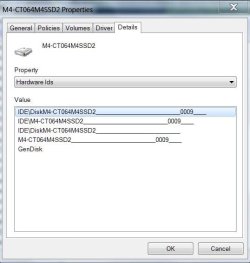
Go to device manager, expand disk drives and right click on the SSD, and select properties. Click the details tab. Click on device descriptions and from the dropdown list, the 1st one is haedware ids. click on that. in the screen there will be numbers on the right side. That is the firmware. You can see mine is firmware 0009.

dev.JPG
 

My Computers My Computers

  • At a glance

    Windows 11 ProRyzen 9 5900X32GB G Skill DDR4-3600EVGA RTX 3080 FTW 3 Ultra
    Computer type
    PC/Desktop
    Computer Manufacturer/Model Number
    ALWAYS UNDER CONSTRUCTION
    OS
    Windows 11 Pro
    CPU
    Ryzen 9 5900X
    Motherboard
    Asus X570 Crosshair Viii Hero
    Memory
    32GB G Skill DDR4-3600
    Graphics Card(s)
    EVGA RTX 3080 FTW 3 Ultra
    Sound Card
    On Board/Sennheiser PC37X Headset
    Monitor(s) Displays
    3 X Asus 27"
    Screen Resolution
    2560x1440
    Hard Drives
    2 X 1 TB NVME drives
    PSU
    EVGA 850
    Case
    Phanteks Eclipse P400A
    Cooling
    EVGA 280 AIO
    Keyboard
    Logitech G510s/ Logitech G13
    Mouse
    Logitech G502
    Internet Speed
    24/1
    Antivirus
    ESET/MBAM Pro/SAS Pro
    Browser
    Chrome/ Firefox/ Edge
  • At a glance

    Windows 11 ProIntel Ultra 9 288V32 GB LPDDR5X 8533
    Computer type
    Laptop
    System Manufacturer/Model Number
    Dell 16 Plus
    OS
    Windows 11 Pro
    CPU
    Intel Ultra 9 288V
    Memory
    32 GB LPDDR5X 8533
    Monitor(s) Displays
    16" Mini-LED HDR600 Touch 90 Hz
    Screen Resolution
    2560X1600
    Hard Drives
    1 TB NVME
You are ahead of me Steve. I am still trying to put 09 on, but cannot find the IDE setting in the BIOS. They offer only AHCI and Raid0. Have to call Dell.
 

My Computer My Computer

At a glance

Vista, Windows7, Mint Mate, Zorin, Windows 8from 1.6GHz Duo to i7
Computer Manufacturer/Model Number
HP, Dell, Gateway, Toshiba - 4 laptops and 2 desktops
OS
Vista, Windows7, Mint Mate, Zorin, Windows 8
CPU
from 1.6GHz Duo to i7
Monitor(s) Displays
2x HP w2207
Hard Drives
5x HDD, 7x SSD, 12x Externals
Keyboard
with trackball - no mices
Mouse
Trackball mice
Internet Speed
DSL 6000
You are ahead of me Steve. I am still trying to put 09 on, but cannot find the IDE setting in the BIOS. They offer only AHCI and Raid0. Have to call Dell.

That's pretty strange, to me. I've never seen one with no IDE option in bios. It would really be a pain if you have to take it out to do a firmware update. But, I do have a laptop with no one time boot option. To boot from a USB you have to reset bios boot options.
 

My Computers My Computers

  • At a glance

    Windows 11 ProRyzen 9 5900X32GB G Skill DDR4-3600EVGA RTX 3080 FTW 3 Ultra
    Computer type
    PC/Desktop
    Computer Manufacturer/Model Number
    ALWAYS UNDER CONSTRUCTION
    OS
    Windows 11 Pro
    CPU
    Ryzen 9 5900X
    Motherboard
    Asus X570 Crosshair Viii Hero
    Memory
    32GB G Skill DDR4-3600
    Graphics Card(s)
    EVGA RTX 3080 FTW 3 Ultra
    Sound Card
    On Board/Sennheiser PC37X Headset
    Monitor(s) Displays
    3 X Asus 27"
    Screen Resolution
    2560x1440
    Hard Drives
    2 X 1 TB NVME drives
    PSU
    EVGA 850
    Case
    Phanteks Eclipse P400A
    Cooling
    EVGA 280 AIO
    Keyboard
    Logitech G510s/ Logitech G13
    Mouse
    Logitech G502
    Internet Speed
    24/1
    Antivirus
    ESET/MBAM Pro/SAS Pro
    Browser
    Chrome/ Firefox/ Edge
  • At a glance

    Windows 11 ProIntel Ultra 9 288V32 GB LPDDR5X 8533
    Computer type
    Laptop
    System Manufacturer/Model Number
    Dell 16 Plus
    OS
    Windows 11 Pro
    CPU
    Intel Ultra 9 288V
    Memory
    32 GB LPDDR5X 8533
    Monitor(s) Displays
    16" Mini-LED HDR600 Touch 90 Hz
    Screen Resolution
    2560X1600
    Hard Drives
    1 TB NVME
You said it. Taking it out would be a pain especially since I had plenty of trouble getting it into this tight box - with Velcro.
 

My Computer My Computer

At a glance

Vista, Windows7, Mint Mate, Zorin, Windows 8from 1.6GHz Duo to i7
Computer Manufacturer/Model Number
HP, Dell, Gateway, Toshiba - 4 laptops and 2 desktops
OS
Vista, Windows7, Mint Mate, Zorin, Windows 8
CPU
from 1.6GHz Duo to i7
Monitor(s) Displays
2x HP w2207
Hard Drives
5x HDD, 7x SSD, 12x Externals
Keyboard
with trackball - no mices
Mouse
Trackball mice
Internet Speed
DSL 6000
With most all brands of SSDs, the people with Mac's always have to do it. Macs won't update firmware even if running Windows in Bootcamp.
 

My Computers My Computers

  • At a glance

    Windows 11 ProRyzen 9 5900X32GB G Skill DDR4-3600EVGA RTX 3080 FTW 3 Ultra
    Computer type
    PC/Desktop
    Computer Manufacturer/Model Number
    ALWAYS UNDER CONSTRUCTION
    OS
    Windows 11 Pro
    CPU
    Ryzen 9 5900X
    Motherboard
    Asus X570 Crosshair Viii Hero
    Memory
    32GB G Skill DDR4-3600
    Graphics Card(s)
    EVGA RTX 3080 FTW 3 Ultra
    Sound Card
    On Board/Sennheiser PC37X Headset
    Monitor(s) Displays
    3 X Asus 27"
    Screen Resolution
    2560x1440
    Hard Drives
    2 X 1 TB NVME drives
    PSU
    EVGA 850
    Case
    Phanteks Eclipse P400A
    Cooling
    EVGA 280 AIO
    Keyboard
    Logitech G510s/ Logitech G13
    Mouse
    Logitech G502
    Internet Speed
    24/1
    Antivirus
    ESET/MBAM Pro/SAS Pro
    Browser
    Chrome/ Firefox/ Edge
  • At a glance

    Windows 11 ProIntel Ultra 9 288V32 GB LPDDR5X 8533
    Computer type
    Laptop
    System Manufacturer/Model Number
    Dell 16 Plus
    OS
    Windows 11 Pro
    CPU
    Intel Ultra 9 288V
    Memory
    32 GB LPDDR5X 8533
    Monitor(s) Displays
    16" Mini-LED HDR600 Touch 90 Hz
    Screen Resolution
    2560X1600
    Hard Drives
    1 TB NVME
Back
Top