New to Windows 7, was on Vista prior- few queries pls

eknirb

Go SF Giants
Member
VIP
Local time
5:51 AM
Messages
242
1) It boots up with asking me for a password. Don't want that. Where do I change?

2) Monitor goes dark after awhile of non use- guess there's an energy saver option?

3) IR remote. I have the TV "Windows Media Center Option." I have the cable hooked up in the back to the processor---where do I plug in the IR remote, I forget. And theres one of those and another remote with a tiny silver tab at the end?

4) Can't seem to get printer to work, tho it was properly installed. USB connected, powered up, etc. Don't I just install the CANON software or so I do something else?

5)Is it just me or does it take a long time to boot up?

6) I might--might--start using IE9. Why are there two versions shown in start list? Internet Explorer, and Internet Explorer 64 bit.

New HPE h81010t, 12G Ram, Intel Core i5-2400.
 

My Computer My Computer

At a glance

Windows 7 Home Premium 64bit.
OS
Windows 7 Home Premium 64bit.
Hello & welcome to Seven Forums.

1: Auto log on to your user account
2: Select a power plan & Change power plan settings
3: not really my area of expertise, sorry
4: Driver - install add printer wizard or you might try installing the Canon software in compatibility mode.
5: How long does it take to boot up? If it's around a minute or so, it's perfectly normal.
6: There are 2 versions installed, one 32(86)bit and the other 64bit; because you have 64bit Windows, as I gather from your specs.

I hope this will help you out, but if you have any more problems or questions, don't hesitate to ask.
 

My Computer My Computer

At a glance

Windows 7 Ultimate x64Intel C2D E8400@4Ghz OC4x2GB Kingston HyperX 8500@1066MhzNvidia GTS450 OC
Computer Manufacturer/Model Number
Custom/DIY
OS
Windows 7 Ultimate x64
CPU
Intel C2D E8400@4Ghz OC
Motherboard
ASUS P5Q-E, bios 2101
Memory
4x2GB Kingston HyperX 8500@1066Mhz
Graphics Card(s)
Nvidia GTS450 OC
Sound Card
Onboard SoundMax
Monitor(s) Displays
Samsung Syncmaster 17"
Screen Resolution
1280x1024
Hard Drives
WD6402AAEX-640GB(system), WD10EALX-1TB(storage), other external disks & docking stations
PSU
Corsair TX-750 V2
Case
Custom Tower
Cooling
Air: Arctic Cooling 2xF8 & F12; Akasa AK-968, 2xAK-HD-BL
Mouse
Gigabyte M6900
Internet Speed
10M/1M
ok, well i just deleted password. i didn't want it to have me have to enter one each time.

i guess re IE; i don't know why the start menu shows two versions of it. One just says 'Internet Explorer,' and the other 'Internet Explorer 64 bit.'
 

My Computer My Computer

At a glance

Windows 7 Home Premium 64bit.
OS
Windows 7 Home Premium 64bit.
The start menu shows two versions of IE9 because there are two versions i.e. IE9 32-bit and IE9 64-bit, which are displayed because you have the 64-bit version of Windows 7.

If having both of them displayed under All Programs bothers you, just delete the shortcut for the version you don't want to use.

Alternatively, right-click the version you do want to use and choose to pin it to the start menu and/or the taskbar.

One thing to remember about the 64-bit version though, Adobe are still working on a 64-bit version of Flash player so you may get a warning that IE9 64-bit can't play Flash video.
 

My Computer My Computer

At a glance

Windows 7 Ultimate SP1 64-BitIntel Core i7 870 @ 2.93GHz8Gb Dual-Channel DDR3 @ 664MHznVidia GeForce GTX 460 1024MB dedicated RAM
Computer Manufacturer/Model Number
HP Pavilion Elite 495UK
OS
Windows 7 Ultimate SP1 64-Bit
CPU
Intel Core i7 870 @ 2.93GHz
Motherboard
MSI 2A9C (CPU1)
Memory
8Gb Dual-Channel DDR3 @ 664MHz
Graphics Card(s)
nVidia GeForce GTX 460 1024MB dedicated RAM
Sound Card
Realtek HD Audio
Monitor(s) Displays
HP2310i
Screen Resolution
1920 x 1080
Hard Drives
1x1954GB Hitachi HDS22020ALA 330 (RAID), 1x1954GB Hitachi External for backup and storage
PSU
460W
Case
HP Elite
Cooling
Air cooled
Keyboard
Logitech K750 solar-powered keyboard
Mouse
Logitech Wireless M180 mouse
Internet Speed
2Mb
Other Info
Pure Avanti Flow Internet Radio with iPod Dock, 64Gb iPod, HP USB Speakers, Sony MDR-V500 Headphones, Sony Vaio F-Series Laptop
ok, well i just deleted password. i didn't want it to have me have to enter one each time.

i guess re IE; i don't know why the start menu shows two versions of it. One just says 'Internet Explorer,' and the other 'Internet Explorer 64 bit.'


>>> well i just deleted password. i didn't want it to have me have to enter one each time.

Bypass the logon screen. Logon directly to your desktop....

Automatically Log On a User Account at Windows 7 Startup
http://www.sevenforums.com/tutorials/377-log-automatically-startup.html
 

My Computer My Computer

At a glance

Windows 7 Home Premium 64-bit, SP1Intel Pentium P6200, Cores 2, 2.13 GHz4 GBIntel HD
Computer Manufacturer/Model Number
Acer Aspire 7741Z
OS
Windows 7 Home Premium 64-bit, SP1
CPU
Intel Pentium P6200, Cores 2, 2.13 GHz
Memory
4 GB
Graphics Card(s)
Intel HD
Sound Card
unknown
Monitor(s) Displays
17.3 inches
Screen Resolution
1600 x 900
Hard Drives
640 GB, 5400 PRM
@Eknirb:

I too noticed that after you let Win 7 idle for a number of minutes, EVEN if you have a screen saver activated like I do that the screen will go dark after a number of minutes and remain so until the PC goes into sleep mpde, I wish I could get the screen saver to remain on until the PC is set to go into sleep mode.

Anyone know how to set it up that way?
 

My Computer My Computer

At a glance

win 7 home premium 64 bitcore i5 7606 gbati 5450
Computer Manufacturer/Model Number
hp pavilion 6680t
OS
win 7 home premium 64 bit
CPU
core i5 760
Motherboard
iona (from MSI)
Memory
6 gb
Graphics Card(s)
ati 5450
Sound Card
real tek 888
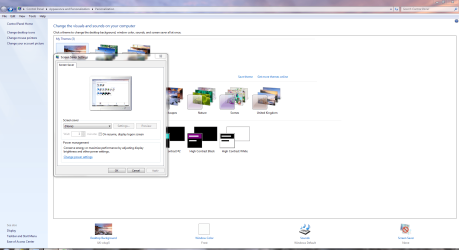
Right-click your desktop again then choose Personalize and click on Screensaver. Make sure that On resume, display logon screen is unchecked and choose None in the drop-down list for the screensaver.

SS.PNG
 

My Computer My Computer

At a glance

Windows 7 Ultimate SP1 64-BitIntel Core i7 870 @ 2.93GHz8Gb Dual-Channel DDR3 @ 664MHznVidia GeForce GTX 460 1024MB dedicated RAM
Computer Manufacturer/Model Number
HP Pavilion Elite 495UK
OS
Windows 7 Ultimate SP1 64-Bit
CPU
Intel Core i7 870 @ 2.93GHz
Motherboard
MSI 2A9C (CPU1)
Memory
8Gb Dual-Channel DDR3 @ 664MHz
Graphics Card(s)
nVidia GeForce GTX 460 1024MB dedicated RAM
Sound Card
Realtek HD Audio
Monitor(s) Displays
HP2310i
Screen Resolution
1920 x 1080
Hard Drives
1x1954GB Hitachi HDS22020ALA 330 (RAID), 1x1954GB Hitachi External for backup and storage
PSU
460W
Case
HP Elite
Cooling
Air cooled
Keyboard
Logitech K750 solar-powered keyboard
Mouse
Logitech Wireless M180 mouse
Internet Speed
2Mb
Other Info
Pure Avanti Flow Internet Radio with iPod Dock, 64Gb iPod, HP USB Speakers, Sony MDR-V500 Headphones, Sony Vaio F-Series Laptop
Back
Top