
Solved New Updates are available but no updates...

KingIsaiahIV

New member
Local time
2:39 AM
Messages
11
Hi, after a clean install of Windows 7 Starter with my recovery disks, Windows Update won't show me available updates... in the system tray it shows, "New Updates are available" or "Windows is downloading updates N%" but when I open it, it shows "Check for Updates for your PC" or "Checking for Updates...". How can I repair Windows Update.

Note:I ran Windows Update for 1 hour but no luck.

Note: SFC didn't find any corruption or anything...


Please help!!!!
 

Attachments
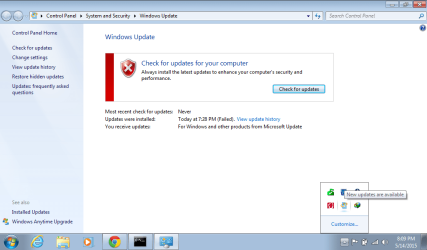
  • scrshot.png
    scrshot.png
    36.1 KB · Views: 0

My Computer My Computer

Computer type
Laptop
Computer Manufacturer/Model Number
HP Mini 110-3715TU
OS
Windows 7 Ultimate x86
CPU
Intel Atom N370 1.66Ghz
Motherboard
Insyde
Memory
2.00GB
Graphics Card(s)
Intel Graphics Media Accelerator 3150
Sound Card
IDT HD Premium Audio
Monitor(s) Displays
HP built-in Display
Screen Resolution
1200x600
Hard Drives
Hitachi HTS723232A7A364
Keyboard
HP Keyboard (built-in)
Mouse
Synaptics Touchpad
Internet Speed
3.2 Mbps (WLAN)
Antivirus
AVG Internet Security 2014
Browser
Google Chrome 36, IE11
I set it to "Install Updates Automatically" then what should I do next?
 

My Computer My Computer

Computer type
Laptop
Computer Manufacturer/Model Number
HP Mini 110-3715TU
OS
Windows 7 Ultimate x86
CPU
Intel Atom N370 1.66Ghz
Motherboard
Insyde
Memory
2.00GB
Graphics Card(s)
Intel Graphics Media Accelerator 3150
Sound Card
IDT HD Premium Audio
Monitor(s) Displays
HP built-in Display
Screen Resolution
1200x600
Hard Drives
Hitachi HTS723232A7A364
Keyboard
HP Keyboard (built-in)
Mouse
Synaptics Touchpad
Internet Speed
3.2 Mbps (WLAN)
Antivirus
AVG Internet Security 2014
Browser
Google Chrome 36, IE11
With "Install Updates Automatically" set, you might be able to also "Check For Updates" manually and see what is available. I might have my own machines set for automatically *checking* for updates but then letting me decide when to actually install them (but I cannot check that right now since I am in XP at the moment). A BSOD during updates is very unusual for me, but it has happened without my ever knowing why since all goes back to normal after a reboot or two.
 

My Computer My Computer

OS
Win7 Ultimate x64
Thank you...
 

My Computer My Computer

Computer type
Laptop
Computer Manufacturer/Model Number
HP Mini 110-3715TU
OS
Windows 7 Ultimate x86
CPU
Intel Atom N370 1.66Ghz
Motherboard
Insyde
Memory
2.00GB
Graphics Card(s)
Intel Graphics Media Accelerator 3150
Sound Card
IDT HD Premium Audio
Monitor(s) Displays
HP built-in Display
Screen Resolution
1200x600
Hard Drives
Hitachi HTS723232A7A364
Keyboard
HP Keyboard (built-in)
Mouse
Synaptics Touchpad
Internet Speed
3.2 Mbps (WLAN)
Antivirus
AVG Internet Security 2014
Browser
Google Chrome 36, IE11
Please follow the Windows Update Posting Instructions and post the requested data

If the file is too large (8MB compressed), remove the older CBSPersist cab files until the final file is below the limit - you can always post them separately after zipping them. (the forum doesn't allow the upload of bare CAB files, for a number of reasons)

Please also post the C:\Windows\windowsudpate.log file
 

My Computer My Computer

Computer type
Laptop
Computer Manufacturer/Model Number
Asus K52F or Lenovo B51-80
OS
Win 7 x64 Home Premium (and x86 VirtualBox VM)/Win10
CPU
i3 370M/i7 6500U
Motherboard
Asus/Lenovo
Memory
8GB - finally :)/8GB
Graphics Card(s)
it's an i3, dude!/dual Intel&nVidia
Sound Card
onboard
Monitor(s) Displays
15.6" built-in
Screen Resolution
1366x768/1920x1080
Hard Drives
750GB Seagate internal
Sundry external drives attached to other computers on the local network
1TB SSD on the Lenovo
PSU
n/a
Internet Speed
as much as I can get - usually on a dongle/phone, so <1MB/s
Antivirus
MSE/Defender
Browser
IE11/12/Edge/Chrome/FF(if I must)
I've already solved the problem.. I downloaded and installed "System Update Readiness Tool" and rebooted and Windows Update showing up all updates available...
 

My Computer My Computer

Computer type
Laptop
Computer Manufacturer/Model Number
HP Mini 110-3715TU
OS
Windows 7 Ultimate x86
CPU
Intel Atom N370 1.66Ghz
Motherboard
Insyde
Memory
2.00GB
Graphics Card(s)
Intel Graphics Media Accelerator 3150
Sound Card
IDT HD Premium Audio
Monitor(s) Displays
HP built-in Display
Screen Resolution
1200x600
Hard Drives
Hitachi HTS723232A7A364
Keyboard
HP Keyboard (built-in)
Mouse
Synaptics Touchpad
Internet Speed
3.2 Mbps (WLAN)
Antivirus
AVG Internet Security 2014
Browser
Google Chrome 36, IE11
Please post the logs anyhow - they may show unfixed errors.
 

My Computer My Computer

Computer type
Laptop
Computer Manufacturer/Model Number
Asus K52F or Lenovo B51-80
OS
Win 7 x64 Home Premium (and x86 VirtualBox VM)/Win10
CPU
i3 370M/i7 6500U
Motherboard
Asus/Lenovo
Memory
8GB - finally :)/8GB
Graphics Card(s)
it's an i3, dude!/dual Intel&nVidia
Sound Card
onboard
Monitor(s) Displays
15.6" built-in
Screen Resolution
1366x768/1920x1080
Hard Drives
750GB Seagate internal
Sundry external drives attached to other computers on the local network
1TB SSD on the Lenovo
PSU
n/a
Internet Speed
as much as I can get - usually on a dongle/phone, so <1MB/s
Antivirus
MSE/Defender
Browser
IE11/12/Edge/Chrome/FF(if I must)
Back
Top