New Widescreen Monitor - Smaller Font Printed With WL Mail

Win7rap

New member
Member
VIP
Local time
6:58 PM
Messages
120
Installed a bigger widescreen monitor but when I print emails (with WL Mail) the text is smaller than with old monitor. Don't understand it - went back to an email that I printed a week ago and printed again ... sure enough, the text size was smaller (the image contained, however, was the same size). Thought the font size (of text in an email) was 'fixed' when sent - so why is it different with a larger monitor.

Now, I did tell Windows 7 to display the text size larger (so could see it better on larger screen) ... but, if anything, I'd have expected printed size to be larger.

Any suggestions of what to do? (I know can copy email text to another file then go to NotePad ++ and change the size - then print ... but that shouldn't be necessary.)

{Not sure if this is right forum, so let me know immediately and I'll reopen in appropriate one}
 

My Computer My Computer

At a glance

Win 7
OS
Win 7
Hi Win7rap, I use WLM 2010. If no message is selected, text size can be adjusted on the 'View' tab.
 

My Computer My Computer

At a glance

Win7 H.Prem. 32bit+SP1
Computer Manufacturer/Model Number
Look in my Signature.
OS
Win7 H.Prem. 32bit+SP1
Thanks Roderunner.

I'm using WLM 2011 (which think is basically the same) but didn't see anything that addressed text or text size. Am I looking at the right 'view' tab?

WLM2011View.PNG
 

My Computer My Computer

At a glance

Win 7
OS
Win 7
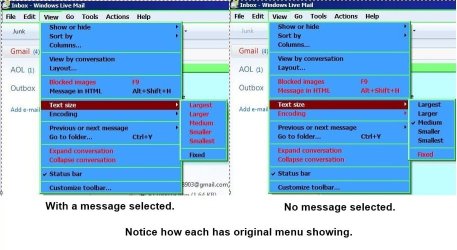
As your using WLM 2011 it might take a bit of exploring. Here's mine.

RR.JPG
 

My Computer My Computer

At a glance

Win7 H.Prem. 32bit+SP1
Computer Manufacturer/Model Number
Look in my Signature.
OS
Win7 H.Prem. 32bit+SP1
Thank you - unfortunately I didn't find any reference to 'text size' in any tab (email, Home, Folder, View, or Account).

BTW how do you get the drop-down (as in your View image)? When I left click on the View tab I get the 'ribbon view' (as in my image) and right clicking just gives the ribbon choices drop-down.

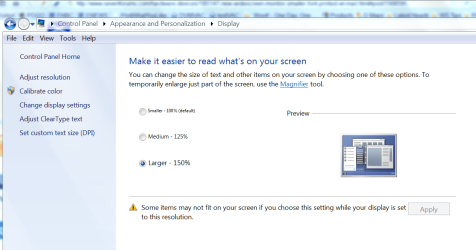
I suspect setting the 'text size' (as in your drop-down) just sets the size of the text displayed - not the printed size. I set the global text size (for all of Windows by):
ChangeTxSz.PNG.

So the displayed text is good ... but the printed text size is very small (seems to be 'governed' by the monitor resolution).
 

My Computer My Computer

At a glance

Win 7
OS
Win 7

My Computer My Computer

At a glance

Windows 7 Pro 64bit build 7601 SP1Intel Core I5 3570K 3.4Ghz w/ Zalman CNPS9900...G.Skill F3-12800CL9D-8GbXL ; 4Gx2EVGA Geforce GTX 770 Superclocked
Computer type
PC/Desktop
Computer Manufacturer/Model Number
Custom Build
OS
Windows 7 Pro 64bit build 7601 SP1
CPU
Intel Core I5 3570K 3.4Ghz w/ Zalman CNPS9900NT RT
Motherboard
MSI Z77A-G45 Gaming
Memory
G.Skill F3-12800CL9D-8GbXL ; 4Gx2
Graphics Card(s)
EVGA Geforce GTX 770 Superclocked
Sound Card
Creative Sound Blaster Z
Monitor(s) Displays
Dual ViewSonic VX2770Smh-LED Black 27"IPS-Panel
Screen Resolution
1920x1080
Hard Drives
Kingston Hyper X 240GB SSD Win8 Pro 64bit 6GB/s Sata III
Intel 335 Series SSD 240GB Win8 Storage 6GB/s Sata III
Intel 320 Series SSD 600GB Storage 3GB/s Sata II
Western Digital Scorpio Black 1TB - Docked via Esata
PSU
Coolermaster GX 750W
Case
Corsair Vengence C70
Cooling
Coolermaster 120mm and Enermax 140mm
Keyboard
Corsair Vengence K70
Mouse
Logitech G500
Internet Speed
22mbps+
Browser
Firefox, Chrome, IE
Other Info
Swan M50W 2.1 speakers
APC UPS
Thermaltake BlacX HDD Dock
Samsung BD Optical Drive
Netgear WNDR4500
Who knew that IE would be involved? Not me !!

Since IE is not my default browser I wonder if Firefox settings will alter print size?

As it turns out, when I attempt to launch IE from my Prog Files I seem to get Chrome??

To be continued later
 

My Computer My Computer

At a glance

Win 7
OS
Win 7
My response is out of sync because i was responding to the Post-1 when the latest post arrived.

I can't remember right now, but there was some 2010 feature that didn't work right so I installed 2011 which 'fixed'
the problem. Thus I'm reluctant to 'back up'.
 

My Computer My Computer

At a glance

Win 7
OS
Win 7
Finally got IE9 fixed. Changed font size to 12 in IE9 and printed again ... no joy !

The printed text was small (same as before).

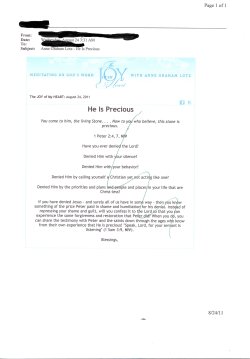
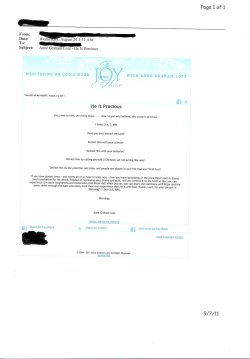
Here is an example of a good print and a small print (unfortunately the scanned images don't show the problem very well(both are from my wife's email):

Good Print(1st) .......................................Small print(2nd)
xGoodPrint.jpg ..................... xSmallPrint.jpg

As you can see, the email header ( Name, To field, etc) and the email image are OK in both emails... but the text in the (2nd) is smaller (difficult for wife to read).
 
Last edited:

My Computer My Computer

At a glance

Win 7
OS
Win 7
You might want to blackout any identifying info in the email header.
As to your continued problem I don't know. This is odd.
 

My Computer My Computer

At a glance

Windows 7 Pro 64bit build 7601 SP1Intel Core I5 3570K 3.4Ghz w/ Zalman CNPS9900...G.Skill F3-12800CL9D-8GbXL ; 4Gx2EVGA Geforce GTX 770 Superclocked
Computer type
PC/Desktop
Computer Manufacturer/Model Number
Custom Build
OS
Windows 7 Pro 64bit build 7601 SP1
CPU
Intel Core I5 3570K 3.4Ghz w/ Zalman CNPS9900NT RT
Motherboard
MSI Z77A-G45 Gaming
Memory
G.Skill F3-12800CL9D-8GbXL ; 4Gx2
Graphics Card(s)
EVGA Geforce GTX 770 Superclocked
Sound Card
Creative Sound Blaster Z
Monitor(s) Displays
Dual ViewSonic VX2770Smh-LED Black 27"IPS-Panel
Screen Resolution
1920x1080
Hard Drives
Kingston Hyper X 240GB SSD Win8 Pro 64bit 6GB/s Sata III
Intel 335 Series SSD 240GB Win8 Storage 6GB/s Sata III
Intel 320 Series SSD 600GB Storage 3GB/s Sata II
Western Digital Scorpio Black 1TB - Docked via Esata
PSU
Coolermaster GX 750W
Case
Corsair Vengence C70
Cooling
Coolermaster 120mm and Enermax 140mm
Keyboard
Corsair Vengence K70
Mouse
Logitech G500
Internet Speed
22mbps+
Browser
Firefox, Chrome, IE
Other Info
Swan M50W 2.1 speakers
APC UPS
Thermaltake BlacX HDD Dock
Samsung BD Optical Drive
Netgear WNDR4500
Agree
 

My Computer My Computer

At a glance

Win 7
OS
Win 7
Back
Top