New window Pops Up everytime I open a folder

CravEnGGo

New member
Local time
9:50 PM
Messages
7
I need help :cry: I've just uninstalled Internet Explorer on my laptop and I've deleted everything related about Internet Explorer Including the Internet Explorer Folder Located in Local Disk (C: )/Program Files. Then after I've restarted my laptop I opened a folder and instead of the folder opening in the same window, it opened in a new window. I've tried Researching the internet for help but the result was frustrating. I've even tried the folder Options by Clicking the "Open each folder In the same Window" Button but Nothing Happened :confused:. I'm Using an Acer Windows 7 Ultimate Laptop
 

My Computer My Computer

Computer type
Laptop
Computer Manufacturer/Model Number
Acer 4743
OS
32-bit Operating System, Windows 7 Ultimate x32
Antivirus
Avast
Browser
Google Chrome, Mozilla Firefox
Sorry if this sounds kind of vague, but I believe IE is used for some filing that is offline as well. Again, I am not the most knowledgeable about this, I am sure someone will chime in here shortly...
 

My Computer My Computer

Computer type
Laptop
OS
Windows 7 Ultimate 64bit SP-1
CPU
Intel Core i5 3rd Gen. w/ Turbo Boost 2.6
Motherboard
Asus
Hard Drives
8" Drive (primary storage device)
2 TB External
1 Internal HD
Mouse
Logitech Anywhere MX
Internet Speed
Light Speed
Antivirus
MSE
Why would you remove everything I.E.?
My recommendation would be to install I.E. even if you don't use it. I can't give you a bunch of high tech reasons except Windows 7 I.E. has it figures in many parts of the operating system. I.E. is not like a add on browser it is a internal part of Windows 7. When you remove everything that I.E. uses you have also remove things that other parts of the operating system uses. I have also found out that many things to do with Microsoft work better when using I.E. I don't know the tech reason except Microsoft likes Microsoft.
I would start by trying a restore point before you removed everything I.E.

http://www.sevenforums.com/tutorial...re-points-manually-extract-files-folders.html

http://www.sevenforums.com/tutorials/700-system-restore.html
 

My Computer My Computer

Computer type
PC/Desktop
Computer Manufacturer/Model Number
Home made Desktop
OS
Windows 10 Pro. 64/ version 1709 Windows 7 Pro/64
CPU
Intel i7-6800K @ 4.3
Motherboard
ASUS X-99 Deluxe II
Memory
Corsair Platinum 16 gig @2400
Graphics Card(s)
EVGA GTX 1070 OC
Monitor(s) Displays
Asus 27" LED LCD/VE278Q
Screen Resolution
1920-1080 or 1280-720 HDMI
Hard Drives
INTEL SSD 730-240 Gb Sata 3.0/
PSU
EVGA Platium 1200W
Case
Phanteks Luxe Tempered Glass 8 fans/ one radiator
Cooling
XSPC/ Water Cooled CPU
Keyboard
Das 4 Professional
Mouse
Logitech M705/MX Anywhere 2-S
Internet Speed
100 mbits
Antivirus
Microsoft Security Essentials/ Malwarebytes Premium 3.0/ SAS
Browser
I.E. 11 default/Firefox/ ISP Time Warner Cable/Spectrum
Other Info
LG BluRay Burner/
Sound system-KLipsch-THX/
Icy Dock ssd Hot Swap bays.
I already did the system restore thing and it said it couldn't find a copy of the directory
 

My Computer My Computer

Computer type
Laptop
Computer Manufacturer/Model Number
Acer 4743
OS
32-bit Operating System, Windows 7 Ultimate x32
Antivirus
Avast
Browser
Google Chrome, Mozilla Firefox
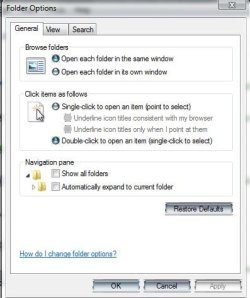
Check this setting:

  • Open Control panel
  • open Folder options
  • in the top section of the Gereral tab
  • in Browse folders: Make sure that the Open each folder in the same Window is selected
 

Attachments

  • folderopt.JPG
    folderopt.JPG
    33.6 KB · Views: 3
Last edited:

My Computer My Computer

Computer type
PC/Desktop
Computer Manufacturer/Model Number
Custom
OS
Windows 7 Ultimate x64
CPU
AMD A10-7850 Quad Core 3.7 GHz
Motherboard
MSI MS-7900
Memory
16 GB
Graphics Card(s)
MSI Radeon R7 250 OC Crossfired with A10 AMD Radeon R7
Monitor(s) Displays
Samsung SyncMaster XL2370HD, ViewSonic VA1912wb
Screen Resolution
1920*1080, 1440*900
Hard Drives
128 GB SSD
512 GB SSD
500 GB HDD
PSU
Corsair CX500
Case
Rosewill THOR V2 BLACK
Keyboard
Logitech G15
Mouse
CMSTORM MS2K
Internet Speed
ATT U-Verse
Antivirus
Microsoft Security Essentials, MalwareBytes
Browser
Firefox (lastest stable) with NoScript
Other Info
Just a humdrum little system.

My Computer My Computer

Computer type
PC/Desktop
Computer Manufacturer/Model Number
Home Built Desktop By DataTech
OS
Windows 7 Ultimate X64 SP1
CPU
Intel i5-2550K, Differing ~4.4-4.8GHz No built in GPU
Motherboard
ASUS P8Z68-V PRO/GEN3
Memory
16GB G.Skill Sniper 1866MHz @ 2133MHz 2x8GB
Graphics Card(s)
ASUS GTX650TIB-DC2OC-2GD5, (650TI Boost)
Sound Card
Onboard Realtek 5-1
Monitor(s) Displays
Samsung P2570HD
Screen Resolution
1920x1080
Hard Drives
Samsung 840 Pro 256GB SSD for OS, 500GB Seagate Constellation (Enterprise drive) for Data
PSU
Corsair HX650W
Case
Inwin Dragon Rider
Cooling
Hyper 212 EVO w/two Noctua fans, push-pull, @1300 RPM
Keyboard
E-Z Eyes, bright yellow keys with large characters
Mouse
steelseries SENSEI Laser Pro Gaming
Internet Speed
48-51Mbs Mbs down, 11 Mbs up Xfinity Cable
Antivirus
Norton Internet Security 2013
Browser
IE 10, Opera, Pale Moon if needed
Other Info
4 case fans, LG BluRay-RE, ASUS DVD-RW, Mr. Fusion power supply, 1.21 gigawatts.

My Computer My Computer

Computer type
PC/Desktop
Computer Manufacturer/Model Number
Home made Desktop
OS
Windows 10 Pro. 64/ version 1709 Windows 7 Pro/64
CPU
Intel i7-6800K @ 4.3
Motherboard
ASUS X-99 Deluxe II
Memory
Corsair Platinum 16 gig @2400
Graphics Card(s)
EVGA GTX 1070 OC
Monitor(s) Displays
Asus 27" LED LCD/VE278Q
Screen Resolution
1920-1080 or 1280-720 HDMI
Hard Drives
INTEL SSD 730-240 Gb Sata 3.0/
PSU
EVGA Platium 1200W
Case
Phanteks Luxe Tempered Glass 8 fans/ one radiator
Cooling
XSPC/ Water Cooled CPU
Keyboard
Das 4 Professional
Mouse
Logitech M705/MX Anywhere 2-S
Internet Speed
100 mbits
Antivirus
Microsoft Security Essentials/ Malwarebytes Premium 3.0/ SAS
Browser
I.E. 11 default/Firefox/ ISP Time Warner Cable/Spectrum
Other Info
LG BluRay Burner/
Sound system-KLipsch-THX/
Icy Dock ssd Hot Swap bays.
Nevermind the problem, your suggestions are too complicated. i'll just get used to opening folders by right clicking them and clicking the open button, afterall it works
 

My Computer My Computer

Computer type
Laptop
Computer Manufacturer/Model Number
Acer 4743
OS
32-bit Operating System, Windows 7 Ultimate x32
Antivirus
Avast
Browser
Google Chrome, Mozilla Firefox
Check this setting:

  • Open Control panel
  • open Folder options
  • in the top section of the Gereral tab
  • in Browse folders: Make sure that the Open each folder in the same Window is selected
already tried that too nothing happened:(
 

My Computer My Computer

Computer type
Laptop
Computer Manufacturer/Model Number
Acer 4743
OS
32-bit Operating System, Windows 7 Ultimate x32
Antivirus
Avast
Browser
Google Chrome, Mozilla Firefox
reinstall Internet explorer
 

My Computer My Computer

Computer type
Laptop
Computer Manufacturer/Model Number
ACER ASPIRE 5742G
OS
Microsoft Windows 7 Home Premium 64-bits 7601 Multiprocessor Free Service Pack 1
CPU
Intel(R) Core(TM) i3 CPU M 370 @ 2.40GHz
Motherboard
Acer Aspire 5742G
Memory
4,00 GB
Graphics Card(s)
ATI Mobility Radeon HD 5400 Series
Sound Card
(1) AMD High Definition Audio Device (2) Realtek High Defi
Screen Resolution
1366 x 768 x 32 bits (4294967296 colors) @ 60 Hz
Hard Drives
WDC WD5000BEVT-22ZAT0
Nevermind the problem, your suggestions are too complicated. i'll just get used to opening folders by right clicking them and clicking the open button, afterall it works

That may backfire at some point though and amke your system unbootable due to your delting system files.

reinstall Internet explorer

^^^Try this^^^
 

My Computer My Computer

Computer type
PC/Desktop
Computer Manufacturer/Model Number
Home Built Desktop By DataTech
OS
Windows 7 Ultimate X64 SP1
CPU
Intel i5-2550K, Differing ~4.4-4.8GHz No built in GPU
Motherboard
ASUS P8Z68-V PRO/GEN3
Memory
16GB G.Skill Sniper 1866MHz @ 2133MHz 2x8GB
Graphics Card(s)
ASUS GTX650TIB-DC2OC-2GD5, (650TI Boost)
Sound Card
Onboard Realtek 5-1
Monitor(s) Displays
Samsung P2570HD
Screen Resolution
1920x1080
Hard Drives
Samsung 840 Pro 256GB SSD for OS, 500GB Seagate Constellation (Enterprise drive) for Data
PSU
Corsair HX650W
Case
Inwin Dragon Rider
Cooling
Hyper 212 EVO w/two Noctua fans, push-pull, @1300 RPM
Keyboard
E-Z Eyes, bright yellow keys with large characters
Mouse
steelseries SENSEI Laser Pro Gaming
Internet Speed
48-51Mbs Mbs down, 11 Mbs up Xfinity Cable
Antivirus
Norton Internet Security 2013
Browser
IE 10, Opera, Pale Moon if needed
Other Info
4 case fans, LG BluRay-RE, ASUS DVD-RW, Mr. Fusion power supply, 1.21 gigawatts.

Attachments

  • ie.PNG
    ie.PNG
    49.2 KB · Views: 1

My Computer My Computer

Computer type
PC/Desktop
Computer Manufacturer/Model Number
Custom
OS
Windows 7 Ultimate x64
CPU
AMD A10-7850 Quad Core 3.7 GHz
Motherboard
MSI MS-7900
Memory
16 GB
Graphics Card(s)
MSI Radeon R7 250 OC Crossfired with A10 AMD Radeon R7
Monitor(s) Displays
Samsung SyncMaster XL2370HD, ViewSonic VA1912wb
Screen Resolution
1920*1080, 1440*900
Hard Drives
128 GB SSD
512 GB SSD
500 GB HDD
PSU
Corsair CX500
Case
Rosewill THOR V2 BLACK
Keyboard
Logitech G15
Mouse
CMSTORM MS2K
Internet Speed
ATT U-Verse
Antivirus
Microsoft Security Essentials, MalwareBytes
Browser
Firefox (lastest stable) with NoScript
Other Info
Just a humdrum little system.
The correct way to get rid of IE if you don't want to look at it is in Programs and Features>Remove Features. This just hides it so you don't have to see it.

But the others are correct that you butchered your Win7 by deleting it piecemeal. You can possibly fix this by reinstalling IE from Loki's link above, then doing another SFC /SCANNOW Command.

If after 3 SFC's it still reports unfixable System files, run a Repair Install. The latest official installer with SP1 is provided in tutorial.
 
Back
Top