Solved Newbie advise needed

landi90

New member
Local time
2:21 PM
Messages
6
Hello all i have a packhard bell extreme with 320gb hard drive, that i have now filled so i have brought a 1.5tb hard drive to replace place it. i purchased this computer from pc world with vista just before win 7 came out and no i didnt like one bit so i brought a genuine win7 upgrade.
So here is my plan to put the 1.5tb into this computer But reading some posts and info on this site it would appear to not as easy as i had hoped.. I never got any disks when i brought the computer vista was preinstalled. so can someone please advise what i need to do
thanks
 

My Computer

OS
windows 7 ultimate 32

My Computer

OS
ME/XP/Vista/Win7
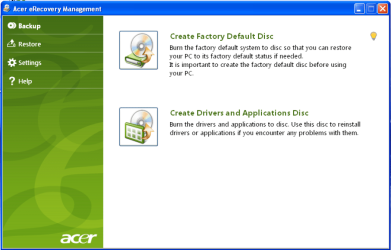
thanks for your reply theog. so far i have done nothing wanted to find what i was up against before i started. Could you please explain OEM manufacturer's Recovery Disks?
 

My Computer

OS
windows 7 ultimate 32

My Computer

Computer type
PC/Desktop
Computer Manufacturer/Model Number
Custom Build
OS
Windows 7 Home Premium 32-Bit - Build 7600 SP1
CPU
Intel Core i3-2120 3.30Ghz
Motherboard
Asus P8Z68-V LX Intel Z68 Socket H2 ATX
Memory
Kingston 4 GB DDR3 1333 mhz
Graphics Card(s)
AMD Radeon HD6670
Sound Card
Sound Blaster Audigy SE 24-Bit
Monitor(s) Displays
Asus VE228
Screen Resolution
1440 X 900
Hard Drives
OCZ Vertex 3 120 GB Sata 3 SSD ==
Kingston SH103/S3 120 G Hyper X 120 GB SSD ==
Western Digital 500 GB Caviar Green 7200 RPM ==
PSU
Corsair CX600M == 600 Watt
Case
NZXT Apollo - Silver with Clear Side Panel
Cooling
Three 120 mm Fans
Keyboard
Microsoft Natural 4000
Mouse
Microsoft Custom Optical 3000
Internet Speed
AT&T Fiber Optic Wireless Network
Antivirus
Microsoft Security Essentials
Browser
Chrome
Other Info
120 mm Blue LED Fan -- Three Blue LED Lazer Light Sticks
Your files will not be erased, as they are on the drive you will be pulling. But at the same time you will not be able to access them.
 

My Computer

Computer type
PC/Desktop
Computer Manufacturer/Model Number
Skylake Special #666
OS
Windows 10 Pro x64
CPU
Intel Core i7 6700K
Motherboard
Asus Sabertooth Z170 Mark 1
Memory
GSkill TridentZ RGB 16GB 3600 16-16-16-36
Graphics Card(s)
EVGA GTX 980 Ti SC x2
Sound Card
Realtek High Definition
Monitor(s) Displays
AOC G2460PG
Screen Resolution
1920 x 1080 144Hz
Hard Drives
Samsung 860 Pro 256GB, Seagate Barracuda 4TB x2
PSU
EVGA 1000 P2, EVGA White Custom Braided Cables
Case
Corsair Vengeance C70 Gunmetal Black
Cooling
Corsair H100i v2, Corsair ML120 x2, Thermal Grizzly Kryonaut
Keyboard
Logitech G910 Orion Spectrum
Mouse
Logitech G700s
Internet Speed
Verizon Fios Quantum Gateway 75/75
Antivirus
Windows Defender, Malwarebytes Free 3.8.3
Browser
Chrome
Other Info
Corsair SP120 x4, LG Blu-ray Drive, Durabrand HT-395 100 Watt Dolby Digital Amp, Corsair H2100 Wireless 7.1 Headset

My Computer

Computer type
PC/Desktop
Computer Manufacturer/Model Number
Built them myself, Science Experiments !
OS
Win7 Enterprise, Win7 x86 (Ult 7600), Win7 x64 Ult 7600, TechNet RTM on AMD x64 (2.8Ghz)
CPU
AMD fx8350 4ghz, AMD-32 2400mhz, AMD-64 3200mhz, AMDx64 2.8G
Motherboard
SIS 755, ECS-K8M890M-M (Ult 7600), GigaByte & others
Memory
2gb, 4gb on the Ult 7600, 4gb on Technet RTM, 32gb on FX8350
Graphics Card(s)
Draw my own Graphics, several nVidia cards
Sound Card
on motherboard
Monitor(s) Displays
19" flat scr, 28" I-Inc widescr,22" Emprex Widescr, 23" Acer
Screen Resolution
1280 x 1024, 1440 x 900, 1920 x 1080
Hard Drives
6 pata Ide HD's & 2 Sata HD's
added 80gb external on Ult 7600 computer,
numerous extra 1tb, 2TB, 3Tb SATA HD's
A collection of ext HD Docks w/ HDs
PSU
430w, 550w, 600w, 700, 800, etc
Case
All Generic Full Towers
Cooling
Open Air & a few fans, some w/ colored LEDs
Keyboard
Compaq & Dell recycled from GoodWill
Mouse
Made in China Optical Wired Mouse
Internet Speed
Fast Cable InterNet
Antivirus
AVG Free on 24 different Desktops, NO Problems!
Browser
IE 8 is preferred, but use FireFox sometimes
Other Info
Linksys Routers, switches, & Hubs
Too Many USB Flash Drives to count, Biggest is 64GB !
Eight computers in my home network.
Sixteen computers at my business network.
Linked via TeamViewer !
Lots of old used spare computer parts everywhere!
  • Like
Reactions: Arc
Guys, you are confusing the OP. You better agree who has the lead.

And read his post:

He has a brand new HDD
and he wants to get rid of Vista
for that he has purchase a retail Win7 installation disc
 

My Computer

Computer Manufacturer/Model Number
HP, Dell, Gateway, Toshiba - 4 laptops and 2 desktops
OS
Vista, Windows7, Mint Mate, Zorin, Windows 8
CPU
from 1.6GHz Duo to i7
Monitor(s) Displays
2x HP w2207
Hard Drives
5x HDD, 7x SSD, 12x Externals
Keyboard
with trackball - no mices
Mouse
Trackball mice
Internet Speed
DSL 6000
Everything you need is here to Clean Reinstall - Factory OEM Windows 7 to your new hard drive.

Be sure to unplug the old HD beforehand, then after install you can plug it back in to copy over your files as described in the tutorial.

If you stick with the tools and methods in the install you will get and keep a perfect install.
 
Guys, you are confusing the OP. You better agree who has the lead.

And read his post:

He has a brand new HDD
and he wants to get rid of Vista
for that he has purchase a retail Win7 installation disc


Many Many Thanks everyone but still confused and believe me sometimes its not hard lol :banghead:.
But this is probadly down to me not explaining myself very well,

Yes a brand new hard drive
Yes win 7 disk but it is an win 7 upgrade disk from from vista
And YES i want rid of Vista :party:

But the Vista os came with computer that i brought from Pc World and sadly came with NO disks

So fingers crossed i can have a clean install at the end of it with win 7. Any help, pointers, advise, please
 
Last edited:

My Computer

OS
windows 7 ultimate 32
Is the meaning installation disk the same as the upgrade win7 from vista
 

My Computer

OS
windows 7 ultimate 32
Hi again i have just been reading "gregrocker" last posting and followed the link in there There is talk of the Students version which mine is. I dont know if this makes any difference
 

My Computer

OS
windows 7 ultimate 32
Is the meaning installation disk the same as the upgrade win7 from vista

Yes it is. The tutorial in message 13 from Theog will tell you what you need since you have the Upgrade Win 7.
 

My Computer

Computer type
PC/Desktop
Computer Manufacturer/Model Number
Custom Build
OS
Windows 7 Home Premium 32-Bit - Build 7600 SP1
CPU
Intel Core i3-2120 3.30Ghz
Motherboard
Asus P8Z68-V LX Intel Z68 Socket H2 ATX
Memory
Kingston 4 GB DDR3 1333 mhz
Graphics Card(s)
AMD Radeon HD6670
Sound Card
Sound Blaster Audigy SE 24-Bit
Monitor(s) Displays
Asus VE228
Screen Resolution
1440 X 900
Hard Drives
OCZ Vertex 3 120 GB Sata 3 SSD ==
Kingston SH103/S3 120 G Hyper X 120 GB SSD ==
Western Digital 500 GB Caviar Green 7200 RPM ==
PSU
Corsair CX600M == 600 Watt
Case
NZXT Apollo - Silver with Clear Side Panel
Cooling
Three 120 mm Fans
Keyboard
Microsoft Natural 4000
Mouse
Microsoft Custom Optical 3000
Internet Speed
AT&T Fiber Optic Wireless Network
Antivirus
Microsoft Security Essentials
Browser
Chrome
Other Info
120 mm Blue LED Fan -- Three Blue LED Lazer Light Sticks
To go 100% safe, make an image of your Vista first. The instructions in the link work the sam for Vista as for /7. And once you have /7 installed, I also recommend to make periodic images. Else follow the advice of Greg.

http://www.sevenforums.com/tutorials/73828-imaging-free-macrium.html?ltr=I

And download and burn the Macrium recovery CD from my Skydrive. It will save you a lot of time.

https://skydrive.live.com/?cid=475a...cid=475A0A48CA6D4035&id=475A0A48CA6D4035!1812

Use this program to burn the downloaded .iso to CD.

http://filehippo.com/download_imgburn/
 

My Computer

Computer Manufacturer/Model Number
HP, Dell, Gateway, Toshiba - 4 laptops and 2 desktops
OS
Vista, Windows7, Mint Mate, Zorin, Windows 8
CPU
from 1.6GHz Duo to i7
Monitor(s) Displays
2x HP w2207
Hard Drives
5x HDD, 7x SSD, 12x Externals
Keyboard
with trackball - no mices
Mouse
Trackball mice
Internet Speed
DSL 6000
  • Like
Reactions: Arc
win 7 now on computer ;)

Many thanks to everyone for your help and advice
sadly a new probelm no sound :cry: but thats a differant section
 

My Computer

OS
windows 7 ultimate 32
Try downloading the sound drivers from Packhard Bell web site.

You are welcome. :dinesh:
 

My Computer

OS
ME/XP/Vista/Win7
Back
Top