
Newest version of Windows update will not install

sdgengineer

New member
Local time
3:00 PM
Messages
1
Hello, New to this forum. I tried to do the things mentioned in the Windows Update Posting Instructions

so here goes: The last succesful Windows update was Jun 14 although Office, and others seem to be updating

Ran the System Update Readiness Tool (SURT) for my computer ( 32 bit Windows 7 Home premium)

Got the following screenshots after trying windows update: First WU1 after I click on it to get the latest WU software I get WU2 It shows error code 80070570

I tried to run sfc /scannow but immediately I received "Windows Resource protection could not perform the requested operation."

I ran it 4 more times with the same result.

I have attached the CBS.zip file (logs you requested as well

Please let me know if you have away ahead.

Thanks

SDGengineer
 

Attachments
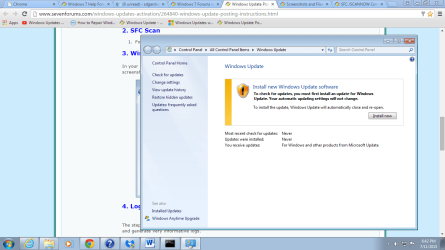
  • WU1.png
    WU1.png
    60.9 KB · Views: 0
  • WU2.png
    WU2.png
    72.8 KB · Views: 0

My Computer My Computer

At a glance

Windows 7 Home premium 32 BitIntel Pentium 2.8 GHz2 GB
Computer type
PC/Desktop
Computer Manufacturer/Model Number
HP Optiplex 745
OS
Windows 7 Home premium 32 Bit
CPU
Intel Pentium 2.8 GHz
Memory
2 GB
Antivirus
MS SEc Essentials
Youhave a number of errors showing, all with a common format...
Code:
015-07-11 18:36:00, Info                  CSI    00000009 [SR] Verifying 100 (0x00000064) components
2015-07-11 18:36:00, Info                  CSI    0000000a [SR] Beginning Verify and Repair transaction
2015-07-11 18:36:02, Error                 CSI    0000000b (F) STATUS_FILE_CORRUPT_ERROR #300714# from Windows::Rtl::SystemImplementation::DirectFileSystemProvider::SysCreateFile(flags = 0, handle = {provider=@0x2d5ff0, handle=0}, da = (SYNCHRONIZE), oa = @0x85e188->OBJECT_ATTRIBUTES {s:24; rd:NULL; on:[39]"\SystemRoot\WinSxS\Temp\PendingRenames\"; a:(OBJ_CASE_INSENSITIVE)}, iosb = @0x85e1a8, as = (null), fa = (FILE_ATTRIBUTE_DIRECTORY), sa = (FILE_SHARE_READ|FILE_SHARE_WRITE|FILE_SHARE_DELETE), cd = FILE_OPEN_IF, co = (FILE_DIRECTORY_FILE|FILE_SYNCHRONOUS_IO_NONALERT|0x00004000), eab = NULL, eal = 0, disp = (null))
[gle=0xd0000102]
2015-07-11 18:36:02, Error                 CSI    0000000c@2015/7/11:23:36:02.588 (F) d:\win7sp1_gdr\base\wcp\sil\merged\ntu\ntsystem.cpp(2062): Error STATUS_FILE_CORRUPT_ERROR originated in function Windows::Rtl::SystemImplementation::DirectFileSystemProvider::SysCreateFile expression: (null)
[gle=0x80004005]
2015-07-11 18:36:15, Error                 CSI    0000000d (F) STATUS_FILE_CORRUPT_ERROR #300711# from Windows::Rtl::SystemImplementation::CFile_IRtlFileTearoff::SetContents(file = [l:104{52}]"\SystemRoot\WinSxS\FileMaps\_0000000000000000.cdf-ms", flags = 0, contents = {l:552 b:50636d480100000000000000ac4a06f11e8a237f11000000880000000c0000005400000000000000000000000100000084000000000000000000000003000000ffffffffff1b352825d55541acb06e7c64c725d80500000006000000090000000d0000000f000000070000000a0000000e0000000b000000080000000c000000...})[gle=0xd0000102]
2015-07-11 18:36:15, Error                 CSI    0000000e (F) STATUS_FILE_CORRUPT_ERROR #300705# from CFileMapContext::AddFileMapping(...)[gle=0xd0000102]
2015-07-11 18:36:15, Error                 CSI    0000000f (F) STATUS_FILE_CORRUPT_ERROR #300665# from CFileInstaller::CommitChanges(...)[gle=0xd0000102]
2015-07-11 18:36:15, Error                 CSI    00000010 (F) STATUS_FILE_CORRUPT_ERROR #300664# from PrimitiveInstaller::CCoordinator::FinalizeChanges(...)[gle=0xd0000102]
It's the first time I've come across this type of error - I'm going to have to do some research and get back to you.
 

My Computer My Computer

At a glance

Win 7 x64 Home Premium (and x86 VirtualBox VM...i3 370M/i7 6500U8GB - finally :)/8GBit's an i3, dude!/dual Intel&nVidia
Computer type
Laptop
Computer Manufacturer/Model Number
Asus K52F or Lenovo B51-80
OS
Win 7 x64 Home Premium (and x86 VirtualBox VM)/Win10
CPU
i3 370M/i7 6500U
Motherboard
Asus/Lenovo
Memory
8GB - finally :)/8GB
Graphics Card(s)
it's an i3, dude!/dual Intel&nVidia
Sound Card
onboard
Monitor(s) Displays
15.6" built-in
Screen Resolution
1366x768/1920x1080
Hard Drives
750GB Seagate internal
Sundry external drives attached to other computers on the local network
1TB SSD on the Lenovo
PSU
n/a
Internet Speed
as much as I can get - usually on a dongle/phone, so <1MB/s
Antivirus
MSE/Defender
Browser
IE11/12/Edge/Chrome/FF(if I must)
I think the first thing to do is to try and ensure that the HD is not damaged...

Please run a full CHKDSK and SFC scan....

Click on Start > All Programs > Accessories
Right-click ont he Command Prompt entry
Select Run as Administrator and accept the UAC prompt- the Elevated Command Prompt window should pop up.

At the Command prompt, type

CHKDSK C: /R

and hit the Enter key.

You will be told that the drive is locked, and the CHKDSK will run at the next boot - hit the Ykey, and then reboot.
The CHKDSK will take a few hours depending on the size of the drive, so be patient!
After the CHKDSK has run, Windows should boot normally (possibly after a secondauto-reboot) - then run the SFC.

SFC -System File Checker - Instructions

Click on Start > All Programs > Accessories
Right-click on the Command Prompt entry

Select Run as Administrator and accept the UAC prompt- the Elevated Command Prompt window should pop up.

At the Command prompt, type

SFC /SCANNOW

and hit the Enter key

Wait for the scan to finish - make a note of any error messages - and then reboot.

Upload the CBS.log file (compressed, please!) to your reply

ALSO

Open Event Viewer
click on the Windows logs entry in the left pane to expand it.
Now click on the Application entry - wait while it loads.

Click on 'File' in the menu bar and select Save...

Save the file as Appevt.evtx

Repeat for the System log

then zip both, and upload them.
 

My Computer My Computer

At a glance

Win 7 x64 Home Premium (and x86 VirtualBox VM...i3 370M/i7 6500U8GB - finally :)/8GBit's an i3, dude!/dual Intel&nVidia
Computer type
Laptop
Computer Manufacturer/Model Number
Asus K52F or Lenovo B51-80
OS
Win 7 x64 Home Premium (and x86 VirtualBox VM)/Win10
CPU
i3 370M/i7 6500U
Motherboard
Asus/Lenovo
Memory
8GB - finally :)/8GB
Graphics Card(s)
it's an i3, dude!/dual Intel&nVidia
Sound Card
onboard
Monitor(s) Displays
15.6" built-in
Screen Resolution
1366x768/1920x1080
Hard Drives
750GB Seagate internal
Sundry external drives attached to other computers on the local network
1TB SSD on the Lenovo
PSU
n/a
Internet Speed
as much as I can get - usually on a dongle/phone, so <1MB/s
Antivirus
MSE/Defender
Browser
IE11/12/Edge/Chrome/FF(if I must)
Back
Top