Newly added HDD not searchable

rocks911

New member
Member
VIP
Local time
12:08 PM
Messages
100
I just added a 2 tb internal HDD and assigned it drive letter A. It is properly installed, I can read and write to/from but when I search for files on it there are no results. Also when I moved files from C drive to it they were copied, not moved. I didnt copy and then paste, though thats more like what occured, but rather I dragged and dropped but the files werent moved they were copied.

What is this all about? The drive and everything in it is shared with everyone. This sharing thing in W7 is a colossal boondogle.
 

My Computer My Computer

At a glance

Windows 7 home premium 64 bitAMD Phenom IIx6 1065T 2.90 GHz8 GBATI Radeon HD 5570
Computer Manufacturer/Model Number
HP model HPE-519C
OS
Windows 7 home premium 64 bit
CPU
AMD Phenom IIx6 1065T 2.90 GHz
Motherboard
Foxconn H-RS880-UATX (ALOE)
Memory
8 GB
Graphics Card(s)
ATI Radeon HD 5570
I just added a 2 tb internal HDD and assigned it drive letter A. It is properly installed, I can read and write to/from but when I search for files on it there are no results. Also when I moved files from C drive to it they were copied, not moved. I didnt copy and then paste, though thats more like what occured, but rather I dragged and dropped but the files werent moved they were copied.

What is this all about? The drive and everything in it is shared with everyone. This sharing thing in W7 is a colossal boondogle.

I take it you are new on win 7

To move instead of copy just use shift and drag.

As to why it is not indexed. Did you add the whole drive to the indexing in your control panel?
 

My Computer My Computer

At a glance

Win 8 Release candidate 8400[email protected]4 gigsNvidia 9600M
Computer Manufacturer/Model Number
HP Pavillion dv-7 1005 Tx
OS
Win 8 Release candidate 8400
CPU
[email protected]
Memory
4 gigs
Graphics Card(s)
Nvidia 9600M
Sound Card
HD built-in
Monitor(s) Displays
17" Wxga
Screen Resolution
1440x900
Cooling
none
Internet Speed
45Mb down 5Mb up
Thanks for that. My primary drive, drive c was not indexed as well as a couple external HDD's, cant imagine why. And yes I'm quite new to W7, quite a learning curve
 

My Computer My Computer

At a glance

Windows 7 home premium 64 bitAMD Phenom IIx6 1065T 2.90 GHz8 GBATI Radeon HD 5570
Computer Manufacturer/Model Number
HP model HPE-519C
OS
Windows 7 home premium 64 bit
CPU
AMD Phenom IIx6 1065T 2.90 GHz
Motherboard
Foxconn H-RS880-UATX (ALOE)
Memory
8 GB
Graphics Card(s)
ATI Radeon HD 5570
Thanks for that. My primary drive, drive c was not indexed as well as a couple external HDD's, cant imagine why. And yes I'm quite new to W7, quite a learning curve

If you are coming from XP it is worlds different. Ask questions. We have a ton of talent here .

If you need help with adding the volumes to indexing let us know

BTW there is a great tutorial section here by one of the Nets best.
 

My Computer My Computer

At a glance

Win 8 Release candidate 8400[email protected]4 gigsNvidia 9600M
Computer Manufacturer/Model Number
HP Pavillion dv-7 1005 Tx
OS
Win 8 Release candidate 8400
CPU
[email protected]
Memory
4 gigs
Graphics Card(s)
Nvidia 9600M
Sound Card
HD built-in
Monitor(s) Displays
17" Wxga
Screen Resolution
1440x900
Cooling
none
Internet Speed
45Mb down 5Mb up
A: is pretty much a bad drive letter to use as both it an B: have always been system reserved for legacy floppy drives...
Even though you may have a newer PC i believe these exceptions are still written into modern day CMOS info...

Please try any other drive letter other than A or B...and see what happens.
 

My Computer My Computer

At a glance

Vista Ultimate X64/ Windows 7 Dual-bootQ66004G OCZ PC2 8500 PlatinumEVGA 8800GTS Vid Card
Computer Manufacturer/Model Number
Self-Built
OS
Vista Ultimate X64/ Windows 7 Dual-boot
CPU
Q6600
Motherboard
ASUS P5K
Memory
4G OCZ PC2 8500 Platinum
Graphics Card(s)
EVGA 8800GTS Vid Card
Hard Drives
500G Seagate SATA
200G Seagate SATA
100G WD Caviar SATA
80G WD Caviar IDE
PSU
OCZ Elite 800W PSU
Case
RaidMax Smilodon Case
Thanks for the replies,

I think I have successfully indexed the drive. I wont know until I can get back to my PC which will be a couple of days, but fingers crossed it will work as it should.

Clearly there is a lot of talent here. I'm sure I'll be back.

Thanks for the help
 

My Computer My Computer

At a glance

Windows 7 home premium 64 bitAMD Phenom IIx6 1065T 2.90 GHz8 GBATI Radeon HD 5570
Computer Manufacturer/Model Number
HP model HPE-519C
OS
Windows 7 home premium 64 bit
CPU
AMD Phenom IIx6 1065T 2.90 GHz
Motherboard
Foxconn H-RS880-UATX (ALOE)
Memory
8 GB
Graphics Card(s)
ATI Radeon HD 5570
Indexed new HDD, still not searchable

I added a new HDD and indexed it. I discovered that searches didnt find specific content on the drive so I went in to indexing properties and discovered that it was indexed for "properties only". I changed that to have it indexed for "properties and file contents", still no change. I have nothing but videos on the drive and none of them are searchable.
I go to index options/advanced options/index location/current location and it indicates C:\ProgramData\Microsoft, could that be right? It is a newly added internal drive with the drive letter A assigned.

What is up? It would be great if this were searchable.

I swear that I dont know if I have the stamina to learn the intricacies of W7 64 bit, I feel like I've been at this computer every minute of the day troubleshooting it since the day I got it a month ago. Soooo, soooo tired.
 

My Computer My Computer

At a glance

Windows 7 home premium 64 bitAMD Phenom IIx6 1065T 2.90 GHz8 GBATI Radeon HD 5570
Computer Manufacturer/Model Number
HP model HPE-519C
OS
Windows 7 home premium 64 bit
CPU
AMD Phenom IIx6 1065T 2.90 GHz
Motherboard
Foxconn H-RS880-UATX (ALOE)
Memory
8 GB
Graphics Card(s)
ATI Radeon HD 5570
A: is pretty much a bad drive letter to use as both it an B: have always been system reserved for legacy floppy drives...
Even though you may have a newer PC i believe these exceptions are still written into modern day CMOS info...

Please try any other drive letter other than A or B...and see what happens.

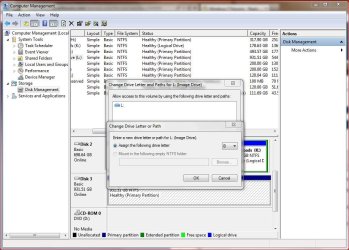
My understanding is as long as the drive letter is available you can use it. I’ve never seen where it states you can’t use either of those letters, especially in Vista/Windows 7.

Disk Management.JPG

Anyway you can actually assign "B" to a drive if you want as long as it's not used elsewhere. I've done it myself in the past, even with XP. Haven't tried "A" but that's also assignable, again, as long as it's available - Can I use the B: drive on my PC? - B drive PC | Ask MetaFilter

Now, Windows may have it's "default" drive letter assignment, but you can change those around. The only one I'm not sure about is "C" drive. Can you for example make C "D"? That I haven't tried.
 

My Computer My Computer

At a glance

Windows 10 ProIntel Core i7-4770K (3.5Ghz)32 gig Corsair Dominator Platinum (4x8Gig)Sapphire Tri-X R9 Fury
Computer type
PC/Desktop
Computer Manufacturer/Model Number
Custom built by me.
OS
Windows 10 Pro
CPU
Intel Core i7-4770K (3.5Ghz)
Motherboard
Gigabyte G1 Sniper 5 (F10 Bios)
Memory
32 gig Corsair Dominator Platinum (4x8Gig)
Graphics Card(s)
Sapphire Tri-X R9 Fury
Sound Card
Soundblaster ZXR
Monitor(s) Displays
NEC PA242W 24" LCD Monitor
Screen Resolution
1920 x 1200
Hard Drives
Primary - Samsung 850 Pro (512gig), Samsung 840 Pro (256gig), 2TB WD Caviar Black.
PSU
EVGA Supernova 1000 G2
Case
Cooler Master HAF X
Cooling
Corsair H100i with Corsair Air Series SP120 Quiet Fans
Keyboard
Logitech Wireless Wave
Mouse
Logitech Performance MX
Internet Speed
High Speed Cable
Antivirus
Norton Security
Browser
IE11
Other Info
Memory Timings - 1866MHz @ 9-9-9-27-1T @ 1.5 volts
For heavens sake after I installed the drive and went to index it I was provided a dropdown list of drive letters and A was one of them, so crazy me, I used it.
 

My Computer My Computer

At a glance

Windows 7 home premium 64 bitAMD Phenom IIx6 1065T 2.90 GHz8 GBATI Radeon HD 5570
Computer Manufacturer/Model Number
HP model HPE-519C
OS
Windows 7 home premium 64 bit
CPU
AMD Phenom IIx6 1065T 2.90 GHz
Motherboard
Foxconn H-RS880-UATX (ALOE)
Memory
8 GB
Graphics Card(s)
ATI Radeon HD 5570

My Computer My Computer

At a glance

Windows 10 ProIntel Core i7-4770K (3.5Ghz)32 gig Corsair Dominator Platinum (4x8Gig)Sapphire Tri-X R9 Fury
Computer type
PC/Desktop
Computer Manufacturer/Model Number
Custom built by me.
OS
Windows 10 Pro
CPU
Intel Core i7-4770K (3.5Ghz)
Motherboard
Gigabyte G1 Sniper 5 (F10 Bios)
Memory
32 gig Corsair Dominator Platinum (4x8Gig)
Graphics Card(s)
Sapphire Tri-X R9 Fury
Sound Card
Soundblaster ZXR
Monitor(s) Displays
NEC PA242W 24" LCD Monitor
Screen Resolution
1920 x 1200
Hard Drives
Primary - Samsung 850 Pro (512gig), Samsung 840 Pro (256gig), 2TB WD Caviar Black.
PSU
EVGA Supernova 1000 G2
Case
Cooler Master HAF X
Cooling
Corsair H100i with Corsair Air Series SP120 Quiet Fans
Keyboard
Logitech Wireless Wave
Mouse
Logitech Performance MX
Internet Speed
High Speed Cable
Antivirus
Norton Security
Browser
IE11
Other Info
Memory Timings - 1866MHz @ 9-9-9-27-1T @ 1.5 volts
sygnus21,

Hopefully you noticed my latest post where I mentioned that AFTER following zigzags advice I was still unable to search the contents of my new HDD "A" drive.

It seems to me that Microsoft has put up a lot of barriers to keep people out of my PC but there are so many and they are so varied that I am utterly lost. Is there not one way to make my PC accessible to everybody and then work the other way? Everything is on lockdown and I am having great difficulty getting anywhere. I have a new network device, a WD TV and have been unable to share anything with it. I have looked for solutions to this and havent found the right one. It has been suggested that I'm, for lack of a better term, not too bright, but when I Google "trouble connecting to WD TV with W7" there are over 2 million hits. Apparently there are others having problems.

Anyways, back to the new HDD, still not searchable.
 

My Computer My Computer

At a glance

Windows 7 home premium 64 bitAMD Phenom IIx6 1065T 2.90 GHz8 GBATI Radeon HD 5570
Computer Manufacturer/Model Number
HP model HPE-519C
OS
Windows 7 home premium 64 bit
CPU
AMD Phenom IIx6 1065T 2.90 GHz
Motherboard
Foxconn H-RS880-UATX (ALOE)
Memory
8 GB
Graphics Card(s)
ATI Radeon HD 5570
Sygnus,
I followed your link about indexing and I've been there done that. "A" drive is checked as well as every folder in "A" drive but still not searchable. I did see one of the last things mentioned in your little tutorial "Even of you uncheck and re-check your system drive C: in an attempt to have it fully indexed, the following folders will always be excluded: C:\programdata\
As I mentioned in my earlier post "I go to index options/advanced options/index location/current location and it indicates C:\ProgramData\Microsoft"
Why would my new "A" drive show its current location as C:\ProgramData\Microsoft?
 

My Computer My Computer

At a glance

Windows 7 home premium 64 bitAMD Phenom IIx6 1065T 2.90 GHz8 GBATI Radeon HD 5570
Computer Manufacturer/Model Number
HP model HPE-519C
OS
Windows 7 home premium 64 bit
CPU
AMD Phenom IIx6 1065T 2.90 GHz
Motherboard
Foxconn H-RS880-UATX (ALOE)
Memory
8 GB
Graphics Card(s)
ATI Radeon HD 5570
I did see one of the last things mentioned in your little tutorial "Even of you uncheck and re-check your system drive C: in an attempt to have it fully indexed, the following folders will always be excluded: C:\programdata\

First things first - that isn't my "little tutorial" - I didn't write it. And I'm sure (hope) you didn't mean any harm with that term but some may find it a little offensive, especially since it takes more than a little work to put a tutorial together. Just something to think about.

Anyway you might post your questions about the tutorial and what is written there. I'm not an expert on Indexing so you'd be better served asking your questions in that post.

At any rate did you look under Modifying Search Locations? It talks about adding drives/files to the index.

Modifying Search Locations

The easiest way of adding a folder, and all associated subfolders, to the index is to add it to a Library. Sometimes, however, you want to add a drive or folder to the index, but don't want to include it in a library.

Good luck.
 

My Computer My Computer

At a glance

Windows 10 ProIntel Core i7-4770K (3.5Ghz)32 gig Corsair Dominator Platinum (4x8Gig)Sapphire Tri-X R9 Fury
Computer type
PC/Desktop
Computer Manufacturer/Model Number
Custom built by me.
OS
Windows 10 Pro
CPU
Intel Core i7-4770K (3.5Ghz)
Motherboard
Gigabyte G1 Sniper 5 (F10 Bios)
Memory
32 gig Corsair Dominator Platinum (4x8Gig)
Graphics Card(s)
Sapphire Tri-X R9 Fury
Sound Card
Soundblaster ZXR
Monitor(s) Displays
NEC PA242W 24" LCD Monitor
Screen Resolution
1920 x 1200
Hard Drives
Primary - Samsung 850 Pro (512gig), Samsung 840 Pro (256gig), 2TB WD Caviar Black.
PSU
EVGA Supernova 1000 G2
Case
Cooler Master HAF X
Cooling
Corsair H100i with Corsair Air Series SP120 Quiet Fans
Keyboard
Logitech Wireless Wave
Mouse
Logitech Performance MX
Internet Speed
High Speed Cable
Antivirus
Norton Security
Browser
IE11
Other Info
Memory Timings - 1866MHz @ 9-9-9-27-1T @ 1.5 volts
Nevermind
 

My Computer My Computer

At a glance

Windows 7 home premium 64 bitAMD Phenom IIx6 1065T 2.90 GHz8 GBATI Radeon HD 5570
Computer Manufacturer/Model Number
HP model HPE-519C
OS
Windows 7 home premium 64 bit
CPU
AMD Phenom IIx6 1065T 2.90 GHz
Motherboard
Foxconn H-RS880-UATX (ALOE)
Memory
8 GB
Graphics Card(s)
ATI Radeon HD 5570
Back
Top