Solved Next Gen ?... WMP 12

  • Thread starter Thread starter Legacy Code
  • Start date Start date
didn't there used to be a program for skinning WMP back in the xp days
 

My Computer My Computer

At a glance

Windows 7 Ultimate Signature EditionIntel Core i7 Extreme 3.33GHz12GB DDR32x EVGA 285 2GB in SLI
Computer Manufacturer/Model Number
Custom
OS
Windows 7 Ultimate Signature Edition
CPU
Intel Core i7 Extreme 3.33GHz
Motherboard
EVGA X-58 SLI Classified
Memory
12GB DDR3
Graphics Card(s)
2x EVGA 285 2GB in SLI
Sound Card
Creative Labs X-Fi ExtremeGamer
Monitor(s) Displays
30" Viewsonic
Hard Drives
2x1TB Western Digital 7200RPM in RAID 0/1TB WD My Book External HDD
PSU
Thermaltake 1000w supporting quad SLI
Case
Thermaltake Armor Full Tower
Cooling
Thermaltake V1 CPU+DIY Liquid cooling
Well, there were skins that you could edit back in the xp days. :p
 

My Computer My Computer

At a glance

Windows 8 Pro 64-bitIntel Core i7 950 @4.4GHz12GB DDR3 1333MHz @1400 (9-9-9-24)2x AMD Radeon HD 6770
Computer type
PC/Desktop
Computer Manufacturer/Model Number
Custom built
OS
Windows 8 Pro 64-bit
CPU
Intel Core i7 950 @4.4GHz
Motherboard
EVGA 131-GT-E767
Memory
12GB DDR3 1333MHz @1400 (9-9-9-24)
Graphics Card(s)
2x AMD Radeon HD 6770
Sound Card
Sound Blaster Audigy
Monitor(s) Displays
Acer S231HL + Acer E19T5W
Screen Resolution
1920x1080 + 1440x900
Hard Drives
128GB Samsung 840 Pro
1TB Seagate Barracuda 7200RPM 64mb
500GB Seagate Barracuda 7200RPM 16mb
PSU
Corsair GS800
Case
Custom-made
Cooling
CM Hyper212+, lots of fans
Keyboard
NMB RT8255C+
Mouse
Func MS-3
Internet Speed
30/1.5
Antivirus
Microsoft Security Essentials/Spybot SD/Malwarebytes
Browser
Google Chrome
Other Info
Onkyo TX-27 receiver & two Realistic Optimus T100s.
I had a quick look on google and the ones i found are for WMP10 (XP) dont think the PNG's or bitmap locations would match up , same as WMP 11 and 12 are different.

Thank you for the tip Valtonray im going to give it a try , may be lucky :D

Oh .... Found a PNG for the mouse over on the play/burn basket search bar( turns it black on mouse over and you can enter text )

BASKET_TITLE_EDIT_CUE.PNG. - Add a new layer in PS ,extend the canvas to 500 wide , fill it black and save. Works on default Aero theme OK.:party:
 
I started again on a new wmploc.dll and made a new theme : RECODE as my copy of Project13 was pretty much jumbled up with unneeded edits.

So here is a list of the main body PNG's and BITMAP neeed to alter the basic colour , Ive read through the post and i was kinda repeating myself and made some mistakes in image locations as well :o but its all part of the learning process i guess.

Correct file locations for wmploc.dll as follows :

TOP ~

TOP BAR :
5401 - Top toolbar ( Where back and forward navigation buttons are located)

MIDDLE COMMAND BAR:
COMMAND_BAR_BG.PNG - Command bar (organize /stream/ create playlist bar )

BOTTOM :
LISTVIEWHEADER.PNG - Columns title bar / album / time / rating

-----------------------------------------------------------------------------------
PLAY/BURN/SYNC BASKET ~

5535 - Top segment ( Playlist /burn /sync icon background.)

SPLITTER_TOP.PNG - Vertical divider on left hand side on basket
SPLITTER_BOTTOM.PNG - Vertical divider on left hand side on basket

BASKET_TITLE_EDIT_CUE.PNG - Gradient for mouse over in search bar in basket area.

BASKET_CB_SEPARATOR.PNG - Strip under save list/ start burn/ start sync basket.
BASKET_CB_BG - Background under burn/play /sync buttons ( save playlist , start burn/start sync)
BASKET_TITLE_SEPARATOR.PNG - Strip under search box in basket.
BASKET_CB_BG_PLAYER - not used by me but its the long oval shaped shadow in the top of the burn basket.
BASKET_BG_BOTTOM.PNG - bottom of basket ( extened to 1000 pix high. will cover all basket up to search box)

----------------------------------------------------------------------------------
MAIN WINDOW ~

LBG_BOTTOM_TRANSPARENCY.PNG - gradient layer ( turn down transparency to remove)
LBG_TOP_TRANSPARENCY.PNG - see above ^^^

LIBRARY_BACKGROUND7.PNG - main wallpaper for player.

-----------------------------------------------------------------------------------
BOTTOM PLAYER CONTROL BAR ~

BITMAP FOLDER : 5402 This bitmap is "tiled" by that i mean it repeats itself as you resize WMP12.
-----------------------------------------------------------------------------------
PLAY / BURN / SYNC BUTTONS ~

5030 - Outline of buttons.
5031 - Main button when clicked
5032 - Unclicked button mouse over button.
45032 - Clicked button mouse over.

5420,5521,5422,5423 - Top Progess bar in basket.

-----------------------------------------------------------------------------------
NAVIGATION BUTTONS ~

5350,5351,5352 - navigation buttons ( each one provides a different glow)
5353 - no action / greyed out.

5360,5361 - Background shape to buttons

5300 - triangle shaped navigation button on top toolbar ( libary> music > all music )

-----------------------------------------------------------------------------------
SEARCH BUTTONS ~

WW_SEARCH.PNG,WW_SEARCH_120.PNG,WW_SEARCH_144.PNG - Magnifiying glass icon in search bar.

WW_CLEAR.PNG,WW_CLEAR_120.PNG,WW_CLEAR_144.PNG - Clear search icon ( see above)
-----------------------------------------------------------------------------------
BOTTOM CONTROL BAR ~

progress/seek bar :

4159 - Outline progress/seek bar.
3881 - Track progess/seek inner bar main window
3882 - End cap of bar ( inline with it and not the oval control knob )
3883 - Oval player knob - drag.
3884 - Oval player knob - mouse over.
4058 - Oval player knob - forward seek.


I will list the icons , buttons and player controls and update this post as hopefully it will help out anyone interested in creating a WMP12 theme.

As i said in a earlier post i went through 257 looking for the search bar backgrounds and today i ran the whole folder through a PS action and made everything black, player controls , gradients , background , you name it .DID NOT WORK and did pretty much the same for bitmaps as well. ( apart from RBG's) So its either controlled by HEX, or could it possibly be controlled by another .DLL ?

I messed with wmplocDUI.dll and broke the player ( just for the lulz.) Would it be controlled by the default Aero theme as the colour seems to be used through out the system ? Dont know much about making a VS yet , but its next on the list as soon as this one is cracked.

Default files included in zip - Spilt into relevant folders with copy of description from this post :geek:
 

Attachments

Last edited:
Thanks you guys; what I did..

My first post here, wotz up?

Well sure, so I really hated the new look of WMP and was trying lots of things, but since hacking wmp12 was new to me it was taking a long time to figure out resources with RHack & Restorator just by looking at images then cross referencing looking at the player.. Ha, sounds dumb I know but, there is little out there to help except for changing the background, and that is just to change to more ugly bmps.. great,not.

Then I bumped into this tread, and people; this is the only one I found in such depth. This thread made me cut dev time on getting a decent look by a ton! So a great big thank you for resource refs, etc..

Also it was huge disappointment to see "advanced tag editor" gone, as well as a few other deletions of behaviors I found helpful. As usual; what was MS thinking? Anyway if you don't have it here is a link to Windows Media Player Plus!
This fellow basically put most of what was making me get ready to change players, back into wmp12 via a simple addin-plugin, very cool. Here's a list;

  • Tag Editor Plus: an alternative for WMP's Advanced Tag Editor. Tag Editor Plus works on WMP 12 too, where the Advanced Tag Editor has been removed.
  • Real 'find as you type' in the library: you can simply start typing to search, without having to click on the Search field first.
  • Access the standard Explorer right-click menu of a media file directly from within WMP.
  • Restore last active playlist, media item, and playback position at WMP startup.
  • Show currently playing media in WMP's title bar.
  • Disable group headers in the Library Pane.
  • Enhanced and configurable version of the Windows Live Messenger Music plug-in (What I'm Listening To).
  • Access the properties of a plug-in from within the main WMP menu (Tools - Plug-in properties), without having to go to Options first.
  • Easily re-enable all plug-ins after a crash.
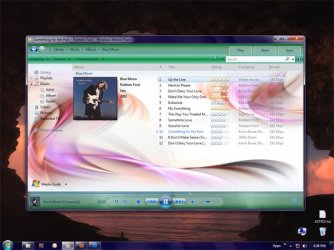
Here's a screen shot of my first go, my cool green look. It goes with the areo config I have now, plus I didn't have to redo rollover states since the lite blue works with the green..

Looking forward to creating a few more; labeling wploc's and having a stable of wmp looks to go with my fav desktop configs. Heck when we all get done with some we should post em, and start a repository of wmp looks.

So thanks again all. Plus, great site, I've been learning a lot here..!
LaBamba ~ WP
 

Attachments

  • WMP12_2.jpg
    WMP12_2.jpg
    61.2 KB · Views: 60
Last edited:

My Computer My Computer

At a glance

win 7 64bitAMD phenom x4 9406gig
OS
win 7 64bit
CPU
AMD phenom x4 940
Motherboard
gigabyte
Graphics Card(s)
6gig
I wondered... Where did this project go? I see Legacy Code haven't been online for a while :(
 
I've wondered that myself, Serg. :3
 

My Computer My Computer

At a glance

Windows 8 Pro 64-bitIntel Core i7 950 @4.4GHz12GB DDR3 1333MHz @1400 (9-9-9-24)2x AMD Radeon HD 6770
Computer type
PC/Desktop
Computer Manufacturer/Model Number
Custom built
OS
Windows 8 Pro 64-bit
CPU
Intel Core i7 950 @4.4GHz
Motherboard
EVGA 131-GT-E767
Memory
12GB DDR3 1333MHz @1400 (9-9-9-24)
Graphics Card(s)
2x AMD Radeon HD 6770
Sound Card
Sound Blaster Audigy
Monitor(s) Displays
Acer S231HL + Acer E19T5W
Screen Resolution
1920x1080 + 1440x900
Hard Drives
128GB Samsung 840 Pro
1TB Seagate Barracuda 7200RPM 64mb
500GB Seagate Barracuda 7200RPM 16mb
PSU
Corsair GS800
Case
Custom-made
Cooling
CM Hyper212+, lots of fans
Keyboard
NMB RT8255C+
Mouse
Func MS-3
Internet Speed
30/1.5
Antivirus
Microsoft Security Essentials/Spybot SD/Malwarebytes
Browser
Google Chrome
Other Info
Onkyo TX-27 receiver & two Realistic Optimus T100s.
My first post here, wotz up?

Well sure, so I really hated the new look of WMP and was trying lots of things, but since hacking wmp12 was new to me it was taking a long time to figure out resources with RHack & Restorator just by looking at images then cross referencing looking at the player.. Ha, sounds dumb I know but, there is little out there to help except for changing the background, and that is just to change to more ugly bmps.. great,not.

Then I bumped into this tread, and people; this is the only one I found in such depth. This thread made me cut dev time on getting a decent look by a ton! So a great big thank you for resource refs, etc..

Also it was huge disappointment to see "advanced tag editor" gone, as well as a few other deletions of behaviors I found helpful. As usual; what was MS thinking? Anyway if you don't have it here is a link to Windows Media Player Plus!
This fellow basically put most of what was making me get ready to change players, back into wmp12 via a simple addin-plugin, very cool. Here's a list;

  • Tag Editor Plus: an alternative for WMP's Advanced Tag Editor. Tag Editor Plus works on WMP 12 too, where the Advanced Tag Editor has been removed.
  • Real 'find as you type' in the library: you can simply start typing to search, without having to click on the Search field first.
  • Access the standard Explorer right-click menu of a media file directly from within WMP.
  • Restore last active playlist, media item, and playback position at WMP startup.
  • Show currently playing media in WMP's title bar.
  • Disable group headers in the Library Pane.
  • Enhanced and configurable version of the Windows Live Messenger Music plug-in (What I'm Listening To).
  • Access the properties of a plug-in from within the main WMP menu (Tools - Plug-in properties), without having to go to Options first.
  • Easily re-enable all plug-ins after a crash.
Here's a screen shot of my first go, my cool green look. It goes with the areo config I have now, plus I didn't have to redo rollover states since the lite blue works with the green..

Looking forward to creating a few more; labeling wploc's and having a stable of wmp looks to go with my fav desktop configs. Heck when we all get done with some we should post em, and start a repository of wmp looks.

So thanks again all. Plus, great site, I've been learning a lot here..!
LaBamba ~ WP

How did you get the Vista transparency background look for the bottom controls? Anyone know which image it is?
 

My Computer My Computer

At a glance

Windows 7 Professional 32-bit (6.1, Build 7600)Intel(R) Pentium(R) 4 3.00 GHz HT2.0 GBATI Mobility Radeon 9600 64MB
Computer Manufacturer/Model Number
Averatec 6130HS-20
OS
Windows 7 Professional 32-bit (6.1, Build 7600)
CPU
Intel(R) Pentium(R) 4 3.00 GHz HT
Memory
2.0 GB
Graphics Card(s)
ATI Mobility Radeon 9600 64MB
Sound Card
Realtek AC'97 Audio
Screen Resolution
1280 x 800
Hard Drives
Seagate 96023A 60GB 7200RPM -
Seagate FreeAgentDesktop 250GB
Cooling
20 Inch Box Fan
Mouse
Targus PAWM10 Wireless Optical Laptop Mouse
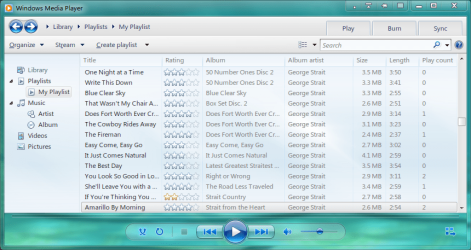
I've tried all I know to get the bottom control bar to be transparent with no joy. The best I could do overall with this WMP 12 cluster of theme was to tone down some of the MS blueish nish to get it more in line with my msstyle.

Untitled.png


Why does MS have such a fetish for all this blue color? If I can't find a way to make the bottom control bar semi-transparent, I'm ditching WMP 12 for the WMP 11. It skins out and actually functions with less resources than WMP 12. The mini mode skin of WMP 11 uses my msstyle window frames for it's background which is pretty decent lookin to me. The main skin also uses the aero style frame for the bottom control bar which also looks better to me. If anyone has any info on how to get that look with WMP 12, please post it.
 

My Computer My Computer

At a glance

Windows 7 Professional 32-bit (6.1, Build 7600)Intel(R) Pentium(R) 4 3.00 GHz HT2.0 GBATI Mobility Radeon 9600 64MB
Computer Manufacturer/Model Number
Averatec 6130HS-20
OS
Windows 7 Professional 32-bit (6.1, Build 7600)
CPU
Intel(R) Pentium(R) 4 3.00 GHz HT
Memory
2.0 GB
Graphics Card(s)
ATI Mobility Radeon 9600 64MB
Sound Card
Realtek AC'97 Audio
Screen Resolution
1280 x 800
Hard Drives
Seagate 96023A 60GB 7200RPM -
Seagate FreeAgentDesktop 250GB
Cooling
20 Inch Box Fan
Mouse
Targus PAWM10 Wireless Optical Laptop Mouse
My first post here, wotz up?

Well sure, so I really hated the new look of WMP and was trying lots of things, but since hacking wmp12 was new to me it was taking a long time to figure out resources with RHack & Restorator just by looking at images then cross referencing looking at the player.. Ha, sounds dumb I know but, there is little out there to help except for changing the background, and that is just to change to more ugly bmps.. great,not.

Then I bumped into this tread, and people; this is the only one I found in such depth. This thread made me cut dev time on getting a decent look by a ton! So a great big thank you for resource refs, etc..

Here's a screen shot of my first go, my cool green look. It goes with the areo config I have now, plus I didn't have to redo rollover states since the lite blue works with the green..

Looking forward to creating a few more; labeling wploc's and having a stable of wmp looks to go with my fav desktop configs. Heck when we all get done with some we should post em, and start a repository of wmp looks.

So thanks again all. Plus, great site, I've been learning a lot here..!
LaBamba ~ WP

How did you get the Vista transparency background look for the bottom controls? Anyone know which image it is?

Hang on and I'll look for the file and post it tomorrow. Do you want the trans img for the controls themselves; play, stop, etc, or for the entire bar at the bottom of the player?
 

My Computer My Computer

At a glance

win 7 64bitAMD phenom x4 9406gig
OS
win 7 64bit
CPU
AMD phenom x4 940
Motherboard
gigabyte
Graphics Card(s)
6gig
My first post here, wotz up?

Well sure, so I really hated the new look of WMP and was trying lots of things, but since hacking wmp12 was new to me it was taking a long time to figure out resources with RHack & Restorator just by looking at images then cross referencing looking at the player.. Ha, sounds dumb I know but, there is little out there to help except for changing the background, and that is just to change to more ugly bmps.. great,not.

Then I bumped into this tread, and people; this is the only one I found in such depth. This thread made me cut dev time on getting a decent look by a ton! So a great big thank you for resource refs, etc..

Here's a screen shot of my first go, my cool green look. It goes with the areo config I have now, plus I didn't have to redo rollover states since the lite blue works with the green..

Looking forward to creating a few more; labeling wploc's and having a stable of wmp looks to go with my fav desktop configs. Heck when we all get done with some we should post em, and start a repository of wmp looks.

So thanks again all. Plus, great site, I've been learning a lot here..!
LaBamba ~ WP

How did you get the Vista transparency background look for the bottom controls? Anyone know which image it is?

Hang on and I'll look for the file and post it tomorrow. Do you want the trans img for the controls themselves; play, stop, etc, or for the entire bar at the bottom of the player?

Mostly the bar at the bottom. Better yet, I would like the bottom to look like yours. Is it an image or something in the code that controls the transparency of the bottom?
 

My Computer My Computer

At a glance

Windows 7 Professional 32-bit (6.1, Build 7600)Intel(R) Pentium(R) 4 3.00 GHz HT2.0 GBATI Mobility Radeon 9600 64MB
Computer Manufacturer/Model Number
Averatec 6130HS-20
OS
Windows 7 Professional 32-bit (6.1, Build 7600)
CPU
Intel(R) Pentium(R) 4 3.00 GHz HT
Memory
2.0 GB
Graphics Card(s)
ATI Mobility Radeon 9600 64MB
Sound Card
Realtek AC'97 Audio
Screen Resolution
1280 x 800
Hard Drives
Seagate 96023A 60GB 7200RPM -
Seagate FreeAgentDesktop 250GB
Cooling
20 Inch Box Fan
Mouse
Targus PAWM10 Wireless Optical Laptop Mouse
How did you get the Vista transparency background look for the bottom controls? Anyone know which image it is?

Hang on and I'll look for the file and post it tomorrow. Do you want the trans img for the controls themselves; play, stop, etc, or for the entire bar at the bottom of the player?

Mostly the bar at the bottom. Better yet, I would like the bottom to look like yours. Is it an image or something in the code that controls the transparency of the bottom?

Yes it's an image. There are several that are used in WP12 to get transparency. I extracted the image, took it to PS and created what I wanted and left the transparency layer as it was. There is an image in the app-DLL in that bar that is a transparency overlay. But I did give the overlay semi.opaque image about 50% trans too, just to make sure. Also gave it a beval as you can see. It's a small image that tiles across the bar, really pretty tiny if I recall. Creating a bevel in that case is a tad tricky since you don't want to see multiple bevels across that bar - LOL - I did that at first..

Just now took a quick look in resource hacker, which I used to do this along with PS, this is a PNG you will work on, and I can't find my files yet!

I'll make a better effort and look tomorrow and post the image name..

More to come
 

My Computer My Computer

At a glance

win 7 64bitAMD phenom x4 9406gig
OS
win 7 64bit
CPU
AMD phenom x4 940
Motherboard
gigabyte
Graphics Card(s)
6gig
Greg S, dug through some things. The bottom bar, if you use Resource Hacker is in; wmploc.dll/bitmap/5402-1033 - also it is a .bmp, not a .png, and it is 600x60px. So my memory failed there.

I gave this resource a gradient and the trans overlay's took care of the rest. Keep in mind when you change this, the top bar and most sections of the player will not match; you have to do an overhaul of almost all the graphics of the main player. This will not affect the Playing Now player.

let me know how you do..
Cheers !
 

My Computer My Computer

At a glance

win 7 64bitAMD phenom x4 9406gig
OS
win 7 64bit
CPU
AMD phenom x4 940
Motherboard
gigabyte
Graphics Card(s)
6gig
How did you get the Vista transparency background look for the bottom controls? Anyone know which image it is?

Hang on and I'll look for the file and post it tomorrow. Do you want the trans img for the controls themselves; play, stop, etc, or for the entire bar at the bottom of the player?

Mostly the bar at the bottom. Better yet, I would like the bottom to look like yours. Is it an image or something in the code that controls the transparency of the bottom?

BTW- here is the file I made that you have seen, if you want use it. <<http://dcedesigns.com/WMP12/wmploc.DLLhttp://dcedesigns.com/WMP12/wmploc.dll>> Take ownership of your current dll, give it a backup name, and dump this one in, done deal. You probably know all this, but there it is again..
 
Last edited:

My Computer My Computer

At a glance

win 7 64bitAMD phenom x4 9406gig
OS
win 7 64bit
CPU
AMD phenom x4 940
Motherboard
gigabyte
Graphics Card(s)
6gig
Hang on and I'll look for the file and post it tomorrow. Do you want the trans img for the controls themselves; play, stop, etc, or for the entire bar at the bottom of the player?

Mostly the bar at the bottom. Better yet, I would like the bottom to look like yours. Is it an image or something in the code that controls the transparency of the bottom?

BTW- here is the file I made that you have seen, if you want use it. <<http://dcedesigns.com/WMP12/wmploc.DLL>> Take ownership of your current dll, give it a backup name, and dump this one in, done deal. You probably know all this, but there it is again..

Thanks my friend! My top two toolbars have already been changed to the grayish color as was the bottom bar which is seen in my previous screenshot. I'll probably change the top two again to match what I have now in the screenshot below. Then again I may not since this is kinda close to what the photo previewer looks like. In my opinion, MS went in the wrong direction cosmetically from WMP 11 to WMP 12. Loosing the Aero look in 11 to their bread and butter blueish everything in 12 with no Aero is a step backwards. I guess they had their reasons though.

Untitled.png
 

My Computer My Computer

At a glance

Windows 7 Professional 32-bit (6.1, Build 7600)Intel(R) Pentium(R) 4 3.00 GHz HT2.0 GBATI Mobility Radeon 9600 64MB
Computer Manufacturer/Model Number
Averatec 6130HS-20
OS
Windows 7 Professional 32-bit (6.1, Build 7600)
CPU
Intel(R) Pentium(R) 4 3.00 GHz HT
Memory
2.0 GB
Graphics Card(s)
ATI Mobility Radeon 9600 64MB
Sound Card
Realtek AC'97 Audio
Screen Resolution
1280 x 800
Hard Drives
Seagate 96023A 60GB 7200RPM -
Seagate FreeAgentDesktop 250GB
Cooling
20 Inch Box Fan
Mouse
Targus PAWM10 Wireless Optical Laptop Mouse
Back
Top