Solved NGNIX DNS changer virus is in my system

loninappleton

New member
Member
VIP
Local time
1:37 PM
Messages
892
A DNS changer has started to effect a news site I use regularly. I understand that reinstalling Firefox (which I tried) is useless as in System Restore (did that too) since the DNS changer is out on
the ethernet itself and is redirecting traffic even through my ATT router. I don't know how my ISP
could help with this.

And I don't know if the DNS problem is isloated on one machine. I have a small homenet:
I went to another PC and saw that it was the only one on the network workgroup. I reset the
worlgroup and the new site which was being blocked came back on.

Before leaving this post I will try that on the initial problem PC:


Nope. The problem PC still displays NGNIX browser or whatevs. It tells to go to this url or that
URL perhaps for ransome, who knows?

Regardless I can still communicate on this system. What can Sevenforums tell me to
clear out my DNS entries? Reset the Router?

One help place said run Hitman Pro and that site was down or some such.

Is there a direct tool by now to tackle this?
 

My Computer My Computer

At a glance

Windows 7 x64 UltimateAMD Athlon II x3 4502 GB
Computer type
PC/Desktop
Computer Manufacturer/Model Number
custom
OS
Windows 7 x64 Ultimate
CPU
AMD Athlon II x3 450
Motherboard
MSI 880GM
Memory
2 GB
Hard Drives
various
Browser
Firefox, Opera
Open a CMD prompt type


Ipconfig /all


Post results


Set your DNS on the PC to 1.1.1.1 & 1.0.0.1
 

My Computer My Computer

At a glance

win 8 32 bit
Computer type
PC/Desktop
OS
win 8 32 bit
Thanks for the prompt response.

Please advise for the path to get to the settings in Admin. for DNS

I see IPv6 has some weird numbers in it from a normal ipconfig printout.

Why does this affect a backup HD?


ipconfig attached
 

Attachments

  • ipconfig.png
    ipconfig.png
    26.7 KB · Views: 1

My Computer My Computer

At a glance

Windows 7 x64 UltimateAMD Athlon II x3 4502 GB
Computer type
PC/Desktop
Computer Manufacturer/Model Number
custom
OS
Windows 7 x64 Ultimate
CPU
AMD Athlon II x3 450
Motherboard
MSI 880GM
Memory
2 GB
Hard Drives
various
Browser
Firefox, Opera
Thanks. I was really spinning on this late last night. Will make a paper copy I can follow.
Your DNS inputs then, follow line one and line two?


With the usual old fart fear of making changes I even read this on a different PC.
Will report back when I've made the changes.
 

My Computer My Computer

At a glance

Windows 7 x64 UltimateAMD Athlon II x3 4502 GB
Computer type
PC/Desktop
Computer Manufacturer/Model Number
custom
OS
Windows 7 x64 Ultimate
CPU
AMD Athlon II x3 450
Motherboard
MSI 880GM
Memory
2 GB
Hard Drives
various
Browser
Firefox, Opera
No success. I did the procedure exactly including flushdns. A really pesky problem.

In between replies on the same HD I'm going to run the cleaning procedures given in another
thread.

I recall from an earlier question a DOS program called traceroute was mentioned. Could that be of any help with this?

Also If I am using a bookmark to load the KPFA site, is there something in Firefox to Clear entry?

You mentioned I was on the slow lane. Indeed in the DNS dialog the image showed 1G where mine is 100mps. Is that just the difference of my ISP connection speed?
 

My Computer My Computer

At a glance

Windows 7 x64 UltimateAMD Athlon II x3 4502 GB
Computer type
PC/Desktop
Computer Manufacturer/Model Number
custom
OS
Windows 7 x64 Ultimate
CPU
AMD Athlon II x3 450
Motherboard
MSI 880GM
Memory
2 GB
Hard Drives
various
Browser
Firefox, Opera
Can you check all browsers that none are set to use a proxy


From a CMD prompt type


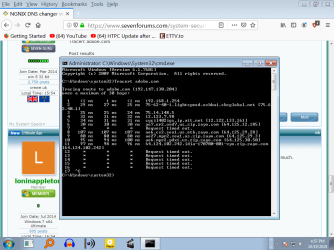
Tracert adobe.com

Post results
 

My Computer My Computer

At a glance

win 8 32 bit
Computer type
PC/Desktop
OS
win 8 32 bit
Is Adobe then some sort of test example? I don't know if it's on the problem HD as I don't use ot much.


Can I run the problem site?


I will follow the instruction and see what happens.
 

My Computer My Computer

At a glance

Windows 7 x64 UltimateAMD Athlon II x3 4502 GB
Computer type
PC/Desktop
Computer Manufacturer/Model Number
custom
OS
Windows 7 x64 Ultimate
CPU
AMD Athlon II x3 450
Motherboard
MSI 880GM
Memory
2 GB
Hard Drives
various
Browser
Firefox, Opera
Here is the adobe tracert attached
 

Attachments

  • tracert adobe.png
    tracert adobe.png
    38 KB · Views: 2

My Computer My Computer

At a glance

Windows 7 x64 UltimateAMD Athlon II x3 4502 GB
Computer type
PC/Desktop
Computer Manufacturer/Model Number
custom
OS
Windows 7 x64 Ultimate
CPU
AMD Athlon II x3 450
Motherboard
MSI 880GM
Memory
2 GB
Hard Drives
various
Browser
Firefox, Opera
Lets see whats going on


Please download and save FRST 64bit or FRST 32 bit to your Desktop.

Downloading MiniToolBox

Right click to run as administrator (XP users click run after receipt of Windows Security Warning - Open File). When the tool opens click Yes to disclaimer.
Make sure that Addition option is checked.
Press Scan button.
It will produce a log called FRST.txt in the same directory the tool is run from.
Please copy and paste log back here.
The first time the tool is run it generates another log (Addition.txt - also located in the same directory as FRST.exe/FRST64.exe). Please also paste that along with the FRST.txt into your reply.
 

My Computer My Computer

At a glance

win 8 32 bit
Computer type
PC/Desktop
OS
win 8 32 bit
You may have malware on your computer. Whether what tools I can give you will fix the damage I don't know. That is if this is malware.

Before I give you links to some things you can run, check your IP address at Shodan. Does Shodan list any open ports, and if so which ones?

Grab your IP address (this is the WAN external IP) here: IP X - IP info and leak test suite

Paste your IP address in Shodan here: Shodan

Any ports opened? No? Moving on.

Go here and download and install Sanity Check. When you first install it will need to add a few registry keys. Say yes and then reboot your computer. Now run Sanity Check. After you run Sanity Check what is its analysis? Post what it may find.

Resplendence Software - SanityCheck, Advanced Rootkit and Malware Detector

Download and run rKill here: Download RKill

Now for a full fledged anti-virus scanner. It is Herdprotect. In this case the portable version since Herdprotect for some reason or another isn't releasing their installer right now. But the portable version will work. Now Herdprotect uses some 67 anti-virus engines I think it is. So you may or may not have false positives. I never had myself. You need to run it once, wait at least 30 minutes then run it again. What are its findings?

Download Portable herdProtect 1.0.3.9 Beta
 

My Computer My Computer

At a glance

Windows 7 Ultimate x64
Computer type
PC/Desktop
OS
Windows 7 Ultimate x64

My Computer My Computer

At a glance

W7 home premium 32bit/W7HP 64bit/w10 tp insid...E5300 dual core3gbNvidia Geforce 7100 Nforce 630i
Computer type
PC/Desktop
Computer Manufacturer/Model Number
medionl/Aspire 6930G/acer x55a
OS
W7 home premium 32bit/W7HP 64bit/w10 tp insider ring
CPU
E5300 dual core
Motherboard
medion MS7366
Memory
3gb
Graphics Card(s)
Nvidia Geforce 7100 Nforce 630i
Monitor(s) Displays
avixc
Internet Speed
n (isp resticted to 72)
Antivirus
mse/pands
Browser
palemoon
Other Info
Belkin Fd7050 n USB using Railink RT2870 drivers, more upto date
Either will do frst is more comprhesive
 

My Computer My Computer

At a glance

win 8 32 bit
Computer type
PC/Desktop
OS
win 8 32 bit
I will pursue this. Isn't FRST a program at Bleeping Computer or one they use?


But as an update to the whole thread, I did the cleaning routine I mentioned of chkdsk /f/r
Entended Disk Cleanup
Glary Utilities
and Old Timer TFC


It was a lengthy process-- time consuming but after it all, my problem URL link to the news station
got through.


I have to do a bit of testing yet and backup my good stuff.


But your tutorial will be valuable for current day virus tools... the free ones please.


I can say that before the cleaner routine Malwarebytes free edition which I normally use did not
crack the NGinx problem. All the old programs like HijackThis and others I kept in a toolkit folder--
it's been a long time since I've done any of this or had to. Refreshing all that will be helpful.


I'll report on your suggestion in a bit. Today, lots of backups and straightening out what works and
securing it.
 

My Computer My Computer

At a glance

Windows 7 x64 UltimateAMD Athlon II x3 4502 GB
Computer type
PC/Desktop
Computer Manufacturer/Model Number
custom
OS
Windows 7 x64 Ultimate
CPU
AMD Athlon II x3 450
Motherboard
MSI 880GM
Memory
2 GB
Hard Drives
various
Browser
Firefox, Opera

My Computer My Computer

At a glance

Win 7 HP SP1 64-bit Vista HB SP2 32-bit Linux...Intel(R) Pentium(R) CPU P6200 @ 2.13GHz4.00 GBIntel(R) Graphics Media Accelerator HD
Computer type
Laptop
Computer Manufacturer/Model Number
Fujitsu LIFEBOOK
OS
Win 7 HP SP1 64-bit Vista HB SP2 32-bit Linux Mint 18.3
CPU
Intel(R) Pentium(R) CPU P6200 @ 2.13GHz
Motherboard
FUJITSU FJNBB06
Memory
4.00 GB
Graphics Card(s)
Intel(R) Graphics Media Accelerator HD
Sound Card
[1] Realtek High Definition Audio [2] Intel(R) Display Audio
Screen Resolution
1366 x 768 x 32 bits (4294967296 colors) @ 59 Hz
Hard Drives
TOSHIBA MK5076GSX
Antivirus
AVG FREE
One of 3 fast dns others google and opendns
 

My Computer My Computer

At a glance

win 8 32 bit
Computer type
PC/Desktop
OS
win 8 32 bit
OP again. I'm reviewing this thread and will gather the programs mentioned above.


That will take some time the way I do things.
 

My Computer My Computer

At a glance

Windows 7 x64 UltimateAMD Athlon II x3 4502 GB
Computer type
PC/Desktop
Computer Manufacturer/Model Number
custom
OS
Windows 7 x64 Ultimate
CPU
AMD Athlon II x3 450
Motherboard
MSI 880GM
Memory
2 GB
Hard Drives
various
Browser
Firefox, Opera
I have run and saved the txt file for FRST.
Is that too big to display as attachment? Should I put it in a folder?
 

My Computer My Computer

At a glance

Windows 7 x64 UltimateAMD Athlon II x3 4502 GB
Computer type
PC/Desktop
Computer Manufacturer/Model Number
custom
OS
Windows 7 x64 Ultimate
CPU
AMD Athlon II x3 450
Motherboard
MSI 880GM
Memory
2 GB
Hard Drives
various
Browser
Firefox, Opera
You may have malware on your computer. Whether what tools I can give you will fix the damage I don't know. That is if this is malware.

Before I give you links to some things you can run, check your IP address at Shodan. Does Shodan list any open ports, and if so which ones?

Grab your IP address (this is the WAN external IP) here: IP X - IP info and leak test suite

Paste your IP address in Shodan here: Shodan

Any ports opened? No? Moving on.

Go here and download and install Sanity Check. When you first install it will need to add a few registry keys. Say yes and then reboot your computer. Now run Sanity Check. After you run Sanity Check what is its analysis? Post what it may find.

Resplendence Software - SanityCheck, Advanced Rootkit and Malware Detector

Download and run rKill here: Download RKill

Now for a full fledged anti-virus scanner. It is Herdprotect. In this case the portable version since Herdprotect for some reason or another isn't releasing their installer right now. But the portable version will work. Now Herdprotect uses some 67 anti-virus engines I think it is. So you may or may not have false positives. I never had myself. You need to run it once, wait at least 30 minutes then run it again. What are its findings?

Download Portable herdProtect 1.0.3.9 Beta

I don't like making long quotes but there seems no way around it. Why all the jumping about with Shodan. I ran the get IP address routine. Then you show a Shodan registration to go through.
The shodan screen is too long to screen print. I have not done any more registrations new passwords etc.

When I feel more patient I may go through it but right now I feel like a rat in a maze.

I'll try Sanity check. At least it doesn't seem to need any more registrations and passwords-- I have box full. I'm tired of it.

Currently I'm using Basilisk for of Firefox. I had hoped that would stop all the upgrade prompts
but that might have been wishful thinking as well. I just want off the bus.
 

My Computer My Computer

At a glance

Windows 7 x64 UltimateAMD Athlon II x3 4502 GB
Computer type
PC/Desktop
Computer Manufacturer/Model Number
custom
OS
Windows 7 x64 Ultimate
CPU
AMD Athlon II x3 450
Motherboard
MSI 880GM
Memory
2 GB
Hard Drives
various
Browser
Firefox, Opera
You can copy txt from both reports and paste as txt in the forum one per post
 

My Computer My Computer

At a glance

win 8 32 bit
Computer type
PC/Desktop
OS
win 8 32 bit
Back
Top