No 2.1 audio channels

Nope. Does not work.
 

My Computer My Computer

Computer type
Laptop
Computer Manufacturer/Model Number
Lenovo B570
OS
Windows 7 Ulimate 64Bit
CPU
Intel Core i3 2350M @ 2.30
Motherboard
Lenovo Emerald Lake
Memory
8 GB DDR3 @ 1333 MHz
Graphics Card(s)
Intel HD 3000 Mobile
Sound Card
Realtek ACL 272
Screen Resolution
1366x768
Hard Drives
Hitachi 500GB
Internet Speed
30 MBps Down 512 Kbps up
Antivirus
Avast
Browser
Chrome
Do you get the 235 error? Or what doesn't work?
 

My Computer My Computer

Computer type
PC/Desktop
Computer Manufacturer/Model Number
Built 2/11/2011
OS
Windows 7 Pro-x64
CPU
i7-2600 3.4GHz - 3.8GHz Turbo
Motherboard
Intel DH67BL-B3
Memory
8Gb - 2x4GB, Muskin 991770 PC3-1333
Graphics Card(s)
Integrated Intel HD 2000
Sound Card
Integrated Intel 10.1 HD, RealTek ALC892
Monitor(s) Displays
Asus LCD VH222H, Haier HL24XSL2a
Screen Resolution
1920x1080, 1920x1080
Hard Drives
Crucial SSD C300-128Gb,
Western Digital WD5002AALX - 500Gb,
Western Digital WD7501AALS - 750Gb
PSU
Seasonic 650W 80+ Gold Modular
Case
Rosewill Defender
Cooling
Stock CPU, Four 120mm case fans, PCH fan added
Keyboard
Logitech EX100 Y-RBH94 Wireless
Mouse
Logitech EX100 M-RCE95 Wireless
Internet Speed
3.0/1.5 Mbs
Antivirus
Microsoft Security Essentials
Browser
Microsoft Internet Explorer 11
Other Info
Antec Veris Premier-Multimedia IR Station,
Cyber Accoustics-3602 Speakers,
AFT XM-5U Card Reader,
Hauppauge TV-HVR-2250,
Sony LX300 USB Turntable
Running as admin did not solve the problem. I didnt get any errors during the installing.
 

My Computer My Computer

Computer type
Laptop
Computer Manufacturer/Model Number
Lenovo B570
OS
Windows 7 Ulimate 64Bit
CPU
Intel Core i3 2350M @ 2.30
Motherboard
Lenovo Emerald Lake
Memory
8 GB DDR3 @ 1333 MHz
Graphics Card(s)
Intel HD 3000 Mobile
Sound Card
Realtek ACL 272
Screen Resolution
1366x768
Hard Drives
Hitachi 500GB
Internet Speed
30 MBps Down 512 Kbps up
Antivirus
Avast
Browser
Chrome
Ok. If it doesn't work with Lenovo drivers, it isn't going to work.

BUT...

I have one more item to try. Check the BIOS for Audio options. These should be under Configuration. There may be an option to select which type of audio to use. There may be an option for audio type Auto, HD or Legacy. If it's there, make sure it's set to HD. The option name may vary from OEM to OEM but it should have something similar.
 

My Computer My Computer

Computer type
PC/Desktop
Computer Manufacturer/Model Number
Built 2/11/2011
OS
Windows 7 Pro-x64
CPU
i7-2600 3.4GHz - 3.8GHz Turbo
Motherboard
Intel DH67BL-B3
Memory
8Gb - 2x4GB, Muskin 991770 PC3-1333
Graphics Card(s)
Integrated Intel HD 2000
Sound Card
Integrated Intel 10.1 HD, RealTek ALC892
Monitor(s) Displays
Asus LCD VH222H, Haier HL24XSL2a
Screen Resolution
1920x1080, 1920x1080
Hard Drives
Crucial SSD C300-128Gb,
Western Digital WD5002AALX - 500Gb,
Western Digital WD7501AALS - 750Gb
PSU
Seasonic 650W 80+ Gold Modular
Case
Rosewill Defender
Cooling
Stock CPU, Four 120mm case fans, PCH fan added
Keyboard
Logitech EX100 Y-RBH94 Wireless
Mouse
Logitech EX100 M-RCE95 Wireless
Internet Speed
3.0/1.5 Mbs
Antivirus
Microsoft Security Essentials
Browser
Microsoft Internet Explorer 11
Other Info
Antec Veris Premier-Multimedia IR Station,
Cyber Accoustics-3602 Speakers,
AFT XM-5U Card Reader,
Hauppauge TV-HVR-2250,
Sony LX300 USB Turntable
OK thanks for helping I tried going into bios but there were no audio option thanks for helping
 

My Computer My Computer

Computer type
Laptop
Computer Manufacturer/Model Number
Lenovo B570
OS
Windows 7 Ulimate 64Bit
CPU
Intel Core i3 2350M @ 2.30
Motherboard
Lenovo Emerald Lake
Memory
8 GB DDR3 @ 1333 MHz
Graphics Card(s)
Intel HD 3000 Mobile
Sound Card
Realtek ACL 272
Screen Resolution
1366x768
Hard Drives
Hitachi 500GB
Internet Speed
30 MBps Down 512 Kbps up
Antivirus
Avast
Browser
Chrome
I'm going to post a link to this thread in the help forum and see if anyone else has ideas. I'm tapped out. Sorry.
 

My Computer My Computer

Computer type
PC/Desktop
Computer Manufacturer/Model Number
Built 2/11/2011
OS
Windows 7 Pro-x64
CPU
i7-2600 3.4GHz - 3.8GHz Turbo
Motherboard
Intel DH67BL-B3
Memory
8Gb - 2x4GB, Muskin 991770 PC3-1333
Graphics Card(s)
Integrated Intel HD 2000
Sound Card
Integrated Intel 10.1 HD, RealTek ALC892
Monitor(s) Displays
Asus LCD VH222H, Haier HL24XSL2a
Screen Resolution
1920x1080, 1920x1080
Hard Drives
Crucial SSD C300-128Gb,
Western Digital WD5002AALX - 500Gb,
Western Digital WD7501AALS - 750Gb
PSU
Seasonic 650W 80+ Gold Modular
Case
Rosewill Defender
Cooling
Stock CPU, Four 120mm case fans, PCH fan added
Keyboard
Logitech EX100 Y-RBH94 Wireless
Mouse
Logitech EX100 M-RCE95 Wireless
Internet Speed
3.0/1.5 Mbs
Antivirus
Microsoft Security Essentials
Browser
Microsoft Internet Explorer 11
Other Info
Antec Veris Premier-Multimedia IR Station,
Cyber Accoustics-3602 Speakers,
AFT XM-5U Card Reader,
Hauppauge TV-HVR-2250,
Sony LX300 USB Turntable
Has this laptop ever played HD audio and the sub too?
 

My Computer My Computer

Computer type
PC/Desktop
Computer Manufacturer/Model Number
Home Built Desktop By DataTech
OS
Windows 7 Ultimate X64 SP1
CPU
Intel i5-2550K, Differing ~4.4-4.8GHz No built in GPU
Motherboard
ASUS P8Z68-V PRO/GEN3
Memory
16GB G.Skill Sniper 1866MHz @ 2133MHz 2x8GB
Graphics Card(s)
ASUS GTX650TIB-DC2OC-2GD5, (650TI Boost)
Sound Card
Onboard Realtek 5-1
Monitor(s) Displays
Samsung P2570HD
Screen Resolution
1920x1080
Hard Drives
Samsung 840 Pro 256GB SSD for OS, 500GB Seagate Constellation (Enterprise drive) for Data
PSU
Corsair HX650W
Case
Inwin Dragon Rider
Cooling
Hyper 212 EVO w/two Noctua fans, push-pull, @1300 RPM
Keyboard
E-Z Eyes, bright yellow keys with large characters
Mouse
steelseries SENSEI Laser Pro Gaming
Internet Speed
48-51Mbs Mbs down, 11 Mbs up Xfinity Cable
Antivirus
Norton Internet Security 2013
Browser
IE 10, Opera, Pale Moon if needed
Other Info
4 case fans, LG BluRay-RE, ASUS DVD-RW, Mr. Fusion power supply, 1.21 gigawatts.
Yes, I tired it with this video 2.1 Speaker System Test - YouTube and everything works fine (even the sub), but I think I fixed the problem.

Everything works because I was comparing my home theater sub woofer (800W)to my small sub(4Watts).

I was only wondering about not showing 2.1 audio channel.
 
Last edited:

My Computer My Computer

Computer type
Laptop
Computer Manufacturer/Model Number
Lenovo B570
OS
Windows 7 Ulimate 64Bit
CPU
Intel Core i3 2350M @ 2.30
Motherboard
Lenovo Emerald Lake
Memory
8 GB DDR3 @ 1333 MHz
Graphics Card(s)
Intel HD 3000 Mobile
Sound Card
Realtek ACL 272
Screen Resolution
1366x768
Hard Drives
Hitachi 500GB
Internet Speed
30 MBps Down 512 Kbps up
Antivirus
Avast
Browser
Chrome
Actually, your sub is 4 Watts. The satellite speakers are 1.5W each for a total of 7 Watts.

In any case, I glad you fixed the problem.
 

My Computer My Computer

Computer type
PC/Desktop
Computer Manufacturer/Model Number
Built 2/11/2011
OS
Windows 7 Pro-x64
CPU
i7-2600 3.4GHz - 3.8GHz Turbo
Motherboard
Intel DH67BL-B3
Memory
8Gb - 2x4GB, Muskin 991770 PC3-1333
Graphics Card(s)
Integrated Intel HD 2000
Sound Card
Integrated Intel 10.1 HD, RealTek ALC892
Monitor(s) Displays
Asus LCD VH222H, Haier HL24XSL2a
Screen Resolution
1920x1080, 1920x1080
Hard Drives
Crucial SSD C300-128Gb,
Western Digital WD5002AALX - 500Gb,
Western Digital WD7501AALS - 750Gb
PSU
Seasonic 650W 80+ Gold Modular
Case
Rosewill Defender
Cooling
Stock CPU, Four 120mm case fans, PCH fan added
Keyboard
Logitech EX100 Y-RBH94 Wireless
Mouse
Logitech EX100 M-RCE95 Wireless
Internet Speed
3.0/1.5 Mbs
Antivirus
Microsoft Security Essentials
Browser
Microsoft Internet Explorer 11
Other Info
Antec Veris Premier-Multimedia IR Station,
Cyber Accoustics-3602 Speakers,
AFT XM-5U Card Reader,
Hauppauge TV-HVR-2250,
Sony LX300 USB Turntable
Yes, I tired it with this video 2.1 Speaker System Test - YouTube and everything works fine (even the sub), but I think I fixed the problem.

Everything works because I was comparing my home theater sub woofer (800W)to my small sub(4Watts).

I was only wondering about not showing 2.1 audio channel.


Did you ever find out why the 2.1 audio channel was not showing?

My system doesn't show it either. The only options are Stereo, Quadraphonic, 5.1 Surround, and 7.1 Surround. The XP computer that this PC replaced had the option for 2.1, but this Windows 7 system does not.

I currently have it set on Stereo and tried the Speaker System Test you referenced. Any signal sent to the sub-woofer is also heard on the stereo speakers - so I wouldn't say everything works here. If YouTube only supports 2-channel stereo sound, that could explain sub-woofer sound being heard from the stereo speakers but not necessarily. Any suggestions for how to test this?

Also, I had the Realtek HD Audio Manager window open when I started trying to troubleshoot this but now I can't seem to find it. I'm referring to the one shown in the 1st reply in this thread. Can anyone tell me how to get back to the Realtek HD Audio Manager window?

I realize this is a very old thread, but it really seems to fit the issue I'm facing. Thanks in advance for any help!
 

My Computer My Computer

Computer type
PC/Desktop
Computer Manufacturer/Model Number
Dell XPS 8900
OS
Windows 7 Pro 64bit
I never found why it was not showing.

Youtube does support 5.1 but I am no sure if it supports 7.1

https://support.google.com/youtube/answer/1722171?hl=en

Is your speaker properly connected? Did you check to see if it works on a different computer?

If you're windows 7 go to program files x86 or program files and find the Realtek folder. From that you should be able to run the Realtek HD audio manager. I don't if this works but you can try searching from the start bar.

I will try to help you as much I can.
 

My Computer My Computer

Computer type
Laptop
Computer Manufacturer/Model Number
Lenovo B570
OS
Windows 7 Ulimate 64Bit
CPU
Intel Core i3 2350M @ 2.30
Motherboard
Lenovo Emerald Lake
Memory
8 GB DDR3 @ 1333 MHz
Graphics Card(s)
Intel HD 3000 Mobile
Sound Card
Realtek ACL 272
Screen Resolution
1366x768
Hard Drives
Hitachi 500GB
Internet Speed
30 MBps Down 512 Kbps up
Antivirus
Avast
Browser
Chrome
Thank for your reply!

1. I checked the link to YouTube help where it shows that it supports 5.1, but does it support 2.1?
I did a search but could find nothing about 2.1 audio in YouTube Help. I've tried changing the setting on the computer's audio output from Stereo to 5.1 Surround. When I test the speakers while still in "Speaker Setup," there is no sound when it says it's testing the sub-woofer.
I ran the 2.1 Speaker System Test that you referenced in #48 of this thread.
When that YouTube video shows it's testing the sub-woofer, there is bass coming from my sub-woofer but also from the stereo speakers. There is never an instance in any tests I've tried where sound is only coming from the sub-woofer and not the stereo speakers. That would be expected, I suppose, because I have selected Stereo in "Speaker Setup" because there is no option for 2.1 audio and my sub-woofer doesn't pass the test for 5.1 Surround.
2. The speakers are properly connected, from all I can tell. I have not yet tried the speakers on another computer but that's my plan. I will update the result when I do.

3. Regarding the Realtek HD Audio Manager, I had tried searching for it from the start bar but found nothing.

4. I tried looking for the Realtek HD Audio Manager in the x86 Programs folder, as you suggested, but it only had things for the Realtek card reader.
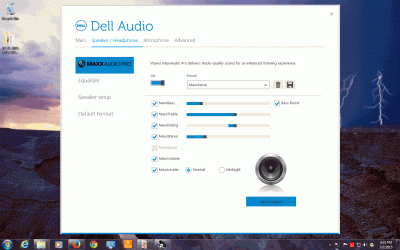
There is a folder for Realtek audio in the other Programs folder, but any applications I click there either seem to do nothing or they take me to Dell's audio manager.​
I was quite certain that when I started troubleshooting this, I had the same Realtek HD Audio Manager dashboard on my screen as the one in your screen shot at the beginning of this thread. Maybe I'm mistaken.
Whether I can find that dashboard or not (although I wish I could), my biggest question is how to get sub-woofer audio independently from the stereo speaker. Do I need a different driver, perhaps, that will allow "Speaker Setup" to include 2.1 as one of the options?

Thanks for helping me try to figure this out!

 

My Computer My Computer

Computer type
PC/Desktop
Computer Manufacturer/Model Number
Dell XPS 8900
OS
Windows 7 Pro 64bit
1. YouTube supports 5.1 and below. So it does support 2.1.

2. What is the speaker company? Check how much watts is your sub. My was 4 Watts which is very low. I had to put the volume all the way to max to hear the sub.

3. For the realtek exe file, It might be in C:\Users\BehindYouu\AppData and check one of the folders. If it is not there then I cant help you. You need to turn on hidden files to see those folders. To enable that search hidden in the start menu and it should be the first one.

Again, check the watts on your sub. If it is low then you wont notice it. Tell me the model of the speakers and I will see what I can do.

Also what is your Audio codec? Look at post #4.

some support up to 7.1 channels and some dont. Mine supported to 4 channels. (does not include the sub).
 

My Computer My Computer

Computer type
Laptop
Computer Manufacturer/Model Number
Lenovo B570
OS
Windows 7 Ulimate 64Bit
CPU
Intel Core i3 2350M @ 2.30
Motherboard
Lenovo Emerald Lake
Memory
8 GB DDR3 @ 1333 MHz
Graphics Card(s)
Intel HD 3000 Mobile
Sound Card
Realtek ACL 272
Screen Resolution
1366x768
Hard Drives
Hitachi 500GB
Internet Speed
30 MBps Down 512 Kbps up
Antivirus
Avast
Browser
Chrome
1. Well, that makes sense. Wish it worked the same way with my PC. It supports 5.1 but doesn't appear to support 2.1.

2. My speakers are Altec Lansing BX2321 - a set of 2 "front" speakers (stereo), 6 watts per channel and a 16-watt sub-woofer.
There is sound coming out of the sub-woofer when the "Speaker Setup" is set to Stereo. The trouble is that it seems the bass is also coming out of the stereo speakers. That is, it wouldn't sound much different if you turned the sub-woofer off. The only way to know there is sound coming out of it is to get up close to it. Maybe it's supposed to work that way but it seems it worked independently of the stereo speaker when the system was connected to my XP machine.
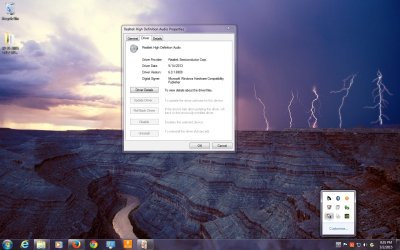
3. The realtek exe file appears to be nowhere, but thanks for your advice regarding where to look. The driver is "Realtek ALC3861 Audio, 6.0.1.6909, A01" but that doesn't help find the Realtek HD Audio Manager. So it follows that I can't determine what the Audio codec is. Assuming I am uploading these screenshots properly, here is what I can find:
 

Attachments

  • 03-02-2015 Realtek HD Audio Properties.jpg
    03-02-2015 Realtek HD Audio Properties.jpg
    153.1 KB · Views: 1
  • 03-02-2015 Dell Audio Manager.gif
    03-02-2015 Dell Audio Manager.gif
    157.6 KB · Views: 0

My Computer My Computer

Computer type
PC/Desktop
Computer Manufacturer/Model Number
Dell XPS 8900
OS
Windows 7 Pro 64bit
Hey sorry for late response. I suggest you make a new thread as I don't know how to fix it.
 

My Computer My Computer

Computer type
Laptop
Computer Manufacturer/Model Number
Lenovo B570
OS
Windows 7 Ulimate 64Bit
CPU
Intel Core i3 2350M @ 2.30
Motherboard
Lenovo Emerald Lake
Memory
8 GB DDR3 @ 1333 MHz
Graphics Card(s)
Intel HD 3000 Mobile
Sound Card
Realtek ACL 272
Screen Resolution
1366x768
Hard Drives
Hitachi 500GB
Internet Speed
30 MBps Down 512 Kbps up
Antivirus
Avast
Browser
Chrome
In order for 2.1 to be displayed within the drivers you need 2 connections into your motherboard. 1 connection will be for the stereo, left & right signal – this is usually the green jack. The other will be for the subwoofer – usually the orange jack. This will also allow the software (or driver) to split the audio signal sending discrete low frequency information to the subwoofer and a separate signal for the mids/highs to the satellites.


Both the Altec’s and Logitech speakers mention within this thread are not capable of this connection for they only have a stereo connection. In this case a full range signal is sent to the subwoofer where it is crossed over filtering the mids/highs to the satellites. However, by what is described of the Altecs, there is no crossover and the subwoofer is just used to reinforce the lower frequencies of the satellites.
 

My Computer My Computer

Computer type
PC/Desktop
Computer Manufacturer/Model Number
Misfits Machine!
OS
Windows 7 Professional
CPU
Intel i7 4790K
Motherboard
ASUS Maximus VII Hero
Memory
32 GB G.SKILL TridentX F3-2400C10D-GTX
Graphics Card(s)
EVGA GeForce GTX 980 Superclocked X2 SLI
Sound Card
Teac UD-501 External USB DAC/Bryston BHA-1 Headphone Amp
Monitor(s) Displays
BenQ BL3200PT
Screen Resolution
2560x1440
Hard Drives
Samsung 850 Pro Series 256GB SSD
Western Digital Red 3TB
PSU
Corsair RM Series Gold 1000W
Case
Corsair Carbide Series Air 540
Cooling
Corsair Hydro Series H110
Keyboard
Corsair Vengeance K70 - Cherry MX Red/Razer Orbweaver Elite
Mouse
Razer DeathAdder Chroma
In order for 2.1 to be displayed within the drivers you need 2 connections into your motherboard. 1 connection will be for the stereo, left & right signal – this is usually the green jack. The other will be for the subwoofer – usually the orange jack. This will also allow the software (or driver) to split the audio signal sending discrete low frequency information to the subwoofer and a separate signal for the mids/highs to the satellites.


Both the Altec’s and Logitech speakers mention within this thread are not capable of this connection for they only have a stereo connection. In this case a full range signal is sent to the subwoofer where it is crossed over filtering the mids/highs to the satellites. However, by what is described of the Altecs, there is no crossover and the subwoofer is just used to reinforce the lower frequencies of the satellites.


Thank you for the very thorough explanation - very much appreciated. :)
 

My Computer My Computer

Computer type
PC/Desktop
Computer Manufacturer/Model Number
Dell XPS 8900
OS
Windows 7 Pro 64bit
Back
Top