
Solved No AHCI option in BIOS, is my computer default in AHCI or IDE?

WindowsOP

New member
Local time
12:23 PM
Messages
60
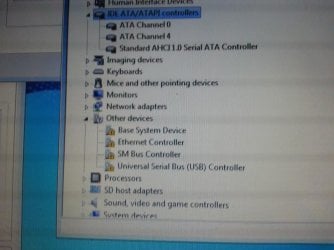
I bought a brand new SSD, installed it in Windows 7, and there is no option in my BIOS for the SATA controller (to switch between IDE and AHCI Mode). How do I determine whether my computer's sata controller is using IDE or AHCI?

I want to make sure that my AHCI controller is enabled and not IDE when using TRIM.

If anyone can look at the picture below and determine whether my computer is default in IDE or AHCI, then I will mark this as Solved.

Thanks.
 

Attachments
  • unnamed.jpg
    unnamed.jpg
    48.2 KB · Views: 2

My Computer My Computer

At a glance

Windows Ultimate x64Intel Core 2 Duo TP5500 1.6Ghz3GBIntel 945 Chipset
Computer type
Laptop
Computer Manufacturer/Model Number
Dell D620
OS
Windows Ultimate x64
CPU
Intel Core 2 Duo TP5500 1.6Ghz
Memory
3GB
Graphics Card(s)
Intel 945 Chipset
Sound Card
HD Audio Device
Screen Resolution
1440x900
Hard Drives
80GB HDD
Internet Speed
25 down 5 up
Antivirus
Avast, Malwarebytes
Browser
Chrome
Run this tool and see what it says,

AS SSD Benchmark 1.7.4739.38088 Download - TechSpot

It will show you what mode it's running in.

208817d1335334947-show-us-your-ssd-performance-2-new-test.png
 

My Computer My Computer

At a glance

Win 10 Pro x64Intel I5-2500K @3.3GHz16GB G.Skill Ripjaws X (4x4GB)EVGA GeForce 750 Ti SC 2GB
Computer type
PC/Desktop
Computer Manufacturer/Model Number
Self Built
OS
Win 10 Pro x64
CPU
Intel I5-2500K @3.3GHz
Motherboard
Asrock P67 Extreme4
Memory
16GB G.Skill Ripjaws X (4x4GB)
Graphics Card(s)
EVGA GeForce 750 Ti SC 2GB
Sound Card
ASUS Xonar DG 5.1 Channels 24-bit 96KHz PCI Interface Sound
Monitor(s) Displays
auria eq2367
Screen Resolution
1920 x 1080
Hard Drives
250GB Samsung 850 EVO SSD
1TB WD Blue
1TB Hitachi
PSU
SeaSonic X 650W 80 Plus Gold
Case
Corsair Obsidian 750D
Cooling
Corsair H60, Three 140mm case fans
Keyboard
Logitech Wireless Keyboard K520
Mouse
Logitech Wireless Mouse M310
Internet Speed
Wave Broadband ~ 100 dn 5 up
Antivirus
Windows Defender, Malwarebytes Premium
Browser
Edge, IE11, Chrome
Other Info
Laptop specs: HP g7-1365dx /
CPU: AMD A6-3420M APU with Radeon(tm) HD Graphics /
RAM: Crucial 8Gb (2x4Gb) /
SSD: Crucial M4-CT128M4SSD2 ATA Device/ FW 000F /
GFX: AMD Radeon HD 6520G /
OS: Windows 10 Pro x64

My Computer My Computer

At a glance

Windows Ultimate x64Intel Core 2 Duo TP5500 1.6Ghz3GBIntel 945 Chipset
Computer type
Laptop
Computer Manufacturer/Model Number
Dell D620
OS
Windows Ultimate x64
CPU
Intel Core 2 Duo TP5500 1.6Ghz
Memory
3GB
Graphics Card(s)
Intel 945 Chipset
Sound Card
HD Audio Device
Screen Resolution
1440x900
Hard Drives
80GB HDD
Internet Speed
25 down 5 up
Antivirus
Avast, Malwarebytes
Browser
Chrome
You're welcome.
 

My Computer My Computer

At a glance

Win 10 Pro x64Intel I5-2500K @3.3GHz16GB G.Skill Ripjaws X (4x4GB)EVGA GeForce 750 Ti SC 2GB
Computer type
PC/Desktop
Computer Manufacturer/Model Number
Self Built
OS
Win 10 Pro x64
CPU
Intel I5-2500K @3.3GHz
Motherboard
Asrock P67 Extreme4
Memory
16GB G.Skill Ripjaws X (4x4GB)
Graphics Card(s)
EVGA GeForce 750 Ti SC 2GB
Sound Card
ASUS Xonar DG 5.1 Channels 24-bit 96KHz PCI Interface Sound
Monitor(s) Displays
auria eq2367
Screen Resolution
1920 x 1080
Hard Drives
250GB Samsung 850 EVO SSD
1TB WD Blue
1TB Hitachi
PSU
SeaSonic X 650W 80 Plus Gold
Case
Corsair Obsidian 750D
Cooling
Corsair H60, Three 140mm case fans
Keyboard
Logitech Wireless Keyboard K520
Mouse
Logitech Wireless Mouse M310
Internet Speed
Wave Broadband ~ 100 dn 5 up
Antivirus
Windows Defender, Malwarebytes Premium
Browser
Edge, IE11, Chrome
Other Info
Laptop specs: HP g7-1365dx /
CPU: AMD A6-3420M APU with Radeon(tm) HD Graphics /
RAM: Crucial 8Gb (2x4Gb) /
SSD: Crucial M4-CT128M4SSD2 ATA Device/ FW 000F /
GFX: AMD Radeon HD 6520G /
OS: Windows 10 Pro x64

My Computer My Computer

At a glance

Windows Ultimate x64Intel Core 2 Duo TP5500 1.6Ghz3GBIntel 945 Chipset
Computer type
Laptop
Computer Manufacturer/Model Number
Dell D620
OS
Windows Ultimate x64
CPU
Intel Core 2 Duo TP5500 1.6Ghz
Memory
3GB
Graphics Card(s)
Intel 945 Chipset
Sound Card
HD Audio Device
Screen Resolution
1440x900
Hard Drives
80GB HDD
Internet Speed
25 down 5 up
Antivirus
Avast, Malwarebytes
Browser
Chrome
It's just a benchmarking tool, have a look through this thread,

http://www.sevenforums.com/hardware-devices/213193-show-us-your-ssd-performance-2-a-159.html

They are running a few different tools like that quite frequently with no harm being done.

You will be doing a quick test on your SSD, and the lifetime of SSD's are quite respectable now a days, just enjoy your SSD, the only thing not recommended on an SSD is defragging.

It is useless on an SSD and will reduce it's life.
 

My Computer My Computer

At a glance

Win 10 Pro x64Intel I5-2500K @3.3GHz16GB G.Skill Ripjaws X (4x4GB)EVGA GeForce 750 Ti SC 2GB
Computer type
PC/Desktop
Computer Manufacturer/Model Number
Self Built
OS
Win 10 Pro x64
CPU
Intel I5-2500K @3.3GHz
Motherboard
Asrock P67 Extreme4
Memory
16GB G.Skill Ripjaws X (4x4GB)
Graphics Card(s)
EVGA GeForce 750 Ti SC 2GB
Sound Card
ASUS Xonar DG 5.1 Channels 24-bit 96KHz PCI Interface Sound
Monitor(s) Displays
auria eq2367
Screen Resolution
1920 x 1080
Hard Drives
250GB Samsung 850 EVO SSD
1TB WD Blue
1TB Hitachi
PSU
SeaSonic X 650W 80 Plus Gold
Case
Corsair Obsidian 750D
Cooling
Corsair H60, Three 140mm case fans
Keyboard
Logitech Wireless Keyboard K520
Mouse
Logitech Wireless Mouse M310
Internet Speed
Wave Broadband ~ 100 dn 5 up
Antivirus
Windows Defender, Malwarebytes Premium
Browser
Edge, IE11, Chrome
Other Info
Laptop specs: HP g7-1365dx /
CPU: AMD A6-3420M APU with Radeon(tm) HD Graphics /
RAM: Crucial 8Gb (2x4Gb) /
SSD: Crucial M4-CT128M4SSD2 ATA Device/ FW 000F /
GFX: AMD Radeon HD 6520G /
OS: Windows 10 Pro x64
It's just a benchmarking tool, have a look through this thread,

http://www.sevenforums.com/hardware-devices/213193-show-us-your-ssd-performance-2-a-159.html

They are running a few different tools like that quite frequently with no harm being done.

You will be doing a quick test on your SSD, and the lifetime of SSD's are quite respectable now a days, just enjoy your SSD, the only thing not recommended on an SSD is defragging.

It is useless on an SSD and will reduce it's life.

On the first sentence of the quote, he said that don't write benchmarking often and then explains why , etc etc etc.

What I'm doing is not write benchmarking right?

Also, is there a guide that I can tweak my SSD so that the SSD will last longer? The ssd's have a short life span of writes so preventing this would help.


1) PLEASE PLEASE PLEASE do NOT do the write benchmarking often. Each memory cell on a SSD has a set number of times it can be written to. The controller keeps track of the number of writes to a cell and makes it read-only when this value is met or exceeded. Most of the write benchmark programs out there write all across the SSD several times to every open cell either at the block level or file level then erase the block/file. Then the controller is left to clean up the mess, hurting performance and drive life. I watched an OCZ tech burn out one of their SSDs running write benchmarks over and over for several days non-stop. The drive became read-only after a slowdown of 98%.
 

My Computer My Computer

At a glance

Windows Ultimate x64Intel Core 2 Duo TP5500 1.6Ghz3GBIntel 945 Chipset
Computer type
Laptop
Computer Manufacturer/Model Number
Dell D620
OS
Windows Ultimate x64
CPU
Intel Core 2 Duo TP5500 1.6Ghz
Memory
3GB
Graphics Card(s)
Intel 945 Chipset
Sound Card
HD Audio Device
Screen Resolution
1440x900
Hard Drives
80GB HDD
Internet Speed
25 down 5 up
Antivirus
Avast, Malwarebytes
Browser
Chrome
Where is that from? When quoting stuff it helps to link the source.

Yes they have a certain number of writes, but you would have to be running them constantly to do any real harm.

Your quote above seems to be dated honestly
 

My Computer My Computer

At a glance

Win 10 Pro x64Intel I5-2500K @3.3GHz16GB G.Skill Ripjaws X (4x4GB)EVGA GeForce 750 Ti SC 2GB
Computer type
PC/Desktop
Computer Manufacturer/Model Number
Self Built
OS
Win 10 Pro x64
CPU
Intel I5-2500K @3.3GHz
Motherboard
Asrock P67 Extreme4
Memory
16GB G.Skill Ripjaws X (4x4GB)
Graphics Card(s)
EVGA GeForce 750 Ti SC 2GB
Sound Card
ASUS Xonar DG 5.1 Channels 24-bit 96KHz PCI Interface Sound
Monitor(s) Displays
auria eq2367
Screen Resolution
1920 x 1080
Hard Drives
250GB Samsung 850 EVO SSD
1TB WD Blue
1TB Hitachi
PSU
SeaSonic X 650W 80 Plus Gold
Case
Corsair Obsidian 750D
Cooling
Corsair H60, Three 140mm case fans
Keyboard
Logitech Wireless Keyboard K520
Mouse
Logitech Wireless Mouse M310
Internet Speed
Wave Broadband ~ 100 dn 5 up
Antivirus
Windows Defender, Malwarebytes Premium
Browser
Edge, IE11, Chrome
Other Info
Laptop specs: HP g7-1365dx /
CPU: AMD A6-3420M APU with Radeon(tm) HD Graphics /
RAM: Crucial 8Gb (2x4Gb) /
SSD: Crucial M4-CT128M4SSD2 ATA Device/ FW 000F /
GFX: AMD Radeon HD 6520G /
OS: Windows 10 Pro x64
Where is that from? When quoting stuff it helps to link the source.

Yes they have a certain number of writes, but you would have to be running them constantly to do any real harm.

Your quote above seems to be dated honestly

Here's the source to the quote, sorry.
I used that CrystalDisk thingy that you just run and it give you results without running any tests, my SSD is 100% healthy and says around 35-40C or F?

I just want to see the performance on my SSD which comes to the link you provided that does that but want to make sure if its safe first.
http://www.sevenforums.com/tutorials/70822-ssd-tweaks-optimizations-windows-7-a.html#post623705
 

My Computer My Computer

At a glance

Windows Ultimate x64Intel Core 2 Duo TP5500 1.6Ghz3GBIntel 945 Chipset
Computer type
Laptop
Computer Manufacturer/Model Number
Dell D620
OS
Windows Ultimate x64
CPU
Intel Core 2 Duo TP5500 1.6Ghz
Memory
3GB
Graphics Card(s)
Intel 945 Chipset
Sound Card
HD Audio Device
Screen Resolution
1440x900
Hard Drives
80GB HDD
Internet Speed
25 down 5 up
Antivirus
Avast, Malwarebytes
Browser
Chrome
Sorry, but that info is questionable, specially when the next post in that tutorial recommends a defragger,

What would SSD speed be without some free, cool tools that are helpful...

Benchmarking (as above): HD Tune Free Downloadhttp://www.hdtune.com/files/hdtune_255.exe
Auslogics Disk Defrag: Download Auslogics Disk Defrag for free
CrystalDiskInfo: Crystal Dew World - Download Center
Crap Cleaner (Keeps things cleaned up): http://www.ccleaner.com/ (I have it auto-clean on logoff)

Helpful well behaved Windows 7 gadgets (get them from http://windows.microsoft.com/en-US/windows/downloads/personalize?T1=desktopgadgets )
All CPU Meter (shows memory and cpu usage, all cores)
Wireless network meter (also works for wired) shows network usage
Drive Meter 1.0.0.1 Shows all IO to your drives.. MOST useful of the three!

I think that needs to be removed, everybody knows you don't defrag an SSD.

If you want up to date advice from some real pros go to this thread,

http://www.sevenforums.com/hardware-devices/213193-show-us-your-ssd-performance-2-a.html

Once again, I really have to point out your SSD is not as fragile as you think, enjoy it for it's intended purpose, every thing has a limited life so just enjoy it while you have it.
 

My Computer My Computer

At a glance

Win 10 Pro x64Intel I5-2500K @3.3GHz16GB G.Skill Ripjaws X (4x4GB)EVGA GeForce 750 Ti SC 2GB
Computer type
PC/Desktop
Computer Manufacturer/Model Number
Self Built
OS
Win 10 Pro x64
CPU
Intel I5-2500K @3.3GHz
Motherboard
Asrock P67 Extreme4
Memory
16GB G.Skill Ripjaws X (4x4GB)
Graphics Card(s)
EVGA GeForce 750 Ti SC 2GB
Sound Card
ASUS Xonar DG 5.1 Channels 24-bit 96KHz PCI Interface Sound
Monitor(s) Displays
auria eq2367
Screen Resolution
1920 x 1080
Hard Drives
250GB Samsung 850 EVO SSD
1TB WD Blue
1TB Hitachi
PSU
SeaSonic X 650W 80 Plus Gold
Case
Corsair Obsidian 750D
Cooling
Corsair H60, Three 140mm case fans
Keyboard
Logitech Wireless Keyboard K520
Mouse
Logitech Wireless Mouse M310
Internet Speed
Wave Broadband ~ 100 dn 5 up
Antivirus
Windows Defender, Malwarebytes Premium
Browser
Edge, IE11, Chrome
Other Info
Laptop specs: HP g7-1365dx /
CPU: AMD A6-3420M APU with Radeon(tm) HD Graphics /
RAM: Crucial 8Gb (2x4Gb) /
SSD: Crucial M4-CT128M4SSD2 ATA Device/ FW 000F /
GFX: AMD Radeon HD 6520G /
OS: Windows 10 Pro x64
Two things I don't do with any of my SSD's.
1. Never defrag
2. Never baby them. Just use them and enjoy them. Most of todays SSD brands will last as long a most hard drives.
 

My Computer My Computer

At a glance

Windows 10 Pro. 64/ version 1709 Windows 7 Pr...Intel i7-6800K @ 4.3Corsair Platinum 16 gig @2400EVGA GTX 1070 OC
Computer type
PC/Desktop
Computer Manufacturer/Model Number
Home made Desktop
OS
Windows 10 Pro. 64/ version 1709 Windows 7 Pro/64
CPU
Intel i7-6800K @ 4.3
Motherboard
ASUS X-99 Deluxe II
Memory
Corsair Platinum 16 gig @2400
Graphics Card(s)
EVGA GTX 1070 OC
Monitor(s) Displays
Asus 27" LED LCD/VE278Q
Screen Resolution
1920-1080 or 1280-720 HDMI
Hard Drives
INTEL SSD 730-240 Gb Sata 3.0/
PSU
EVGA Platium 1200W
Case
Phanteks Luxe Tempered Glass 8 fans/ one radiator
Cooling
XSPC/ Water Cooled CPU
Keyboard
Das 4 Professional
Mouse
Logitech M705/MX Anywhere 2-S
Internet Speed
100 mbits
Antivirus
Microsoft Security Essentials/ Malwarebytes Premium 3.0/ SAS
Browser
I.E. 11 default/Firefox/ ISP Time Warner Cable/Spectrum
Other Info
LG BluRay Burner/
Sound system-KLipsch-THX/
Icy Dock ssd Hot Swap bays.
Back
Top