No audio... after changing heat sink? (on-board audio, input is ok)

Goldstein

New member
Local time
6:49 PM
Messages
7
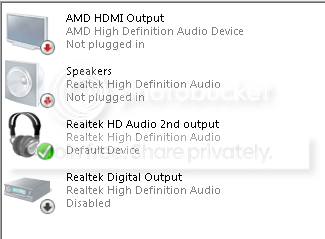
Currently my computer recognizes that there are headphones connected to it(which I have tested on my phone) , the speaker symbol and playback devices shows that the volume is on and active; I have the 6.0.1.6873 Realtek driver and the HD Audio Codec; I have tried changing my default devices in "Playback Devices"; both Windows Audio and Multimedia Class Scheduler are on, and yet I have no sound.

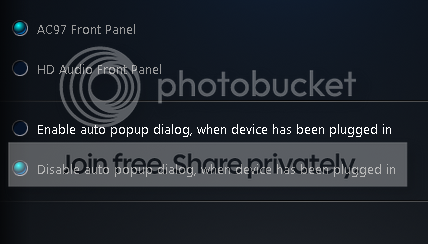
On a side note, every time I reinstall the driver it won't detect my speakers until I set it to AC.97 and, unlike the indicator found in "Playback Devices" the volume mixer is inactive even when sounds should be playing.

I've also tried a system restore to before I installed the heat sink, which is before this occurred, and looking around for audio options in my BIOS (M5A78l-M LX Plus, v.1033) to no avail. The only thing I can think of is to format or somehow v.1034 of my BIOS would do anything even though it was released five months ago and I just got this problem... Please help and thank you in advance.

Also, I've already tried virus scanning and chkdisk, if that is at all relevant.
 
Last edited:

My Computer My Computer

At a glance

Windows 7 Home Premium 64bit
OS
Windows 7 Home Premium 64bit
If you have the RealTek audio and "HD Audio Codec" that usually indicates that along with the RealTek you also have the generic Windows installed HD Audio Codec audio sound driver. If that is the case there can be conflicts and the HD Audio Codec needs to be uninstalled so your RealTek can properly operate.

If this is what's happening, go to the Device Manager, RIGHT click on the HD Audio Codec entry to highlight it and then LEFT click "uninstall". Restart the PC and check to see if the RealTek (and possibly an entry for HDMI audio if you have that) is the only entries in the Device Manager for Sound. The "Speakers" (RealTek) should be set as the default audio playback device in the Control Panel/Hardware and Sound and finally the Sound Panel Playback section.
 

My Computer My Computer

At a glance

Windows 10 64 bitIntel i7 6700K16GB Corsair DominatorIntel CPU Graphics
Computer type
PC/Desktop
Computer Manufacturer/Model Number
My Own Build
OS
Windows 10 64 bit
CPU
Intel i7 6700K
Motherboard
ASUS ROG Maximus VIII Hero
Memory
16GB Corsair Dominator
Graphics Card(s)
Intel CPU Graphics
Sound Card
RealTek
Monitor(s) Displays
27" Dell S2719dgf
Screen Resolution
2560X1440
Hard Drives
1 TB Samsung 850 EVO SSD for Win 10 Pro
500GB Samsung 850 EVO SSD for Win 10 Insider
2 TB drive for backup
PSU
EVGA Supernova 750G2
Case
BeQuiet Silent Base 600
Cooling
Deepcool Captain 120EX
Keyboard
Microsoft Wireless 2000
Mouse
Microsoft wireless
Internet Speed
100 MB/sec (Cable)
Antivirus
Microsoft Defender and Malwarebytes
Browser
Edge/Firefox
Other Info
Cakewalk (Sonar) by BandLab and Studio One 4.1 Pro recording studio software. MOTU 896Mk3 Hybrid recording interface, Frontier Tranzport wireless control unit, Behringer X-Touch Control Surface.
Five USB connected optical drives for CD Audio production using Nero BurningROM
Yeah sorry, I mentioned the codecs because I thought they were a utility for the drivers, I've only had the Realtek driver.
When I switch this to AC97 in the sound manager:
AC97-HDAudio_zpsf8067f8e.png

My Playback devices will look like this(The headphones don't work still)
Output_zps7154ce9d.png

-When I switch the connector settings to HD Audio my headphones don't work still and they are not detected, does that mean anything?

-Also, when I take all my devices out and put them in one by one, the audio manager doesn't notice me plugging in the headphones.
 
Last edited:

My Computer My Computer

At a glance

Windows 7 Home Premium 64bit
OS
Windows 7 Home Premium 64bit
HD Audio should be the correct type as that is what is on the Motherboard.

As you changed the "heat sink", which I assume is the CPU cooler, what all did you disconnect? If you had the audio disconnected from the motherboard, did you reconnect the HD Audio connector for the front panel (or did you connect the AC97?). The HD Audio is the correct one.

One thing to try. First, uninstall the RealTek in the device manager, DO NOT check the box to uninstall the drivers. Then restart the PC and when Windows starts it will reinstall the sound. If there were a corruption in Windows this will fix it. This also fixes a lot of other flakey problems.

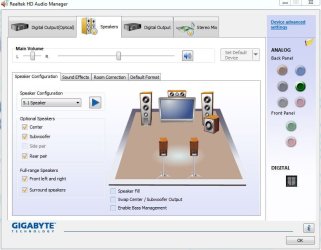
Also check the RealTek HD Audio Manager to see if anything is not set up correctly. On my RealTek HD Audio Manager, Device Advanced Settings, I have an option for how the front panel headphone jack works. See screen shot.
 

Attachments

  • RealTek HD Manager.JPG
    RealTek HD Manager.JPG
    57.9 KB · Views: 1

My Computer My Computer

At a glance

Windows 10 64 bitIntel i7 6700K16GB Corsair DominatorIntel CPU Graphics
Computer type
PC/Desktop
Computer Manufacturer/Model Number
My Own Build
OS
Windows 10 64 bit
CPU
Intel i7 6700K
Motherboard
ASUS ROG Maximus VIII Hero
Memory
16GB Corsair Dominator
Graphics Card(s)
Intel CPU Graphics
Sound Card
RealTek
Monitor(s) Displays
27" Dell S2719dgf
Screen Resolution
2560X1440
Hard Drives
1 TB Samsung 850 EVO SSD for Win 10 Pro
500GB Samsung 850 EVO SSD for Win 10 Insider
2 TB drive for backup
PSU
EVGA Supernova 750G2
Case
BeQuiet Silent Base 600
Cooling
Deepcool Captain 120EX
Keyboard
Microsoft Wireless 2000
Mouse
Microsoft wireless
Internet Speed
100 MB/sec (Cable)
Antivirus
Microsoft Defender and Malwarebytes
Browser
Edge/Firefox
Other Info
Cakewalk (Sonar) by BandLab and Studio One 4.1 Pro recording studio software. MOTU 896Mk3 Hybrid recording interface, Frontier Tranzport wireless control unit, Behringer X-Touch Control Surface.
Five USB connected optical drives for CD Audio production using Nero BurningROM
HD Audio should be the correct type as that is what is on the Motherboard.

As you changed the "heat sink", which I assume is the CPU cooler, what all did you disconnect? If you had the audio disconnected from the motherboard, did you reconnect the HD Audio connector for the front panel (or did you connect the AC97?). The HD Audio is the correct one.

One thing to try. First, uninstall the RealTek in the device manager, DO NOT check the box to uninstall the drivers. Then restart the PC and when Windows starts it will reinstall the sound. If there were a corruption in Windows this will fix it. This also fixes a lot of other flakey problems.

Also check the RealTek HD Audio Manager to see if anything is not set up correctly. On my RealTek HD Audio Manager, Device Advanced Settings, I have an option for how the front panel headphone jack works. See screen shot.

Just reinstalled and restarted twice and its exactly the same; AC97 detects headphones, no sound::HD Audio does not detect headphones and of course no sound.
I do have the HD audio cable connected but my head phones are connected through the rear panel.

The only options I have in my audio manager are for my playback devices, the connector settings in the previous image, and these:
audioops_zps8fb2480c.png
 

My Computer My Computer

At a glance

Windows 7 Home Premium 64bit
OS
Windows 7 Home Premium 64bit
That Audio manager is different than what I have, on both my Gigabyte motherboard (what I posted) and on an ASUS Z77 motherboard. The ASUS has about the same audio manager as my Gigabyte.

The check mark for "Make front and rear output devices playback two different audio streams simultaneously" may be an issue. What different "streams" is it going to playback?

Do you have the latest RealTek driver, for your motherboard, from ASUS? If not, download and install the latest version and see if it changes anything. M5A78L-M LX PLUS - Motherboards - ASUS
 

My Computer My Computer

At a glance

Windows 10 64 bitIntel i7 6700K16GB Corsair DominatorIntel CPU Graphics
Computer type
PC/Desktop
Computer Manufacturer/Model Number
My Own Build
OS
Windows 10 64 bit
CPU
Intel i7 6700K
Motherboard
ASUS ROG Maximus VIII Hero
Memory
16GB Corsair Dominator
Graphics Card(s)
Intel CPU Graphics
Sound Card
RealTek
Monitor(s) Displays
27" Dell S2719dgf
Screen Resolution
2560X1440
Hard Drives
1 TB Samsung 850 EVO SSD for Win 10 Pro
500GB Samsung 850 EVO SSD for Win 10 Insider
2 TB drive for backup
PSU
EVGA Supernova 750G2
Case
BeQuiet Silent Base 600
Cooling
Deepcool Captain 120EX
Keyboard
Microsoft Wireless 2000
Mouse
Microsoft wireless
Internet Speed
100 MB/sec (Cable)
Antivirus
Microsoft Defender and Malwarebytes
Browser
Edge/Firefox
Other Info
Cakewalk (Sonar) by BandLab and Studio One 4.1 Pro recording studio software. MOTU 896Mk3 Hybrid recording interface, Frontier Tranzport wireless control unit, Behringer X-Touch Control Surface.
Five USB connected optical drives for CD Audio production using Nero BurningROM
The check mark for "Make front and rear output devices playback two different audio streams simultaneously" may be an issue. What different "streams" is it going to playback?

I have tried switching those options but you have to have one or the other. My driver version is 6.0.1.6873. I don't see how my driver could affect this since I've already tried a system restore.
 

My Computer My Computer

At a glance

Windows 7 Home Premium 64bit
OS
Windows 7 Home Premium 64bit
Different drivers can provide different options. What you have is way different than all other RealTek HD Audio Manager's I've seen.

The version you have is newer than the latest version on the ASUS site for your motherboard. Where did you get this driver version?
 

My Computer My Computer

At a glance

Windows 10 64 bitIntel i7 6700K16GB Corsair DominatorIntel CPU Graphics
Computer type
PC/Desktop
Computer Manufacturer/Model Number
My Own Build
OS
Windows 10 64 bit
CPU
Intel i7 6700K
Motherboard
ASUS ROG Maximus VIII Hero
Memory
16GB Corsair Dominator
Graphics Card(s)
Intel CPU Graphics
Sound Card
RealTek
Monitor(s) Displays
27" Dell S2719dgf
Screen Resolution
2560X1440
Hard Drives
1 TB Samsung 850 EVO SSD for Win 10 Pro
500GB Samsung 850 EVO SSD for Win 10 Insider
2 TB drive for backup
PSU
EVGA Supernova 750G2
Case
BeQuiet Silent Base 600
Cooling
Deepcool Captain 120EX
Keyboard
Microsoft Wireless 2000
Mouse
Microsoft wireless
Internet Speed
100 MB/sec (Cable)
Antivirus
Microsoft Defender and Malwarebytes
Browser
Edge/Firefox
Other Info
Cakewalk (Sonar) by BandLab and Studio One 4.1 Pro recording studio software. MOTU 896Mk3 Hybrid recording interface, Frontier Tranzport wireless control unit, Behringer X-Touch Control Surface.
Five USB connected optical drives for CD Audio production using Nero BurningROM
One other issue, you have never addressed my question of the "heat sink". Was this the CPU cooler? What type did you have an what do you have now? As you were working on the motherboard, did you ground yourself (preferably with a "grounding wrist strap") while doing whatever you did? If not, there is a chance static electricity damaged some component on the motherboard.
 

My Computer My Computer

At a glance

Windows 10 64 bitIntel i7 6700K16GB Corsair DominatorIntel CPU Graphics
Computer type
PC/Desktop
Computer Manufacturer/Model Number
My Own Build
OS
Windows 10 64 bit
CPU
Intel i7 6700K
Motherboard
ASUS ROG Maximus VIII Hero
Memory
16GB Corsair Dominator
Graphics Card(s)
Intel CPU Graphics
Sound Card
RealTek
Monitor(s) Displays
27" Dell S2719dgf
Screen Resolution
2560X1440
Hard Drives
1 TB Samsung 850 EVO SSD for Win 10 Pro
500GB Samsung 850 EVO SSD for Win 10 Insider
2 TB drive for backup
PSU
EVGA Supernova 750G2
Case
BeQuiet Silent Base 600
Cooling
Deepcool Captain 120EX
Keyboard
Microsoft Wireless 2000
Mouse
Microsoft wireless
Internet Speed
100 MB/sec (Cable)
Antivirus
Microsoft Defender and Malwarebytes
Browser
Edge/Firefox
Other Info
Cakewalk (Sonar) by BandLab and Studio One 4.1 Pro recording studio software. MOTU 896Mk3 Hybrid recording interface, Frontier Tranzport wireless control unit, Behringer X-Touch Control Surface.
Five USB connected optical drives for CD Audio production using Nero BurningROM
I don't know what I expected, after trying all these things, especially after a system restore and the way this thread is going its probably going to lead to my hardware(When I did say "heat sink" I was referring to a CPU cooler). I'll probably have a technician double-check it and see if I need a sound card or whatever, anyway thanks for your help.
 

My Computer My Computer

At a glance

Windows 7 Home Premium 64bit
OS
Windows 7 Home Premium 64bit
Back
Top