No audio after hibernate mode

chucktower

New member
Local time
5:59 PM
Messages
3
Hi, when I start windows seven (firefox) the audio is fine, then when I hibernate and resume, there is no audio at all...media player, firefox or at all. I tried the mixer and headphones, and I am using the high def audio device, I guess is standard with the gateway p173x-fx...brand new install of windows seven
 

My Computer My Computer

Computer type
Laptop
Computer Manufacturer/Model Number
Gateway p173x-fx
OS
windows seven pro-64
CPU
intel core 2 duo
Memory
4gig
Graphics Card(s)
standard vga graphics
Sound Card
high def audio
Browser
firefox
Hi chucktower,
Welcome to SevenForums!

click :orb:
searchbox
type services.msc
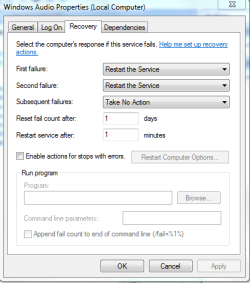
scroll down to windows audio. right-click and then click properties.
go to the recover tab and click the panels always have it set to Restart the service.
Capture.PNG
 

My Computer My Computer

Computer type
PC/Desktop
Computer Manufacturer/Model Number
HP Desktop & Compaq Laptop
OS
Win 10 x64, Linux Lite, Win 7 x64, BlackArch, & Kali
Hard Drives
Samsung 850 Pro 256Gb,
Hitachi HDD 1Tb,
Crucial MX SSD 250Gb
Segate 3Tb USB 3.0 Ext. Backup HDD
Internet Speed
150Mbps dn, 20Mbps up
Antivirus
Avast Free, Malwarebytes Anti-Exploit & Anti-Ransomware
Browser
Firefox, Chrome, Opera, & VPN
everything was already as you have said. what I found out is that, if I go to device manager and select the audio, I go to driver-disable then enable, the audio will return. But this isn't a permanent fix, there has to be a way around it.
 

My Computer My Computer

Computer type
Laptop
Computer Manufacturer/Model Number
Gateway p173x-fx
OS
windows seven pro-64
CPU
intel core 2 duo
Memory
4gig
Graphics Card(s)
standard vga graphics
Sound Card
high def audio
Browser
firefox
Did your computer originally have Vista installed?
Have you tried updating the audio driver or installing the audio driver from the manufacturer's website.
Have you tried uninstalling the audio driver and rebooting to permit windows to locate the device and replace driver?

Audio & Video


  • Graphics Processor
    NVIDIA GeForce 8800M GTS - 512 MB GDDR3 SDRAM
  • Integrated Webcam
    Yes
  • Sound
    Stereo speakers, microphone
 
Last edited:

My Computer My Computer

Computer type
PC/Desktop
Computer Manufacturer/Model Number
HP Desktop & Compaq Laptop
OS
Win 10 x64, Linux Lite, Win 7 x64, BlackArch, & Kali
Hard Drives
Samsung 850 Pro 256Gb,
Hitachi HDD 1Tb,
Crucial MX SSD 250Gb
Segate 3Tb USB 3.0 Ext. Backup HDD
Internet Speed
150Mbps dn, 20Mbps up
Antivirus
Avast Free, Malwarebytes Anti-Exploit & Anti-Ransomware
Browser
Firefox, Chrome, Opera, & VPN
Yes, the computer was originally built with Vista. I tried the update but there are none available...yet I haven't tried the manufacturer. I get the impression that its a factory sound card though...I did uninstall the driver, and allowed the comp to reboot. I found a site that suggested this, and had no luck. Funny though and maybe good information/hint is that if I disable then enable the device it then works. Somehow hibernate is throwing a gremlin somewhere...also I tried the checkbox that says "allow applications to take exclusive control of this device" in 'speaker properties/advanced' with no luck
 

My Computer My Computer

Computer type
Laptop
Computer Manufacturer/Model Number
Gateway p173x-fx
OS
windows seven pro-64
CPU
intel core 2 duo
Memory
4gig
Graphics Card(s)
standard vga graphics
Sound Card
high def audio
Browser
firefox
Back
Top