No audio devices are installed. Please help.

JoshDavis

New member
Local time
10:42 AM
Messages
8
Hi

I recently upgraded from XP to 7 and have been stumped by a problem for over a week now that I can't seem to find in any other forums.

I have a Gigabyte GA-965P-DS3P motherboard with RealTek High Definition onboard sound (I'm pretty sure, could someone confirm this?)

RealTek High Definition Audio appears in device manager but in the Sound window of Control panel it says there are "No audio devices installed".

I have the most up to date driver for the RealTek onboard sound from the thread on this website. (Driver version - 6.0.1.6083), yet it still doesn't show as an audio device?

When i try to let windows update them automatically they say i have the most up to date drivers?

Under properties for Realtek HD Audio i have this error "Windows cannot load the device driver for this hardware. The driver may be corrupted or missing. (Code 39).

Any help would be greatly appreciated.

Cheers,
Josh
 
Last edited:

My Computer My Computer

At a glance

Windows 7 32 bitIntel E660 2.4Ghz Dual Core2GB G.Skill DDR2XFX Nvidia GTS 250 1Gb DDR3
OS
Windows 7 32 bit
CPU
Intel E660 2.4Ghz Dual Core
Motherboard
Gigabyte GA-965P-DS3P
Memory
2GB G.Skill DDR2
Graphics Card(s)
XFX Nvidia GTS 250 1Gb DDR3
Sound Card
Sound Blaster Audigy
Monitor(s) Displays
AOC 197V
Hard Drives
2 x 250GB Seagate Barracuda
PSU
Raidmax 500W
Cooling
Zalman CPU Fan
In your BIOS, do you have an option for Azalia codec? is it enabled?

Also, did you know you have to install the Drivers twice? The first time removes the old drivers, the second time installs the new driver.

Ap
 

My Computer My Computer

At a glance

Windows 7 Home PremiumIntel Core 2 Duo @ 3.00gHz4 GBATI Radeon HD 2600 XT
Computer Manufacturer/Model Number
Assembled in my workshop
OS
Windows 7 Home Premium
CPU
Intel Core 2 Duo @ 3.00gHz
Motherboard
Gigabyte GA-P35-S3G
Memory
4 GB
Graphics Card(s)
ATI Radeon HD 2600 XT
Sound Card
RME 24/96 Card, Realtek Internal Audio PreSonus FireStudio
Monitor(s) Displays
Acer 1917 (x2)
Screen Resolution
1280 x 1024 on both monitors
Hard Drives
Three 250GB Seagate SATA Barracuda 7200rpm
PSU
Rosewill 500-watt
Case
Rosewill mid-tower
Cooling
Noctua NH-U9B (CPU), PwrSupply fan + single large case Fan
Keyboard
Macally w/2/USB ports.
Mouse
Trackman Wheel
Other Info
Event 20/20 bas studio monitors, Yamaha sub.
Rackmount Korg/Roland/Yamaha synthesizers,
Cubase MIDI/audio recording. Sony Soundforge audio/mastering software. CD Architect Mastering. RME & Presonus audio interfaces.
BIOS

Hi Ap,

In my BIOS i have two options for Azalia Codecs, auto and disabled. I have it on Auto. I have installed the driver for the onboard sound a couple of times to make sure the old driver has been removed.

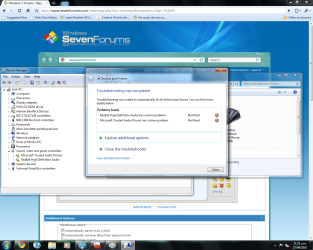
When i turn on/restart my computer a Windows Update "Playing Audio" troubleshooter opens and says that re-intalling the driver might work and do I want to apply this fix? It tries to install an update for my Realtek High Definition Audio but fails. Same for the Microsoft Trusted Audio Drivers.

"Problems found
Realtek High Definition Audio has a driver problem Not fixed X"

In my device manager it shows Microsoft Trusted Audio Drivers and Realtek High Definition Audio under Sound, Video and Game Controllers but they both have the yellow triangle with exclamation mark in the middle.

Thanks for your reply.

Any ideas what could be going wrong?
 

My Computer My Computer

At a glance

Windows 7 32 bitIntel E660 2.4Ghz Dual Core2GB G.Skill DDR2XFX Nvidia GTS 250 1Gb DDR3
OS
Windows 7 32 bit
CPU
Intel E660 2.4Ghz Dual Core
Motherboard
Gigabyte GA-965P-DS3P
Memory
2GB G.Skill DDR2
Graphics Card(s)
XFX Nvidia GTS 250 1Gb DDR3
Sound Card
Sound Blaster Audigy
Monitor(s) Displays
AOC 197V
Hard Drives
2 x 250GB Seagate Barracuda
PSU
Raidmax 500W
Cooling
Zalman CPU Fan
Errors

Maybe this helps
 

Attachments

  • Errors.png
    Errors.png
    156.4 KB · Views: 345

My Computer My Computer

At a glance

Windows 7 32 bitIntel E660 2.4Ghz Dual Core2GB G.Skill DDR2XFX Nvidia GTS 250 1Gb DDR3
OS
Windows 7 32 bit
CPU
Intel E660 2.4Ghz Dual Core
Motherboard
Gigabyte GA-965P-DS3P
Memory
2GB G.Skill DDR2
Graphics Card(s)
XFX Nvidia GTS 250 1Gb DDR3
Sound Card
Sound Blaster Audigy
Monitor(s) Displays
AOC 197V
Hard Drives
2 x 250GB Seagate Barracuda
PSU
Raidmax 500W
Cooling
Zalman CPU Fan
I just looked that motherboard up on the Gigabyte website and it says it uses Intel High Definition audio... might want to try getting the driver from the manufacturer's site.
 

My Computer My Computer

At a glance

windows 7 Ultimate x64Core i7 3770K8 GB Corsair Vengeance DDR3Asus Nvidia GTX 770
OS
windows 7 Ultimate x64
CPU
Core i7 3770K
Motherboard
Asus Sabertooth Z77
Memory
8 GB Corsair Vengeance DDR3
Graphics Card(s)
Asus Nvidia GTX 770
Sound Card
Asus Xonar Essence STX
Monitor(s) Displays
Asus VG248QE
Screen Resolution
1920x1200 @ 60 Hz
Hard Drives
Western DIgital Caviar Black 1 GB
Corsair Force GT 240 GB
PSU
Corsair HX-1000
Case
Corsair Air 540
Cooling
Corsair H100i
Keyboard
Microsoft Sidewinder x4
Mouse
Intellimouse Explorer 3.0
Internet Speed
Cable
Intel Driver for Audio

On the Gigabyte website, under audio drivers for the GA-965P-DS3P is says the most recent update for an audio codec is

"Realtek Function driver for Realtek Azalia audio chip (Including Microsoft UAA Driver in English edition) Version:R2.45 39.36 MB"

This is from the manufacturer website?

It doesn't mention anything about Intel in the driver updates even though in the product description it says it uses Intel High Definition Audio????

I have downloaded the most up to date version of this from a thread in these forums. Version R 2.46. In my BIOS i have an option for Azalia Codec too? Which i have enabled.

I am seriously confused? Do i have Realtek or Intel? And what is the driver i need for Intel if so because i can't seem to find anything on the website.
 
Last edited:

My Computer My Computer

At a glance

Windows 7 32 bitIntel E660 2.4Ghz Dual Core2GB G.Skill DDR2XFX Nvidia GTS 250 1Gb DDR3
OS
Windows 7 32 bit
CPU
Intel E660 2.4Ghz Dual Core
Motherboard
Gigabyte GA-965P-DS3P
Memory
2GB G.Skill DDR2
Graphics Card(s)
XFX Nvidia GTS 250 1Gb DDR3
Sound Card
Sound Blaster Audigy
Monitor(s) Displays
AOC 197V
Hard Drives
2 x 250GB Seagate Barracuda
PSU
Raidmax 500W
Cooling
Zalman CPU Fan
Hi Ap,

In my BIOS i have two options for Azalia Codecs, auto and disabled. I have it on Auto. I have installed the driver for the onboard sound a couple of times to make sure the old driver has been removed.

When i turn on/restart my computer a Windows Update "Playing Audio" troubleshooter opens and says that re-intalling the driver might work and do I want to apply this fix? It tries to install an update for my Realtek High Definition Audio but fails. Same for the Microsoft Trusted Audio Drivers.

"Problems found
Realtek High Definition Audio has a driver problem Not fixed X"

In my device manager it shows Microsoft Trusted Audio Drivers and Realtek High Definition Audio under Sound, Video and Game Controllers but they both have the yellow triangle with exclamation mark in the middle.

Thanks for your reply.

Any ideas what could be going wrong?

Yep, "Auto" is the correct selection in the BIOS.

This is what Gigabyte lists.

GA-965P-DS3P (rev. 3.3) - GIGABYTE - Support&Download - Motherboard - Driver

It's version 2.45 of the Realtek driver.

Do you have the Audigy out of the machine and removed any and all related creative drivers? (i looked at your spec)

i would use the Control Panel applet to remove all audio related drivers, first uninstalling them in Device manager then try the Gigabyte Realtek driver.

We've seen other problems here but not the audio device being recognized... not unless you have other cards or devices that are causing a direct IRQ or address conflict.

Ap
 

My Computer My Computer

At a glance

Windows 7 Home PremiumIntel Core 2 Duo @ 3.00gHz4 GBATI Radeon HD 2600 XT
Computer Manufacturer/Model Number
Assembled in my workshop
OS
Windows 7 Home Premium
CPU
Intel Core 2 Duo @ 3.00gHz
Motherboard
Gigabyte GA-P35-S3G
Memory
4 GB
Graphics Card(s)
ATI Radeon HD 2600 XT
Sound Card
RME 24/96 Card, Realtek Internal Audio PreSonus FireStudio
Monitor(s) Displays
Acer 1917 (x2)
Screen Resolution
1280 x 1024 on both monitors
Hard Drives
Three 250GB Seagate SATA Barracuda 7200rpm
PSU
Rosewill 500-watt
Case
Rosewill mid-tower
Cooling
Noctua NH-U9B (CPU), PwrSupply fan + single large case Fan
Keyboard
Macally w/2/USB ports.
Mouse
Trackman Wheel
Other Info
Event 20/20 bas studio monitors, Yamaha sub.
Rackmount Korg/Roland/Yamaha synthesizers,
Cubase MIDI/audio recording. Sony Soundforge audio/mastering software. CD Architect Mastering. RME & Presonus audio interfaces.
Yeah the Audigy is gone. I gave up on trying to get that working and would prefer onboard to nothing at all.

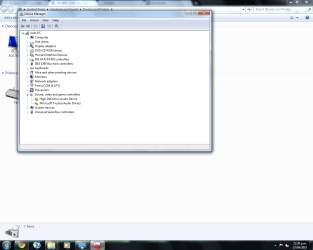
I have completely uninstalled all Creative drivers and Realtek Drivers. Device manager now looks like this.

Downloading R2.45 from Gigabyte site now.

I have seen a few different types of methods for installing the driver. Should i run the setup.exe or is there a way i should manually install?
 

Attachments

  • clean.png
    clean.png
    61.1 KB · Views: 67

My Computer My Computer

At a glance

Windows 7 32 bitIntel E660 2.4Ghz Dual Core2GB G.Skill DDR2XFX Nvidia GTS 250 1Gb DDR3
OS
Windows 7 32 bit
CPU
Intel E660 2.4Ghz Dual Core
Motherboard
Gigabyte GA-965P-DS3P
Memory
2GB G.Skill DDR2
Graphics Card(s)
XFX Nvidia GTS 250 1Gb DDR3
Sound Card
Sound Blaster Audigy
Monitor(s) Displays
AOC 197V
Hard Drives
2 x 250GB Seagate Barracuda
PSU
Raidmax 500W
Cooling
Zalman CPU Fan
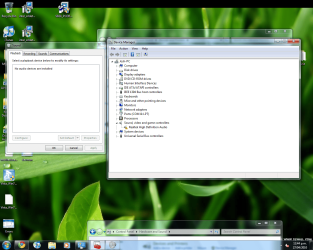
Ran the setup.exe and restarted.

Installed but still no audio devices installed?

Any ideas?
 

Attachments

  • devman.png
    devman.png
    250.8 KB · Views: 51

My Computer My Computer

At a glance

Windows 7 32 bitIntel E660 2.4Ghz Dual Core2GB G.Skill DDR2XFX Nvidia GTS 250 1Gb DDR3
OS
Windows 7 32 bit
CPU
Intel E660 2.4Ghz Dual Core
Motherboard
Gigabyte GA-965P-DS3P
Memory
2GB G.Skill DDR2
Graphics Card(s)
XFX Nvidia GTS 250 1Gb DDR3
Sound Card
Sound Blaster Audigy
Monitor(s) Displays
AOC 197V
Hard Drives
2 x 250GB Seagate Barracuda
PSU
Raidmax 500W
Cooling
Zalman CPU Fan
Ran the setup.exe and restarted.

Installed but still no audio devices installed?

Any ideas?

You did an upgrade over the top of XP?

Did HD audio work under XP?

The only think I can come up with is some conflict with left over settings or files.

Ap
 
Last edited:

My Computer My Computer

At a glance

Windows 7 Home PremiumIntel Core 2 Duo @ 3.00gHz4 GBATI Radeon HD 2600 XT
Computer Manufacturer/Model Number
Assembled in my workshop
OS
Windows 7 Home Premium
CPU
Intel Core 2 Duo @ 3.00gHz
Motherboard
Gigabyte GA-P35-S3G
Memory
4 GB
Graphics Card(s)
ATI Radeon HD 2600 XT
Sound Card
RME 24/96 Card, Realtek Internal Audio PreSonus FireStudio
Monitor(s) Displays
Acer 1917 (x2)
Screen Resolution
1280 x 1024 on both monitors
Hard Drives
Three 250GB Seagate SATA Barracuda 7200rpm
PSU
Rosewill 500-watt
Case
Rosewill mid-tower
Cooling
Noctua NH-U9B (CPU), PwrSupply fan + single large case Fan
Keyboard
Macally w/2/USB ports.
Mouse
Trackman Wheel
Other Info
Event 20/20 bas studio monitors, Yamaha sub.
Rackmount Korg/Roland/Yamaha synthesizers,
Cubase MIDI/audio recording. Sony Soundforge audio/mastering software. CD Architect Mastering. RME & Presonus audio interfaces.
Reinstall

Just reinstalled 7 without the SB Audigy. Started up and BING. HD Audio Device running fine in Device Manager and an HD Audio Device in Control Panel > Sound.

Sweet.

I'm a bit hesitant to try setting up the Audigy now because I'm so stoked right now to have sound that I'd hate to mess it up again so soon.

But if I was to attempt to get it working how should I go about it?

Disable Azalia Codecs, put the Audigy back in, download this driver:

Creative Sound Blaster audio driver 1.04.0090

Does that sound right?

I have the Audigy SE with the model number SB0570.
 

My Computer My Computer

At a glance

Windows 7 32 bitIntel E660 2.4Ghz Dual Core2GB G.Skill DDR2XFX Nvidia GTS 250 1Gb DDR3
OS
Windows 7 32 bit
CPU
Intel E660 2.4Ghz Dual Core
Motherboard
Gigabyte GA-965P-DS3P
Memory
2GB G.Skill DDR2
Graphics Card(s)
XFX Nvidia GTS 250 1Gb DDR3
Sound Card
Sound Blaster Audigy
Monitor(s) Displays
AOC 197V
Hard Drives
2 x 250GB Seagate Barracuda
PSU
Raidmax 500W
Cooling
Zalman CPU Fan
Just reinstalled 7 without the SB Audigy. Started up and BING. HD Audio Device running fine in Device Manager and an HD Audio Device in Control Panel > Sound.

Sweet.

Creative Sound Blaster audio driver 1.04.0090

Does that sound right?

I have the Audigy SE with the model number SB0570.


Aha... so it was the Audigy drivers.

The 1.04.0090 driver looks like the right one, here's fair warning... The Audigy cards (I have one too) sound like crap under Win-7. The Realtek actually sounds better.

You can try it, but besides disabling the Azaila codec I'd also uninstall the Realtek drivers.

There are a couple of third party SB/Audigy solutions that sound pretty good, I've always been partial to the KX drivers, they sound great.

Official kX Project Site -- News

Keep us posted when you reinstall Windows again! ;)

Ap
 

My Computer My Computer

At a glance

Windows 7 Home PremiumIntel Core 2 Duo @ 3.00gHz4 GBATI Radeon HD 2600 XT
Computer Manufacturer/Model Number
Assembled in my workshop
OS
Windows 7 Home Premium
CPU
Intel Core 2 Duo @ 3.00gHz
Motherboard
Gigabyte GA-P35-S3G
Memory
4 GB
Graphics Card(s)
ATI Radeon HD 2600 XT
Sound Card
RME 24/96 Card, Realtek Internal Audio PreSonus FireStudio
Monitor(s) Displays
Acer 1917 (x2)
Screen Resolution
1280 x 1024 on both monitors
Hard Drives
Three 250GB Seagate SATA Barracuda 7200rpm
PSU
Rosewill 500-watt
Case
Rosewill mid-tower
Cooling
Noctua NH-U9B (CPU), PwrSupply fan + single large case Fan
Keyboard
Macally w/2/USB ports.
Mouse
Trackman Wheel
Other Info
Event 20/20 bas studio monitors, Yamaha sub.
Rackmount Korg/Roland/Yamaha synthesizers,
Cubase MIDI/audio recording. Sony Soundforge audio/mastering software. CD Architect Mastering. RME & Presonus audio interfaces.
Thanks for all your help.

In that case I might just stick with the onboard. Sounds just as good to me.

Cheers for all your help. Trying everything that you suggested eventually led to working out what the problem was.

Thanks very much.
 

My Computer My Computer

At a glance

Windows 7 32 bitIntel E660 2.4Ghz Dual Core2GB G.Skill DDR2XFX Nvidia GTS 250 1Gb DDR3
OS
Windows 7 32 bit
CPU
Intel E660 2.4Ghz Dual Core
Motherboard
Gigabyte GA-965P-DS3P
Memory
2GB G.Skill DDR2
Graphics Card(s)
XFX Nvidia GTS 250 1Gb DDR3
Sound Card
Sound Blaster Audigy
Monitor(s) Displays
AOC 197V
Hard Drives
2 x 250GB Seagate Barracuda
PSU
Raidmax 500W
Cooling
Zalman CPU Fan
In that case I might just stick with the onboard. Sounds just as good to me.

Cheers for all your help. Trying everything that you suggested eventually led to working out what the problem was.

Thanks very much.

Hey, no problem... glad to be of help. Win-7 has been playing bad with audio for quite a few users. The Gigabyte motherboards seem to do pretty well, I had a bit of trouble at the beginning but all is well now. Updating the MB BIOS helped.

best-

Ap
 

My Computer My Computer

At a glance

Windows 7 Home PremiumIntel Core 2 Duo @ 3.00gHz4 GBATI Radeon HD 2600 XT
Computer Manufacturer/Model Number
Assembled in my workshop
OS
Windows 7 Home Premium
CPU
Intel Core 2 Duo @ 3.00gHz
Motherboard
Gigabyte GA-P35-S3G
Memory
4 GB
Graphics Card(s)
ATI Radeon HD 2600 XT
Sound Card
RME 24/96 Card, Realtek Internal Audio PreSonus FireStudio
Monitor(s) Displays
Acer 1917 (x2)
Screen Resolution
1280 x 1024 on both monitors
Hard Drives
Three 250GB Seagate SATA Barracuda 7200rpm
PSU
Rosewill 500-watt
Case
Rosewill mid-tower
Cooling
Noctua NH-U9B (CPU), PwrSupply fan + single large case Fan
Keyboard
Macally w/2/USB ports.
Mouse
Trackman Wheel
Other Info
Event 20/20 bas studio monitors, Yamaha sub.
Rackmount Korg/Roland/Yamaha synthesizers,
Cubase MIDI/audio recording. Sony Soundforge audio/mastering software. CD Architect Mastering. RME & Presonus audio interfaces.
Back
Top