hi guys pretty new here so take it easy plz (lol)
i have 2 problems regarding audio.
1. when i upgraded my pc i added a okish motherboard but i wanted sound from my front panel so i took the jumper cap off the prongs for audio but now i have added some desktop speakers and want to plug them into the back of my pc but cannot remember which prongs to put the caps back on anyone any ideas plz.
now the hard one
2. i have a sapphire radeon hd4650 1GB graphics card inserted into my pci-e x16 slot on my motherboard and have a lcd monitor connected on the vga port and a full hd tv/monitor connected via HDMI port to hdmi port1 on tv. the picture is class when i have movies playing or game running but i dont have any sound what so ever. if i want to watch a film i have to connect my tv to my graphics card via the vga port and watch it like that (pointless having it connected via hdmi if i have no sound).
i have been trying since december to get it working but to no avail.
(what i have tried)
i did a fresh install of winxp installed all drivers needed, installed ati drivers from g/c driver cd then installed ati hdmi audio driver from amd site then the realtek hdmi driver and the microsoft uaa driver, and guess what no hdmi audio.
next i formatted and the installed windows vista did the same except the uaa driver as this was not required. and still no sound from hdmi.
lastly i installed windows 7 home premium. installed the latest ati drivers and the ati hdmi driver and still no sound from hdmi.
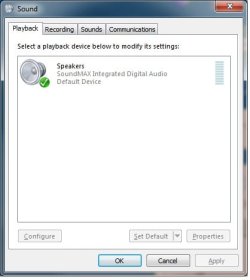
on all 3 o/s there has been NO option in the sound properties to choose hdmi audio as default. it just does not appear.
no then heres what im thinking does the motherboard need to be hd or should the graphics card be enough.
also i was informed from ati and sapphire support guy that i dont need a dvi dongle to connect hdmi cable to as the graphics card as a hdmi port is on the card itself i should just connect card to tv hdmi to hdmi.
i have no option in my bios to turn on/off hdmi audio (this is what makes me think the motherboard need to be hd).
please help cause im soooooo fed up having to watch my hd movies via the vga cable.
thanks alot for reading and extra thanks for helping.
i have 2 problems regarding audio.
1. when i upgraded my pc i added a okish motherboard but i wanted sound from my front panel so i took the jumper cap off the prongs for audio but now i have added some desktop speakers and want to plug them into the back of my pc but cannot remember which prongs to put the caps back on anyone any ideas plz.
now the hard one
2. i have a sapphire radeon hd4650 1GB graphics card inserted into my pci-e x16 slot on my motherboard and have a lcd monitor connected on the vga port and a full hd tv/monitor connected via HDMI port to hdmi port1 on tv. the picture is class when i have movies playing or game running but i dont have any sound what so ever. if i want to watch a film i have to connect my tv to my graphics card via the vga port and watch it like that (pointless having it connected via hdmi if i have no sound).
i have been trying since december to get it working but to no avail.
(what i have tried)
i did a fresh install of winxp installed all drivers needed, installed ati drivers from g/c driver cd then installed ati hdmi audio driver from amd site then the realtek hdmi driver and the microsoft uaa driver, and guess what no hdmi audio.
next i formatted and the installed windows vista did the same except the uaa driver as this was not required. and still no sound from hdmi.
lastly i installed windows 7 home premium. installed the latest ati drivers and the ati hdmi driver and still no sound from hdmi.
on all 3 o/s there has been NO option in the sound properties to choose hdmi audio as default. it just does not appear.
no then heres what im thinking does the motherboard need to be hd or should the graphics card be enough.
also i was informed from ati and sapphire support guy that i dont need a dvi dongle to connect hdmi cable to as the graphics card as a hdmi port is on the card itself i should just connect card to tv hdmi to hdmi.
i have no option in my bios to turn on/off hdmi audio (this is what makes me think the motherboard need to be hd).
please help cause im soooooo fed up having to watch my hd movies via the vga cable.
thanks alot for reading and extra thanks for helping.
My Computer
At a glance
windows 7 home premiumamd Athlon 64 3200+1GBSapphire Radeon HD4650 1GB
- OS
- windows 7 home premium
- CPU
- amd Athlon 64 3200+
- Motherboard
- ECS gs7610
- Memory
- 1GB
- Graphics Card(s)
- Sapphire Radeon HD4650 1GB
- Sound Card
- onboard soundmax
- Monitor(s) Displays
- LG Flatron M2262D FullHD TV & Monitor 22 Inch wide Screen
- Hard Drives
- 80GB
- PSU
- Z-Power 550Watt
- Case
- Viper