no audio when connecting hdmi to syncmaster 2333hd monitor

arjang

New member
Local time
10:59 AM
Messages
8
hi all
my problem is that when i connect my PC to syncmaster 2333hd monitor via HDMI, there is no audio output from the monitor!!! i have already done as 2333hd spec requires, disabling audio from HDMI and connecting a mini audio cable. i downgraded my graphic card driver but still no luck!! any help wud be very much appreciated

product spec:
2333hd monitor
GeForce 9600GT
 

My Computer My Computer

At a glance

windows 7
OS
windows 7
Try right clicking the speaker icon in the system tray then go with play back devices. Make it default in there.
 

My Computer My Computer

At a glance

Windows 7 Pro x64 -- PCLinuxOS KDE4 FullMonty...i7-875k @ Turbo - 7,6,5,5 - 3.6ghzCorsair CMD8GX3M4A1600C8 8gbAsus EAH5850 DirectCU/2DIS/1GD5
Computer Manufacturer/Model Number
Custom
OS
Windows 7 Pro x64 -- PCLinuxOS KDE4 FullMonty 2011
CPU
i7-875k @ Turbo - 7,6,5,5 - 3.6ghz
Motherboard
Asus P7P55D-E Deluxe
Memory
Corsair CMD8GX3M4A1600C8 8gb
Graphics Card(s)
Asus EAH5850 DirectCU/2DIS/1GD5
Sound Card
On Board
Monitor(s) Displays
Samsung SyncMaster T220 - Panasonic VT30a 50"
Screen Resolution
1680x1050 -
Hard Drives
Corsair Force 3 SSD 120GB x 2 ::
WD VelociRaptor 150GB WD1500HLFS x 2
PSU
Corsair HX-850 Power Supply
Case
Coolmaster HAF 932
Cooling
Corsair H50
Keyboard
Logitech Wireless MK700
Mouse
Logitech Wireless MX620
Internet Speed
Good enough for now
Other Info
Voip. Insanely cheap phone calls.
the speaker is set as default. there is audio when i plug my headphone but no audio from my monitor speaker
 

My Computer My Computer

At a glance

windows 7
OS
windows 7
anyone can help plz ??????
 

My Computer My Computer

At a glance

windows 7
OS
windows 7
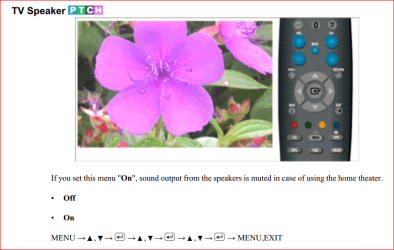
You have the speaker set to On or Off in the monitor's settings? Looking at the manual it would appear that the correct setting would be Off,

samsung.PNG

Also unless your 9600 has a SPDIF header on it like the cards shown here,

Guide: 8800GT/9800GT/9800GTX Sound over HDMI (Now including Creative cards)

and connected to the SPDIF header on either the motherboard or sound card, you won't get sound over HDMI from it despite it having a HDMI port on the card.
 

My Computer My Computer

At a glance

Win 7 Ultimate x64FX-8350 @ 4.6 GHz so farADATA XPG V1 Series Black 8GB DDR3 1600Sapphire R9 270x Dual-X
Computer type
PC/Desktop
Computer Manufacturer/Model Number
Me
OS
Win 7 Ultimate x64
CPU
FX-8350 @ 4.6 GHz so far
Motherboard
Asus M5A97 EVO
Memory
ADATA XPG V1 Series Black 8GB DDR3 1600
Graphics Card(s)
Sapphire R9 270x Dual-X
Sound Card
Xonar DGX w/ Corsair Vengence 1300
Monitor(s) Displays
Acer S232HL Abid
Screen Resolution
1920x1080
Hard Drives
120 GB OCZ Vertex 3
500 GB Seagate 7200.12
PSU
Antec Earthwatts 650W Green
Case
Antec Three Hundred
Cooling
Cooler Master 212 EVO
Keyboard
Logitech G510
Mouse
Logitech G500s
Internet Speed
35000/3000
Like stormy13 suggested make sure you are using the audio cable to connect the video card to your sound cards spdif output. Also if you do have it installed and its still not working try flipping the connector on the sound card side of the cable -it should only plug in one way on the video card.
 

My Computer My Computer

At a glance

windows 8.1 Pro x64intel [email protected]2x8gb ripjaws x @2133asus r9-290@1100/1300
Computer type
PC/Desktop
Computer Manufacturer/Model Number
Elsa
OS
windows 8.1 Pro x64
CPU
intel [email protected]
Motherboard
msi mpower max ac
Memory
2x8gb ripjaws x @2133
Graphics Card(s)
asus r9-290@1100/1300
Sound Card
creative sbz
Monitor(s) Displays
dell u3011
Hard Drives
840 evo 250 & 8.5tb
PSU
evga supernova p2-1000
Case
corsair air 540
Cooling
corsair h100
Keyboard
logitech g710+
Mouse
logitech g502
Internet Speed
50/10
Antivirus
avg
Browser
firefox
Spidf

To receive audio on monitor using HDMi u have to use SPIDF
I have a Gainward 9600 Gt and all i did is conect a cable from it to my motherboard on the SPIDF conection. And works like a charm.

The audio cable the Syncmaster has is only used with VGa cable i think.
 

My Computer My Computer

At a glance

Windows 7
OS
Windows 7
the speaker is set as default. there is audio when i plug my headphone but no audio from my monitor speaker
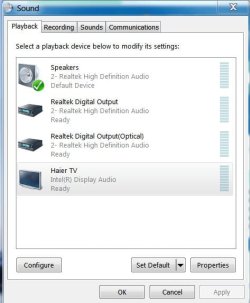
You don't want the "speaker" set as default output. You want the device your connected to as the default output. In this case, your Monitor. It should be listed in the Playback devices. All devices capable of audio output should be listed. If you want the audio to be played on the monitor speakers, you must select the monitor as the default audio playback device.

The image below shows a sample of Playback devices. It currently indicates Speakers since I have external 5.1 speakers attached. If I want the audio to be played through the TV/Monitor, it needs to be selected as the default playback device.
 

Attachments

  • Sound Playback Options.JPG
    Sound Playback Options.JPG
    38.3 KB · Views: 27

My Computer My Computer

At a glance

Windows 7 Pro-x64i7-2600 3.4GHz - 3.8GHz Turbo8Gb - 2x4GB, Muskin 991770 PC3-1333Integrated Intel HD 2000
Computer type
PC/Desktop
Computer Manufacturer/Model Number
Built 2/11/2011
OS
Windows 7 Pro-x64
CPU
i7-2600 3.4GHz - 3.8GHz Turbo
Motherboard
Intel DH67BL-B3
Memory
8Gb - 2x4GB, Muskin 991770 PC3-1333
Graphics Card(s)
Integrated Intel HD 2000
Sound Card
Integrated Intel 10.1 HD, RealTek ALC892
Monitor(s) Displays
Asus LCD VH222H, Haier HL24XSL2a
Screen Resolution
1920x1080, 1920x1080
Hard Drives
Crucial SSD C300-128Gb,
Western Digital WD5002AALX - 500Gb,
Western Digital WD7501AALS - 750Gb
PSU
Seasonic 650W 80+ Gold Modular
Case
Rosewill Defender
Cooling
Stock CPU, Four 120mm case fans, PCH fan added
Keyboard
Logitech EX100 Y-RBH94 Wireless
Mouse
Logitech EX100 M-RCE95 Wireless
Internet Speed
3.0/1.5 Mbs
Antivirus
Microsoft Security Essentials
Browser
Microsoft Internet Explorer 11
Other Info
Antec Veris Premier-Multimedia IR Station,
Cyber Accoustics-3602 Speakers,
AFT XM-5U Card Reader,
Hauppauge TV-HVR-2250,
Sony LX300 USB Turntable
Back
Top