No Audio

cabledevin

New member
Local time
1:32 AM
Messages
12
I have no audio

Windows 7 64bit fully updated
Machine is made of parts from newegg
Sound used to work on vista
Had Realtek ac97 drivers when it worked
Read through much of the thread about the ac97 but it wasn't helpful and I've spent a long time googling this.
Tried nearly all the different drivers for the ac97
/No Back ports don't work either
When I hold my mouse over the mixer it says digital audio
I am trying to use analog Sound
I don't have digital sound, and if I do I can't play it because my video card doesn't have an hdmi port to connect to my monitor, nor do I have anything else that can play it
Under Device Manager it is listed as High Definition Audio Device
Under Sound Devices the only one listed is "Digital Audio (HDMI)" So I don't think it is recognizing the analog one.

Does anyone have an idea on how to get my analog sound to work please?
 

My Computer

Computer Manufacturer/Model Number
Home Made
OS
Windows 7
CPU
7850 Black Edition Kuma 2.8GHz
Motherboard
ASRock A780GXH
Memory
3 Gigs
Graphics Card(s)
Radeon X1600PRO
Sound Card
VIA VT1708S
Monitor(s) Displays
ASUS VH222H
Screen Resolution
1920x1080
Hard Drives
Seagate Barracuda 7200 320 GB
PSU
LOGISYS Computer PS480D-BK 480W
Cooling
The CPU Stock
Keyboard
Dell
Mouse
Micro Optical
Internet Speed
Cable
Have you updated the drivers since you upgraded to 7?

Also, through what medium are you attempting to hear sound?
 

My Computer

Computer Manufacturer/Model Number
HP Pavilion dv6815nr Notebook
OS
7 Home Premium x86
CPU
AMD Turion 64 X2 Mobille Technology TL-60 2.0GHz
Memory
3GB
Graphics Card(s)
NVIDIA GeForce 7150M / nForce630M
Sound Card
Conexant High Definition SmartAudio 221
Screen Resolution
1280 x 800
Hard Drives
Samsung 147GB
Mouse
Synaptics TouchPad
Other Info
Norton Security Suite (360)
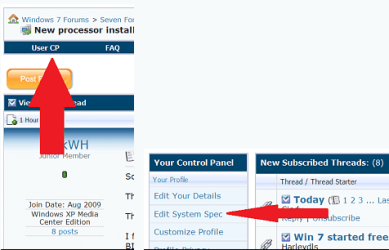
How about listing those Newegg parts. This will help others help you. And welcome to seven forums. Fabe usercp 1.png
 

My Computer

Computer Manufacturer/Model Number
Self Built
OS
Windows 7 ultimate 64 bit / XP Home sp3
CPU
intel Core 2 Duo E8400 3.0ghz
Motherboard
Asus P5ND bios 1401
Memory
8 gigs 1066 OCZ Fata1ty
Graphics Card(s)
EVGA GTX 580 Call of Duty Black Ops Edition
Sound Card
Creative Soundblaster Audigy 2zs
Monitor(s) Displays
Asus 24in LCD's 2MS X2
Screen Resolution
1920x1080p @60Hz
Hard Drives
WD Caviar 500 Black/ WD Caviar 200 Blue
PSU
OCZ 700W GameXtreme
Case
NZXT Apollo
Cooling
Corsair H50 CPU/120mm x3 /60mm x2 /Corsair Dominator Ram
Keyboard
Logitech Bluetooth Wireless MX5000
Mouse
Logitech Bluetooth Wireless MX1000
Internet Speed
Download 19.83 Upload 0.97
Other Info
Logitech Z2300 Speakers/ Bose Noise Cancelling Headphones/Avermedia PCI-e Hybrid TV Bravo/Epson NX415 all in one/ 4 Port Powered USB Hub/ LG 10x Bluray Burner /TSST Corp DVDRW External
Have you updated the drivers since you upgraded to 7?

Also, through what medium are you attempting to hear sound?

Yes, in fact I've tried a whole bunch of different drivers. Also, instead of upgrade I have done a clean install. I do not hear audio through any port in neither my headphones nor my monitor (via an analog sound jack through which it used to work)

My computer (by it's parts) is mostly a few years old. So I know it all works because it has been working for some time. Also, I updated my specs, so my profile should have them, although I do not think any but the motherboard and soundcard one will be of any use.

When I looked up my motherboard, it seems that my motherboard has an on-board HDMI port. I could try using that, but I want my analog to work so I can listen through my headphones and not just my monitor. Yet also, if I used the on-board HDMI, I would be using the whole on-board video card, so I wouldn't be using my video card I bought separately, which I'm pretty sure is better... probably

EDIT: Ahh, I actually I think my realtek drivers were my old motherboard I see this new one isn't realtek... I'll try some of the drivers for the right one this time.
 
Last edited:

My Computer

Computer Manufacturer/Model Number
Home Made
OS
Windows 7
CPU
7850 Black Edition Kuma 2.8GHz
Motherboard
ASRock A780GXH
Memory
3 Gigs
Graphics Card(s)
Radeon X1600PRO
Sound Card
VIA VT1708S
Monitor(s) Displays
ASUS VH222H
Screen Resolution
1920x1080
Hard Drives
Seagate Barracuda 7200 320 GB
PSU
LOGISYS Computer PS480D-BK 480W
Cooling
The CPU Stock
Keyboard
Dell
Mouse
Micro Optical
Internet Speed
Cable
Okay, I installed the new drivers, now I get audio from my front port, but not my back ones. The backones still detect whether or not there is something plugged into them, but I still don't hear anything from them.

EDIT: [I don't like to triple post, so i'm putting this in an edit]
I'm Back Again! It's slowly starting to work. If I change the sound to If I change my default device speaker the back panel audio jacks start working. If I change it to headphones my front ones work. If there is no fix for this, I can live with having to switch back and forth, but I don't know why they can't both work.
 
Last edited:

My Computer

Computer Manufacturer/Model Number
Home Made
OS
Windows 7
CPU
7850 Black Edition Kuma 2.8GHz
Motherboard
ASRock A780GXH
Memory
3 Gigs
Graphics Card(s)
Radeon X1600PRO
Sound Card
VIA VT1708S
Monitor(s) Displays
ASUS VH222H
Screen Resolution
1920x1080
Hard Drives
Seagate Barracuda 7200 320 GB
PSU
LOGISYS Computer PS480D-BK 480W
Cooling
The CPU Stock
Keyboard
Dell
Mouse
Micro Optical
Internet Speed
Cable
Hehe, glad you have fixed your problem without any help...well for the most part.

I understand your final dilemma of not being able to hear through all audio ports on the computer. The only thing I can think of is that you have two different sound cards in the computer...perhaps a standard one from the motherboard itself and a separate card not directly attached to the motherboard?
 

My Computer

Computer Manufacturer/Model Number
HP Pavilion dv6815nr Notebook
OS
7 Home Premium x86
CPU
AMD Turion 64 X2 Mobille Technology TL-60 2.0GHz
Memory
3GB
Graphics Card(s)
NVIDIA GeForce 7150M / nForce630M
Sound Card
Conexant High Definition SmartAudio 221
Screen Resolution
1280 x 800
Hard Drives
Samsung 147GB
Mouse
Synaptics TouchPad
Other Info
Norton Security Suite (360)
I could try getting a sound card. I'd say this issue has been resolved. Thanks for being supportive and kind natured.
 

My Computer

Computer Manufacturer/Model Number
Home Made
OS
Windows 7
CPU
7850 Black Edition Kuma 2.8GHz
Motherboard
ASRock A780GXH
Memory
3 Gigs
Graphics Card(s)
Radeon X1600PRO
Sound Card
VIA VT1708S
Monitor(s) Displays
ASUS VH222H
Screen Resolution
1920x1080
Hard Drives
Seagate Barracuda 7200 320 GB
PSU
LOGISYS Computer PS480D-BK 480W
Cooling
The CPU Stock
Keyboard
Dell
Mouse
Micro Optical
Internet Speed
Cable
Oh, sorry to mislead you. I was suggesting that maybe the problem is that there are already two sound cards in your computer. I did a search on Google and found that some people are able to have two on their computer and switch between the two.

Well I'm glad to hear your satisfied with the matter, and maybe you can come back if you ever figure out how to completely fix the issue. :D
 

My Computer

Computer Manufacturer/Model Number
HP Pavilion dv6815nr Notebook
OS
7 Home Premium x86
CPU
AMD Turion 64 X2 Mobille Technology TL-60 2.0GHz
Memory
3GB
Graphics Card(s)
NVIDIA GeForce 7150M / nForce630M
Sound Card
Conexant High Definition SmartAudio 221
Screen Resolution
1280 x 800
Hard Drives
Samsung 147GB
Mouse
Synaptics TouchPad
Other Info
Norton Security Suite (360)
Back
Top