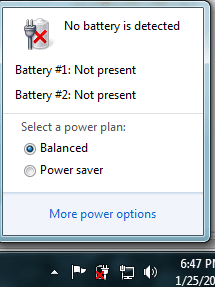
No battery is detected

unlockAVSO

New member
Local time
5:45 AM
Messages
57
I have Dell Latitude D630 Laptop and my battery works fine but in the screen it says that no battery is detected,it was working but when i was working on my laptop the battery place it was overheated (mabye going in 50+ C ),so I removed it immediately and hours later I put in but it says no battery is detected.All drivers are update.What should I do,thanks.
 

My Computer

Computer type
Laptop
Computer Manufacturer/Model Number
Dell Latitude D630
OS
Windows 7 Ultimate 32bit
CPU
Dual Core T8100 2.10 (2CPU)
Motherboard
Dell
Memory
2gb
Graphics Card(s)
Mobile Intel(R) 965 Express Chipset Family
Monitor(s) Displays
ACER 19 inch
Mouse
Logitech 2$ mouse but it's awesome
Internet Speed
10.0 mb/s
Antivirus
Eset Nod32 6 Full
Browser
Google Chrome
50c isnt hot, so i wouldnt worry, leave it in a car in the summer and it will easily beat that.
Check the pins on the battery as well as the laptop to see if any are bent. one of the pins will be used to measure voltage from the battery to the mobo, if its bent it may cause this issue as its not detecting any voltage.
 

My Computer

Computer type
PC/Desktop
Computer Manufacturer/Model Number
Built by badgers!!!
OS
Windows 7 Ultimate x64, & Mac OS X 10.9.2
CPU
Intel Core i5 2500k
Motherboard
Asus P8z68 LE
Memory
Corsair Vengence 8gb 1866mhz
Graphics Card(s)
Nvidia GTX 770 OC
Monitor(s) Displays
2x ASUS LED 22" IPS
Screen Resolution
3840x1080
Hard Drives
240GB Crucial M500 SSD
120gb Corsair Force 3 SSD
1TB Western Digital
PSU
Corsair HX650w Modular
Case
Corsair Air 540
Cooling
Corsair H60 Push/Pull
Keyboard
Corsair K70/ Logitech G27 wheel
Mouse
Saitek R.A.T 9
Internet Speed
Too slow!
Other Info
AMD fusion E350N Home server-Windows Home Server 2011 (also made by badgers!)
2011 Macbook 2.4ghz Core2Duo, 4gb ddr3, 120gb Ocz Vertex SSD
If it will run on battery, leave it on until the battery runs down and it powers off. Next, plug it into the charger and leave it for at least 24 hours without powering it on.
 

My Computer

Computer type
PC/Desktop
Computer Manufacturer/Model Number
Home Built Desktop By DataTech
OS
Windows 7 Ultimate X64 SP1
CPU
Intel i5-2550K, Differing ~4.4-4.8GHz No built in GPU
Motherboard
ASUS P8Z68-V PRO/GEN3
Memory
16GB G.Skill Sniper 1866MHz @ 2133MHz 2x8GB
Graphics Card(s)
ASUS GTX650TIB-DC2OC-2GD5, (650TI Boost)
Sound Card
Onboard Realtek 5-1
Monitor(s) Displays
Samsung P2570HD
Screen Resolution
1920x1080
Hard Drives
Samsung 840 Pro 256GB SSD for OS, 500GB Seagate Constellation (Enterprise drive) for Data
PSU
Corsair HX650W
Case
Inwin Dragon Rider
Cooling
Hyper 212 EVO w/two Noctua fans, push-pull, @1300 RPM
Keyboard
E-Z Eyes, bright yellow keys with large characters
Mouse
steelseries SENSEI Laser Pro Gaming
Internet Speed
48-51Mbs Mbs down, 11 Mbs up Xfinity Cable
Antivirus
Norton Internet Security 2013
Browser
IE 10, Opera, Pale Moon if needed
Other Info
4 case fans, LG BluRay-RE, ASUS DVD-RW, Mr. Fusion power supply, 1.21 gigawatts.
50 c+ (i think it was) if at your lap top is normal at mine not and it was increasing,i tried all all of them but didnt work
and another question why does my laptop battery runs out so fast for 3-5 mins :O , thanks
 

My Computer

Computer type
Laptop
Computer Manufacturer/Model Number
Dell Latitude D630
OS
Windows 7 Ultimate 32bit
CPU
Dual Core T8100 2.10 (2CPU)
Motherboard
Dell
Memory
2gb
Graphics Card(s)
Mobile Intel(R) 965 Express Chipset Family
Monitor(s) Displays
ACER 19 inch
Mouse
Logitech 2$ mouse but it's awesome
Internet Speed
10.0 mb/s
Antivirus
Eset Nod32 6 Full
Browser
Google Chrome
oh well thats solved it. your battery is knackered.
its because you leave the laptop plugged in for very long periods of time/overnight.

Batteries have limited charge cycles (normally 1000 charges).

if you leave it plugged in when it gets to 100% it will stop charging, then the battery will naturally very slowly go flat, when the battery looses 1% your laptop will start charging it again, this is 1 charge cycle. they soon add up and beforw you know it your battery is knackered.

to condition a battery properly charge it to 100% and then unplug it, use it as normal and only recharge it at less than 20%. also never leave it charging over night when not on.
if you plan to use it all day in the same spot, take the battery out and just run it on mains.

Basically you need a new battery :)
 

My Computer

Computer type
PC/Desktop
Computer Manufacturer/Model Number
Built by badgers!!!
OS
Windows 7 Ultimate x64, & Mac OS X 10.9.2
CPU
Intel Core i5 2500k
Motherboard
Asus P8z68 LE
Memory
Corsair Vengence 8gb 1866mhz
Graphics Card(s)
Nvidia GTX 770 OC
Monitor(s) Displays
2x ASUS LED 22" IPS
Screen Resolution
3840x1080
Hard Drives
240GB Crucial M500 SSD
120gb Corsair Force 3 SSD
1TB Western Digital
PSU
Corsair HX650w Modular
Case
Corsair Air 540
Cooling
Corsair H60 Push/Pull
Keyboard
Corsair K70/ Logitech G27 wheel
Mouse
Saitek R.A.T 9
Internet Speed
Too slow!
Other Info
AMD fusion E350N Home server-Windows Home Server 2011 (also made by badgers!)
2011 Macbook 2.4ghz Core2Duo, 4gb ddr3, 120gb Ocz Vertex SSD
no it did not solve,because even that my battery runs so fast the icon was not like that "battery is not detected",It is not a big problem but i would like to solve it,thanks
 

My Computer

Computer type
Laptop
Computer Manufacturer/Model Number
Dell Latitude D630
OS
Windows 7 Ultimate 32bit
CPU
Dual Core T8100 2.10 (2CPU)
Motherboard
Dell
Memory
2gb
Graphics Card(s)
Mobile Intel(R) 965 Express Chipset Family
Monitor(s) Displays
ACER 19 inch
Mouse
Logitech 2$ mouse but it's awesome
Internet Speed
10.0 mb/s
Antivirus
Eset Nod32 6 Full
Browser
Google Chrome
no it did not solve,because even that my battery runs so fast the icon was not like that "battery is not detected",It is not a big problem but i would like to solve it,thanks
Do you mean the battery power runs down fast? If so then I suspect it is a bad battery, OR, the battery you have is a replacement?
 

My Computer

Computer type
PC/Desktop
Computer Manufacturer/Model Number
Home Built Desktop By DataTech
OS
Windows 7 Ultimate X64 SP1
CPU
Intel i5-2550K, Differing ~4.4-4.8GHz No built in GPU
Motherboard
ASUS P8Z68-V PRO/GEN3
Memory
16GB G.Skill Sniper 1866MHz @ 2133MHz 2x8GB
Graphics Card(s)
ASUS GTX650TIB-DC2OC-2GD5, (650TI Boost)
Sound Card
Onboard Realtek 5-1
Monitor(s) Displays
Samsung P2570HD
Screen Resolution
1920x1080
Hard Drives
Samsung 840 Pro 256GB SSD for OS, 500GB Seagate Constellation (Enterprise drive) for Data
PSU
Corsair HX650W
Case
Inwin Dragon Rider
Cooling
Hyper 212 EVO w/two Noctua fans, push-pull, @1300 RPM
Keyboard
E-Z Eyes, bright yellow keys with large characters
Mouse
steelseries SENSEI Laser Pro Gaming
Internet Speed
48-51Mbs Mbs down, 11 Mbs up Xfinity Cable
Antivirus
Norton Internet Security 2013
Browser
IE 10, Opera, Pale Moon if needed
Other Info
4 case fans, LG BluRay-RE, ASUS DVD-RW, Mr. Fusion power supply, 1.21 gigawatts.
no it did not solve,because even that my battery runs so fast the icon was not like that "battery is not detected",It is not a big problem but i would like to solve it,thanks
Do you mean the battery power runs down fast? If so then I suspect it is a bad battery, OR, the battery you have is a replacement?

Read the topic up it's hard for me to explain in english,I removed my battery while laptop was working (it was charging) and you know the icon at the start taskbar which tells you about the battery now it shows only there is no battery detected.
 

Attachments

  • Untitled.png
    Untitled.png
    6 KB · Views: 28

My Computer

Computer type
Laptop
Computer Manufacturer/Model Number
Dell Latitude D630
OS
Windows 7 Ultimate 32bit
CPU
Dual Core T8100 2.10 (2CPU)
Motherboard
Dell
Memory
2gb
Graphics Card(s)
Mobile Intel(R) 965 Express Chipset Family
Monitor(s) Displays
ACER 19 inch
Mouse
Logitech 2$ mouse but it's awesome
Internet Speed
10.0 mb/s
Antivirus
Eset Nod32 6 Full
Browser
Google Chrome
I understood that, but asked you for more info trying to help. Is it the same battery that was in the laptop when new?
 

My Computer

Computer type
PC/Desktop
Computer Manufacturer/Model Number
Home Built Desktop By DataTech
OS
Windows 7 Ultimate X64 SP1
CPU
Intel i5-2550K, Differing ~4.4-4.8GHz No built in GPU
Motherboard
ASUS P8Z68-V PRO/GEN3
Memory
16GB G.Skill Sniper 1866MHz @ 2133MHz 2x8GB
Graphics Card(s)
ASUS GTX650TIB-DC2OC-2GD5, (650TI Boost)
Sound Card
Onboard Realtek 5-1
Monitor(s) Displays
Samsung P2570HD
Screen Resolution
1920x1080
Hard Drives
Samsung 840 Pro 256GB SSD for OS, 500GB Seagate Constellation (Enterprise drive) for Data
PSU
Corsair HX650W
Case
Inwin Dragon Rider
Cooling
Hyper 212 EVO w/two Noctua fans, push-pull, @1300 RPM
Keyboard
E-Z Eyes, bright yellow keys with large characters
Mouse
steelseries SENSEI Laser Pro Gaming
Internet Speed
48-51Mbs Mbs down, 11 Mbs up Xfinity Cable
Antivirus
Norton Internet Security 2013
Browser
IE 10, Opera, Pale Moon if needed
Other Info
4 case fans, LG BluRay-RE, ASUS DVD-RW, Mr. Fusion power supply, 1.21 gigawatts.
yes it is the same battery
 

My Computer

Computer type
Laptop
Computer Manufacturer/Model Number
Dell Latitude D630
OS
Windows 7 Ultimate 32bit
CPU
Dual Core T8100 2.10 (2CPU)
Motherboard
Dell
Memory
2gb
Graphics Card(s)
Mobile Intel(R) 965 Express Chipset Family
Monitor(s) Displays
ACER 19 inch
Mouse
Logitech 2$ mouse but it's awesome
Internet Speed
10.0 mb/s
Antivirus
Eset Nod32 6 Full
Browser
Google Chrome
you need a new battery. thats the only answer. the fact it only lasts 5 mins is a classic example of a dying battery. the fact its not detected is probably because each cell has dropped below 3.3v.

lithium ion batteries dont loose voltage in the same way as a Nimh or Nicad battery does, they maintain the same voltage until they are flat, and then go off slightly.
If the voltage drops too low it can do irraversable damage to the cells. and I think what has happened here is that the cells have dropped below the threshold and is no longer detected by the motherboard as its looking for more than 3.3v per cell.
 

My Computer

Computer type
PC/Desktop
Computer Manufacturer/Model Number
Built by badgers!!!
OS
Windows 7 Ultimate x64, & Mac OS X 10.9.2
CPU
Intel Core i5 2500k
Motherboard
Asus P8z68 LE
Memory
Corsair Vengence 8gb 1866mhz
Graphics Card(s)
Nvidia GTX 770 OC
Monitor(s) Displays
2x ASUS LED 22" IPS
Screen Resolution
3840x1080
Hard Drives
240GB Crucial M500 SSD
120gb Corsair Force 3 SSD
1TB Western Digital
PSU
Corsair HX650w Modular
Case
Corsair Air 540
Cooling
Corsair H60 Push/Pull
Keyboard
Corsair K70/ Logitech G27 wheel
Mouse
Saitek R.A.T 9
Internet Speed
Too slow!
Other Info
AMD fusion E350N Home server-Windows Home Server 2011 (also made by badgers!)
2011 Macbook 2.4ghz Core2Duo, 4gb ddr3, 120gb Ocz Vertex SSD
See if these help:
How to improve your laptop battery's performance | Dell US
Dell PC Diagnostics | Dell US

The machine isn't offered by Dell anymore, so it could be a weak or dead battery - they only last a few years.
The Dell links above will help you determine the condition of your battery. If you need to replace it, you'll know for certain. If it's something else... you can rule out a bad battery.

A replacement battery is not that expensive, but if you don't need to replace it, don't.
 

My Computer

Computer type
Laptop
Computer Manufacturer/Model Number
HP Pavilion dv6-6c10us
OS
x64 (6.3.9600) Win8.1 Pro & soon dual boot x64 (6.1.7601) Win7_SP1 HomePrem
CPU
AMD A6-3420M APU with Radeon(tm) HD Graphics
Motherboard
Hewlett-Packard 1805
Memory
6.00 GB
Graphics Card(s)
AMD Radeon(TM) HD 6520G
Sound Card
(1) AMD High Definition Audio Device (2) IDT High Definiti
Monitor(s) Displays
HP W2072a 20" LCD (1600 x 900) @ 60 Hz
Screen Resolution
1366 x 768 x 32 bits (4294967296 colors) @ 60 Hz
Hard Drives
ST640LM0 00 HM641JI SATA Disk Device
Keyboard
Logitech k520 wireless KB
Mouse
Logitech m320 wireless mouse (bundled with KB)
Internet Speed
15/5 | 54 MB Wireless 'n'
Antivirus
Realtime: Defender or Avast | On-demand: Malwarebytes, ESET
Browser
IE 11 on Win8, IE 10 on win 7
Other Info
Media: [Gimp, Audacity, VLC] || Comm: [WEmail 2012, Skype] || Productivity: [OpenOffice,| Textpad] || Utils: [Sysinternals, cCleaner, Speccy, Defraggler]
Back
Top