Solved No beep from motherboard on startup

chris0

New member
Local time
2:52 PM
Messages
29
When I recieved the Asus H97-PLUS, it was not really working for me so the seller was kind to trade my motherboard with a new MSI H97 Gaming 3 motherboard, I installed the motherboard and I just finished reinstalling windows, I have only 1 issue, when I startup my computer I don't hear that beep sound, I don't know if MSI motherboards have that beep sound since it is my first MSI motherboard but it worries me that maybe something is wrong.

Hope someone can help.

Thanks,
Chris
 

My Computer My Computer

At a glance

Windows 7 Professional 64-bitsIntel i5 44604x 2GB G.Skill F3-12800CL9D-2GBNQSapphire Radeon R9 280 Dual-X
Computer type
PC/Desktop
Computer Manufacturer/Model Number
custom build
OS
Windows 7 Professional 64-bits
CPU
Intel i5 4460
Motherboard
MSI H97 Gaming 3
Memory
4x 2GB G.Skill F3-12800CL9D-2GBNQ
Graphics Card(s)
Sapphire Radeon R9 280 Dual-X
Hard Drives
WD Blue 1TB
Samsung 500GB
PSU
XFX TS 550W
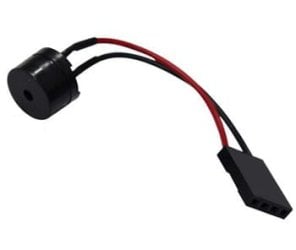
To make a mobo beep, you need a beeper connected to the speaker pins on the board (usually near the SATA ports) - looks like this

beep.jpg

IIRC they usually come in the bag of screws, standoffs etc with a new case. You can prob get one from Amazon, fleaBay etc. I never use them, so have half a dozen in my spares box.
 

My Computer My Computer

At a glance

Windows 7 Pro x64 sp1i7 4770K8GB Corsair Vengeance 1600MHzonboard
Computer type
PC/Desktop
Computer Manufacturer/Model Number
self build
OS
Windows 7 Pro x64 sp1
CPU
i7 4770K
Motherboard
MSI B85M-E45
Memory
8GB Corsair Vengeance 1600MHz
Graphics Card(s)
onboard
Monitor(s) Displays
LG 27MP35
Screen Resolution
1920-1080
Hard Drives
Seagate 2TB
PSU
Cooler Master GX 750
Case
Antec 300
Cooling
Seidon 120V
Internet Speed
60/18
Antivirus
MSE
Browser
Firefox
A lot of motherboards today do not come with a speaker. It is something that really annoys me.

In the past some had a piezo built into the board. But real estate is getting expensive on a standard ATX motherboard and the speaker was left out in crowded high end boards.

Traditionally, the speaker was a part of the case. So MB manufacturer's did not need to think about anything but the speaker header.
When boards started coming out with piezos built in the case guys stopped doing speakers to lower costs.

Now we (the consumers) are in no man's land. The MB guys and the case guys are doing that playground snit:
"You do the speaker"
"No, you do the speaker"
"No, you do it" ......
 

My Computer My Computer

At a glance

Windows 7 64 Bit Home Premium SP1i7-3820GSkill F3-14900CL9Q - 16GBEVGA GeForce GTX660 - Driver 352.86
Computer type
PC/Desktop
Computer Manufacturer/Model Number
Home Built - Jan 2013
OS
Windows 7 64 Bit Home Premium SP1
CPU
i7-3820
Motherboard
Asus P9X79-PRO - Bios 4608
Memory
GSkill F3-14900CL9Q - 16GB
Graphics Card(s)
EVGA GeForce GTX660 - Driver 352.86
Sound Card
On board Realtek ALC898
Monitor(s) Displays
Acer S271HL
Screen Resolution
1920 x 1080
Hard Drives
#1- Samsung 840 Pro Series
#2- Western Digital WD1002FAEX Sata3 Black
#3- Western Digital WD1002FAEX Sata3 Black
PSU
Corsair CMPSU-850TX-V2 - 850 watt (by Seasonic)
Case
Corsair Obsidian 550D
Cooling
Standard 3 120mm case fans, Cooler Master Hyper 212 EVO
Keyboard
MS KC-0405
Mouse
Intellimouse 5-button
Internet Speed
56 Mbits/Sec (on a good day)
Antivirus
Avast & Malwarebytes
Browser
Firefox
Other Info
Asus DVD - DRW-24B1ST 24X
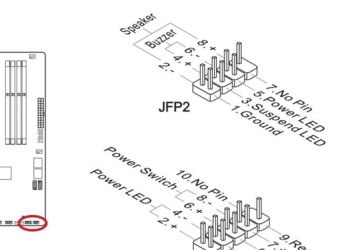
just double-checked with the OP's new mobo manual - see pic

speaker.jpg

> use speaker pins
 

My Computer My Computer

At a glance

Windows 7 Pro x64 sp1i7 4770K8GB Corsair Vengeance 1600MHzonboard
Computer type
PC/Desktop
Computer Manufacturer/Model Number
self build
OS
Windows 7 Pro x64 sp1
CPU
i7 4770K
Motherboard
MSI B85M-E45
Memory
8GB Corsair Vengeance 1600MHz
Graphics Card(s)
onboard
Monitor(s) Displays
LG 27MP35
Screen Resolution
1920-1080
Hard Drives
Seagate 2TB
PSU
Cooler Master GX 750
Case
Antec 300
Cooling
Seidon 120V
Internet Speed
60/18
Antivirus
MSE
Browser
Firefox
Hi thanks for the replies, I did the speaker pins in the JFP2 and I still don't get a startup beep, maybe like TVeblen is saying, the startup beep is just gone, I hope someone with a MSI motherboard can approve it is true.
 

My Computer My Computer

At a glance

Windows 7 Professional 64-bitsIntel i5 44604x 2GB G.Skill F3-12800CL9D-2GBNQSapphire Radeon R9 280 Dual-X
Computer type
PC/Desktop
Computer Manufacturer/Model Number
custom build
OS
Windows 7 Professional 64-bits
CPU
Intel i5 4460
Motherboard
MSI H97 Gaming 3
Memory
4x 2GB G.Skill F3-12800CL9D-2GBNQ
Graphics Card(s)
Sapphire Radeon R9 280 Dual-X
Hard Drives
WD Blue 1TB
Samsung 500GB
PSU
XFX TS 550W
Can't see speaker pins being present if the mobo don't have a beep function. As with most pc probs, troubleshoot by substitution ie try a different beeper, or your beeper in a different pc. It's possible the beeper is broken.
 

My Computer My Computer

At a glance

Windows 7 Pro x64 sp1i7 4770K8GB Corsair Vengeance 1600MHzonboard
Computer type
PC/Desktop
Computer Manufacturer/Model Number
self build
OS
Windows 7 Pro x64 sp1
CPU
i7 4770K
Motherboard
MSI B85M-E45
Memory
8GB Corsair Vengeance 1600MHz
Graphics Card(s)
onboard
Monitor(s) Displays
LG 27MP35
Screen Resolution
1920-1080
Hard Drives
Seagate 2TB
PSU
Cooler Master GX 750
Case
Antec 300
Cooling
Seidon 120V
Internet Speed
60/18
Antivirus
MSE
Browser
Firefox
I doubt a 1 day old motherboard has a broken beeper, I also installed the motherboard with care.
 

My Computer My Computer

At a glance

Windows 7 Professional 64-bitsIntel i5 44604x 2GB G.Skill F3-12800CL9D-2GBNQSapphire Radeon R9 280 Dual-X
Computer type
PC/Desktop
Computer Manufacturer/Model Number
custom build
OS
Windows 7 Professional 64-bits
CPU
Intel i5 4460
Motherboard
MSI H97 Gaming 3
Memory
4x 2GB G.Skill F3-12800CL9D-2GBNQ
Graphics Card(s)
Sapphire Radeon R9 280 Dual-X
Hard Drives
WD Blue 1TB
Samsung 500GB
PSU
XFX TS 550W
I did the speaker pins in the JFP2 and I still don't get a startup beep,

I assume this means that you tried to connect a speaker to the pins?

If so, keep in mind that the speaker connection must be installed with the correct orientation, unlike other case connections.
If you connected a speaker and get no beep, try reversing it (turn it 180 degrees).
That is a very common 'problem'.

Also a clarification: I only said that the motherboard manufacturer's stopped installing or supplying a speaker.
But the motherboards still beep.
 

My Computer My Computer

At a glance

Windows 7 64 Bit Home Premium SP1i7-3820GSkill F3-14900CL9Q - 16GBEVGA GeForce GTX660 - Driver 352.86
Computer type
PC/Desktop
Computer Manufacturer/Model Number
Home Built - Jan 2013
OS
Windows 7 64 Bit Home Premium SP1
CPU
i7-3820
Motherboard
Asus P9X79-PRO - Bios 4608
Memory
GSkill F3-14900CL9Q - 16GB
Graphics Card(s)
EVGA GeForce GTX660 - Driver 352.86
Sound Card
On board Realtek ALC898
Monitor(s) Displays
Acer S271HL
Screen Resolution
1920 x 1080
Hard Drives
#1- Samsung 840 Pro Series
#2- Western Digital WD1002FAEX Sata3 Black
#3- Western Digital WD1002FAEX Sata3 Black
PSU
Corsair CMPSU-850TX-V2 - 850 watt (by Seasonic)
Case
Corsair Obsidian 550D
Cooling
Standard 3 120mm case fans, Cooler Master Hyper 212 EVO
Keyboard
MS KC-0405
Mouse
Intellimouse 5-button
Internet Speed
56 Mbits/Sec (on a good day)
Antivirus
Avast & Malwarebytes
Browser
Firefox
Other Info
Asus DVD - DRW-24B1ST 24X
I have an MSI and there is no beeper built in; that said, the mobo comes with LED built-in for boot error reporting, which I find much more convenient than beeps.
 

My Computer My Computer

At a glance

Windows 7 Pro
Computer type
PC/Desktop
OS
Windows 7 Pro
If the board has a fast/quick boot option in BIOS (and most of the newer ones do) and it is enabled, there will be no beep/chirp at boot. I only ever hear mine do that when I've hit the Reset button, rather than the Power button.

It's normal. I thought I had a bad speaker or another problem at first too.
 

My Computer My Computer

At a glance

7 Ultimate SP1 x64AMD FX-8350 4.0GHz8GB Corsair Vengeance LP DDR3 1600EVGA GTX760 SC 2GB GDDR5
Computer type
PC/Desktop
Computer Manufacturer/Model Number
Custom [03/21/2014]
OS
7 Ultimate SP1 x64
CPU
AMD FX-8350 4.0GHz
Motherboard
Asus M5A99FX Pro R2.0
Memory
8GB Corsair Vengeance LP DDR3 1600
Graphics Card(s)
EVGA GTX760 SC 2GB GDDR5
Sound Card
Realtek ALC892
Monitor(s) Displays
23" Syncmaster P2370HD
Screen Resolution
1920 x 1080
Hard Drives
Scorpio Black WD1003FZEX 1TB
PSU
Corsair RM 750W
Case
Gigabyte Sumo Omega
Cooling
Noctua NH-D14 | 6 120mm case.
Keyboard
Tt eSPORTS Poesidon Z - Blue Switch
Mouse
Logitech M510
Internet Speed
FiOS 100/100
Antivirus
MBAM
Browser
WaterFox & Chrome
Other Info
NETWORKING:
FiOS G1100 (v1.03)
Netgear WNDR37AV
Actiontec MI424WR (Rev. I)
PRINTER:
Canon MX340
Just so you know - I have Fast Boot enabled on my board (P9X79-PRO) and I get a beep.

I also have the BIOS code LED. One small nag is that it is useless with the case side on. But we know it is only used during diagnostics so that is why it is a small nag.

Being old school (or just old) I need that reassuring POST beep to start my session. It is just engrained into my brain!
 

My Computer My Computer

At a glance

Windows 7 64 Bit Home Premium SP1i7-3820GSkill F3-14900CL9Q - 16GBEVGA GeForce GTX660 - Driver 352.86
Computer type
PC/Desktop
Computer Manufacturer/Model Number
Home Built - Jan 2013
OS
Windows 7 64 Bit Home Premium SP1
CPU
i7-3820
Motherboard
Asus P9X79-PRO - Bios 4608
Memory
GSkill F3-14900CL9Q - 16GB
Graphics Card(s)
EVGA GeForce GTX660 - Driver 352.86
Sound Card
On board Realtek ALC898
Monitor(s) Displays
Acer S271HL
Screen Resolution
1920 x 1080
Hard Drives
#1- Samsung 840 Pro Series
#2- Western Digital WD1002FAEX Sata3 Black
#3- Western Digital WD1002FAEX Sata3 Black
PSU
Corsair CMPSU-850TX-V2 - 850 watt (by Seasonic)
Case
Corsair Obsidian 550D
Cooling
Standard 3 120mm case fans, Cooler Master Hyper 212 EVO
Keyboard
MS KC-0405
Mouse
Intellimouse 5-button
Internet Speed
56 Mbits/Sec (on a good day)
Antivirus
Avast & Malwarebytes
Browser
Firefox
Other Info
Asus DVD - DRW-24B1ST 24X
Alright, good to hear there are no problems, thanks for the reply everyone, I will put it as solved :)
 

My Computer My Computer

At a glance

Windows 7 Professional 64-bitsIntel i5 44604x 2GB G.Skill F3-12800CL9D-2GBNQSapphire Radeon R9 280 Dual-X
Computer type
PC/Desktop
Computer Manufacturer/Model Number
custom build
OS
Windows 7 Professional 64-bits
CPU
Intel i5 4460
Motherboard
MSI H97 Gaming 3
Memory
4x 2GB G.Skill F3-12800CL9D-2GBNQ
Graphics Card(s)
Sapphire Radeon R9 280 Dual-X
Hard Drives
WD Blue 1TB
Samsung 500GB
PSU
XFX TS 550W
Back
Top