No display during cold boots

easwar2641993

New member
Member
VIP
Local time
2:30 AM
Messages
122
I am having this issue for the past few days and the issue comes randomly and not for every cold boots. Everything will be on but monitor shows no signal. If I restart CPU by pressing power button, then for the next boot, display comes. What all things I have done are
1) Checked monitor and its signal cable - found no issues
2) From internet, I was suspicious about my 350W PSU but the same PSU is working better for the past 1 year and I have played resource hungry games a lot( now I am playing BF4). So, PSU cannot be an issue?

The problem occurs only on random cold boots. Say , once in 3 or 4 days. Looks like the problem started after upgrading to Catalyst 14.4.
 

My Computer

Computer type
PC/Desktop
OS
Windows 10 LTSB 2016
CPU
Intel Pentium G4560 3.5GHz
Motherboard
Gigabyte GA-B250M-D3H
Memory
8GB DDR4 2400MHz
Graphics Card(s)
Zotac GTX 1050 Ti 4GB GDDR5
Sound Card
Realtek HD Audio Codec ALC892
Monitor(s) Displays
Dell 22inch
Screen Resolution
1920x1080
Hard Drives
60GB UV100 KINGSTON SSD SATA 6Gbps(boot drive)
1 TB Seagate Barracuda 7200RPM SATA 6Gbps
PSU
Corsair CX450 450W 80+ Bronze
Case
Deepcool D-Shield V2
Cooling
Stock
Keyboard
Logitech K120
Mouse
Microsoft Optical Mouse
Internet Speed
100Mbps
Antivirus
Microsoft Security Essentials
Browser
Mozilla Firefox
Other Info
APC Back USP 600VA(360W)
Hey eas,

You might want to look at re-installing the old Catalyst drivers, or try using the Beta ones

Saying that however, is your monitored connected through HDMI, DVI or VGA?

I've had an issue before where it wouldn't display using the HDMI, but it would be fine on boot with the VGA or DVI. So it may be that the driver isn't being called at the boot properly.
 

My Computer

Computer type
PC/Desktop
Computer Manufacturer/Model Number
Custom Build
OS
Windows 8.1
CPU
Intel i5 3750k OC'd 4.0Ghz
Motherboard
P8Z77-V LX3
Memory
16GB Vengence Corsair
Graphics Card(s)
GTX 770 OC 2GB Windforce
Sound Card
C-Media 7.1 Surround Card
Monitor(s) Displays
Asus 3D 23" & BenQ 24" & LG 19"
Screen Resolution
1920*1080, 1920*1080, 1440*900
Hard Drives
Crucial 512GB SSD
WD 1.5 TB
WD 500Gb
PSU
850MW Silverstone
Case
inWin DragonRider
Cooling
4 * 140mm LED Akasa, One 140mm Fan Akasa
Keyboard
Corsair k95
Mouse
R.A.T 7 Contagion
Internet Speed
152 Mb Fiber Optic
Antivirus
ESET Nod32
Browser
Waterfox x64 / Chrome x64
Other Info
Freenas / Plex Media server
Q6600
6Gb DDR3
6TB ZFS Raid
500W PSu
2 x Intel NIC's
Hey eas,

You might want to look at re-installing the old Catalyst drivers, or try using the Beta ones

Saying that however, is your monitored connected through HDMI, DVI or VGA?

I've had an issue before where it wouldn't display using the HDMI, but it would be fine on boot with the VGA or DVI. So it may be that the driver isn't being called at the boot properly.

Found graphics card working good irrespective of drivers. Another problem started to occur which clearly points to either faulty Motherboard or faulty PSU. System won't turn on when power button is pressed and this happens if I turn on the system after long time of system shutdown. Motherboard LED for lan still blinks and system will be turned on if I disconnect power cord and connect it again. What might be the issue?
 

My Computer

Computer type
PC/Desktop
OS
Windows 10 LTSB 2016
CPU
Intel Pentium G4560 3.5GHz
Motherboard
Gigabyte GA-B250M-D3H
Memory
8GB DDR4 2400MHz
Graphics Card(s)
Zotac GTX 1050 Ti 4GB GDDR5
Sound Card
Realtek HD Audio Codec ALC892
Monitor(s) Displays
Dell 22inch
Screen Resolution
1920x1080
Hard Drives
60GB UV100 KINGSTON SSD SATA 6Gbps(boot drive)
1 TB Seagate Barracuda 7200RPM SATA 6Gbps
PSU
Corsair CX450 450W 80+ Bronze
Case
Deepcool D-Shield V2
Cooling
Stock
Keyboard
Logitech K120
Mouse
Microsoft Optical Mouse
Internet Speed
100Mbps
Antivirus
Microsoft Security Essentials
Browser
Mozilla Firefox
Other Info
APC Back USP 600VA(360W)
Hey eas,

You might want to look at re-installing the old Catalyst drivers, or try using the Beta ones

Saying that however, is your monitored connected through HDMI, DVI or VGA?

I've had an issue before where it wouldn't display using the HDMI, but it would be fine on boot with the VGA or DVI. So it may be that the driver isn't being called at the boot properly.

Found graphics card working good irrespective of drivers. Another problem started to occur which clearly points to either faulty Motherboard or faulty PSU. System won't turn on when power button is pressed and this happens if I turn on the system after long time of system shutdown. Motherboard LED for lan still blinks and system will be turned on if I disconnect power cord and connect it again. What might be the issue?

Wait are you saying that it does turn on after taking out the power cord? Or it continues to stay off?


You might want to look at reseating the MOBO / PSU before you do anything else, it may be shorting out somewhere.
 

My Computer

Computer type
PC/Desktop
Computer Manufacturer/Model Number
Custom Build
OS
Windows 8.1
CPU
Intel i5 3750k OC'd 4.0Ghz
Motherboard
P8Z77-V LX3
Memory
16GB Vengence Corsair
Graphics Card(s)
GTX 770 OC 2GB Windforce
Sound Card
C-Media 7.1 Surround Card
Monitor(s) Displays
Asus 3D 23" & BenQ 24" & LG 19"
Screen Resolution
1920*1080, 1920*1080, 1440*900
Hard Drives
Crucial 512GB SSD
WD 1.5 TB
WD 500Gb
PSU
850MW Silverstone
Case
inWin DragonRider
Cooling
4 * 140mm LED Akasa, One 140mm Fan Akasa
Keyboard
Corsair k95
Mouse
R.A.T 7 Contagion
Internet Speed
152 Mb Fiber Optic
Antivirus
ESET Nod32
Browser
Waterfox x64 / Chrome x64
Other Info
Freenas / Plex Media server
Q6600
6Gb DDR3
6TB ZFS Raid
500W PSu
2 x Intel NIC's
Hey eas,

You might want to look at re-installing the old Catalyst drivers, or try using the Beta ones

Saying that however, is your monitored connected through HDMI, DVI or VGA?

I've had an issue before where it wouldn't display using the HDMI, but it would be fine on boot with the VGA or DVI. So it may be that the driver isn't being called at the boot properly.

Found graphics card working good irrespective of drivers. Another problem started to occur which clearly points to either faulty Motherboard or faulty PSU. System won't turn on when power button is pressed and this happens if I turn on the system after long time of system shutdown. Motherboard LED for lan still blinks and system will be turned on if I disconnect power cord and connect it again. What might be the issue?

Wait are you saying that it does turn on after taking out the power cord? Or it continues to stay off?


You might want to look at reseating the MOBO / PSU before you do anything else, it may be shorting out somewhere.

I tried reseating and cleared CMOS. I am saying that it won't turn on first time, no matter how many times I press the power button or when I start the PC manually by shorting the power button pins with a screw driver. It will turn on when I disconnect the power cord and connect it again OR turn of the mains which supply power to the psu and turn it on again. Very strange! What I am saying is, it will turn on the 2nd time!
 

My Computer

Computer type
PC/Desktop
OS
Windows 10 LTSB 2016
CPU
Intel Pentium G4560 3.5GHz
Motherboard
Gigabyte GA-B250M-D3H
Memory
8GB DDR4 2400MHz
Graphics Card(s)
Zotac GTX 1050 Ti 4GB GDDR5
Sound Card
Realtek HD Audio Codec ALC892
Monitor(s) Displays
Dell 22inch
Screen Resolution
1920x1080
Hard Drives
60GB UV100 KINGSTON SSD SATA 6Gbps(boot drive)
1 TB Seagate Barracuda 7200RPM SATA 6Gbps
PSU
Corsair CX450 450W 80+ Bronze
Case
Deepcool D-Shield V2
Cooling
Stock
Keyboard
Logitech K120
Mouse
Microsoft Optical Mouse
Internet Speed
100Mbps
Antivirus
Microsoft Security Essentials
Browser
Mozilla Firefox
Other Info
APC Back USP 600VA(360W)
You have strange things happening with your PSU,

Have you tried a second PSU?

Unfortunately, I cannot think of anything else to add to my previous suggestions, I'll poke someone to come take a look if i can!
 

My Computer

Computer type
PC/Desktop
Computer Manufacturer/Model Number
Custom Build
OS
Windows 8.1
CPU
Intel i5 3750k OC'd 4.0Ghz
Motherboard
P8Z77-V LX3
Memory
16GB Vengence Corsair
Graphics Card(s)
GTX 770 OC 2GB Windforce
Sound Card
C-Media 7.1 Surround Card
Monitor(s) Displays
Asus 3D 23" & BenQ 24" & LG 19"
Screen Resolution
1920*1080, 1920*1080, 1440*900
Hard Drives
Crucial 512GB SSD
WD 1.5 TB
WD 500Gb
PSU
850MW Silverstone
Case
inWin DragonRider
Cooling
4 * 140mm LED Akasa, One 140mm Fan Akasa
Keyboard
Corsair k95
Mouse
R.A.T 7 Contagion
Internet Speed
152 Mb Fiber Optic
Antivirus
ESET Nod32
Browser
Waterfox x64 / Chrome x64
Other Info
Freenas / Plex Media server
Q6600
6Gb DDR3
6TB ZFS Raid
500W PSu
2 x Intel NIC's

Yes mate better try another PSU if you can because the GPU specs state youneed a PSU of at least 400 watts to run this particular card.

http://www.sapphiretech.com/presentation/product/product_index.aspx?pid=1454&lid=1#look at the power requirements in the specs


Now given that you are also running a fair bit of stuff off the PSU makessense to me you need probably at least a 600 - 650 watt PSU for comfort and adecent one a that. Now I notice too the PSU is Corsair which is a plus but itis a VS model which is really intended for average power consumption machinesif you read the Corsair literature on it.
VS Series? VS350 ? 350 Watt Power Supply
look here and you will see you only have 25 amps available @ 12+ v


May I suggest Builder Series? CX500 or even the 600 as the 500 at least gives you 34 amps @ 12+ v. As a by the by the 600 comes in an M model meaning it is modular which is better for cable management but again a tad more expensive

A bit more expensive but more reliable and I think you will find that because of the different models being made by different companies makes the quality of the build that much different.
 

My Computer

Computer type
PC/Desktop
Computer Manufacturer/Model Number
Own build (new) Desk1 / Asus ROG Win 7 / Desk2 1st build
OS
Desk1 7 Home Prem / Desk2 10 Pro / Main lap Asus ROG 10 Pro 2 laptop Toshiba 7 Pro Asus P2520 7 & 10
CPU
Desk1 i5 3750K / Laptop i7 GTX 860M / Desk2 i5 2500
Motherboard
Desk1 Asus P877-V / Desk2 Gigabyte H67 UD3H / Laptop ?
Memory
Desk1 8GB (1866) / Desk2 16GB (1333) / Laptop 8Gb DDR3
Graphics Card(s)
Desk 1& 2NVidia GTX 650 & Laptops on board Intel
Sound Card
Desk 1 & 2 -XONAR DG Realtek High Def audio Laptop
Monitor(s) Displays
Desk 1 Benq HD 2450 / Desk2 Philips 24" / Laptop 17.5"
Screen Resolution
1920x1080 D1 & D2 & Laptop 1
Hard Drives
Desk1 Samsung 120GB 830 SSD
Asus ROG 256GB 850 Pro SSD
Desk2 Samsung 840 256 SSD
Toshiba 120GB EVO
PSU
Desk 1 Corsair HX 1050/ Laptop ? / Desk 2 Corsair HX 650
Case
Desk 1 Cooler HAF XM ? Toshiba laptop / Desk2 Coolermaster
Cooling
Fans on all Desk1 -2 Desk2 - all Coolermasters 5 Laptop ?
Keyboard
Desk 1 MS Sidewinder X6 Desk 2 MS Sidewinder X 4
Mouse
Desk 1&2 - Gigabyte MS 900 gamer - laptop - Logitec wireless
Internet Speed
ADSL2+
Other Info
One other Desktop (tester) and spare Toshba laptop both with SSD's
Running Kaspersky 2016 ISS on all machines config'd identically
Logitec audio stereo systems on each machine (x3)
Canon MG5250MFC
Router/modem TP-Link running WPA2SK
Yes mate better try another PSU if you can because the GPU specs state youneed a PSU of at least 400 watts to run this particular card.

http://www.sapphiretech.com/presentation/product/product_index.aspx?pid=1454&lid=1#look at the power requirements in the specs


Now given that you are also running a fair bit of stuff off the PSU makessense to me you need probably at least a 600 - 650 watt PSU for comfort and adecent one a that. Now I notice too the PSU is Corsair which is a plus but itis a VS model which is really intended for average power consumption machinesif you read the Corsair literature on it.
VS Series? VS350 ? 350 Watt Power Supply
look here and you will see you only have 25 amps available @ 12+ v


May I suggest Builder Series? CX500 or even the 600 as the 500 at least gives you 34 amps @ 12+ v. As a by the by the 600 comes in an M model meaning it is modular which is better for cable management but again a tad more expensive

A bit more expensive but more reliable and I think you will find that because of the different models being made by different companies makes the quality of the build that much different.

Hey, I performed paper clip method when I had such another no booting issue. To my surprise, PSU started when shorted green wire and one of the black wires. So, motherboard??????
 

My Computer

Computer type
PC/Desktop
OS
Windows 10 LTSB 2016
CPU
Intel Pentium G4560 3.5GHz
Motherboard
Gigabyte GA-B250M-D3H
Memory
8GB DDR4 2400MHz
Graphics Card(s)
Zotac GTX 1050 Ti 4GB GDDR5
Sound Card
Realtek HD Audio Codec ALC892
Monitor(s) Displays
Dell 22inch
Screen Resolution
1920x1080
Hard Drives
60GB UV100 KINGSTON SSD SATA 6Gbps(boot drive)
1 TB Seagate Barracuda 7200RPM SATA 6Gbps
PSU
Corsair CX450 450W 80+ Bronze
Case
Deepcool D-Shield V2
Cooling
Stock
Keyboard
Logitech K120
Mouse
Microsoft Optical Mouse
Internet Speed
100Mbps
Antivirus
Microsoft Security Essentials
Browser
Mozilla Firefox
Other Info
APC Back USP 600VA(360W)
Yes mate better try another PSU if you can because the GPU specs state youneed a PSU of at least 400 watts to run this particular card.

http://www.sapphiretech.com/presentation/product/product_index.aspx?pid=1454&lid=1#look at the power requirements in the specs


Now given that you are also running a fair bit of stuff off the PSU makessense to me you need probably at least a 600 - 650 watt PSU for comfort and adecent one a that. Now I notice too the PSU is Corsair which is a plus but itis a VS model which is really intended for average power consumption machinesif you read the Corsair literature on it.
VS Series? VS350 ? 350 Watt Power Supply
look here and you will see you only have 25 amps available @ 12+ v


May I suggest Builder Series? CX500 or even the 600 as the 500 at least gives you 34 amps @ 12+ v. As a by the by the 600 comes in an M model meaning it is modular which is better for cable management but again a tad more expensive

A bit more expensive but more reliable and I think you will find that because of the different models being made by different companies makes the quality of the build that much different.

Hey, I performed paper clip method when I had such another no booting issue. To my surprise, PSU started when shorted green wire and one of the black wires. So, motherboard??????


No the PSU will start when you do that trick because is getting the signal to turn on.

What we are saying is your Graphics card requires certain amount of power, which your current PSU cannot supply to it.

Can you try booting without the graphics card to confirm?
 

My Computer

Computer type
PC/Desktop
Computer Manufacturer/Model Number
Custom Build
OS
Windows 8.1
CPU
Intel i5 3750k OC'd 4.0Ghz
Motherboard
P8Z77-V LX3
Memory
16GB Vengence Corsair
Graphics Card(s)
GTX 770 OC 2GB Windforce
Sound Card
C-Media 7.1 Surround Card
Monitor(s) Displays
Asus 3D 23" & BenQ 24" & LG 19"
Screen Resolution
1920*1080, 1920*1080, 1440*900
Hard Drives
Crucial 512GB SSD
WD 1.5 TB
WD 500Gb
PSU
850MW Silverstone
Case
inWin DragonRider
Cooling
4 * 140mm LED Akasa, One 140mm Fan Akasa
Keyboard
Corsair k95
Mouse
R.A.T 7 Contagion
Internet Speed
152 Mb Fiber Optic
Antivirus
ESET Nod32
Browser
Waterfox x64 / Chrome x64
Other Info
Freenas / Plex Media server
Q6600
6Gb DDR3
6TB ZFS Raid
500W PSu
2 x Intel NIC's
Yes mate better try another PSU if you can because the GPU specs state youneed a PSU of at least 400 watts to run this particular card.

http://www.sapphiretech.com/presentation/product/product_index.aspx?pid=1454&lid=1#look at the power requirements in the specs


Now given that you are also running a fair bit of stuff off the PSU makessense to me you need probably at least a 600 - 650 watt PSU for comfort and adecent one a that. Now I notice too the PSU is Corsair which is a plus but itis a VS model which is really intended for average power consumption machinesif you read the Corsair literature on it.
VS Series? VS350 ? 350 Watt Power Supply
look here and you will see you only have 25 amps available @ 12+ v


May I suggest Builder Series? CX500 or even the 600 as the 500 at least gives you 34 amps @ 12+ v. As a by the by the 600 comes in an M model meaning it is modular which is better for cable management but again a tad more expensive

A bit more expensive but more reliable and I think you will find that because of the different models being made by different companies makes the quality of the build that much different.

Hey, I performed paper clip method when I had such another no booting issue. To my surprise, PSU started when shorted green wire and one of the black wires. So, motherboard??????


No the PSU will start when you do that trick because is getting the signal to turn on.

What we are saying is your Graphics card requires certain amount of power, which your current PSU cannot supply to it.

Can you try booting without the graphics card to confirm?

Got a very interesting result!!!!The same thing happened again - No display during a cold boot. Every fans, lights working, but just no display. I disconnected display cord and connected to onboard VGA, that is Intel HD Graphics 2000. Oh god, its working and I was able to use the PC as usual but this time PC is not detecting graphics card though graphics card fan is running like a hell. I made a shut down and restarted, lol no display during warm boot. This time I disconnected display from onboard VGA to graphics card. Working!!!
hm..strange...
 

My Computer

Computer type
PC/Desktop
OS
Windows 10 LTSB 2016
CPU
Intel Pentium G4560 3.5GHz
Motherboard
Gigabyte GA-B250M-D3H
Memory
8GB DDR4 2400MHz
Graphics Card(s)
Zotac GTX 1050 Ti 4GB GDDR5
Sound Card
Realtek HD Audio Codec ALC892
Monitor(s) Displays
Dell 22inch
Screen Resolution
1920x1080
Hard Drives
60GB UV100 KINGSTON SSD SATA 6Gbps(boot drive)
1 TB Seagate Barracuda 7200RPM SATA 6Gbps
PSU
Corsair CX450 450W 80+ Bronze
Case
Deepcool D-Shield V2
Cooling
Stock
Keyboard
Logitech K120
Mouse
Microsoft Optical Mouse
Internet Speed
100Mbps
Antivirus
Microsoft Security Essentials
Browser
Mozilla Firefox
Other Info
APC Back USP 600VA(360W)
Yep sounds very much like a GPU problem mate.
The paper clip trick is only the power on - there is circuitry inside the PSU that tests the volts etc before the machine can be turned on by the Power_Good at pin 8 on the 24 pin plug. The system is only fired once that signal is reached at pin 8.
Otherwise the machine could be exposed to volts outside of any normal parameters as most of the rails have to run within a very tight +/- percentage of the stated volts.
The Power_Good voltage has to be above 2.4v and below 6v for the purpose of turning on the machine ie booting.
 

My Computer

Computer type
PC/Desktop
Computer Manufacturer/Model Number
Own build (new) Desk1 / Asus ROG Win 7 / Desk2 1st build
OS
Desk1 7 Home Prem / Desk2 10 Pro / Main lap Asus ROG 10 Pro 2 laptop Toshiba 7 Pro Asus P2520 7 & 10
CPU
Desk1 i5 3750K / Laptop i7 GTX 860M / Desk2 i5 2500
Motherboard
Desk1 Asus P877-V / Desk2 Gigabyte H67 UD3H / Laptop ?
Memory
Desk1 8GB (1866) / Desk2 16GB (1333) / Laptop 8Gb DDR3
Graphics Card(s)
Desk 1& 2NVidia GTX 650 & Laptops on board Intel
Sound Card
Desk 1 & 2 -XONAR DG Realtek High Def audio Laptop
Monitor(s) Displays
Desk 1 Benq HD 2450 / Desk2 Philips 24" / Laptop 17.5"
Screen Resolution
1920x1080 D1 & D2 & Laptop 1
Hard Drives
Desk1 Samsung 120GB 830 SSD
Asus ROG 256GB 850 Pro SSD
Desk2 Samsung 840 256 SSD
Toshiba 120GB EVO
PSU
Desk 1 Corsair HX 1050/ Laptop ? / Desk 2 Corsair HX 650
Case
Desk 1 Cooler HAF XM ? Toshiba laptop / Desk2 Coolermaster
Cooling
Fans on all Desk1 -2 Desk2 - all Coolermasters 5 Laptop ?
Keyboard
Desk 1 MS Sidewinder X6 Desk 2 MS Sidewinder X 4
Mouse
Desk 1&2 - Gigabyte MS 900 gamer - laptop - Logitec wireless
Internet Speed
ADSL2+
Other Info
One other Desktop (tester) and spare Toshba laptop both with SSD's
Running Kaspersky 2016 ISS on all machines config'd identically
Logitec audio stereo systems on each machine (x3)
Canon MG5250MFC
Router/modem TP-Link running WPA2SK
I too concur with Icit2lol; at this point its probably something having to do with your or gpu. Most graphics cards require a certain amount of voltage that is set voltage(parameters) in order for them to work properly which is also why you need to make sure your power supply is putting out the right amount of voltage as well.
 

My Computer

Computer type
PC/Desktop
Computer Manufacturer/Model Number
custom built
OS
Windows 7 ultimate 64-bit
CPU
Intel I7 2600K 3.4ghz
Motherboard
Asus Evo P8P67
Memory
Corsair 16gb ddr3 1600mhz
Graphics Card(s)
Nvidia Geforce gt 430
Sound Card
Sound Blaster Titanium x-fi pci express
Monitor(s) Displays
Dell E198WFP
Hard Drives
1 western digital 2TB drive.
PSU
Antec 1200 watt
Case
Inwin Dragon Rider
Cooling
6 case supplied cooling fans
Keyboard
logitech mk700
Mouse
logitech m705
Internet Speed
25-50mbps download; 10mbps upload(i think)
Antivirus
avg free 2014
Browser
mozilla firefox
Other Info
Also have a pretty bad speaker setup which is a klipsch promedia 5.1 surround speaker setup with huge subwoofer and lg blu ray player/writer. Also a hp officejet pro 8600 plus wireless all in one and a logitech s7500 webcam.
As Matt says mate and you might try this to figure out what power PSU you need.

eXtreme Power Supply Calculator just enter the gear you have and it will spit out what power (wattage) PSU will be needed - minimum.
 

My Computer

Computer type
PC/Desktop
Computer Manufacturer/Model Number
Own build (new) Desk1 / Asus ROG Win 7 / Desk2 1st build
OS
Desk1 7 Home Prem / Desk2 10 Pro / Main lap Asus ROG 10 Pro 2 laptop Toshiba 7 Pro Asus P2520 7 & 10
CPU
Desk1 i5 3750K / Laptop i7 GTX 860M / Desk2 i5 2500
Motherboard
Desk1 Asus P877-V / Desk2 Gigabyte H67 UD3H / Laptop ?
Memory
Desk1 8GB (1866) / Desk2 16GB (1333) / Laptop 8Gb DDR3
Graphics Card(s)
Desk 1& 2NVidia GTX 650 & Laptops on board Intel
Sound Card
Desk 1 & 2 -XONAR DG Realtek High Def audio Laptop
Monitor(s) Displays
Desk 1 Benq HD 2450 / Desk2 Philips 24" / Laptop 17.5"
Screen Resolution
1920x1080 D1 & D2 & Laptop 1
Hard Drives
Desk1 Samsung 120GB 830 SSD
Asus ROG 256GB 850 Pro SSD
Desk2 Samsung 840 256 SSD
Toshiba 120GB EVO
PSU
Desk 1 Corsair HX 1050/ Laptop ? / Desk 2 Corsair HX 650
Case
Desk 1 Cooler HAF XM ? Toshiba laptop / Desk2 Coolermaster
Cooling
Fans on all Desk1 -2 Desk2 - all Coolermasters 5 Laptop ?
Keyboard
Desk 1 MS Sidewinder X6 Desk 2 MS Sidewinder X 4
Mouse
Desk 1&2 - Gigabyte MS 900 gamer - laptop - Logitec wireless
Internet Speed
ADSL2+
Other Info
One other Desktop (tester) and spare Toshba laptop both with SSD's
Running Kaspersky 2016 ISS on all machines config'd identically
Logitec audio stereo systems on each machine (x3)
Canon MG5250MFC
Router/modem TP-Link running WPA2SK
As Matt says mate and you might try this to figure out what power PSU you need.

eXtreme Power Supply Calculator just enter the gear you have and it will spit out what power (wattage) PSU will be needed - minimum.

I calculated the minimum power required and got 237W and recommended watt is 350W.
However, I got an Antec VP550W and I know its not a good PSU but still it should provide more power than the Corsair VS350W. If problems still exist, will report soon.
 

My Computer

Computer type
PC/Desktop
OS
Windows 10 LTSB 2016
CPU
Intel Pentium G4560 3.5GHz
Motherboard
Gigabyte GA-B250M-D3H
Memory
8GB DDR4 2400MHz
Graphics Card(s)
Zotac GTX 1050 Ti 4GB GDDR5
Sound Card
Realtek HD Audio Codec ALC892
Monitor(s) Displays
Dell 22inch
Screen Resolution
1920x1080
Hard Drives
60GB UV100 KINGSTON SSD SATA 6Gbps(boot drive)
1 TB Seagate Barracuda 7200RPM SATA 6Gbps
PSU
Corsair CX450 450W 80+ Bronze
Case
Deepcool D-Shield V2
Cooling
Stock
Keyboard
Logitech K120
Mouse
Microsoft Optical Mouse
Internet Speed
100Mbps
Antivirus
Microsoft Security Essentials
Browser
Mozilla Firefox
Other Info
APC Back USP 600VA(360W)
Hmm that doesn't sound like a large power consumption at all I would have thought it would have been closer to the max there was.

The Antec sounds a decent one to me although like I said I would have stuck to a Corsair but with 60 amps 12+v on tap you should have more than enough power to play with.

Anyway let us know how it goes.
 

My Computer

Computer type
PC/Desktop
Computer Manufacturer/Model Number
Own build (new) Desk1 / Asus ROG Win 7 / Desk2 1st build
OS
Desk1 7 Home Prem / Desk2 10 Pro / Main lap Asus ROG 10 Pro 2 laptop Toshiba 7 Pro Asus P2520 7 & 10
CPU
Desk1 i5 3750K / Laptop i7 GTX 860M / Desk2 i5 2500
Motherboard
Desk1 Asus P877-V / Desk2 Gigabyte H67 UD3H / Laptop ?
Memory
Desk1 8GB (1866) / Desk2 16GB (1333) / Laptop 8Gb DDR3
Graphics Card(s)
Desk 1& 2NVidia GTX 650 & Laptops on board Intel
Sound Card
Desk 1 & 2 -XONAR DG Realtek High Def audio Laptop
Monitor(s) Displays
Desk 1 Benq HD 2450 / Desk2 Philips 24" / Laptop 17.5"
Screen Resolution
1920x1080 D1 & D2 & Laptop 1
Hard Drives
Desk1 Samsung 120GB 830 SSD
Asus ROG 256GB 850 Pro SSD
Desk2 Samsung 840 256 SSD
Toshiba 120GB EVO
PSU
Desk 1 Corsair HX 1050/ Laptop ? / Desk 2 Corsair HX 650
Case
Desk 1 Cooler HAF XM ? Toshiba laptop / Desk2 Coolermaster
Cooling
Fans on all Desk1 -2 Desk2 - all Coolermasters 5 Laptop ?
Keyboard
Desk 1 MS Sidewinder X6 Desk 2 MS Sidewinder X 4
Mouse
Desk 1&2 - Gigabyte MS 900 gamer - laptop - Logitec wireless
Internet Speed
ADSL2+
Other Info
One other Desktop (tester) and spare Toshba laptop both with SSD's
Running Kaspersky 2016 ISS on all machines config'd identically
Logitec audio stereo systems on each machine (x3)
Canon MG5250MFC
Router/modem TP-Link running WPA2SK
Hmm that doesn't sound like a large power consumption at all I would have thought it would have been closer to the max there was.

The Antec sounds a decent one to me although like I said I would have stuck to a Corsair but with 60 amps 12+v on tap you should have more than enough power to play with.

Anyway let us know how it goes.

Performed a cold boot with Antec. So far no problems now. Preparing to RMA the Corsair one. Still I am waiting for 2-3 more days to confirm.
 

My Computer

Computer type
PC/Desktop
OS
Windows 10 LTSB 2016
CPU
Intel Pentium G4560 3.5GHz
Motherboard
Gigabyte GA-B250M-D3H
Memory
8GB DDR4 2400MHz
Graphics Card(s)
Zotac GTX 1050 Ti 4GB GDDR5
Sound Card
Realtek HD Audio Codec ALC892
Monitor(s) Displays
Dell 22inch
Screen Resolution
1920x1080
Hard Drives
60GB UV100 KINGSTON SSD SATA 6Gbps(boot drive)
1 TB Seagate Barracuda 7200RPM SATA 6Gbps
PSU
Corsair CX450 450W 80+ Bronze
Case
Deepcool D-Shield V2
Cooling
Stock
Keyboard
Logitech K120
Mouse
Microsoft Optical Mouse
Internet Speed
100Mbps
Antivirus
Microsoft Security Essentials
Browser
Mozilla Firefox
Other Info
APC Back USP 600VA(360W)
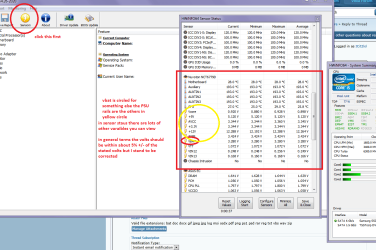
Ok mate I still think the readout you got before was low for what you have you might try a rerun with it and make sure everything is put in - some of it is pretty technical and some stuff it seems irrelevant I know but worth looking at.

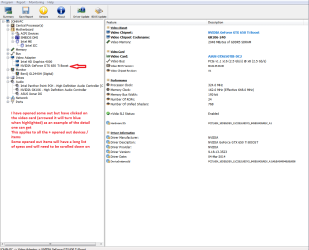
If you want to keep an eye on the volts from the new PSU and other stuff in the machine run HW Info HWiNFO, HWiNFO32/64 - Download < get the right bit version > close the right hand window and click on Sensors > scroll down the window that opens and check the volts.

The other devices can be viewed by opening them out in the left hand side window see my pics.
 

Attachments

  • HW INFO VOLTS.PNG
    HW INFO VOLTS.PNG
    58.2 KB · Views: 2
  • HW INFO SPECS.PNG
    HW INFO SPECS.PNG
    38.5 KB · Views: 0

My Computer

Computer type
PC/Desktop
Computer Manufacturer/Model Number
Own build (new) Desk1 / Asus ROG Win 7 / Desk2 1st build
OS
Desk1 7 Home Prem / Desk2 10 Pro / Main lap Asus ROG 10 Pro 2 laptop Toshiba 7 Pro Asus P2520 7 & 10
CPU
Desk1 i5 3750K / Laptop i7 GTX 860M / Desk2 i5 2500
Motherboard
Desk1 Asus P877-V / Desk2 Gigabyte H67 UD3H / Laptop ?
Memory
Desk1 8GB (1866) / Desk2 16GB (1333) / Laptop 8Gb DDR3
Graphics Card(s)
Desk 1& 2NVidia GTX 650 & Laptops on board Intel
Sound Card
Desk 1 & 2 -XONAR DG Realtek High Def audio Laptop
Monitor(s) Displays
Desk 1 Benq HD 2450 / Desk2 Philips 24" / Laptop 17.5"
Screen Resolution
1920x1080 D1 & D2 & Laptop 1
Hard Drives
Desk1 Samsung 120GB 830 SSD
Asus ROG 256GB 850 Pro SSD
Desk2 Samsung 840 256 SSD
Toshiba 120GB EVO
PSU
Desk 1 Corsair HX 1050/ Laptop ? / Desk 2 Corsair HX 650
Case
Desk 1 Cooler HAF XM ? Toshiba laptop / Desk2 Coolermaster
Cooling
Fans on all Desk1 -2 Desk2 - all Coolermasters 5 Laptop ?
Keyboard
Desk 1 MS Sidewinder X6 Desk 2 MS Sidewinder X 4
Mouse
Desk 1&2 - Gigabyte MS 900 gamer - laptop - Logitec wireless
Internet Speed
ADSL2+
Other Info
One other Desktop (tester) and spare Toshba laptop both with SSD's
Running Kaspersky 2016 ISS on all machines config'd identically
Logitec audio stereo systems on each machine (x3)
Canon MG5250MFC
Router/modem TP-Link running WPA2SK
Ok mate I still think the readout you got before was low for what you have you might try a rerun with it and make sure everything is put in - some of it is pretty technical and some stuff it seems irrelevant I know but worth looking at.

If you want to keep an eye on the volts from the new PSU and other stuff in the machine run HW Info HWiNFO, HWiNFO32/64 - Download < get the right bit version > close the right hand window and click on Sensors > scroll down the window that opens and check the volts.

The other devices can be viewed by opening them out in the left hand side window see my pics.

Thanks for mentioning about that software. I have sent the Corsair PSU for RMA and now I am using Antec VP550W. So far , system performed more than 4-5 cold boots. no issues so far. Can I say that graphics card is working fine?
 

My Computer

Computer type
PC/Desktop
OS
Windows 10 LTSB 2016
CPU
Intel Pentium G4560 3.5GHz
Motherboard
Gigabyte GA-B250M-D3H
Memory
8GB DDR4 2400MHz
Graphics Card(s)
Zotac GTX 1050 Ti 4GB GDDR5
Sound Card
Realtek HD Audio Codec ALC892
Monitor(s) Displays
Dell 22inch
Screen Resolution
1920x1080
Hard Drives
60GB UV100 KINGSTON SSD SATA 6Gbps(boot drive)
1 TB Seagate Barracuda 7200RPM SATA 6Gbps
PSU
Corsair CX450 450W 80+ Bronze
Case
Deepcool D-Shield V2
Cooling
Stock
Keyboard
Logitech K120
Mouse
Microsoft Optical Mouse
Internet Speed
100Mbps
Antivirus
Microsoft Security Essentials
Browser
Mozilla Firefox
Other Info
APC Back USP 600VA(360W)
Well mate lets say so far so good and don't let us count out chickens yet but it is looking to be that way.

I don't know if you run any cleaners for the system or on call malware checks but these are worth keeping.

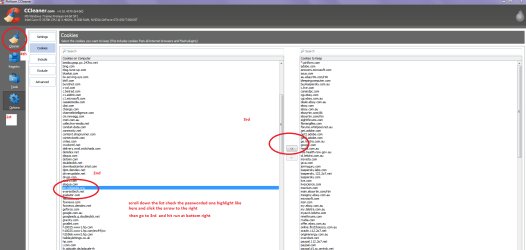
CCleaner - Download < download from piriform will keeps the temp files and rubbish at bay this is the tutorial for it http://www.sevenforums.com/tutorials/306648-ccleaner-delete-junk-files.html just one thing before you run the cleaner make sure to Analyse > Options > Cookies - and any that you use for sites you need passwords for save to the right and liist by highlighting them then click the arrow right. When done go back to Cleaner and run it. (See pic)

Theses are there on call malware scanners I use and a lot of the others use

http://www.superantispyware.com/

http://www.malwarebytes.org/products/malwarebytes_free/

http://www.bleepingcomputer.com/download/adwcleaner/

ADW download frombleeping computer delete any rubbish found with the malware scans
the ADW not so much and you will need to download it each time you run it if you have to.

This is handy too http://www.sevenforums.com/tutorials/11728-optimize-windows-7-a.html
 

Attachments

  • CCcookies.PNG
    CCcookies.PNG
    44.2 KB · Views: 3

My Computer

Computer type
PC/Desktop
Computer Manufacturer/Model Number
Own build (new) Desk1 / Asus ROG Win 7 / Desk2 1st build
OS
Desk1 7 Home Prem / Desk2 10 Pro / Main lap Asus ROG 10 Pro 2 laptop Toshiba 7 Pro Asus P2520 7 & 10
CPU
Desk1 i5 3750K / Laptop i7 GTX 860M / Desk2 i5 2500
Motherboard
Desk1 Asus P877-V / Desk2 Gigabyte H67 UD3H / Laptop ?
Memory
Desk1 8GB (1866) / Desk2 16GB (1333) / Laptop 8Gb DDR3
Graphics Card(s)
Desk 1& 2NVidia GTX 650 & Laptops on board Intel
Sound Card
Desk 1 & 2 -XONAR DG Realtek High Def audio Laptop
Monitor(s) Displays
Desk 1 Benq HD 2450 / Desk2 Philips 24" / Laptop 17.5"
Screen Resolution
1920x1080 D1 & D2 & Laptop 1
Hard Drives
Desk1 Samsung 120GB 830 SSD
Asus ROG 256GB 850 Pro SSD
Desk2 Samsung 840 256 SSD
Toshiba 120GB EVO
PSU
Desk 1 Corsair HX 1050/ Laptop ? / Desk 2 Corsair HX 650
Case
Desk 1 Cooler HAF XM ? Toshiba laptop / Desk2 Coolermaster
Cooling
Fans on all Desk1 -2 Desk2 - all Coolermasters 5 Laptop ?
Keyboard
Desk 1 MS Sidewinder X6 Desk 2 MS Sidewinder X 4
Mouse
Desk 1&2 - Gigabyte MS 900 gamer - laptop - Logitec wireless
Internet Speed
ADSL2+
Other Info
One other Desktop (tester) and spare Toshba laptop both with SSD's
Running Kaspersky 2016 ISS on all machines config'd identically
Logitec audio stereo systems on each machine (x3)
Canon MG5250MFC
Router/modem TP-Link running WPA2SK
I am facing the same prob as you bud!! Kindly tell me if changing PSU solved it premanently!
 

My Computer

Computer type
PC/Desktop
OS
WINDOWS 8.1
Back
Top