Solved No Display When Powering On Computer. Beep Code [1long,2short]

Citrus6745

New member
Local time
12:01 AM
Messages
23
When I power on my system, all the fans, lights, etc. spin up but I get no display on my computer monitors. I tried step-for-step, the post diagnostics from this tutorial up untill I took out the RAM sticks. That was when I received the post beep code "1long beep and 2 short beeps." After this I tried replacing the CMOS battery with a new one and I still got no signal. I even tried connecting the video cables to the motherboard instead of the GPU. I researched the beep code; "An error was encountered in the video BIOS ROM, or a horizontal retrace failure has been encountered." How can this be fixed?
 

My Computer My Computer

Computer type
PC/Desktop
Computer Manufacturer/Model Number
Custom Built
OS
Windows 7 64 bit
CPU
i7-6700k
Motherboard
MSI Gaming Z170A M3 ATX
Memory
G.SKILL Ripjaws 4 series 16GB (4 x 4GB) F4-3000C15Q-16GRR
Graphics Card(s)
Zotac Nvidia GTX 970
Monitor(s) Displays
#1 ASUS MX279(1920x1080) #2 SONY TV(1360x168)
Screen Resolution
1360X768 & 1920X1080 /60hz
Hard Drives
1TB HDD
PSU
EVGA 220-G2-0750-XR 80 PLUS GOLD 750W ECO Mode Fully Modular
Case
NZXT Gaurdian 921
Cooling
Corsair H80i
Keyboard
Roccat Isku
Mouse
Roccat Kone XTD
Where are you sticking the cable to the motherboard and not gpu? Is this the board listed in your specs on here because that has no onboard video on it and you must use a add-in gpu. If your VBIOS is messed up on the 970 it might be rma time.
 

My Computer My Computer

Computer type
PC/Desktop
Computer Manufacturer/Model Number
Custom
OS
10 Pro x64
CPU
Ryzen 9 3900X
Motherboard
Asrock x370 Tachi
Memory
64GB(4x16GB) DDR4
Graphics Card(s)
EVGA 1080ti FTW3
Sound Card
ASUS Xonar Essence STX (V4 Bursons), ODAC rev B, NFB-11, O2
Monitor(s) Displays
3xASUS PB278Q/R, Optoma HD142X
Screen Resolution
3x1440p, 1080p
Hard Drives
512GB 850 EVO(OS, Programs)
4TB (Movies)
3TB (Downloads)
3TB (Programs)
1TB HDD (Games)
2x6TB R1 (videos)
PSU
AX760
Case
Fractal Define R5
Cooling
NH-D15S
Keyboard
Massdrop Ctrl with Box Navy's
Mouse
G903, Alioth XXL Mat
Internet Speed
280/40
Antivirus
MBAM, ESET
Browser
Canary 64 Bit
Other Info
I also own a Thinkpad P50 Xeon 4K, X220T, X1C5
The wrong board was listed in the specs.The one I am using is an ASUS M4A78LT-M. There is a DVI cable and HDMI cable hooked into the only sockets on the board.
 

My Computer My Computer

Computer type
PC/Desktop
Computer Manufacturer/Model Number
Custom Built
OS
Windows 7 64 bit
CPU
i7-6700k
Motherboard
MSI Gaming Z170A M3 ATX
Memory
G.SKILL Ripjaws 4 series 16GB (4 x 4GB) F4-3000C15Q-16GRR
Graphics Card(s)
Zotac Nvidia GTX 970
Monitor(s) Displays
#1 ASUS MX279(1920x1080) #2 SONY TV(1360x168)
Screen Resolution
1360X768 & 1920X1080 /60hz
Hard Drives
1TB HDD
PSU
EVGA 220-G2-0750-XR 80 PLUS GOLD 750W ECO Mode Fully Modular
Case
NZXT Gaurdian 921
Cooling
Corsair H80i
Keyboard
Roccat Isku
Mouse
Roccat Kone XTD
So the VBIOS error is when your using the onboard then, Try running with only one stick of ram in the slot closest to the cpu. If that does nothing try removing the other gpu from the motherboard then try the onboard after leaving the cmos battery out for like 5 minutes to make sure everything is cleared?
 

My Computer My Computer

Computer type
PC/Desktop
Computer Manufacturer/Model Number
Custom
OS
10 Pro x64
CPU
Ryzen 9 3900X
Motherboard
Asrock x370 Tachi
Memory
64GB(4x16GB) DDR4
Graphics Card(s)
EVGA 1080ti FTW3
Sound Card
ASUS Xonar Essence STX (V4 Bursons), ODAC rev B, NFB-11, O2
Monitor(s) Displays
3xASUS PB278Q/R, Optoma HD142X
Screen Resolution
3x1440p, 1080p
Hard Drives
512GB 850 EVO(OS, Programs)
4TB (Movies)
3TB (Downloads)
3TB (Programs)
1TB HDD (Games)
2x6TB R1 (videos)
PSU
AX760
Case
Fractal Define R5
Cooling
NH-D15S
Keyboard
Massdrop Ctrl with Box Navy's
Mouse
G903, Alioth XXL Mat
Internet Speed
280/40
Antivirus
MBAM, ESET
Browser
Canary 64 Bit
Other Info
I also own a Thinkpad P50 Xeon 4K, X220T, X1C5
It worked fine with only one stick of RAM. The monitor gave a display. What does this mean for the other sticks of RAM that dont work while in the board?
 

My Computer My Computer

Computer type
PC/Desktop
Computer Manufacturer/Model Number
Custom Built
OS
Windows 7 64 bit
CPU
i7-6700k
Motherboard
MSI Gaming Z170A M3 ATX
Memory
G.SKILL Ripjaws 4 series 16GB (4 x 4GB) F4-3000C15Q-16GRR
Graphics Card(s)
Zotac Nvidia GTX 970
Monitor(s) Displays
#1 ASUS MX279(1920x1080) #2 SONY TV(1360x168)
Screen Resolution
1360X768 & 1920X1080 /60hz
Hard Drives
1TB HDD
PSU
EVGA 220-G2-0750-XR 80 PLUS GOLD 750W ECO Mode Fully Modular
Case
NZXT Gaurdian 921
Cooling
Corsair H80i
Keyboard
Roccat Isku
Mouse
Roccat Kone XTD
Okay now comes the time consuming part as you really should test each stick individually with memtestx86 + and if they all pass in the first slot then try the second slot to determine if you memory slots have gone bad or the sticks themselves.
http://www.sevenforums.com/tutorials/105647-ram-test-memtest86.html

EDIT: If you find bad sticks test the good one in the other slots to make sure the slots are still good.
 

My Computer My Computer

Computer type
PC/Desktop
Computer Manufacturer/Model Number
Custom
OS
10 Pro x64
CPU
Ryzen 9 3900X
Motherboard
Asrock x370 Tachi
Memory
64GB(4x16GB) DDR4
Graphics Card(s)
EVGA 1080ti FTW3
Sound Card
ASUS Xonar Essence STX (V4 Bursons), ODAC rev B, NFB-11, O2
Monitor(s) Displays
3xASUS PB278Q/R, Optoma HD142X
Screen Resolution
3x1440p, 1080p
Hard Drives
512GB 850 EVO(OS, Programs)
4TB (Movies)
3TB (Downloads)
3TB (Programs)
1TB HDD (Games)
2x6TB R1 (videos)
PSU
AX760
Case
Fractal Define R5
Cooling
NH-D15S
Keyboard
Massdrop Ctrl with Box Navy's
Mouse
G903, Alioth XXL Mat
Internet Speed
280/40
Antivirus
MBAM, ESET
Browser
Canary 64 Bit
Other Info
I also own a Thinkpad P50 Xeon 4K, X220T, X1C5
I ended up moving the RAM one space over, now I have my computer running again as it was before. Thanks for helping!
 

My Computer My Computer

Computer type
PC/Desktop
Computer Manufacturer/Model Number
Custom Built
OS
Windows 7 64 bit
CPU
i7-6700k
Motherboard
MSI Gaming Z170A M3 ATX
Memory
G.SKILL Ripjaws 4 series 16GB (4 x 4GB) F4-3000C15Q-16GRR
Graphics Card(s)
Zotac Nvidia GTX 970
Monitor(s) Displays
#1 ASUS MX279(1920x1080) #2 SONY TV(1360x168)
Screen Resolution
1360X768 & 1920X1080 /60hz
Hard Drives
1TB HDD
PSU
EVGA 220-G2-0750-XR 80 PLUS GOLD 750W ECO Mode Fully Modular
Case
NZXT Gaurdian 921
Cooling
Corsair H80i
Keyboard
Roccat Isku
Mouse
Roccat Kone XTD
So they are in a row of 3 minus the first slot?
 

My Computer My Computer

Computer type
PC/Desktop
Computer Manufacturer/Model Number
Custom
OS
10 Pro x64
CPU
Ryzen 9 3900X
Motherboard
Asrock x370 Tachi
Memory
64GB(4x16GB) DDR4
Graphics Card(s)
EVGA 1080ti FTW3
Sound Card
ASUS Xonar Essence STX (V4 Bursons), ODAC rev B, NFB-11, O2
Monitor(s) Displays
3xASUS PB278Q/R, Optoma HD142X
Screen Resolution
3x1440p, 1080p
Hard Drives
512GB 850 EVO(OS, Programs)
4TB (Movies)
3TB (Downloads)
3TB (Programs)
1TB HDD (Games)
2x6TB R1 (videos)
PSU
AX760
Case
Fractal Define R5
Cooling
NH-D15S
Keyboard
Massdrop Ctrl with Box Navy's
Mouse
G903, Alioth XXL Mat
Internet Speed
280/40
Antivirus
MBAM, ESET
Browser
Canary 64 Bit
Other Info
I also own a Thinkpad P50 Xeon 4K, X220T, X1C5
I have one on the first and the other on the third.
 

My Computer My Computer

Computer type
PC/Desktop
Computer Manufacturer/Model Number
Custom Built
OS
Windows 7 64 bit
CPU
i7-6700k
Motherboard
MSI Gaming Z170A M3 ATX
Memory
G.SKILL Ripjaws 4 series 16GB (4 x 4GB) F4-3000C15Q-16GRR
Graphics Card(s)
Zotac Nvidia GTX 970
Monitor(s) Displays
#1 ASUS MX279(1920x1080) #2 SONY TV(1360x168)
Screen Resolution
1360X768 & 1920X1080 /60hz
Hard Drives
1TB HDD
PSU
EVGA 220-G2-0750-XR 80 PLUS GOLD 750W ECO Mode Fully Modular
Case
NZXT Gaurdian 921
Cooling
Corsair H80i
Keyboard
Roccat Isku
Mouse
Roccat Kone XTD
Did they used to be together cause if they where you don't get dual channel and it's probably why it did not boot. Always gap it as they go in pairs like white/blue, white/blue.
 

Attachments

  • mem.PNG
    mem.PNG
    43.1 KB · Views: 2

My Computer My Computer

Computer type
PC/Desktop
Computer Manufacturer/Model Number
Custom
OS
10 Pro x64
CPU
Ryzen 9 3900X
Motherboard
Asrock x370 Tachi
Memory
64GB(4x16GB) DDR4
Graphics Card(s)
EVGA 1080ti FTW3
Sound Card
ASUS Xonar Essence STX (V4 Bursons), ODAC rev B, NFB-11, O2
Monitor(s) Displays
3xASUS PB278Q/R, Optoma HD142X
Screen Resolution
3x1440p, 1080p
Hard Drives
512GB 850 EVO(OS, Programs)
4TB (Movies)
3TB (Downloads)
3TB (Programs)
1TB HDD (Games)
2x6TB R1 (videos)
PSU
AX760
Case
Fractal Define R5
Cooling
NH-D15S
Keyboard
Massdrop Ctrl with Box Navy's
Mouse
G903, Alioth XXL Mat
Internet Speed
280/40
Antivirus
MBAM, ESET
Browser
Canary 64 Bit
Other Info
I also own a Thinkpad P50 Xeon 4K, X220T, X1C5
I recommend using the motherboard manual.
Only install ram as the motherboard manual indicates and instructs.
All motherboard do NOT do things the same.
 

My Computer My Computer

Computer type
PC/Desktop
Computer Manufacturer/Model Number
Home made Desktop
OS
Windows 10 Pro. 64/ version 1709 Windows 7 Pro/64
CPU
Intel i7-6800K @ 4.3
Motherboard
ASUS X-99 Deluxe II
Memory
Corsair Platinum 16 gig @2400
Graphics Card(s)
EVGA GTX 1070 OC
Monitor(s) Displays
Asus 27" LED LCD/VE278Q
Screen Resolution
1920-1080 or 1280-720 HDMI
Hard Drives
INTEL SSD 730-240 Gb Sata 3.0/
PSU
EVGA Platium 1200W
Case
Phanteks Luxe Tempered Glass 8 fans/ one radiator
Cooling
XSPC/ Water Cooled CPU
Keyboard
Das 4 Professional
Mouse
Logitech M705/MX Anywhere 2-S
Internet Speed
100 mbits
Antivirus
Microsoft Security Essentials/ Malwarebytes Premium 3.0/ SAS
Browser
I.E. 11 default/Firefox/ ISP Time Warner Cable/Spectrum
Other Info
LG BluRay Burner/
Sound system-KLipsch-THX/
Icy Dock ssd Hot Swap bays.
I recommend using the motherboard manual.
Only install ram as the motherboard manual indicates and instructs.
All motherboard do NOT do things the same.

They put in as channel A they should be good.
 

My Computer My Computer

Computer type
PC/Desktop
Computer Manufacturer/Model Number
Custom
OS
10 Pro x64
CPU
Ryzen 9 3900X
Motherboard
Asrock x370 Tachi
Memory
64GB(4x16GB) DDR4
Graphics Card(s)
EVGA 1080ti FTW3
Sound Card
ASUS Xonar Essence STX (V4 Bursons), ODAC rev B, NFB-11, O2
Monitor(s) Displays
3xASUS PB278Q/R, Optoma HD142X
Screen Resolution
3x1440p, 1080p
Hard Drives
512GB 850 EVO(OS, Programs)
4TB (Movies)
3TB (Downloads)
3TB (Programs)
1TB HDD (Games)
2x6TB R1 (videos)
PSU
AX760
Case
Fractal Define R5
Cooling
NH-D15S
Keyboard
Massdrop Ctrl with Box Navy's
Mouse
G903, Alioth XXL Mat
Internet Speed
280/40
Antivirus
MBAM, ESET
Browser
Canary 64 Bit
Other Info
I also own a Thinkpad P50 Xeon 4K, X220T, X1C5
They were not gapped before. Ive had the two RAM sticks for exactly one year to this date and they were in the same channel when they were first installed.
 

My Computer My Computer

Computer type
PC/Desktop
Computer Manufacturer/Model Number
Custom Built
OS
Windows 7 64 bit
CPU
i7-6700k
Motherboard
MSI Gaming Z170A M3 ATX
Memory
G.SKILL Ripjaws 4 series 16GB (4 x 4GB) F4-3000C15Q-16GRR
Graphics Card(s)
Zotac Nvidia GTX 970
Monitor(s) Displays
#1 ASUS MX279(1920x1080) #2 SONY TV(1360x168)
Screen Resolution
1360X768 & 1920X1080 /60hz
Hard Drives
1TB HDD
PSU
EVGA 220-G2-0750-XR 80 PLUS GOLD 750W ECO Mode Fully Modular
Case
NZXT Gaurdian 921
Cooling
Corsair H80i
Keyboard
Roccat Isku
Mouse
Roccat Kone XTD
They were not gapped before. Ive had the two RAM sticks for exactly one year to this date and they were in the same channel when they were first installed.

Oh then your slot must have have gone bad and you should still run memtest on them then, also they will work but not in dual channel. It has been known to cause issues though.
 

My Computer My Computer

Computer type
PC/Desktop
Computer Manufacturer/Model Number
Custom
OS
10 Pro x64
CPU
Ryzen 9 3900X
Motherboard
Asrock x370 Tachi
Memory
64GB(4x16GB) DDR4
Graphics Card(s)
EVGA 1080ti FTW3
Sound Card
ASUS Xonar Essence STX (V4 Bursons), ODAC rev B, NFB-11, O2
Monitor(s) Displays
3xASUS PB278Q/R, Optoma HD142X
Screen Resolution
3x1440p, 1080p
Hard Drives
512GB 850 EVO(OS, Programs)
4TB (Movies)
3TB (Downloads)
3TB (Programs)
1TB HDD (Games)
2x6TB R1 (videos)
PSU
AX760
Case
Fractal Define R5
Cooling
NH-D15S
Keyboard
Massdrop Ctrl with Box Navy's
Mouse
G903, Alioth XXL Mat
Internet Speed
280/40
Antivirus
MBAM, ESET
Browser
Canary 64 Bit
Other Info
I also own a Thinkpad P50 Xeon 4K, X220T, X1C5
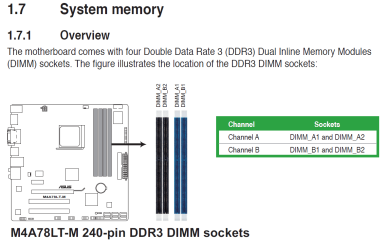
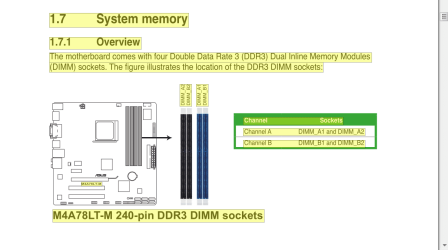
Is this the picture in your motherboard manual?
Exactly where did you install your ram?

OP ram today only..PNG
 

My Computer My Computer

Computer type
PC/Desktop
Computer Manufacturer/Model Number
Home made Desktop
OS
Windows 10 Pro. 64/ version 1709 Windows 7 Pro/64
CPU
Intel i7-6800K @ 4.3
Motherboard
ASUS X-99 Deluxe II
Memory
Corsair Platinum 16 gig @2400
Graphics Card(s)
EVGA GTX 1070 OC
Monitor(s) Displays
Asus 27" LED LCD/VE278Q
Screen Resolution
1920-1080 or 1280-720 HDMI
Hard Drives
INTEL SSD 730-240 Gb Sata 3.0/
PSU
EVGA Platium 1200W
Case
Phanteks Luxe Tempered Glass 8 fans/ one radiator
Cooling
XSPC/ Water Cooled CPU
Keyboard
Das 4 Professional
Mouse
Logitech M705/MX Anywhere 2-S
Internet Speed
100 mbits
Antivirus
Microsoft Security Essentials/ Malwarebytes Premium 3.0/ SAS
Browser
I.E. 11 default/Firefox/ ISP Time Warner Cable/Spectrum
Other Info
LG BluRay Burner/
Sound system-KLipsch-THX/
Icy Dock ssd Hot Swap bays.
I have one on the first and the other on the third.

Is this the picture in your motherboard manual?
Exactly where did you install your ram?

View attachment 382761

If they are going by the cpu as first slot then they are doing channel A and not touching each other. They said they used to be touching in a row and now have a gap. That is the manual for the model they said they have.

 

My Computer My Computer

Computer type
PC/Desktop
Computer Manufacturer/Model Number
Custom
OS
10 Pro x64
CPU
Ryzen 9 3900X
Motherboard
Asrock x370 Tachi
Memory
64GB(4x16GB) DDR4
Graphics Card(s)
EVGA 1080ti FTW3
Sound Card
ASUS Xonar Essence STX (V4 Bursons), ODAC rev B, NFB-11, O2
Monitor(s) Displays
3xASUS PB278Q/R, Optoma HD142X
Screen Resolution
3x1440p, 1080p
Hard Drives
512GB 850 EVO(OS, Programs)
4TB (Movies)
3TB (Downloads)
3TB (Programs)
1TB HDD (Games)
2x6TB R1 (videos)
PSU
AX760
Case
Fractal Define R5
Cooling
NH-D15S
Keyboard
Massdrop Ctrl with Box Navy's
Mouse
G903, Alioth XXL Mat
Internet Speed
280/40
Antivirus
MBAM, ESET
Browser
Canary 64 Bit
Other Info
I also own a Thinkpad P50 Xeon 4K, X220T, X1C5
Back
Top