No drives detected in bios

markshim

New member
Member
Local time
12:51 PM
Messages
87
Hi guys,
My corsair ssd and Samsung hard drive appear in the safely remove hardware and media icon in windows. I was told I could try disabling the hot plug option on my bios. When I looked the sata ports 1 and 2 say nothing present but both drives work and appear in the boot priority part of the bios. My other hard drive and disk are present just not port 1 and 2.

My corsair ssd always appeared in the safely remove hardware icon but not the Samsung drive. I have just put new sata cables in the pc and had to put the corsair cable in the port the the Samsung was in and the Samsung cable where the corsair had been because it was the only way I could it. But now both drives appear in the safely remove hardware icon and both drive say not present in port 1-2 but both still work fine?

Sorry if this is long winded I'm trying to find away to explain lol.

Any help please ?
 

My Computer My Computer

At a glance

Windows 7 Home Premium 64 bitAMD Piledriver 8350 4ghzcorsair Dominators 2x 4gbAsus 7970
OS
Windows 7 Home Premium 64 bit
CPU
AMD Piledriver 8350 4ghz
Motherboard
Asus Sabertooth 990FX Rv2
Memory
corsair Dominators 2x 4gb
Graphics Card(s)
Asus 7970
Monitor(s) Displays
LG M227WD
Hard Drives
Corsair Geforce Gs 480gb SSD OS
Samsung F1 Sinpoint 1tb Games drive
WD Green 1.5tb Storage
PSU
Coolmaster Silent Pro M 1000w
Case
Antec 1200
Cooling
Corsair H80i
Your board hosts two sata controllers one controled by the chipset and one controlled by asmedia its possible you have plugged them into asmedia sata ports in bios you should have two areas where the drives will show have you checked the asmedia controller entries to see if your drives are there
 

My Computer My Computer

At a glance

Win7 Ultimate X64Intel i5 3570K8GB DDR3 1600Onboard
Computer type
PC/Desktop
Computer Manufacturer/Model Number
Pauly Special
OS
Win7 Ultimate X64
CPU
Intel i5 3570K
Motherboard
Gigabyte Z77X-DS3H
Memory
8GB DDR3 1600
Graphics Card(s)
Onboard
Sound Card
Onboard
Screen Resolution
1280x1024
Hard Drives
Samsung 840 Evo SSD (OS)
1TB Spinner (Data)
PSU
800W Arctic
Case
Cooler Master
Cooling
3x120mm Fans
Keyboard
MS Wireless
Mouse
MS Wireless
Internet Speed
20M
Port 1-2 are coloured white while the rest are brown. How do I find the drives in the bios?
 

My Computer My Computer

At a glance

Windows 7 Home Premium 64 bitAMD Piledriver 8350 4ghzcorsair Dominators 2x 4gbAsus 7970
OS
Windows 7 Home Premium 64 bit
CPU
AMD Piledriver 8350 4ghz
Motherboard
Asus Sabertooth 990FX Rv2
Memory
corsair Dominators 2x 4gb
Graphics Card(s)
Asus 7970
Monitor(s) Displays
LG M227WD
Hard Drives
Corsair Geforce Gs 480gb SSD OS
Samsung F1 Sinpoint 1tb Games drive
WD Green 1.5tb Storage
PSU
Coolmaster Silent Pro M 1000w
Case
Antec 1200
Cooling
Corsair H80i
Why does it say port 1-2 in the same place as port 3-4 5-6 if they were different ports tho?
 

My Computer My Computer

At a glance

Windows 7 Home Premium 64 bitAMD Piledriver 8350 4ghzcorsair Dominators 2x 4gbAsus 7970
OS
Windows 7 Home Premium 64 bit
CPU
AMD Piledriver 8350 4ghz
Motherboard
Asus Sabertooth 990FX Rv2
Memory
corsair Dominators 2x 4gb
Graphics Card(s)
Asus 7970
Monitor(s) Displays
LG M227WD
Hard Drives
Corsair Geforce Gs 480gb SSD OS
Samsung F1 Sinpoint 1tb Games drive
WD Green 1.5tb Storage
PSU
Coolmaster Silent Pro M 1000w
Case
Antec 1200
Cooling
Corsair H80i
Also I had the Samsung plug in the one if the ports before I changed the sata and only the corsair would say not present but now both do ?
 

My Computer My Computer

At a glance

Windows 7 Home Premium 64 bitAMD Piledriver 8350 4ghzcorsair Dominators 2x 4gbAsus 7970
OS
Windows 7 Home Premium 64 bit
CPU
AMD Piledriver 8350 4ghz
Motherboard
Asus Sabertooth 990FX Rv2
Memory
corsair Dominators 2x 4gb
Graphics Card(s)
Asus 7970
Monitor(s) Displays
LG M227WD
Hard Drives
Corsair Geforce Gs 480gb SSD OS
Samsung F1 Sinpoint 1tb Games drive
WD Green 1.5tb Storage
PSU
Coolmaster Silent Pro M 1000w
Case
Antec 1200
Cooling
Corsair H80i
TBH im not familiar with your board/bios just thought i may be able to offer you a pointer
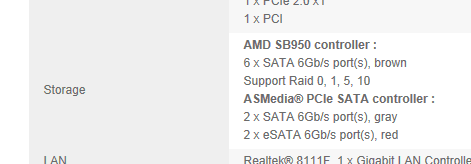
I looked here and found this
Capture.PNG
 

My Computer My Computer

At a glance

Win7 Ultimate X64Intel i5 3570K8GB DDR3 1600Onboard
Computer type
PC/Desktop
Computer Manufacturer/Model Number
Pauly Special
OS
Win7 Ultimate X64
CPU
Intel i5 3570K
Motherboard
Gigabyte Z77X-DS3H
Memory
8GB DDR3 1600
Graphics Card(s)
Onboard
Sound Card
Onboard
Screen Resolution
1280x1024
Hard Drives
Samsung 840 Evo SSD (OS)
1TB Spinner (Data)
PSU
800W Arctic
Case
Cooler Master
Cooling
3x120mm Fans
Keyboard
MS Wireless
Mouse
MS Wireless
Internet Speed
20M
Oh I see now in my manual it says the grey ports are asmedia and the dark ones are normal ones. Should I change the to go in the normal ones ?
 

My Computer My Computer

At a glance

Windows 7 Home Premium 64 bitAMD Piledriver 8350 4ghzcorsair Dominators 2x 4gbAsus 7970
OS
Windows 7 Home Premium 64 bit
CPU
AMD Piledriver 8350 4ghz
Motherboard
Asus Sabertooth 990FX Rv2
Memory
corsair Dominators 2x 4gb
Graphics Card(s)
Asus 7970
Monitor(s) Displays
LG M227WD
Hard Drives
Corsair Geforce Gs 480gb SSD OS
Samsung F1 Sinpoint 1tb Games drive
WD Green 1.5tb Storage
PSU
Coolmaster Silent Pro M 1000w
Case
Antec 1200
Cooling
Corsair H80i
Thanks for help
 

My Computer My Computer

At a glance

Windows 7 Home Premium 64 bitAMD Piledriver 8350 4ghzcorsair Dominators 2x 4gbAsus 7970
OS
Windows 7 Home Premium 64 bit
CPU
AMD Piledriver 8350 4ghz
Motherboard
Asus Sabertooth 990FX Rv2
Memory
corsair Dominators 2x 4gb
Graphics Card(s)
Asus 7970
Monitor(s) Displays
LG M227WD
Hard Drives
Corsair Geforce Gs 480gb SSD OS
Samsung F1 Sinpoint 1tb Games drive
WD Green 1.5tb Storage
PSU
Coolmaster Silent Pro M 1000w
Case
Antec 1200
Cooling
Corsair H80i
I personally always connect to chipset sata ports and have OS HDD in port 0 in your case the brown ones
 

My Computer My Computer

At a glance

Win7 Ultimate X64Intel i5 3570K8GB DDR3 1600Onboard
Computer type
PC/Desktop
Computer Manufacturer/Model Number
Pauly Special
OS
Win7 Ultimate X64
CPU
Intel i5 3570K
Motherboard
Gigabyte Z77X-DS3H
Memory
8GB DDR3 1600
Graphics Card(s)
Onboard
Sound Card
Onboard
Screen Resolution
1280x1024
Hard Drives
Samsung 840 Evo SSD (OS)
1TB Spinner (Data)
PSU
800W Arctic
Case
Cooler Master
Cooling
3x120mm Fans
Keyboard
MS Wireless
Mouse
MS Wireless
Internet Speed
20M
Yeh I will change them over tomorrow. Thank you :)
 

My Computer My Computer

At a glance

Windows 7 Home Premium 64 bitAMD Piledriver 8350 4ghzcorsair Dominators 2x 4gbAsus 7970
OS
Windows 7 Home Premium 64 bit
CPU
AMD Piledriver 8350 4ghz
Motherboard
Asus Sabertooth 990FX Rv2
Memory
corsair Dominators 2x 4gb
Graphics Card(s)
Asus 7970
Monitor(s) Displays
LG M227WD
Hard Drives
Corsair Geforce Gs 480gb SSD OS
Samsung F1 Sinpoint 1tb Games drive
WD Green 1.5tb Storage
PSU
Coolmaster Silent Pro M 1000w
Case
Antec 1200
Cooling
Corsair H80i
Back
Top