No Drives Displayed in "Computer"

Tried it, but like I said, drive letters have been allocated by default.

Just removed iTunes, am gonna restart my comp now, just keeping my fingers crossed.

You say the drive letters have been allocated by default? but cant you change them?
 

My Computer My Computer

Computer Manufacturer/Model Number
Custom Assembled
OS
Windows 7 Build 7600.16385 (Clean Install)
CPU
AMD Black Edition AMD Phenom X3 8750 / 2.4 GHz processor
Motherboard
Gigabyte GA-MA78GM-S2H 780G Socket AM2+ onboard VGA 8 channe
Memory
Kingston 4GB (4x1GB) DDR2 1066MHz/PC2-8500 Hyperx Memory
Graphics Card(s)
Intergrated ATI HD3200
Sound Card
Realtek High Definition Audio
Monitor(s) Displays
Acer 19"
Screen Resolution
1280 x 1024
Hard Drives
2 x Maxtor STM3250310AS 250GB SATAII 7200rpm 8MB Cache

3 x 500gb Seagate External HDD
PSU
CM eXtreme Power 460W PSU
Case
Coolermaster Elite 330 Black Case
Keyboard
Zippy Multimedia
Mouse
Logitech MX™518 Gaming-Grade Optical Mouse
Internet Speed
8Mbps down / 1Mbps up
Other Info
I haz floppyz
You say the drive letters have been allocated by default? but cant you change them?

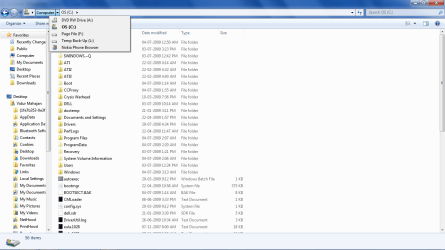
Basically I have 3 partitions. One is the primary partition which has the OS and is the largest, it is C:. Then I have 2 more partitions, one is exclusively a page file (4GB) and is F:. I am unable to change the drive letters of these two but can change the letter of my third partition which has nothing, its just empty 11GB of space. But even after changing the name, nothing happens to the "Computer" folder.

There is a 149mb OEM partition which has no letter, but I assuming that is something entirely different.

Thanks.
 

My Computer My Computer

Computer Manufacturer/Model Number
Dell XPS Studio 16
OS
Windows 7 RC1 64bit
CPU
Intel Core2Duo [email protected]
Memory
3GB
Graphics Card(s)
ATI Radeon 3670 512MB
Screen Resolution
720p
Hard Drives
320GB 7200rpm
Internet Speed
2mbps
Other Info
Backlit Keyboard FTW!
I am also able to do what is there in the attachment, its just that they are not showing up in the Computer folder.
 

Attachments

  • Untitled5.png
    Untitled5.png
    52.5 KB · Views: 17

My Computer My Computer

Computer Manufacturer/Model Number
Dell XPS Studio 16
OS
Windows 7 RC1 64bit
CPU
Intel Core2Duo [email protected]
Memory
3GB
Graphics Card(s)
ATI Radeon 3670 512MB
Screen Resolution
720p
Hard Drives
320GB 7200rpm
Internet Speed
2mbps
Other Info
Backlit Keyboard FTW!
Hmmm dunno what else you can try. It defo looks like some kinda disk management problem but dunno wat else you could try apart from a reformat.
 

My Computer My Computer

Computer Manufacturer/Model Number
Custom Assembled
OS
Windows 7 Build 7600.16385 (Clean Install)
CPU
AMD Black Edition AMD Phenom X3 8750 / 2.4 GHz processor
Motherboard
Gigabyte GA-MA78GM-S2H 780G Socket AM2+ onboard VGA 8 channe
Memory
Kingston 4GB (4x1GB) DDR2 1066MHz/PC2-8500 Hyperx Memory
Graphics Card(s)
Intergrated ATI HD3200
Sound Card
Realtek High Definition Audio
Monitor(s) Displays
Acer 19"
Screen Resolution
1280 x 1024
Hard Drives
2 x Maxtor STM3250310AS 250GB SATAII 7200rpm 8MB Cache

3 x 500gb Seagate External HDD
PSU
CM eXtreme Power 460W PSU
Case
Coolermaster Elite 330 Black Case
Keyboard
Zippy Multimedia
Mouse
Logitech MX™518 Gaming-Grade Optical Mouse
Internet Speed
8Mbps down / 1Mbps up
Other Info
I haz floppyz
Vidurm, I take it this is just one harddrive with three partitions - why do you have the page file in its own partition? That only helps if it's on a different harddrive. In fact it probably hurts your speed because the heads have to move to a far side of the disk.

Anyway, in the Control Panel / Device Manager do you see your drive under Disk Drives? Double-click your drive to bring out the Properties dialog, and click the Volumes tab. What happens when you click the Populate button?
 

My Computer My Computer

Computer Manufacturer/Model Number
Custom workstation /// Lenovo X61t tablet notebook
OS
Windows 7 RTM x64
CPU
Core i7 980X @ 4.04GHz OC /// Core Duo L7500 @ 1.6GHz
Motherboard
Asus P6T6 WS Revolution ///
Memory
12GB G. Skill @ DDR-1600 OC /// 4GB
Graphics Card(s)
Saphire HD4870 Toxic 1GB /// Intel Mobile GMA X3100
Monitor(s) Displays
Dual Eizo 24" SX2461W /// 12"
Screen Resolution
1920x1200 /// 1400x1050
Hard Drives
Workstation:
5x 750GB Barracuda-11 on Areca ARC-1220;
4x 1.5TB Barracuda-11 on Intel ICH10R;
Volumes:
300GB RAID 0, 2.7TB RAID 10 on Intel;
100GB RAID 0, 1.4TB RAID 10 on Areca ///
Notebook: G.Skill Titan 256GB SSD
PSU
Tagan ITZ 1100
Case
GHS-1500 ///
Cooling
Thermalright IFX-14 + a slew of stealth fans ///
Keyboard
Logitech Edge ///
Mouse
Logitech Wireless Optical Trackball
Internet Speed
5Mbps down / 820Kbps up
Other Info
Main use: photography;
DVD Drive: L.G GGW-H20L Blu-Ray / DVD;
OC: QPI/DRAM @ 1.33v, CPU @ 1.293v, DRAM Bus @ 1.65v, CPU PLL @ 1.88v, CPU mult = 25x, BCLK = 160, DDR3-1604 @ 7-8-7-24
Vidurm, I take it this is just one harddrive with three partitions - why do you have the page file in its own partition? That only helps if it's on a different harddrive. In fact it probably hurts your speed because the heads have to move to a far side of the disk.

Anyway, in the Control Panel / Device Manager do you see your drive under Disk Drives? Double-click your drive to bring out the Properties dialog, and click the Volumes tab. What happens when you click the Populate button?

Oh, didn't realise the first part. Will remove it, or maybe add it to my C:.

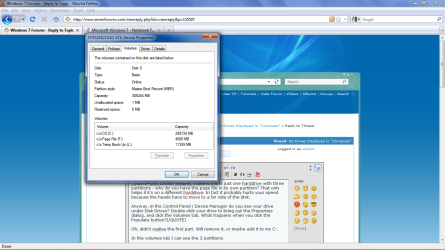
In the volumes tab I can see the 3 partitions and some info. I have attached a screenshot.

Thanks!
 

Attachments

  • Untitled1.png
    Untitled1.png
    87.7 KB · Views: 16

My Computer My Computer

Computer Manufacturer/Model Number
Dell XPS Studio 16
OS
Windows 7 RC1 64bit
CPU
Intel Core2Duo [email protected]
Memory
3GB
Graphics Card(s)
ATI Radeon 3670 512MB
Screen Resolution
720p
Hard Drives
320GB 7200rpm
Internet Speed
2mbps
Other Info
Backlit Keyboard FTW!
Everything looks OK there! I have a feeling there's just something corrupted in the Windows Explorer environment.

I would actually do a re-install of your current Windows build over your current install and that would hopefully fix anything weird in the OS, assuming there isn't some agent external to the OS that's causing this. And yes, put the pagefile back in C and add the remaining space to it.

Other than that I don't know what else to suggest. Let us know what you do and the results. It's a weird one!
 

My Computer My Computer

Computer Manufacturer/Model Number
Custom workstation /// Lenovo X61t tablet notebook
OS
Windows 7 RTM x64
CPU
Core i7 980X @ 4.04GHz OC /// Core Duo L7500 @ 1.6GHz
Motherboard
Asus P6T6 WS Revolution ///
Memory
12GB G. Skill @ DDR-1600 OC /// 4GB
Graphics Card(s)
Saphire HD4870 Toxic 1GB /// Intel Mobile GMA X3100
Monitor(s) Displays
Dual Eizo 24" SX2461W /// 12"
Screen Resolution
1920x1200 /// 1400x1050
Hard Drives
Workstation:
5x 750GB Barracuda-11 on Areca ARC-1220;
4x 1.5TB Barracuda-11 on Intel ICH10R;
Volumes:
300GB RAID 0, 2.7TB RAID 10 on Intel;
100GB RAID 0, 1.4TB RAID 10 on Areca ///
Notebook: G.Skill Titan 256GB SSD
PSU
Tagan ITZ 1100
Case
GHS-1500 ///
Cooling
Thermalright IFX-14 + a slew of stealth fans ///
Keyboard
Logitech Edge ///
Mouse
Logitech Wireless Optical Trackball
Internet Speed
5Mbps down / 820Kbps up
Other Info
Main use: photography;
DVD Drive: L.G GGW-H20L Blu-Ray / DVD;
OC: QPI/DRAM @ 1.33v, CPU @ 1.293v, DRAM Bus @ 1.65v, CPU PLL @ 1.88v, CPU mult = 25x, BCLK = 160, DDR3-1604 @ 7-8-7-24
Thanks so much for trying. Guess I will do a windows reinstall, it's just that I am scared that I might end up losing my data etc, I can just reinstall 7 over my current installation right? Something like a repair....
 

My Computer My Computer

Computer Manufacturer/Model Number
Dell XPS Studio 16
OS
Windows 7 RC1 64bit
CPU
Intel Core2Duo [email protected]
Memory
3GB
Graphics Card(s)
ATI Radeon 3670 512MB
Screen Resolution
720p
Hard Drives
320GB 7200rpm
Internet Speed
2mbps
Other Info
Backlit Keyboard FTW!
A clean install is always better, and it is already an upgraded system so i suggest to you to do a clean install. If you make a backp first you can not lose anything. You can try the upgrade or repair after backing up just for seeing how is it works, and if it's bad you can still do a clean install. Anyways the RTM is on the way so if I were you i wait for it and do the clean install with that.
 

My Computer My Computer

Computer Manufacturer/Model Number
home made
OS
Windows 7 RTM x64
CPU
AMD X2 5000+
Motherboard
Asrock
Memory
4GB
Graphics Card(s)
Nvidia 9400GT
Sound Card
onboard 6Ch
Monitor(s) Displays
Medion 22" + HannSpree 22"
Screen Resolution
1680X1050 + 1920X1080
Hard Drives
Intel SSD 80GB
WD 1.5 TB
WD 1 TB
Samsung 1TB X 3
PSU
noname
Case
noname
Cooling
Zalman
Keyboard
DeLUX multimedia keyboard
Mouse
Microsoft
Internet Speed
25MB/s
Backing up before messing around with the system is always a must :).

Clean installs are always preferable and may or may not be an improvement, but they're a PITA because you have to re-install all your apps and a lot of the configuration and personalization. If you're not switching builds it's not a big issue as it's apples and apples from the same tree :).

It all depends on how much trouble getting your apps up to speed again will be.
 

My Computer My Computer

Computer Manufacturer/Model Number
Custom workstation /// Lenovo X61t tablet notebook
OS
Windows 7 RTM x64
CPU
Core i7 980X @ 4.04GHz OC /// Core Duo L7500 @ 1.6GHz
Motherboard
Asus P6T6 WS Revolution ///
Memory
12GB G. Skill @ DDR-1600 OC /// 4GB
Graphics Card(s)
Saphire HD4870 Toxic 1GB /// Intel Mobile GMA X3100
Monitor(s) Displays
Dual Eizo 24" SX2461W /// 12"
Screen Resolution
1920x1200 /// 1400x1050
Hard Drives
Workstation:
5x 750GB Barracuda-11 on Areca ARC-1220;
4x 1.5TB Barracuda-11 on Intel ICH10R;
Volumes:
300GB RAID 0, 2.7TB RAID 10 on Intel;
100GB RAID 0, 1.4TB RAID 10 on Areca ///
Notebook: G.Skill Titan 256GB SSD
PSU
Tagan ITZ 1100
Case
GHS-1500 ///
Cooling
Thermalright IFX-14 + a slew of stealth fans ///
Keyboard
Logitech Edge ///
Mouse
Logitech Wireless Optical Trackball
Internet Speed
5Mbps down / 820Kbps up
Other Info
Main use: photography;
DVD Drive: L.G GGW-H20L Blu-Ray / DVD;
OC: QPI/DRAM @ 1.33v, CPU @ 1.293v, DRAM Bus @ 1.65v, CPU PLL @ 1.88v, CPU mult = 25x, BCLK = 160, DDR3-1604 @ 7-8-7-24
I know, its just that, well frankly, I'm too lazy. Hehe, will probably see when the final version is up for download or something. Will wait till the thirteenth at least.

Thanks a lot for the help guys! Will definitely post whatever outcome happens.
 

My Computer My Computer

Computer Manufacturer/Model Number
Dell XPS Studio 16
OS
Windows 7 RC1 64bit
CPU
Intel Core2Duo [email protected]
Memory
3GB
Graphics Card(s)
ATI Radeon 3670 512MB
Screen Resolution
720p
Hard Drives
320GB 7200rpm
Internet Speed
2mbps
Other Info
Backlit Keyboard FTW!
Back
Top