No drives were found. Click load driver to provide mass storage....

erisaaka

New member
Local time
4:45 AM
Messages
6
My computer crashed. I put in the Windows 7 disk and when I get to the "Where do you want to install Windows" window everything is blank. There are no partitions in place.

I went to the command prompt and typed:

list disk

and it responds with:

There are no fixed disks to show.

I have taken apart the computer and all wires are attached appropriately.

Can someone give me a clue here? The first time I put in the Windows 7 disc it was detecting the C and D drives just fine. I don't know what the problem is now.

Please help! I am good at following instructions but I am a noob when it comes to all these terminology. So please be patient. Oh, and yes, I have read through all the similar threads and none of them are helpful to my situation.
 

My Computer My Computer

At a glance

Windows 7
OS
Windows 7
I have an A600 Lenovo all-in-one desktop, if that makes any difference.
 

My Computer My Computer

At a glance

Windows 7
OS
Windows 7
Weicome erisaaka,

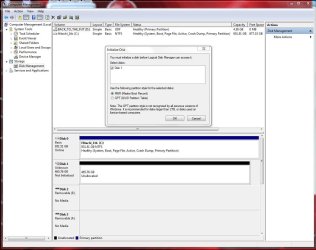
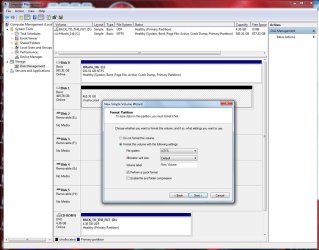
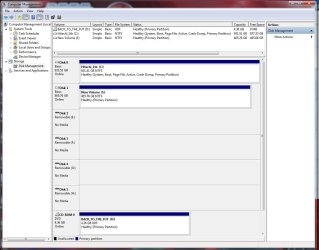
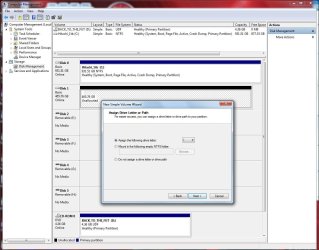
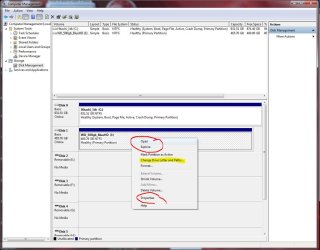
Go to Disk Management. Check that HD's ar initalized, Formatted, Assigned a drive letter, etc.
 

Attachments

  • Disk_Mgmt_New_HD_500gb_WD_Initialize.JPG
    Disk_Mgmt_New_HD_500gb_WD_Initialize.JPG
    110.6 KB · Views: 443
  • Disk_Mgmt_New_HD_500gb_WD_Format_Partition.JPG
    Disk_Mgmt_New_HD_500gb_WD_Format_Partition.JPG
    129 KB · Views: 222
  • Disk_Mgmt_New_HD_500gb_WD_Completed_500gb_formated_&_ready.JPG
    Disk_Mgmt_New_HD_500gb_WD_Completed_500gb_formated_&_ready.JPG
    109.4 KB · Views: 155
  • Disk_Mgmt_New_HD_500gb_WD_Assign_drive_Letter.JPG
    Disk_Mgmt_New_HD_500gb_WD_Assign_drive_Letter.JPG
    127 KB · Views: 124
  • Disk_Mgmt_Open_Explore.JPG
    Disk_Mgmt_Open_Explore.JPG
    115.7 KB · Views: 212

My Computer My Computer

At a glance

Win7 Enterprise, Win7 x86 (Ult 7600), Win7 x6...AMD fx8350 4ghz, AMD-32 2400mhz, AMD-64 3200m...2gb, 4gb on the Ult 7600, 4gb on Technet RTM,...Draw my own Graphics, several nVidia cards
Computer type
PC/Desktop
Computer Manufacturer/Model Number
Built them myself, Science Experiments !
OS
Win7 Enterprise, Win7 x86 (Ult 7600), Win7 x64 Ult 7600, TechNet RTM on AMD x64 (2.8Ghz)
CPU
AMD fx8350 4ghz, AMD-32 2400mhz, AMD-64 3200mhz, AMDx64 2.8G
Motherboard
SIS 755, ECS-K8M890M-M (Ult 7600), GigaByte & others
Memory
2gb, 4gb on the Ult 7600, 4gb on Technet RTM, 32gb on FX8350
Graphics Card(s)
Draw my own Graphics, several nVidia cards
Sound Card
on motherboard
Monitor(s) Displays
19" flat scr, 28" I-Inc widescr,22" Emprex Widescr, 23" Acer
Screen Resolution
1280 x 1024, 1440 x 900, 1920 x 1080
Hard Drives
6 pata Ide HD's & 2 Sata HD's
added 80gb external on Ult 7600 computer,
numerous extra 1tb, 2TB, 3Tb SATA HD's
A collection of ext HD Docks w/ HDs
PSU
430w, 550w, 600w, 700, 800, etc
Case
All Generic Full Towers
Cooling
Open Air & a few fans, some w/ colored LEDs
Keyboard
Compaq & Dell recycled from GoodWill
Mouse
Made in China Optical Wired Mouse
Internet Speed
Fast Cable InterNet
Antivirus
AVG Free on 24 different Desktops, NO Problems!
Browser
IE 8 is preferred, but use FireFox sometimes
Other Info
Linksys Routers, switches, & Hubs
Too Many USB Flash Drives to count, Biggest is 64GB !
Eight computers in my home network.
Sixteen computers at my business network.
Linked via TeamViewer !
Lots of old used spare computer parts everywhere!
My computer crashed. I can't access any of those controls. The only thing I can see is the BIOS and the boot menu for my Windows 7 disc.

Your instructions are very thorough, and I very much appreciate that, but they are not possible for me to follow because of my computer inability to do more than use a command prompt and access the BIOS.
 

My Computer My Computer

At a glance

Windows 7
OS
Windows 7

My Computer My Computer

At a glance

Win7 Enterprise, Win7 x86 (Ult 7600), Win7 x6...AMD fx8350 4ghz, AMD-32 2400mhz, AMD-64 3200m...2gb, 4gb on the Ult 7600, 4gb on Technet RTM,...Draw my own Graphics, several nVidia cards
Computer type
PC/Desktop
Computer Manufacturer/Model Number
Built them myself, Science Experiments !
OS
Win7 Enterprise, Win7 x86 (Ult 7600), Win7 x64 Ult 7600, TechNet RTM on AMD x64 (2.8Ghz)
CPU
AMD fx8350 4ghz, AMD-32 2400mhz, AMD-64 3200mhz, AMDx64 2.8G
Motherboard
SIS 755, ECS-K8M890M-M (Ult 7600), GigaByte & others
Memory
2gb, 4gb on the Ult 7600, 4gb on Technet RTM, 32gb on FX8350
Graphics Card(s)
Draw my own Graphics, several nVidia cards
Sound Card
on motherboard
Monitor(s) Displays
19" flat scr, 28" I-Inc widescr,22" Emprex Widescr, 23" Acer
Screen Resolution
1280 x 1024, 1440 x 900, 1920 x 1080
Hard Drives
6 pata Ide HD's & 2 Sata HD's
added 80gb external on Ult 7600 computer,
numerous extra 1tb, 2TB, 3Tb SATA HD's
A collection of ext HD Docks w/ HDs
PSU
430w, 550w, 600w, 700, 800, etc
Case
All Generic Full Towers
Cooling
Open Air & a few fans, some w/ colored LEDs
Keyboard
Compaq & Dell recycled from GoodWill
Mouse
Made in China Optical Wired Mouse
Internet Speed
Fast Cable InterNet
Antivirus
AVG Free on 24 different Desktops, NO Problems!
Browser
IE 8 is preferred, but use FireFox sometimes
Other Info
Linksys Routers, switches, & Hubs
Too Many USB Flash Drives to count, Biggest is 64GB !
Eight computers in my home network.
Sixteen computers at my business network.
Linked via TeamViewer !
Lots of old used spare computer parts everywhere!
Okay, I will give that a shot. I will let you know how it goes so that in case anyone else runs into this they will that it is a good solution. Thanks!
 

My Computer My Computer

At a glance

Windows 7
OS
Windows 7
Alright so I put minitool partition wizard on a bootable disc. Once I get there I can't follow any of the instructions in the tutorial you gave because there is no partitions to select.

I don't see any instructions in that tutorial that talk about prepping the HD for installation. Can you help me with this? Thank you so much!
 

My Computer My Computer

At a glance

Windows 7
OS
Windows 7
UPDATE: I don't know what an HD is so I am assuming it is something that has very little memory. After booting the MiniTool program from the CD it did detect a drive the had 1.9 GB on it (the HD?). I followed step 2 in the tutorial mentioned above and formatted this drive. I booted from the Windows Disc again and it didn't change the situation. Still no drives detected.
 

My Computer My Computer

At a glance

Windows 7
OS
Windows 7
You system may have crashed because the Hard Drive went out. Since that is where your operating system and all other files are stored, the system cannot run without it. You may be able to hear it running, or see a light blinking to indicate hard drive activity.

But if you can get into your bios, check to see if the drive is listed. It should show a size, maybe between 250 GB to 750GB, whatever you system came with.

If found this maintenance document, if the link works that shows the physical layout of your system and how to open it up, just for information, unless you decide to work on it yourself.

http://download.lenovo.com/UserFile...ntre A600 Hardware Replacement Guide V1.0.pdf
 

My Computer My Computer

At a glance

Windows 7 x64i7-2600K8 GGTX 480
Computer Manufacturer/Model Number
Homebuilt
OS
Windows 7 x64
CPU
i7-2600K
Motherboard
Asus P8Z77-v Pro
Memory
8 G
Graphics Card(s)
GTX 480
Sound Card
Onboard
Monitor(s) Displays
LG W2753V
Screen Resolution
1920x1080
Hard Drives
Crucial M4 128 G SSD
Back
Top