Solved No HDD Recovery area ?

SherriBabee

GEEK-ette in Training
Member
Local time
3:52 AM
Messages
54
Location
Amboy, Illinois
Hello, New to forum.

Was trying to use the Toshiba Recovery Media Creater and got the error "No HDD recovery area, can not be launched".

Toshiba Satellite C655D system, never did a restore to factory and have been running this for over 6 yrs now. Time to do one.
I installed the "Recovery Media Creator" 2 days ago cause it wasn't on my system (probally removed it years ago when removing some bloatware).
I looked at the Disk status for all drives, usb's etc and it seems to be there, but im thinking I did something with *EaseUS Partition Master free edition* a few months back.
*see attached image, it shows it's there*.

I was trying to make a USB backup of the Factory recovery a few months back, using a 16gb and it never appeared on the USB. Gave up.
I do have external drives and thumb drives with all my backup and the like saved there.

N E help would be greatly appreciated.


p.s. Not new to computers, but not as involved in keeping up to date with things as I use to be.


Attachments

  • Recovery Partition.jpg
    Recovery Partition.jpg
    36.9 KB · Views: 9
Last edited:

My Computer My Computer

Computer type
Laptop
Computer Manufacturer/Model Number
Toshiba Satellite C655D-S5086
OS
Win7 Home Premium x64
CPU
AMD V140 Processor
Motherboard
AMD M785 (RS880M) + SB810/SB850
Memory
8gb Crucial
Graphics Card(s)
ATI Mobility Radeon HD 4200 Series
Sound Card
Conexant CX20671 SmartAudio HD
Monitor(s) Displays
Vizio E552VLE-55 inch TV
Screen Resolution
1920 x 1080
Hard Drives
Crucial MX300, 525 GB, SATA III SSD
Keyboard
Logitech K260, wireless
Mouse
Logitech K260, Wireless
Internet Speed
Comcast?
Antivirus
Avast
Browser
Firefox 56.0.2_x64
Other Info
External: Toshiba MQ01UBD100, 5400 RPM, 1000 GB ,
External: Toshiba MK3265GSXN, 5400 RPM, 320 GB HDD
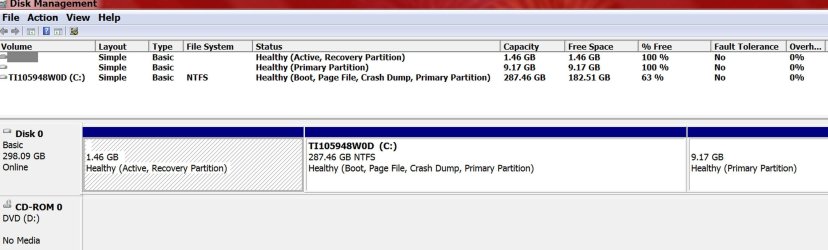
Welcome to the forum can you post a full screenshot from disk Management showing details of partitions and how much is used you have two marked as recovery both set as active
 

My Computer My Computer

Computer type
PC/Desktop
OS
win 8 32 bit
Is this the one showing all my Drives, external storages, usbs, etc... ?
 

Attachments

  • Disk Status-02-01-2017.jpg
    Disk Status-02-01-2017.jpg
    106.9 KB · Views: 15

My Computer My Computer

Computer type
Laptop
Computer Manufacturer/Model Number
Toshiba Satellite C655D-S5086
OS
Win7 Home Premium x64
CPU
AMD V140 Processor
Motherboard
AMD M785 (RS880M) + SB810/SB850
Memory
8gb Crucial
Graphics Card(s)
ATI Mobility Radeon HD 4200 Series
Sound Card
Conexant CX20671 SmartAudio HD
Monitor(s) Displays
Vizio E552VLE-55 inch TV
Screen Resolution
1920 x 1080
Hard Drives
Crucial MX300, 525 GB, SATA III SSD
Keyboard
Logitech K260, wireless
Mouse
Logitech K260, Wireless
Internet Speed
Comcast?
Antivirus
Avast
Browser
Firefox 56.0.2_x64
Other Info
External: Toshiba MQ01UBD100, 5400 RPM, 1000 GB ,
External: Toshiba MK3265GSXN, 5400 RPM, 320 GB HDD
You need to show all of Disk Management.

Unplug any usb, external storage devices etc.

Where are the system files ?
 

My Computer My Computer

Computer type
PC/Desktop
Computer Manufacturer/Model Number
Skylake Special #666
OS
Windows 10 Pro x64
CPU
Intel Core i7 6700K
Motherboard
Asus Sabertooth Z170 Mark 1
Memory
GSkill TridentZ RGB 16GB 3600 16-16-16-36
Graphics Card(s)
EVGA GTX 980 Ti SC x2
Sound Card
Realtek High Definition
Monitor(s) Displays
AOC G2460PG
Screen Resolution
1920 x 1080 144Hz
Hard Drives
Samsung 860 Pro 256GB, Seagate Barracuda 4TB x2
PSU
EVGA 1000 P2, EVGA White Custom Braided Cables
Case
Corsair Vengeance C70 Gunmetal Black
Cooling
Corsair H100i v2, Corsair ML120 x2, Thermal Grizzly Kryonaut
Keyboard
Logitech G910 Orion Spectrum
Mouse
Logitech G700s
Internet Speed
Verizon Fios Quantum Gateway 75/75
Antivirus
Windows Defender, Malwarebytes Free 3.8.3
Browser
Chrome
Other Info
Corsair SP120 x4, LG Blu-ray Drive, Durabrand HT-395 100 Watt Dolby Digital Amp, Corsair H2100 Wireless 7.1 Headset
You need to show all of Disk Management.

Unplug any usb, external storage devices etc.

Where are the system files ?

Goodmorning,
Im not sure what screen you mean???
 

My Computer My Computer

Computer type
Laptop
Computer Manufacturer/Model Number
Toshiba Satellite C655D-S5086
OS
Win7 Home Premium x64
CPU
AMD V140 Processor
Motherboard
AMD M785 (RS880M) + SB810/SB850
Memory
8gb Crucial
Graphics Card(s)
ATI Mobility Radeon HD 4200 Series
Sound Card
Conexant CX20671 SmartAudio HD
Monitor(s) Displays
Vizio E552VLE-55 inch TV
Screen Resolution
1920 x 1080
Hard Drives
Crucial MX300, 525 GB, SATA III SSD
Keyboard
Logitech K260, wireless
Mouse
Logitech K260, Wireless
Internet Speed
Comcast?
Antivirus
Avast
Browser
Firefox 56.0.2_x64
Other Info
External: Toshiba MQ01UBD100, 5400 RPM, 1000 GB ,
External: Toshiba MK3265GSXN, 5400 RPM, 320 GB HDD

My Computer My Computer

Computer type
PC/Desktop
Computer Manufacturer/Model Number
Home made Desktop
OS
Windows 10 Pro. 64/ version 1709 Windows 7 Pro/64
CPU
Intel i7-6800K @ 4.3
Motherboard
ASUS X-99 Deluxe II
Memory
Corsair Platinum 16 gig @2400
Graphics Card(s)
EVGA GTX 1070 OC
Monitor(s) Displays
Asus 27" LED LCD/VE278Q
Screen Resolution
1920-1080 or 1280-720 HDMI
Hard Drives
INTEL SSD 730-240 Gb Sata 3.0/
PSU
EVGA Platium 1200W
Case
Phanteks Luxe Tempered Glass 8 fans/ one radiator
Cooling
XSPC/ Water Cooled CPU
Keyboard
Das 4 Professional
Mouse
Logitech M705/MX Anywhere 2-S
Internet Speed
100 mbits
Antivirus
Microsoft Security Essentials/ Malwarebytes Premium 3.0/ SAS
Browser
I.E. 11 default/Firefox/ ISP Time Warner Cable/Spectrum
Other Info
LG BluRay Burner/
Sound system-KLipsch-THX/
Icy Dock ssd Hot Swap bays.
I wonder how the computer even boots without a System File.

This tutorial by Golden will show you how to post the picture requested.

Disk Management - Post a Screen Capture Image

Jack

Ok, got all other drives/USB's pulled...

p.s. She does boot, but Im sure I messed something up..

Yesterday after I restarted, it went into the mode to Restore Factory settings, that big RED WARNING screen appeared. What did I do or press to get it? Don't know or remember. I naturally hit cancel :rolleyes:
 

Attachments

  • Clipboard01.jpg
    Clipboard01.jpg
    210.4 KB · Views: 6

My Computer My Computer

Computer type
Laptop
Computer Manufacturer/Model Number
Toshiba Satellite C655D-S5086
OS
Win7 Home Premium x64
CPU
AMD V140 Processor
Motherboard
AMD M785 (RS880M) + SB810/SB850
Memory
8gb Crucial
Graphics Card(s)
ATI Mobility Radeon HD 4200 Series
Sound Card
Conexant CX20671 SmartAudio HD
Monitor(s) Displays
Vizio E552VLE-55 inch TV
Screen Resolution
1920 x 1080
Hard Drives
Crucial MX300, 525 GB, SATA III SSD
Keyboard
Logitech K260, wireless
Mouse
Logitech K260, Wireless
Internet Speed
Comcast?
Antivirus
Avast
Browser
Firefox 56.0.2_x64
Other Info
External: Toshiba MQ01UBD100, 5400 RPM, 1000 GB ,
External: Toshiba MK3265GSXN, 5400 RPM, 320 GB HDD
Both recovery partition appear to be blank but it could be they are not being read correctly. The simple solution is to boot free partitioning software set one of them as active and see if it boots to recovery if not try the other one you can role back by making c active
 

My Computer My Computer

Computer type
PC/Desktop
OS
win 8 32 bit
Both recovery partition appear to be blank but it could be they are not being read correctly. The simple solution is to boot free partitioning software set one of them as active and see if it boots to recovery if not try the other one you can role back by making c active

I do have EaseUS Partition Master free edition installed on my system (I did play around with it months ago, maybe thats when I did something ??)
 

Attachments

  • EaseUS Partition Mgr-Results-02-03-17.jpg
    EaseUS Partition Mgr-Results-02-03-17.jpg
    92.1 KB · Views: 4

My Computer My Computer

Computer type
Laptop
Computer Manufacturer/Model Number
Toshiba Satellite C655D-S5086
OS
Win7 Home Premium x64
CPU
AMD V140 Processor
Motherboard
AMD M785 (RS880M) + SB810/SB850
Memory
8gb Crucial
Graphics Card(s)
ATI Mobility Radeon HD 4200 Series
Sound Card
Conexant CX20671 SmartAudio HD
Monitor(s) Displays
Vizio E552VLE-55 inch TV
Screen Resolution
1920 x 1080
Hard Drives
Crucial MX300, 525 GB, SATA III SSD
Keyboard
Logitech K260, wireless
Mouse
Logitech K260, Wireless
Internet Speed
Comcast?
Antivirus
Avast
Browser
Firefox 56.0.2_x64
Other Info
External: Toshiba MQ01UBD100, 5400 RPM, 1000 GB ,
External: Toshiba MK3265GSXN, 5400 RPM, 320 GB HDD
Your recover partition seem to be what is being used to boot. (1.4 GB) It has (*Systems) on it according to
EaseUS Partition Master.

Jack
 

My Computer My Computer

Computer type
PC/Desktop
Computer Manufacturer/Model Number
Home made Desktop
OS
Windows 10 Pro. 64/ version 1709 Windows 7 Pro/64
CPU
Intel i7-6800K @ 4.3
Motherboard
ASUS X-99 Deluxe II
Memory
Corsair Platinum 16 gig @2400
Graphics Card(s)
EVGA GTX 1070 OC
Monitor(s) Displays
Asus 27" LED LCD/VE278Q
Screen Resolution
1920-1080 or 1280-720 HDMI
Hard Drives
INTEL SSD 730-240 Gb Sata 3.0/
PSU
EVGA Platium 1200W
Case
Phanteks Luxe Tempered Glass 8 fans/ one radiator
Cooling
XSPC/ Water Cooled CPU
Keyboard
Das 4 Professional
Mouse
Logitech M705/MX Anywhere 2-S
Internet Speed
100 mbits
Antivirus
Microsoft Security Essentials/ Malwarebytes Premium 3.0/ SAS
Browser
I.E. 11 default/Firefox/ ISP Time Warner Cable/Spectrum
Other Info
LG BluRay Burner/
Sound system-KLipsch-THX/
Icy Dock ssd Hot Swap bays.
Your recover partition seem to be what is being used to boot. (1.4 GB) It has (*Systems) on it according to
EaseUS Partition Master.

Jack

I take it I messed things up a few months or more ago while playing with this program ?

Can U explain to me how U can see that? Im not understanding these partition things to well. Not when it comes to the Boot and such...
 
Last edited:

My Computer My Computer

Computer type
Laptop
Computer Manufacturer/Model Number
Toshiba Satellite C655D-S5086
OS
Win7 Home Premium x64
CPU
AMD V140 Processor
Motherboard
AMD M785 (RS880M) + SB810/SB850
Memory
8gb Crucial
Graphics Card(s)
ATI Mobility Radeon HD 4200 Series
Sound Card
Conexant CX20671 SmartAudio HD
Monitor(s) Displays
Vizio E552VLE-55 inch TV
Screen Resolution
1920 x 1080
Hard Drives
Crucial MX300, 525 GB, SATA III SSD
Keyboard
Logitech K260, wireless
Mouse
Logitech K260, Wireless
Internet Speed
Comcast?
Antivirus
Avast
Browser
Firefox 56.0.2_x64
Other Info
External: Toshiba MQ01UBD100, 5400 RPM, 1000 GB ,
External: Toshiba MK3265GSXN, 5400 RPM, 320 GB HDD
I'm happy explain a little better.

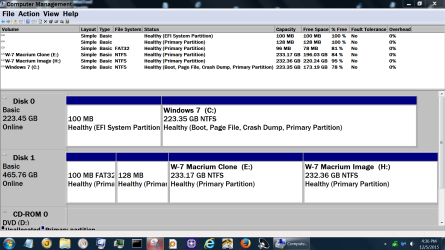
Let me start with a picture from one of my computgers with UEIF my computer.


Disk Management Jan 28.PNG

Disk Management Dec 5 2015.PNG

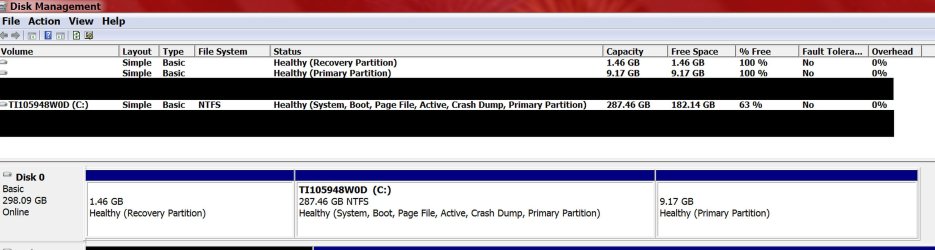
Notice the word (System) in the pictures. That indicates where the needed things to boot are located.

Your (System) is located on your (Recovery Partition) and no where else. Without the Recovery Partition you will not be able to boot your computer.

My understanding is your Recovery Partition should be located on the end of your drive and the (System) should be on a small partition on the front of the drive marked or be included in your
"C" partition.

Please read this tutorial by "whs".
I believe it will solve part of your problem.

Bootmgr - Move to C:\ with EasyBCD

Here is a picture from my other system. Notice where (System) is located.


CaptureDisk Management.PNG


Jack
 
Last edited:

My Computer My Computer

Computer type
PC/Desktop
Computer Manufacturer/Model Number
Home made Desktop
OS
Windows 10 Pro. 64/ version 1709 Windows 7 Pro/64
CPU
Intel i7-6800K @ 4.3
Motherboard
ASUS X-99 Deluxe II
Memory
Corsair Platinum 16 gig @2400
Graphics Card(s)
EVGA GTX 1070 OC
Monitor(s) Displays
Asus 27" LED LCD/VE278Q
Screen Resolution
1920-1080 or 1280-720 HDMI
Hard Drives
INTEL SSD 730-240 Gb Sata 3.0/
PSU
EVGA Platium 1200W
Case
Phanteks Luxe Tempered Glass 8 fans/ one radiator
Cooling
XSPC/ Water Cooled CPU
Keyboard
Das 4 Professional
Mouse
Logitech M705/MX Anywhere 2-S
Internet Speed
100 mbits
Antivirus
Microsoft Security Essentials/ Malwarebytes Premium 3.0/ SAS
Browser
I.E. 11 default/Firefox/ ISP Time Warner Cable/Spectrum
Other Info
LG BluRay Burner/
Sound system-KLipsch-THX/
Icy Dock ssd Hot Swap bays.
Once done I recommend using Macrium Reflect to make complete backups and if your desire a Clone of the
drive "0" Zero.

Jack
 

My Computer My Computer

Computer type
PC/Desktop
Computer Manufacturer/Model Number
Home made Desktop
OS
Windows 10 Pro. 64/ version 1709 Windows 7 Pro/64
CPU
Intel i7-6800K @ 4.3
Motherboard
ASUS X-99 Deluxe II
Memory
Corsair Platinum 16 gig @2400
Graphics Card(s)
EVGA GTX 1070 OC
Monitor(s) Displays
Asus 27" LED LCD/VE278Q
Screen Resolution
1920-1080 or 1280-720 HDMI
Hard Drives
INTEL SSD 730-240 Gb Sata 3.0/
PSU
EVGA Platium 1200W
Case
Phanteks Luxe Tempered Glass 8 fans/ one radiator
Cooling
XSPC/ Water Cooled CPU
Keyboard
Das 4 Professional
Mouse
Logitech M705/MX Anywhere 2-S
Internet Speed
100 mbits
Antivirus
Microsoft Security Essentials/ Malwarebytes Premium 3.0/ SAS
Browser
I.E. 11 default/Firefox/ ISP Time Warner Cable/Spectrum
Other Info
LG BluRay Burner/
Sound system-KLipsch-THX/
Icy Dock ssd Hot Swap bays.
try setting hddrrecovery as active and reboot that seems to be recovery wih disk space used it will boot into recovery then if it fails you can set tit back as it was before by setting the other back to active
 

My Computer My Computer

Computer type
PC/Desktop
OS
win 8 32 bit
Once done I recommend using Macrium Reflect to make complete backups and if your desire a Clone of the
drive "0" Zero.

Jack

Hi Jack,

Thank you for the Link and images. I looked them over and followed your instructions.

Here's what it shows now, doesn't look different to me tho. I see what U mean about showing "System" first tho.
1st image: is from Disk Management. 2nd image: is from Partition Mgr.

I did try to run the * Toshiba Recovery Media Creator * but I got that same error message.
I must be missing something....
 

Attachments

  • After Reboot--1.jpg
    After Reboot--1.jpg
    221.7 KB · Views: 2
  • After Reboot--2.jpg
    After Reboot--2.jpg
    245.2 KB · Views: 1

My Computer My Computer

Computer type
Laptop
Computer Manufacturer/Model Number
Toshiba Satellite C655D-S5086
OS
Win7 Home Premium x64
CPU
AMD V140 Processor
Motherboard
AMD M785 (RS880M) + SB810/SB850
Memory
8gb Crucial
Graphics Card(s)
ATI Mobility Radeon HD 4200 Series
Sound Card
Conexant CX20671 SmartAudio HD
Monitor(s) Displays
Vizio E552VLE-55 inch TV
Screen Resolution
1920 x 1080
Hard Drives
Crucial MX300, 525 GB, SATA III SSD
Keyboard
Logitech K260, wireless
Mouse
Logitech K260, Wireless
Internet Speed
Comcast?
Antivirus
Avast
Browser
Firefox 56.0.2_x64
Other Info
External: Toshiba MQ01UBD100, 5400 RPM, 1000 GB ,
External: Toshiba MK3265GSXN, 5400 RPM, 320 GB HDD
try setting hddrrecovery as active and reboot that seems to be recovery wih disk space used it will boot into recovery then if it fails you can set tit back as it was before by setting the other back to active

Thank you for the reply Samuria. Didn't try that as of yet.
 

My Computer My Computer

Computer type
Laptop
Computer Manufacturer/Model Number
Toshiba Satellite C655D-S5086
OS
Win7 Home Premium x64
CPU
AMD V140 Processor
Motherboard
AMD M785 (RS880M) + SB810/SB850
Memory
8gb Crucial
Graphics Card(s)
ATI Mobility Radeon HD 4200 Series
Sound Card
Conexant CX20671 SmartAudio HD
Monitor(s) Displays
Vizio E552VLE-55 inch TV
Screen Resolution
1920 x 1080
Hard Drives
Crucial MX300, 525 GB, SATA III SSD
Keyboard
Logitech K260, wireless
Mouse
Logitech K260, Wireless
Internet Speed
Comcast?
Antivirus
Avast
Browser
Firefox 56.0.2_x64
Other Info
External: Toshiba MQ01UBD100, 5400 RPM, 1000 GB ,
External: Toshiba MK3265GSXN, 5400 RPM, 320 GB HDD
Goodmorning,

After Reboot today, Here's what the DISK mgr shows, LQQK's right, but Still can't use
Toshiba Recovery Media Creator.


Note: years ago b4 I bought my laptop, I built my WinXP-x32 system from scratch. I find it was easier with Disks in-hand to install system including the service packs 1 and 2. Use to play around with system so much was every few months restoring system :o
 

Attachments

  • Disk-after Reboot--02-05-17.jpg
    Disk-after Reboot--02-05-17.jpg
    34.1 KB · Views: 2

My Computer My Computer

Computer type
Laptop
Computer Manufacturer/Model Number
Toshiba Satellite C655D-S5086
OS
Win7 Home Premium x64
CPU
AMD V140 Processor
Motherboard
AMD M785 (RS880M) + SB810/SB850
Memory
8gb Crucial
Graphics Card(s)
ATI Mobility Radeon HD 4200 Series
Sound Card
Conexant CX20671 SmartAudio HD
Monitor(s) Displays
Vizio E552VLE-55 inch TV
Screen Resolution
1920 x 1080
Hard Drives
Crucial MX300, 525 GB, SATA III SSD
Keyboard
Logitech K260, wireless
Mouse
Logitech K260, Wireless
Internet Speed
Comcast?
Antivirus
Avast
Browser
Firefox 56.0.2_x64
Other Info
External: Toshiba MQ01UBD100, 5400 RPM, 1000 GB ,
External: Toshiba MK3265GSXN, 5400 RPM, 320 GB HDD
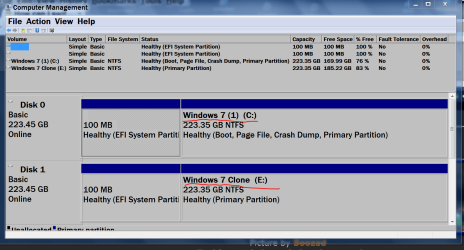
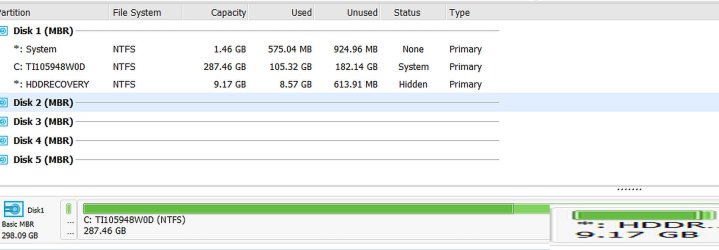
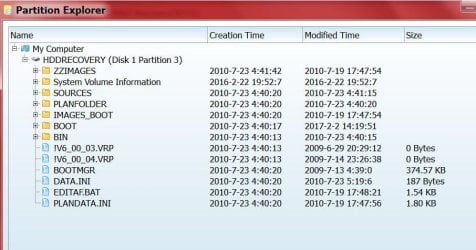
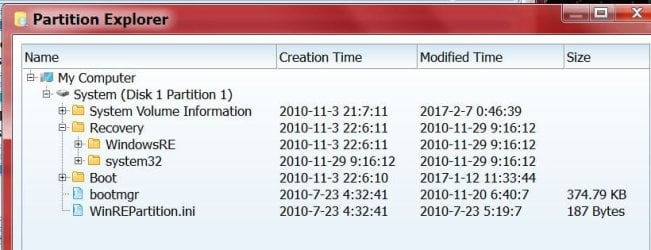
I don't know what to do at this point? Anyone ??

1st image shows the HDD Recovery is there?
 

Attachments

  • MiniTool Partition Wizard---Disk 1-Part 3-a.jpg
    MiniTool Partition Wizard---Disk 1-Part 3-a.jpg
    66.7 KB · Views: 1
  • MiniTool Partition Wizard---Disk 1-Part 1-b.jpg
    MiniTool Partition Wizard---Disk 1-Part 1-b.jpg
    43.4 KB · Views: 1
  • MiniTool Partition Wizard---Disk 1--Operating System-c.jpg
    MiniTool Partition Wizard---Disk 1--Operating System-c.jpg
    137.3 KB · Views: 1
Last edited:

My Computer My Computer

Computer type
Laptop
Computer Manufacturer/Model Number
Toshiba Satellite C655D-S5086
OS
Win7 Home Premium x64
CPU
AMD V140 Processor
Motherboard
AMD M785 (RS880M) + SB810/SB850
Memory
8gb Crucial
Graphics Card(s)
ATI Mobility Radeon HD 4200 Series
Sound Card
Conexant CX20671 SmartAudio HD
Monitor(s) Displays
Vizio E552VLE-55 inch TV
Screen Resolution
1920 x 1080
Hard Drives
Crucial MX300, 525 GB, SATA III SSD
Keyboard
Logitech K260, wireless
Mouse
Logitech K260, Wireless
Internet Speed
Comcast?
Antivirus
Avast
Browser
Firefox 56.0.2_x64
Other Info
External: Toshiba MQ01UBD100, 5400 RPM, 1000 GB ,
External: Toshiba MK3265GSXN, 5400 RPM, 320 GB HDD
Once done I recommend using Macrium Reflect to make complete backups and if your desire a Clone of the
drive "0" Zero.

Jack

Goodevening,

Layback Bear, could you take a look at my last 2 or 3 posts? I think I have that Recovery back where it belongs, but still can't run the Toshiba Recovery Media Creator, or are you saying I can extract it with the Macrium Reflect to create a Recovery USB ?
 

My Computer My Computer

Computer type
Laptop
Computer Manufacturer/Model Number
Toshiba Satellite C655D-S5086
OS
Win7 Home Premium x64
CPU
AMD V140 Processor
Motherboard
AMD M785 (RS880M) + SB810/SB850
Memory
8gb Crucial
Graphics Card(s)
ATI Mobility Radeon HD 4200 Series
Sound Card
Conexant CX20671 SmartAudio HD
Monitor(s) Displays
Vizio E552VLE-55 inch TV
Screen Resolution
1920 x 1080
Hard Drives
Crucial MX300, 525 GB, SATA III SSD
Keyboard
Logitech K260, wireless
Mouse
Logitech K260, Wireless
Internet Speed
Comcast?
Antivirus
Avast
Browser
Firefox 56.0.2_x64
Other Info
External: Toshiba MQ01UBD100, 5400 RPM, 1000 GB ,
External: Toshiba MK3265GSXN, 5400 RPM, 320 GB HDD
Hello,

Well my problem isn't solved yet, not sure where to go from last post; so I ended up ordering a recovery disc from Toshiba and with shipping it's only $29.95 and should have in 7-10 business days.


Last edited:

My Computer My Computer

Computer type
Laptop
Computer Manufacturer/Model Number
Toshiba Satellite C655D-S5086
OS
Win7 Home Premium x64
CPU
AMD V140 Processor
Motherboard
AMD M785 (RS880M) + SB810/SB850
Memory
8gb Crucial
Graphics Card(s)
ATI Mobility Radeon HD 4200 Series
Sound Card
Conexant CX20671 SmartAudio HD
Monitor(s) Displays
Vizio E552VLE-55 inch TV
Screen Resolution
1920 x 1080
Hard Drives
Crucial MX300, 525 GB, SATA III SSD
Keyboard
Logitech K260, wireless
Mouse
Logitech K260, Wireless
Internet Speed
Comcast?
Antivirus
Avast
Browser
Firefox 56.0.2_x64
Other Info
External: Toshiba MQ01UBD100, 5400 RPM, 1000 GB ,
External: Toshiba MK3265GSXN, 5400 RPM, 320 GB HDD
Back
Top